Pending completion
Record links
The second relationship type we'll be exploring is record links. We'll go through:
How record links work
How to practically model our data using record links
How to use record links in our CRUD operations
How record links work
A record link is simply an external record ID that is directly embedded in another record, similar to a foreign key in relational databases.
However, record links are different from foreign keys because they are record IDs that directly access the underlying key-value storage engine.
This allows us to traverse from record to record without needing to run a table scan query because the table and key of the ID are already known. It directly fetches the record instead of scanning for a matching needle in a haystack, like in traditional SQL joins.
Modelling our data using record links
In the previous lesson, we created a primary relationship based on the major actions a person using our e-commerce store would take: wishlist, cart, order and review.
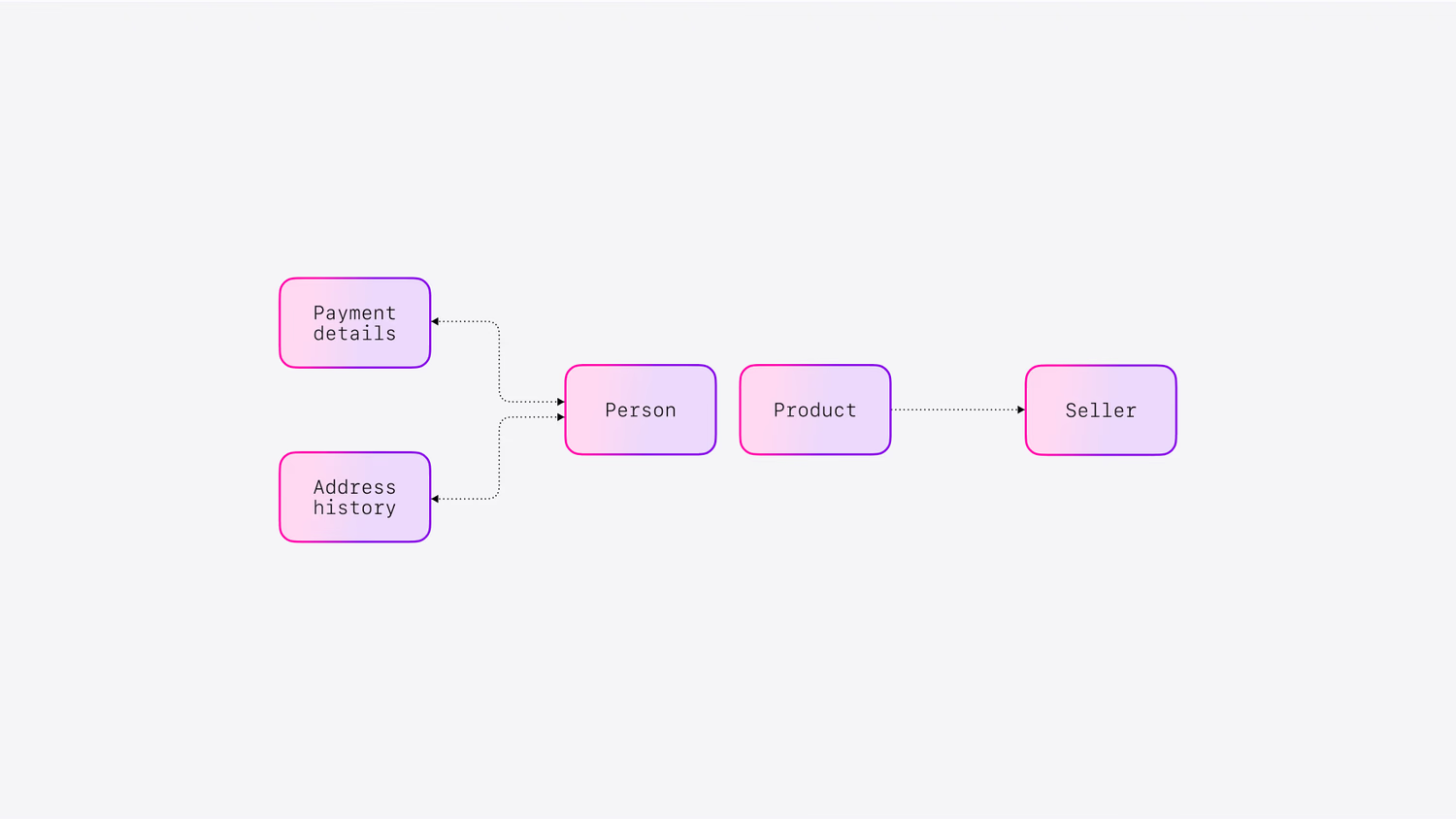
Now we are moving on to secondary relationships. Which are:
Making a one-way relationship from the
productto theseller.Making bidirectional relationships to and from
address_historyandpayment_detailsto theperson.
One important thing to note before moving on, is that while we're talking about primary and secondary relationships here, you can model your data completely using graph relations or using record links.
It all depends on your needs, this is just one recommended way of doing things.
One-way record links
To make a one-way relationship from the product to the seller, we can set the record ID seller:surrealdb as the value of the seller field for all the records in our product table.
That way, we can link every product to information about the seller of that product. Since the Surreal Deal Store is based on our swag store, SurrealDB.store, the seller will always be SurrealDB. This is why we've created this one-to-many relationship.
An important thing to notice here is that we haven't created the seller table yet, but were still able to insert the seller record ID into the product table because there are no foreign key constraints for record links.
Let's therefore quickly create the seller table such that our product record link will actually go somewhere.
Bidirectional record links
Record links don't hold any metadata like graph links do, but they can be queried bidirectionally if you want. The way you do this is by defining them as a field of type record, followed by the REFERENCE clause. They look like this, and are at the very top of the dataset for this part of the course. This is our first look at a DEFINE statement, which we will look a lot more at in the next section.
With those definitions set up, adding record links from address_history and payment_details to the person will let them be queried on either side. We'll look at that in a second.
You could also just add a record link manually if you want, but as you can see it is more work.
When querying an incoming record link you use this <~ operator. It's similar to graph syntax except that it uses a ~ (a tilde or a "squiggly").
Here are two queries returning a single record that includes the record link to the person to get the person's name.
And now here are two similar queries that turn it around. This time, we are querying from the person, then using <~address_history or <~payment_details to access those linking records from the other end.
Record links: CRUD operations
We've already covered how to create record links, let's now explore how to use them in the rest of our CRUD operations.
As these examples show, you can use record links in CRUD operations in the same way as you would, if it was all embedded in the same record, using the dot and bracket notation.
Summary
Now that we've interlinked our knowledge of record links, let's summarise what we've learned.
Record links:
Are external record IDs that are directly embedded in other records, similar to foreign keys in relational databases, but allowing us to traverse from record to record without needing to run a table scan query.
Require no special statement to create; inserting record IDs into other records will link them together.
Only work in one direction by default. But if you define one with the
REFERENCEkeyword, you can query from the other direction as well.
You can use record links in CRUD operations in the same way as you would, if it was all embedded in the same record, using the dot and bracket notation.
That's everything about record links, I'll see you in the next lesson, where we'll explore relational style joins.