The .NET SDK for SurrealDB lets you connect to a database and query it from your application. This guide covers connecting, authenticating, and running your first queries.
1. Install the SDK
Follow the installation guide to add the SDK to your project. From the .NET CLI, add the SurrealDb.Net package:
dotnet add package SurrealDb.NetOnce installed, import the SDK and its models namespaces.
using SurrealDb.Net;
using SurrealDb.Net.Models;
using SurrealDb.Net.Models.Auth;
The SurrealDb.Net namespace contains the SurrealDbClient, while SurrealDb.Net.Models and SurrealDb.Net.Models.Auth provide the record base types and authentication types like RootAuth.
2. Connect to SurrealDB
Create a new SurrealDbClient with a connection string. The URL scheme determines the connection type.
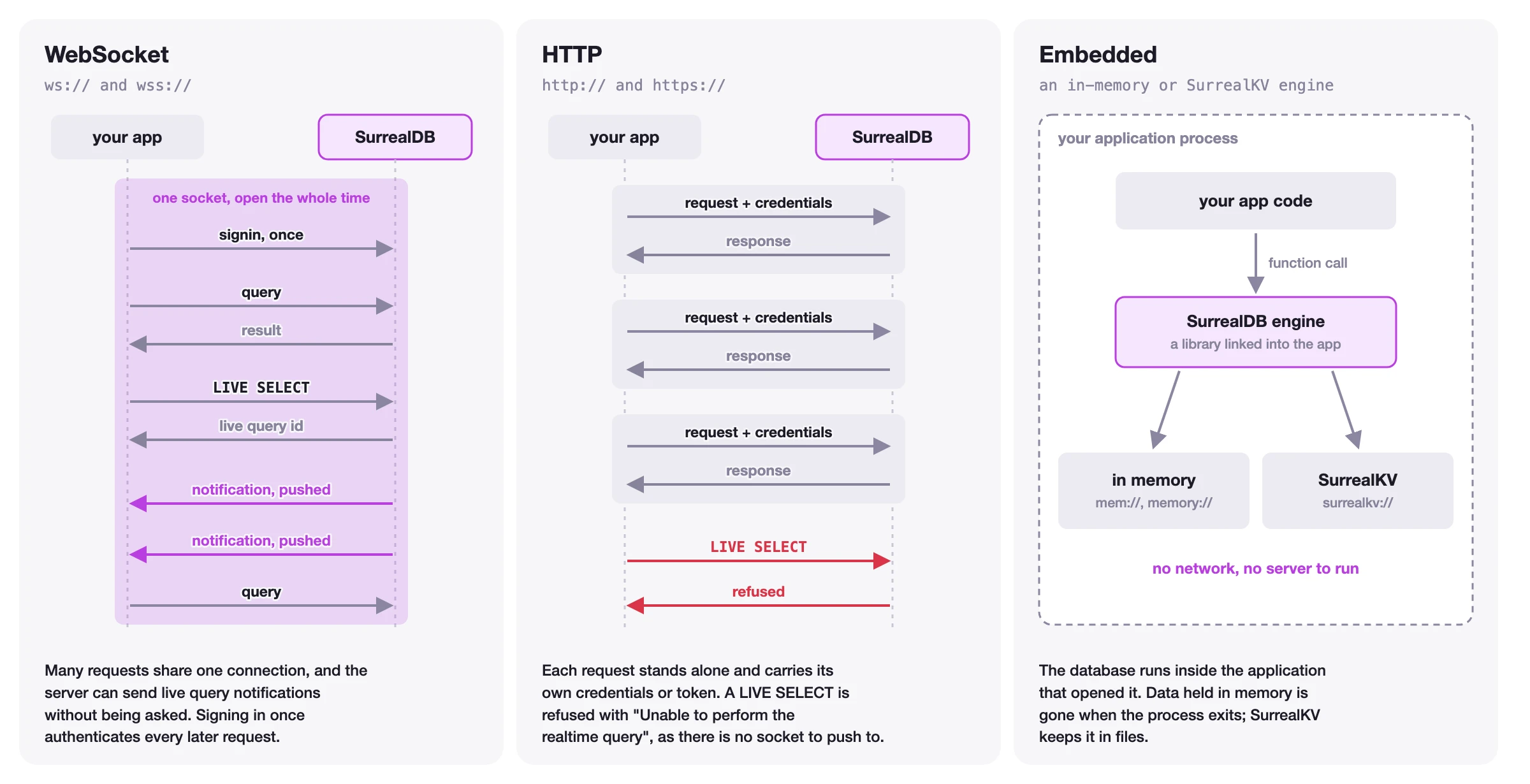
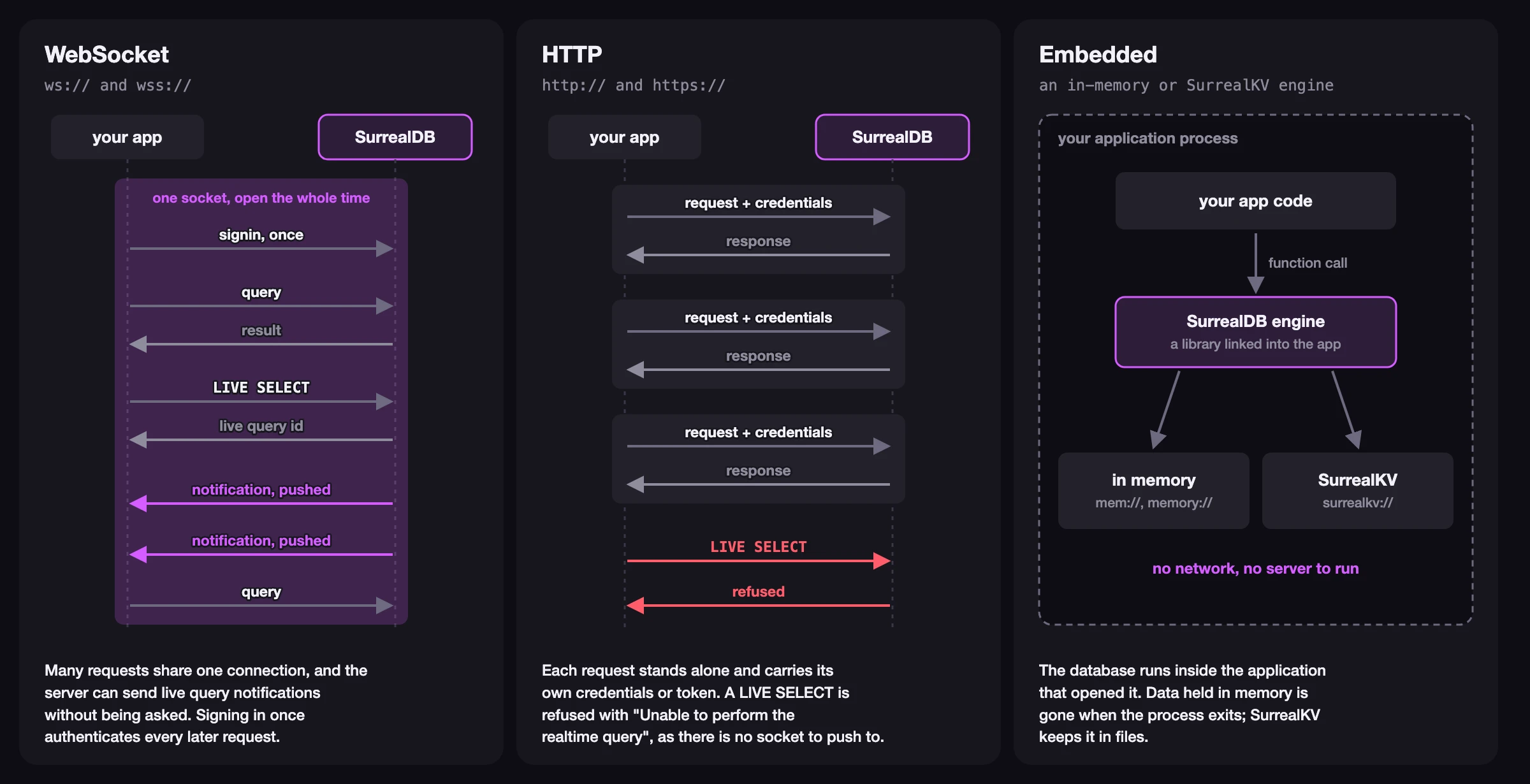
Supported connection protocols include:
WebSocket (
ws://,wss://) for long-lived stateful connections, required for live queries, sessions, and transactionsHTTP (
http://,https://) for short-lived stateless connectionsMemory (
mem://) for embedded instances
The figure below shows how the three kinds of connection differ.
using var db = new SurrealDbClient("ws://127.0.0.1:8000/rpc");After connecting, use .SignIn() to authenticate and .Use() to select the namespace and database you want to work with. Most operations require both.
await db.SignIn(new RootAuth { Username = "root", Password = "secret" });
await db.Use("main", "main");
3. Inserting data into SurrealDB
Once connected, you can use the Create method to create records. Define a class that derives from Record to map to your table, then pass an instance to Create.
const string TABLE = "person";

var person = new Person
{
    Title = "Founder & CEO",
    Name = new() { FirstName = "Tobie", LastName = "Morgan Hitchcock" },
    Marketing = true
};
var created = await db.Create(TABLE, person);
Console.WriteLine(created);
The Person and Name classes describe the shape of your data. Person derives from Record, which provides the record Id.
public class Person : Record
{
    public string? Title { get; set; }
    public Name? Name { get; set; }
    public bool Marketing { get; set; }
}
public class Name
{
    public string? FirstName { get; set; }
    public string? LastName { get; set; }
}
4. Retrieving data from SurrealDB
Selecting records
The Select method retrieves all records from a table. Provide the type parameter to tell the SDK what type to deserialise the response into.
var people = await db.Select<Person>(TABLE);
Console.WriteLine(people);
Running SurrealQL queries
For more advanced use cases, you can use the Query method to run SurrealQL statements directly. Use GetValue<> to extract a typed result from the response.
var queryResponse = await db.Query(
  $"SELECT Marketing, count() AS Count FROM type::table({TABLE}) GROUP BY Marketing"
);
var groups = queryResponse.GetValue<List<Group>>(0);
Console.WriteLine(groups);

public class Group
{
    public bool Marketing { get; set; }
    public int Count { get; set; }
}
5. Closing the connection
When you create the client with using var db = ..., the client is disposed automatically when it goes out of scope, releasing the connection and its resources. If you need to close it explicitly, call Dispose().
db.Dispose();Next steps
You have learned how to install the SDK, connect to SurrealDB, create records, and retrieve data. There is a lot more you can do with the SDK, including updating and deleting records, authentication, live queries, and transactions.
Connection management
Learn how to create and configure a SurrealDbClient connection.
Authentication
Read more about authentication levels and how to integrate them into your application.
Data manipulation
Learn how to create, read, update, and delete records using the SDK.
API Reference
Complete reference for all methods, types, and errors.
This getting-started guide covers the essentials. For the complete methods, API, and concept reference, see the .NET SDK reference.