The JavaScript SDK for SurrealDB lets you connect to a database and query it from your application. This guide covers connecting, authenticating, and running your first queries.
1. Install the SDK
Follow the installation guide to install the SDK as a dependency in your project. Once installed, you can import and instantiate the SDK to start using it.
import { Surreal } from 'surrealdb';

// Create a new Surreal instance
const db = new Surreal();
The Surreal class can be instantiated multiple times to connect to multiple SurrealDB instances at once.
2. Connect to SurrealDB
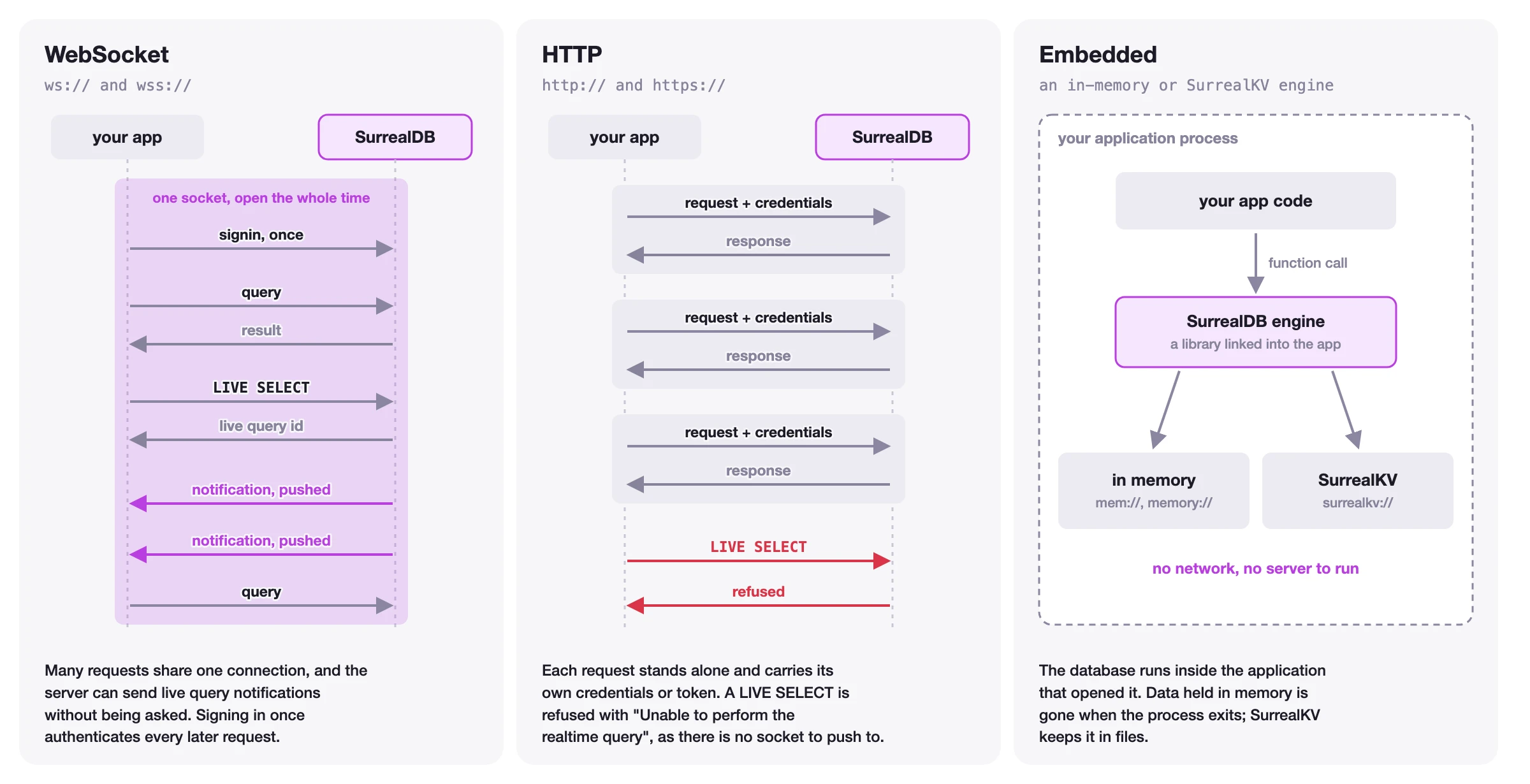
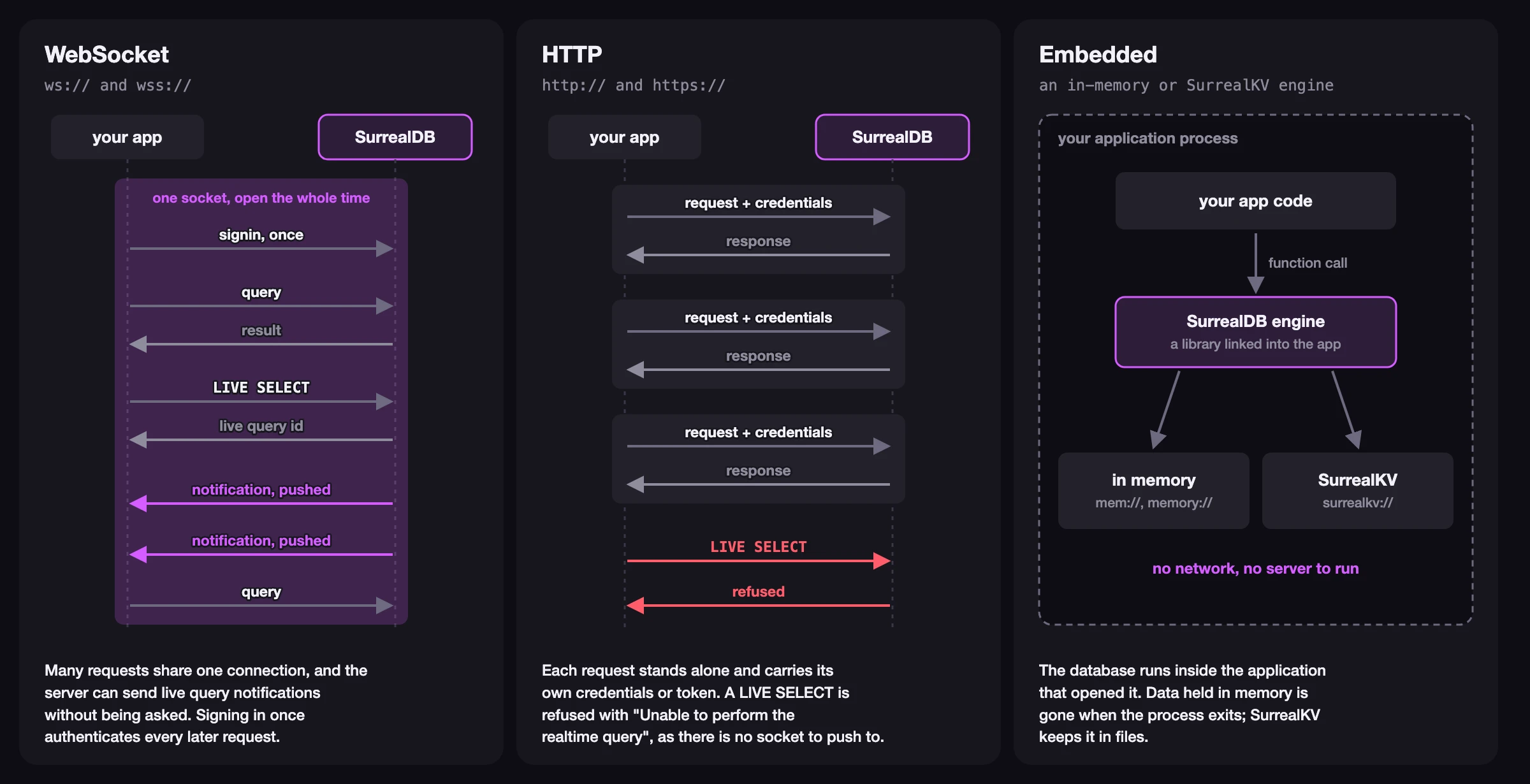
You can use the .connect() method to connect to a local or remote SurrealDB instance. This method accepts a connection string and a set of options, including namespace, database, and authentication details. Supported connection protocols include:
WebSocket (
ws://,wss://) for long-lived connections (e.g. backend or frontend applications)HTTP (
http://,https://) for short-lived stateless connections (e.g. server-side rendering applications)Embedded engines using the WebAssembly engine or Node.js engine
The figure below shows how the three kinds of connection differ.
This approach is suitable for connecting to a SurrealDB instance as a system user, for example when connecting from a server-side application.
const db = new Surreal();

// Connect as system user using the WebSocket protocol
await db.connect('ws://localhost:8000', {
	namespace: "company_name",
	database: "project_name",
	authentication: {
		username: 'root',
		password: 'secret'
	}
});
Alternatively, you can use the .signin() method to authenticate. However, passing the authentication details to the .connect() method is the preferred way, and allows for automatic reconnecting.
3. Inserting data into SurrealDB
Once connected, you can use the .create() method to execute a CREATE query. This method accepts either a Table or a RecordId as the first argument. Use the .content() chain to specify the record data.
import { Table, RecordId } from 'surrealdb';

const users = new Table('users');
const products = new Table('products');

// Create a record with a random id
const user = await db.create(users).content({
	name: 'John',
	email: 'john@example.com',
	age: 32
});

console.log(user);
// { id: user:w6xb3izpgvz4n0gow6q7, name: 'John', email: 'john@example.com', age: 32 }

// Create a record with a specific ID
const appleId = new RecordId(products, 'apple');
const product = await db.create(appleId).content({
	name: 'Apple',
	price: 1.50,
	category: 'fruit'
});

console.log(product);
// { id: product:apple, name: 'Apple', price: 1.50, category: 'fruit' }
4. Retrieving data from SurrealDB
Selecting records
The .select() method retrieves all records from a table, or a single record by its RecordId. You can chain methods like .fields(), .where(), and .limit() to refine your query.
import { Table, RecordId, eq } from 'surrealdb';

const users = new Table('users');
const products = new Table('products');

// Select all users
const allUsers = await db.select(users);

// Select a specific record by ID
const apple = await db.select(new RecordId(products, 'apple'));

// Select specific fields with filtering
const results = await db.select(products)
	.fields('name', 'price')
	.where(eq("category", "fruit"))
	.limit(10);
In addition to the .eq() function in the above example, the SDK provides a full set of expression utilities for building type-safe SurrealQL conditions.
Running SurrealQL queries
For more advanced use cases, you can use the .query() method to run SurrealQL statements directly. Use parameters to safely pass dynamic values.
const [cheapProducts] = await db.query<[{ name: string; price: number }[]]>(
	'SELECT name, price FROM product WHERE price < $max_price ORDER BY price',
	{ max_price: 5.00 }
);

console.log(cheapProducts);
// [{ name: 'Apple', price: 1.50 }]
5. Closing the connection
Once you are done, close the connection to free up resources.
await db.close();Next steps
You have learned how to install the SDK, connect to SurrealDB, create records, and retrieve data. There is a lot more you can do with the SDK, including updating and deleting records, authentication, live queries, and transactions.
Connection management
Learn how to manage your database connections, including events, reconnecting, and more.
Authentication
Read more about authentication and how to integrate it into your application.
Executing queries
Learn how to execute queries against your database, use the query builders, and customise responses.
API Reference
Explore the full API reference for the Surreal client class and its methods.
Surqlize for TypeScript
Define your schema in TypeScript and build typed queries with a fluent API.
This getting-started guide covers the essentials. For the complete methods, API, and concept reference, see the JavaScript SDK reference.