The Rust SDK for SurrealDB lets you connect to a database and query it from your application. This guide covers connecting, authenticating, and running your first queries.
1. Install the SDK
Create a new project using cargo new and add the surrealdb crate along with tokio, which lets you use the database inside an async fn main(). Enabling the macros and rt-multi-thread features on tokio allows the #[tokio::main] attribute to be used on top of fn main().
The two main ways to connect to SurrealDB when getting started are by connecting to a running instance via the protocol-ws feature, or by running an embedded instance in memory using the kv-mem feature. Each of these can be added via a feature flag in the SDK.
cargo new my_project
cd my_project
cargo add surrealdb --features kv-mem,protocol-ws
cargo add tokio --features macros,rt-multi-thread
kv-mem compiles the whole database engine into your application, so the first build takes much longer and needs much more memory. An application that only connects to a server can leave it out and use cargo add surrealdb, whose default features include protocol-ws. Raspberry Pi and small devices explains what each feature compiles.
Once installed, import the SDK's types into src/main.rs.
use surrealdb::engine::remote::ws::Ws;
use surrealdb::opt::auth::Root;
use surrealdb::Surreal;
2. Connect to SurrealDB
Use Surreal::new with the Ws engine to connect to a running SurrealDB instance, then signin to authenticate and use_ns/use_db to select the namespace and database you want to work with. Most operations require both.
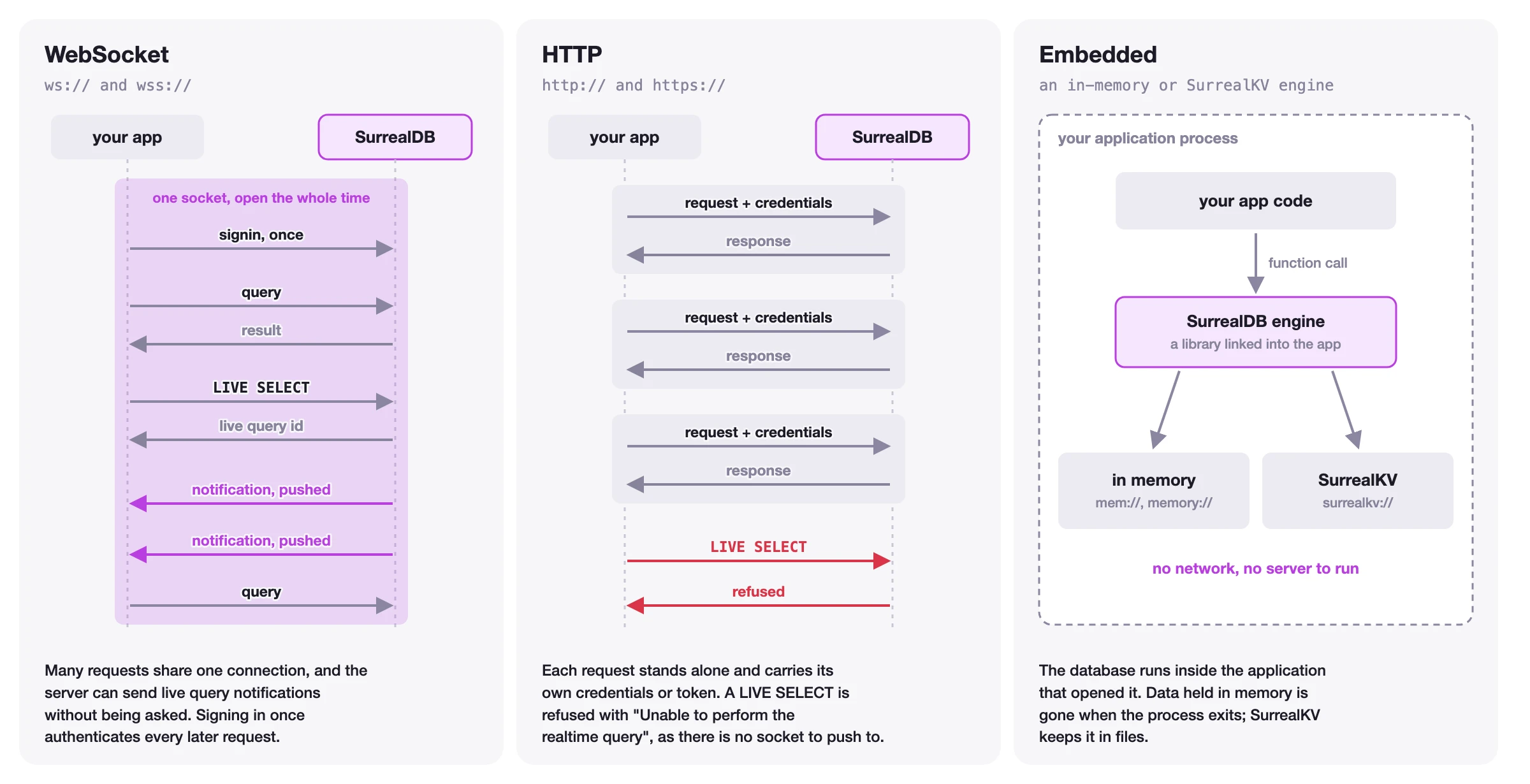
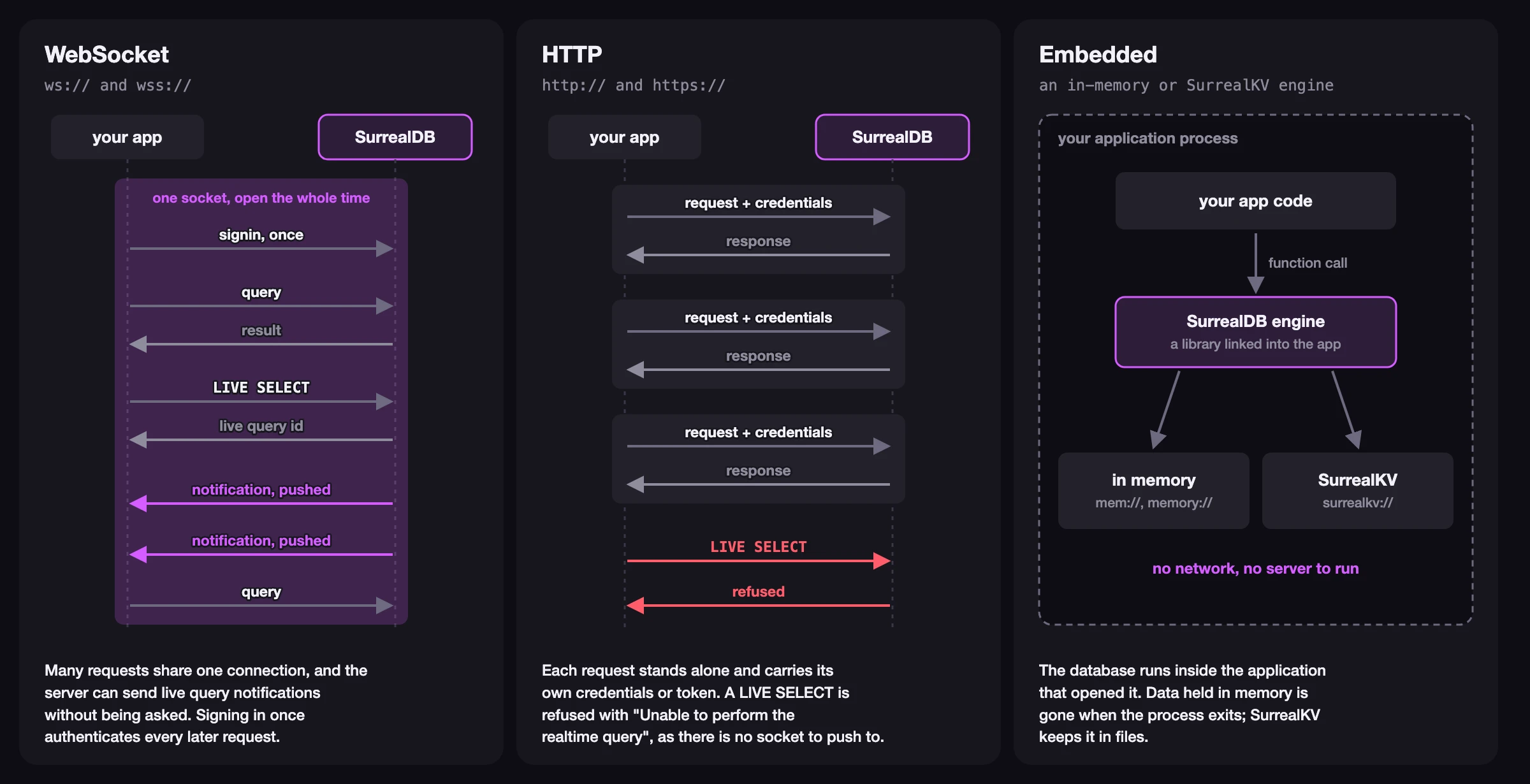
Supported connection protocols include:
WebSocket (
ws://,wss://) via theprotocol-wsfeature, for long-lived stateful connectionsHTTP (
http://,https://) for short-lived stateless connectionsMemory/embedded (
mem://) via thekv-memfeature, for embedded instances
The figure below shows how the three kinds of connection differ.
#[tokio::main]
async fn main() -> surrealdb::Result<()> {

    // Connect to the server
    let db = Surreal::new::<Ws>("127.0.0.1:8000").await?;

    // Signin as a namespace, database, or root user
    db.signin(Root {
        username: "root".to_string(),
        password: "secret".to_string(),
    })
    .await?;

    // Select a specific namespace / database
    db.use_ns("main").use_db("main").await?;

    Ok(())
}
3. Inserting data into SurrealDB
Once connected, you can use create to create records. The most ergonomic way to pass data to and from the database is to use a struct that derives SurrealValue, which allows for both serialisation and deserialisation between the Rust code and the database.
use surrealdb::Surreal;
use surrealdb::engine::remote::ws::Ws;
use surrealdb::opt::auth::Root;
use surrealdb::types::{RecordId, SurrealValue};

#[derive(Debug, SurrealValue)]
struct Name {
    first: String,
    last: String,
}

#[derive(Debug, SurrealValue)]
struct Person {
    title: String,
    name: Name,
    marketing: bool,
}

#[derive(Debug, SurrealValue)]
struct Record {
    id: RecordId,
}

#[tokio::main]
async fn main() -> surrealdb::Result<()> {
    let db = Surreal::new::<Ws>("127.0.0.1:8000").await?;

    db.signin(Root {
        username: "root".to_string(),
        password: "secret".to_string(),
    })
    .await?;

    db.use_ns("main").use_db("main").await?;

    // Create a new person with a random id
    let created: Option<Record> = db
        .create("person")
        .content(Person {
            title: "Founder & CEO".to_string(),
            name: Name {
                first: "Tobie".to_string(),
                last: "Morgan Hitchcock".to_string(),
            },
            marketing: true,
        })
        .await?;
    dbg!(created);

    Ok(())
}
4. Retrieving data from SurrealDB
Selecting records
The select method retrieves all records from a table. Deserialise the result into a Vec of a struct that derives SurrealValue.
// Select all people records
let people: Vec<Record> = db.select("person").await?;
dbg!(people);
Running SurrealQL queries
For more advanced use cases, you can use the query method to run SurrealQL statements directly. Use .bind() to safely pass dynamic values, and .take() to transform a query result into anything that can be deserialised, in this case a Value.
use surrealdb::types::Value;

// Perform a custom advanced query
let mut groups = db
    .query("SELECT marketing, count() FROM type::table($table) GROUP BY marketing")
    .bind(("table", "person"))
    .await?;
dbg!(groups.take::<Value>(0).unwrap());
5. Closing the connection
Rust has no explicit close method. The connection is closed automatically when the Surreal client is dropped, for example when it goes out of scope at the end of your function.
Next steps
You have learned how to install the SDK, connect to SurrealDB, create records, and retrieve data. There is a lot more you can do with the SDK, including updating and deleting records, authentication, live queries, and transactions.
Authentication
Read more about authentication levels and how to integrate them into your application.
Live queries
Learn how to subscribe to real-time changes in your data with live queries.
Embedding SurrealDB
Run SurrealDB in memory or on disk directly inside your Rust application.
API Reference
Complete reference for all methods, types, and errors.
This getting-started guide covers the essentials. For the complete methods, API, and concept reference, see the Rust SDK reference.