The Python SDK for SurrealDB lets you connect to a database and query it from your application. This guide covers connecting, signing in, creating records and reading them back. When you finish, you will have a short script that does each step with the blocking client or the asyncio client.
You need a SurrealDB instance to connect to. To run one on your own computer that keeps its data in memory, install SurrealDB and start it:
surreal db start --user root --pass secret1. Install the SDK
Follow the installation guide to install the SDK as a dependency in your project. Then import the factory function for the style of code you write.
from surrealdb import Surreal

db = Surreal("ws://localhost:8000")
The Surreal and AsyncSurreal factory functions accept a connection URL and return the appropriate connection class based on the protocol.
2. Connect to SurrealDB
Use the .connect() method to open the connection, .signin() to authenticate, and .use() to select a namespace and database.
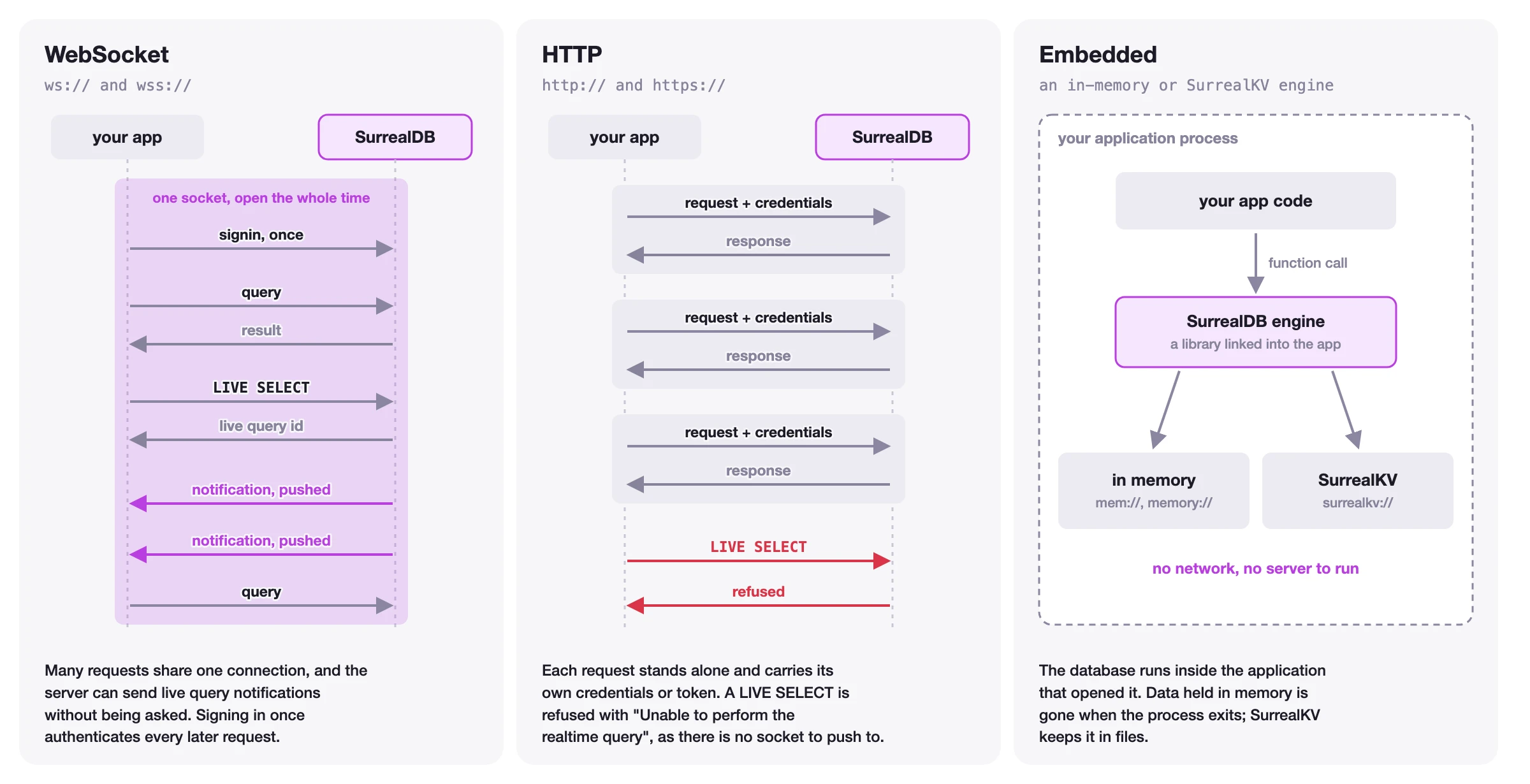
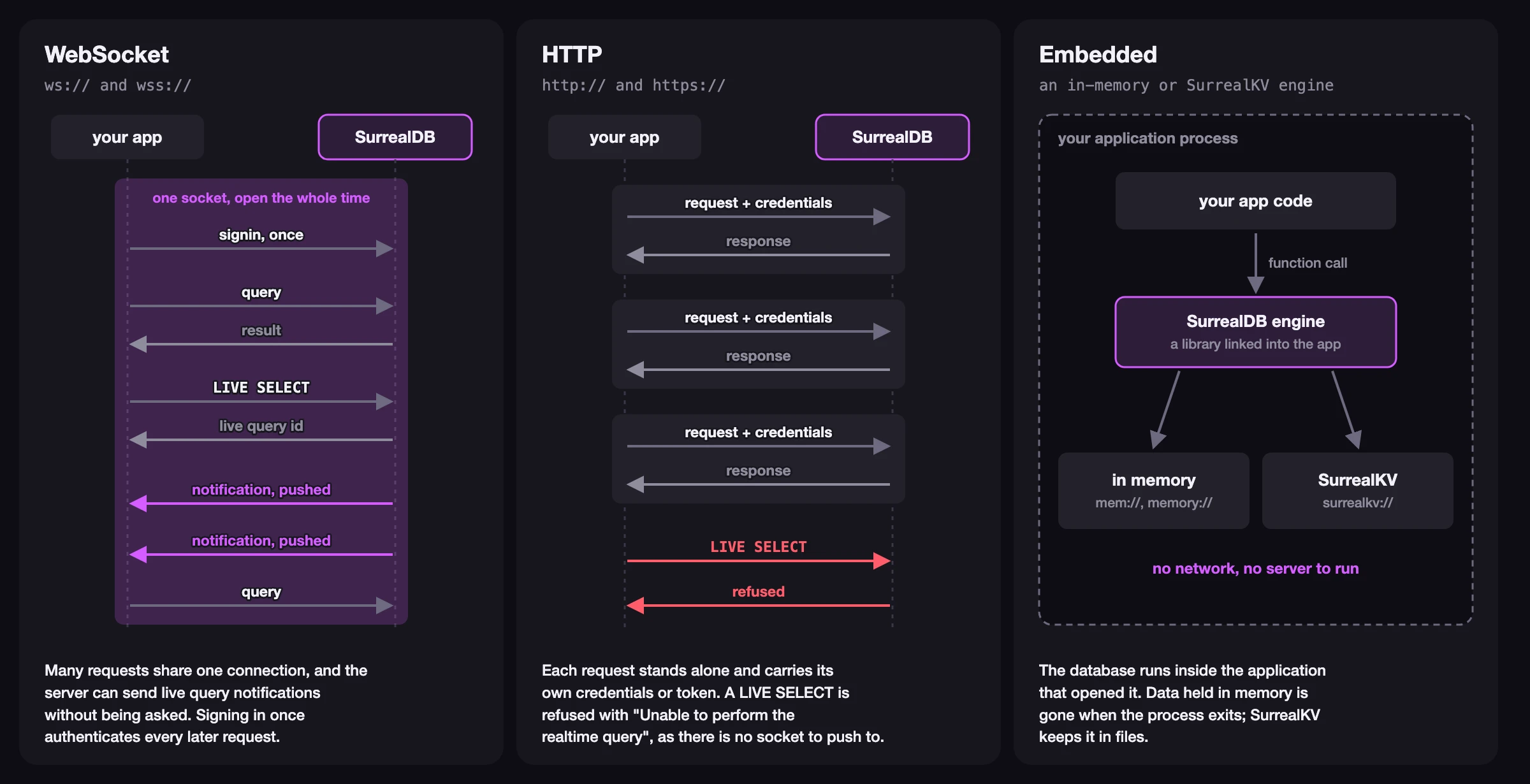
Supported connection protocols include:
WebSocket (
ws://,wss://) for long-lived stateful connectionsHTTP (
http://,https://) for short-lived stateless connectionsEmbedded (
mem://,file://,surrealkv://) for in-process databases, with theembeddedextra installed
The figure below shows how the three kinds of connection differ.
from surrealdb import Surreal

db = Surreal("ws://localhost:8000")
db.connect()
db.signin({"username": "root", "password": "secret"})
db.use("company_name", "project_name")
You can also use a context manager to automatically close the connection when you are done.
with Surreal("ws://localhost:8000") as db:
    db.signin({"username": "root", "password": "secret"})
    db.use("company_name", "project_name")
3. Insert data into SurrealDB
Use the .create() method to create records. Pass a table, or a RecordID to choose the id, as the first argument and the content of the record as the second. With a table, SurrealDB gives the record a random id.
from surrealdb import RecordID, Table

person = db.create(Table("person"), {
    "name": "John",
    "email": "john@example.com",
    "age": 32,
})

apple = db.create(RecordID("product", "apple"), {
    "name": "Apple",
    "price": 1.50,
    "category": "fruit",
})
Each call returns the created record as a dict, with its id:
{
	'category': 'fruit',
	'id': RecordID(table_name=product, record_id='apple'),
	'name': 'Apple',
	'price': 1.5,
} To name a record, use a RecordID. A plain string such as "product:apple" is always a table name, so db.create("product:apple", data) creates a record in a table called product:apple.
4. Retrieve data from SurrealDB
Selecting records
The .select() method reads every record in a table, or one record by its RecordID. On a blocking connection it returns a builder that sends nothing until you call .execute(). On an async connection, await sends it.
people = db.select(Table("person")).execute()

apple = db.select(RecordID("product", "apple")).execute()
A table gives a list of records. A RecordID gives the record, or None when it does not exist.
Running SurrealQL queries
For more advanced use cases, use the .query() method to run SurrealQL statements. Pass the values that the query needs as variables, which the SDK sends separately from the query text. .first() returns the result of the first statement, and .execute() returns a list with the result of every statement.
products = db.query(
    "SELECT name, price FROM product WHERE price < $max ORDER BY price",
    {"max": 5.00},
).first()[{'name': 'Apple', 'price': 1.5}]5. Close the connection
Close the connection when you are done to release its resources. If you use a context manager, this happens automatically.
db.close()Next steps
You have installed the SDK, connected to SurrealDB, created records and read them back. The SDK can also update and delete records, manage authentication, receive live changes, and run transactions.
Connection management
Learn how to manage your database connections, including protocols and context managers.
Authentication
Read more about authentication and how to integrate it into your application.
Data manipulation
Learn how to create, read, update, and delete records using the SDK.
API reference
Complete reference for all classes, methods, types, and errors.
This getting-started guide covers the essentials. For the complete methods, API, and concept reference, see the Python SDK reference. If you are upgrading from version 2 of the SDK, see Migrating to Python SDK 3.x.