The Java SDK for SurrealDB lets you connect to a database and query it from your application. This guide covers connecting, authenticating, and running your first queries.
1. Install the SDK
Follow the installation guide to install the SDK as a dependency in your project. Once installed, import the SDK to start using it.
import com.surrealdb.Surreal;2. Connect to SurrealDB
Use a try-with-resources block to create a connection, then call .useNs() and .useDb() to select a namespace and database, and .signin() to authenticate.
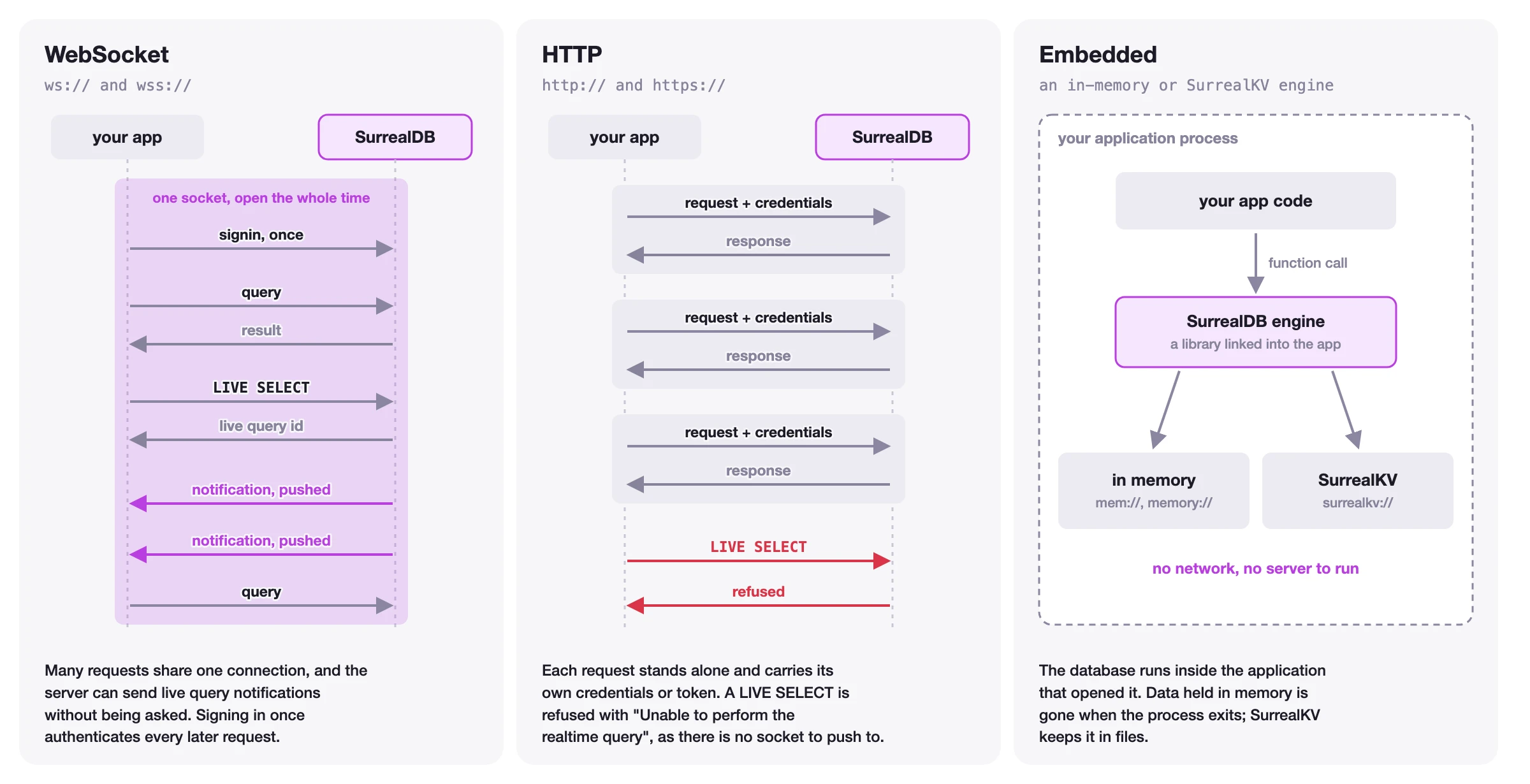
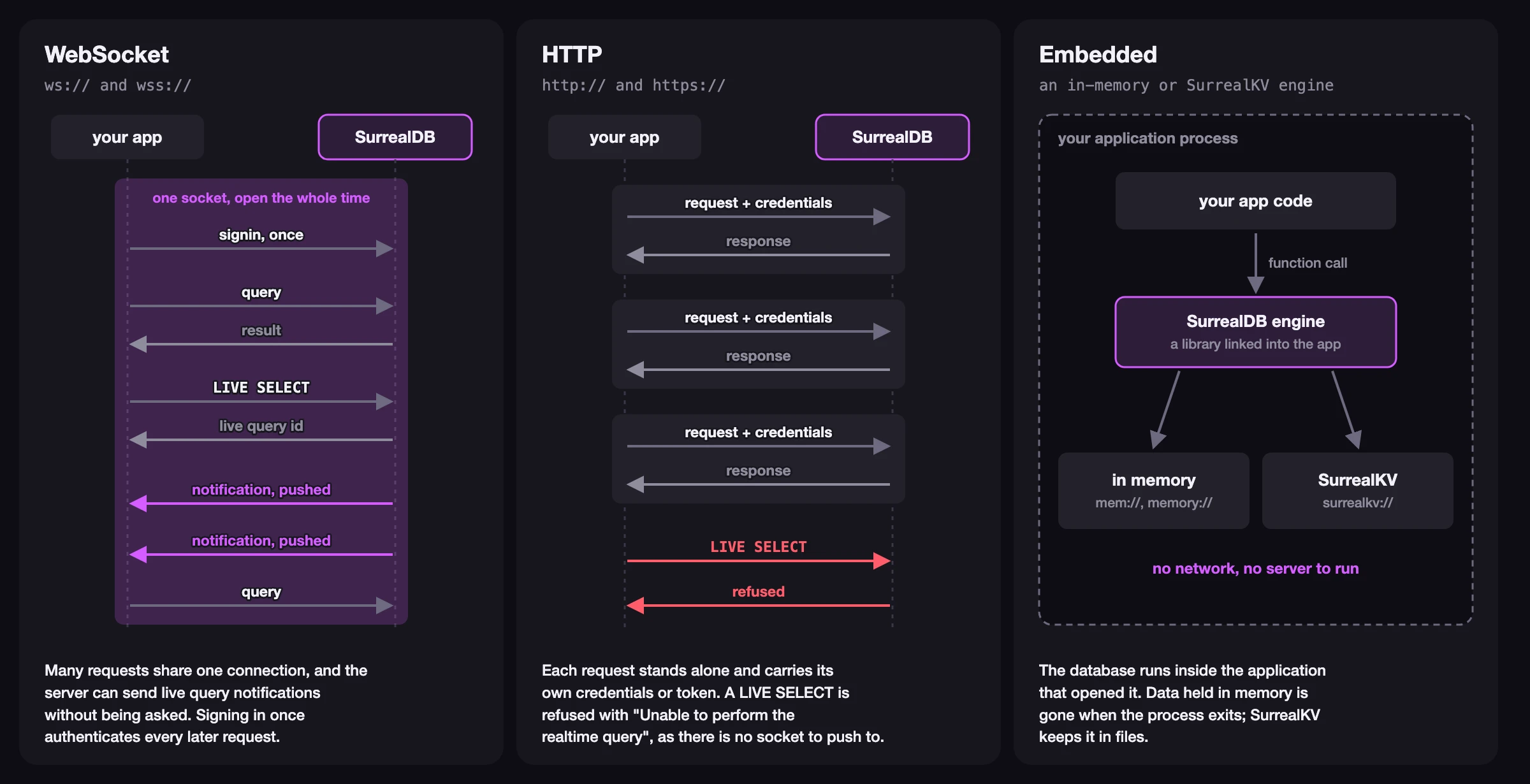
Supported connection protocols include:
WebSocket (
ws://,wss://) for long-lived stateful connectionsHTTP (
http://,https://) for short-lived stateless connectionsEmbedded (
memory,surrealkv://) for in-process databases
The figure below shows how the three kinds of connection differ.
import com.surrealdb.Surreal;
import com.surrealdb.signin.RootCredential;

try (Surreal db = new Surreal()) {
    db.connect("ws://localhost:8000");
    db.useNs("company_name").useDb("project_name");
    db.signin(new RootCredential("root", "root"));
}
The Surreal class implements AutoCloseable, so the connection is automatically closed at the end of the try-with-resources block.
3. Inserting data into SurrealDB
To represent database records in your application, define POJO classes that match your table structure. A public no-argument constructor is required. Use a RecordId field named id to hold the record identifier.
import com.surrealdb.RecordId;

public class Person {
    public RecordId id;
    public String name;
    public int age;

    public Person() {
    }

    public Person(String name, int age) {
        this.name = name;
        this.age = age;
    }
}
Use .create() to insert records into a table. When passing a table name, the method returns a list of created records with generated IDs.
Person person = new Person("John", 32);
List<Person> created = db.create(Person.class, "persons", person);
To create a record with a specific ID, pass a RecordId instead. This returns the created record directly.
Person created = db.create(Person.class, new RecordId("persons", "john"), person);4. Retrieving data from SurrealDB
Selecting records
The .select() method retrieves all records from a table, or a single record by its RecordId.
Iterator<Person> persons = db.select(Person.class, "persons");

Optional<Person> john = db.select(Person.class, new RecordId("persons", "john"));
Running SurrealQL queries
For more advanced use cases, use the .queryBind() method to execute SurrealQL statements with bound parameters.
Response response = db.queryBind(
    "SELECT * FROM persons WHERE age > $min_age",
    Map.of("min_age", 25)
);

Value result = response.take(0);
5. Closing the connection
If you use a try-with-resources block as shown above, the connection is closed automatically. Otherwise, call .close() manually to release resources.
db.close();Next steps
You have learned how to install the SDK, connect to SurrealDB, create records, and retrieve data. There is a lot more you can do with the SDK, including updating and deleting records, authentication, live queries, and transactions.
Connection management
Learn how to manage your database connections, including protocols and embedded mode.
Authentication
Read more about authentication and how to integrate it into your application.
Data manipulation
Learn how to create, read, update, and delete records using the SDK.
API Reference
Complete reference for all classes, methods, types, and errors.
This getting-started guide covers the essentials. For the complete methods, API, and concept reference, see the Java SDK reference.