
4: Adding a schema
Now that we have changed the fields from the original naive_movie data into something more useful, it's time to start thinking about our database schema. Adding a schema will allow us to start adding other movie records as new movies are released, without allowing any unexpected data to get added.
Note: in real life it is preferable to define a schema before inserting any data, so that whatever data is inserted will be validated at exactly that point. But since this tutorial is focused on learning SurrealDB by first experimenting with a lot of data, we are only now moving on to schema definitions.
We definitely want to add some other tables besides movie to our database schema, but we'll focus on the fields of our movie records first. We can give each field a type, while some will also have an assertion or two. Finally, while the plot field is just a string, it has a ton of useful content that we will be able to make best use of by defining a search analyzer and an index so that full text search will work on it.
We'll start with some basic DEFINE statements. Right now our movie table has been defined as a SCHEMALESS table of TYPE ANY, as the output from an INFO FOR DB command shows.
tables: {
  movie: 'DEFINE TABLE movie TYPE ANY SCHEMALESS PERMISSIONS NONE',
  naive_movie: 'DEFINE TABLE naive_movie TYPE ANY SCHEMALESS PERMISSIONS NONE'
}
So our first task will be to define movie as a schemafull table that is TYPE NORMAL, which will ensure that nobody can use it in a RELATE statement.
The rest of the statements will each specify the type of some of the fields, many of which are optional. That should be enough strictness for these fields.
DEFINE TABLE OVERWRITE movie SCHEMAFULL TYPE NORMAL;

DEFINE FIELD actors            ON TABLE movie TYPE array<string>;
DEFINE FIELD awards            ON TABLE movie TYPE option<string>;
DEFINE FIELD box_office        ON TABLE movie TYPE option<int>;
DEFINE FIELD directors         ON TABLE movie TYPE array<string>;
DEFINE FIELD dvd_released      ON TABLE movie TYPE option<datetime>;
DEFINE FIELD genres            ON TABLE movie TYPE array<string>;
DEFINE FIELD imdb_rating       ON TABLE movie TYPE option<int>;
DEFINE FIELD languages         ON TABLE movie TYPE array<string>;
DEFINE FIELD metacritic_rating ON TABLE movie TYPE option<int>;
DEFINE FIELD oscars_won        ON TABLE movie TYPE option<int>;
DEFINE FIELD plot              ON TABLE movie TYPE string;
DEFINE FIELD released          ON TABLE movie TYPE datetime;
DEFINE FIELD rt_rating         ON TABLE movie TYPE option<int>;
DEFINE FIELD runtime           ON TABLE movie TYPE duration;
DEFINE FIELD title             ON TABLE movie TYPE string;
DEFINE FIELD writers           ON TABLE movie TYPE array<string>;
It will also be useful to add a field that computes the average rating of a movie, so let's add that. The math::mean() function will compute the average, but we will first need to filter out any values that are NONE.
This field has a clause called COMPUTED, meaning that it will be computed each time it is accessed instead of stored as a permanent value. This will allow a movie's average rating to be updated as more ratings from these three sites come in.
DEFINE FIELD average_rating ON TABLE movie
  COMPUTED math::mean([imdb_rating, metacritic_rating, rt_rating][WHERE $this IS NOT NONE]);
Following this, we have two fields that we could add some assertions to: poster, and rated. The poster field holds a url that contains the movie's poster, so it should be a string that passes the string::is_url() test.
Before we define this field, let's first make sure that every poster field we have passes the test. An array::distinct() function should do the trick. If every value passes string::is_url(), we should only see the output true.
And that is what we see!
(SELECT VALUE poster.is_url() FROM movie).distinct();[
true
]Since all of the original data passes this condition, we can define the field with the assertion. Let's make it an option<string> just in case we have any movies to add later on that don't have a poster url that we can refer to. The assertion uses the syntax ASSERT $value.is_url(). The $value parameter inside a DEFINE statement represents the actual value of the field.
DEFINE FIELD poster ON TABLE movie TYPE option<string> ASSERT $value.is_url();The second to last field to define is rated, which represents how appropriate the movie is for certain age groups.
Since we have the $RATINGS param defined already, we can put this into the definition to ensure that any new movie has a suitability rating that equals one of those values.
DEFINE FIELD rated ON TABLE movie TYPE option<string> ASSERT $value IN $RATINGS;Let's get to the next feature that we'll add to our movie database: full text search to make it as easy as possible to find just the right movie.
Adding full text search
Now it's time to set up our database to use full-text search. This will allow search terms like "ital" to match on a string like "A working-class Italian-American bouncer", which is part of one of the plot summaries for the movies.
Our movie table has three fields that are freeform strings. Let's take a look at a small sample of a few of them.
SELECT awards, plot, title FROM movie LIMIT 3;[
{
awards: 'Won 1 Oscar. 15 wins & 15 nominations total',
plot: 'After two male musicians witness a mob hit, they flee the state in an all-female band disguised as women, but further complications set in.',
title: 'Some Like It Hot'
},
{
awards: 'Won 3 Oscars. 59 wins & 124 nominations total',
plot: 'A working-class Italian-American bouncer becomes the driver of an African-American classical pianist on a tour of venues through the 1960s American South.',
title: 'Green Book'
},
{
awards: 'Won 2 BAFTA Film 12 wins & 12 nominations total',
plot: 'A former Prohibition-era Jewish gangster returns to the Lower East Side of Manhattan 35 years later, where he must once again confront the ghosts and regrets of his old life.',
title: 'Once Upon a Time in America'
}
]Of these, title and plot are important enough that adding a full-text search index makes sense.
The first step is to define an analyzer, inside which we choose which tokenisers to use to split up the text, and which filters to use to modify it.
An analyzer is a customisable menu of full-text search capabilities that depends on how you intend to search. They can take tokenisers to split text, and filters to modify the tokens.
We'll go with the class tokeniser, which detects changes between digit, letter, punctuation, and blank. After that come the filters ascii (résumé to resume) and lowercase (America to america).
One more filter to add is called an edgengram, which is perfect for apps that return search results as a user starts typing. We will use edgengram(2,10) which will allow movies like "Casino" and "Casablanca" to show up even when a user only types "ca" (or "CA", "cA" and so on, thanks to the lowercase filter).
DEFINE ANALYZER movie_fts
  TOKENIZERS class
  FILTERS ascii, lowercase, edgengram(2,10);
There is a function called search::analyze() that lets us pass in a string to a certain analyzer to see what the final tokens look like. Let's give this a try with two movies!
SELECT
  search::analyze("movie_fts", title) AS tokens,
  title
FROM movie
LIMIT 2;
As the output shows, now a user that types something like "SHIN" or "spO" will still match on one of the titles.
[
	{
		title: 'The Shining',
		tokens: [
			'th',
			'the',
			'sh',
			'shi',
			'shin',
			'shini',
			'shinin',
			'shining'
		]
	},
	{
		title: 'Eternal Sunshine of the Spotless Mind',
		tokens: [
			'et',
			'ete',
			'eter',
			'etern',
			'eterna',
			'eternal',
			'su',
			'sun',
			'suns',
			'sunsh',
			'sunshi',
			'sunshin',
			'sunshine',
			'of',
			'th',
			'the',
			'sp',
			'spo',
			'spot',
			'spotl',
			'spotle',
			'spotles',
			'spotless',
			'mi',
			'min',
			'mind'
		]
	}
];
The next step is to apply this search analyzer to the fields that we want to use it on. This is done by defining an index that contains a FULLTEXT ANALYZER clause.
We will also include a clause called BM25 which shows the closeness of a search, and HIGHLIGHTS for the plot which allows us to highlight matches in a certain manner, such as by adding ** or -- or anything else to make it clear which part of the text is the matching one.
DEFINE INDEX plot_index ON TABLE movie FIELDS plot FULLTEXT ANALYZER movie_fts BM25 HIGHLIGHTS;
DEFINE INDEX title_index ON TABLE movie FIELDS title FULLTEXT ANALYZER movie_fts BM25;
Having a full-text index defined lets us use the @@ operator, known as the "matches" operator. It's like using = except that it uses the full-text index instead of an exact match.
As this query shows, you can't use it unless an index is present.
SELECT rated FROM movie WHERE rated @@ "rat";"There was no suitable index supporting the expression: rated @@ 'rat'"First, a query to see what movies have the word "time" in the title or plot.
SELECT title, plot FROM movie
  WHERE
    plot @@ "time" OR
title @@ "time";[
{
plot: 'April 6th, 1917. As an infantry battalion assembles to wage war deep in enemy territory, two soldiers are assigned to race against time and deliver a message that will stop 1,600 men from walking straight into a deadly trap.',
title: '1917'
},
{
plot: 'Marty McFly, a 17-year-old high school student, is accidentally sent thirty years into the past in a time-traveling DeLorean invented by his close friend, the eccentric scientist Doc Brown.',
title: 'Back to the Future'
},
{
plot: 'A mysterious stranger with a harmonica joins forces with a notorious desperado to protect a beautiful widow from a ruthless assassin working for the railroad.',
title: 'Once Upon a Time in the West'
},
{
plot: 'The Tramp struggles to live in modern industrial society with the help of a young homeless woman.',
title: 'Modern Times'
},
{
plot: 'A former Prohibition-era Jewish gangster returns to the Lower East Side of Manhattan 35 years later, where he must once again confront the ghosts and regrets of his old life.',
title: 'Once Upon a Time in America'
}
]Next, a query using the search::score() function to see which three movies have the greatest relation with the search term "time". This function takes a number which is used to match the output of the score with the matches operator below. For example, search::score(0) knows to get the score from the plot field because of the WHERE plot @0@ "time" clause that follows.
SELECT
    title,
    plot,
    search::score(0) + search::score(1) AS score
FROM movie
    WHERE
        plot @0@ "time" OR title @1@ "time"
ORDER BY score DESC
LIMIT 3;[
{
plot: 'The Tramp struggles to live in modern industrial society with the help of a young homeless woman.',
score: 3.9507575035095215f,
title: 'Modern Times'
},
{
plot: 'Marty McFly, a 17-year-old high school student, is accidentally sent thirty years into the past in a time-traveling DeLorean invented by his close friend, the eccentric scientist Doc Brown.',
score: 3.735989570617676f,
title: 'Back to the Future'
},
{
plot: 'April 6th, 1917. As an infantry battalion assembles to wage war deep in enemy territory, two soldiers are assigned to race against time and deliver a message that will stop 1,600 men from walking straight into a deadly trap.',
score: 3.4721930027008057f,
title: '1917'
}
]Here is a more complex query that matches a common theme in SurrealDB tutorials: the concept of time. Adding the words present, past, and future should do the trick. Each one of these will return a score, which added together will make up the total relevance score for each movie.
SELECT
    title,
    plot,
    search::score(0) + search::score(1) + search::score(2) + search::score(3) + search::score(4) + search::score(5) + search::score(6) + search::score(7) AS score
FROM movie
    WHERE
        plot @0@ "time"    OR title @1@ "time"
    OR  plot @2@ "future"  OR title @3@ "future"
    OR  plot @4@ "past"    OR title @5@ "past"
    OR  plot @6@ "present" OR title @7@ "present"
ORDER BY score DESC;
Doing so brings the movies Back to the Future and The Shining straight to the top, with WALL·E in fifth place!
[
  {
    plot: 'Marty McFly, a 17-year-old high school student, is accidentally sent thirty years into the past in a time-traveling DeLorean invented by his close friend, the eccentric scientist Doc Brown.',
    score: 11.41375184059143f,
    title: 'Back to the Future'
  },
  {
    plot: 'A family heads to an isolated hotel for the winter where a sinister presence influences the father into violence, while his psychic son sees horrific forebodings from both past and future.',
    score: 6.268502235412598f,
    title: 'The Shining'
  },
  {
    plot: 'The Tramp struggles to live in modern industrial society with the help of a young homeless woman.',
    score: 3.9507575035095215f,
    title: 'Modern Times'
  },
  {
    plot: "In the future, a sadistic gang leader is imprisoned and volunteers for a conduct-aversion experiment, but it doesn't go as planned.",
    score: 3.702232599258423f,
    title: 'A Clockwork Orange'
  },
  {
    plot: 'In the distant future, a small waste-collecting robot inadvertently embarks on a space journey that will ultimately decide the fate of mankind.',
    score: 3.545522689819336f,
    title: 'WALL·E'
  },
  {
    plot: 'April 6th, 1917. As an infantry battalion assembles to wage war deep in enemy territory, two soldiers are assigned to race against time and deliver a message that will stop 1,600 men from walking straight into a deadly trap.',
    score: 3.4721930027008057f,
    title: '1917'
  },
  {
    plot: 'A mysterious stranger with a harmonica joins forces with a notorious desperado to protect a beautiful widow from a ruthless assassin working for the railroad.',
    score: 3.166771173477173f,
    title: 'Once Upon a Time in the West'
  },
  {
    plot: 'A former Prohibition-era Jewish gangster returns to the Lower East Side of Manhattan 35 years later, where he must once again confront the ghosts and regrets of his old life.',
    score: 3.0653889179229736f,
    title: 'Once Upon a Time in America'
  },
  {
    plot: 'A thief who steals corporate secrets through the use of dream-sharing technology is given the inverse task of planting an idea into the mind of a C.E.O., but his tragic past may doom the project and his team to disaster.',
    score: 3.0321388244628906f,
    title: 'Inception'
  },
  {
    plot: "When a ronin requesting seppuku at a feudal lord's palace is told of the brutal suicide of another ronin who previously visited, he reveals how their pasts are intertwined - and in doing so challenges the clan's integrity.",
    score: 2.957204580307007f,
    title: 'Hara-Kiri'
  },
  {
    plot: "A human soldier is sent from 2029 to 1984 to stop an almost indestructible cyborg killing machine, sent from the same year, which has been programmed to execute a young woman whose unborn son is the key to humanity's future salvation",
    score: 2.9160244464874268f,
    title: 'The Terminator'
  }
]
Next is a query to practice the search::highlight() function. This function is especially useful when using our edgengram filter, as it will return results even if just the first two letters match. Without highlighting where the match occurred, the reader will probably have a hard time telling exactly which word inside the plot was the matching one.
Adding an asterisk to the left and right side of the matching word will make it most clear which one fits what the user was searching for.
SELECT
    search::highlight("**", "**", 0) AS plot
FROM movie
    WHERE
      plot @0@ "per"
LIMIT 4;
As two asterisks are often used to make font bold, you can see just how clear this would be for a user who is beginning to type a word in a search for a matching plot. In the text below, "per" matches on "perceived", "persecution", "perspective", and "perfect".
[
	{
		plot: 'A mentally unstable veteran works as a nighttime taxi driver in New York City, where the **perceived** decadence and sleaze fuels his urge for violent action.'
	},
	{
		plot: 'In German-occupied Poland during World War II, industrialist Oskar Schindler gradually becomes concerned for his Jewish workforce after witnessing their **persecution** by the Nazis.'
	},
	{
		plot: 'The presidencies of Kennedy and Johnson, the Vietnam War, the Watergate scandal and other historical events unfold from the **perspective** of an Alabama man with an IQ of 75, whose only desire is to be reunited with his childhood sweeth'
	},
	{
		plot: 'When an open-minded Jewish waiter and his son become victims of the Holocaust, he uses a **perfect** mixture of will, humor, and imagination to protect his son from the dangers around their camp.'
	}
];THE PLATFORM
Everything an application and its agents know. Five surfaces, one engine.
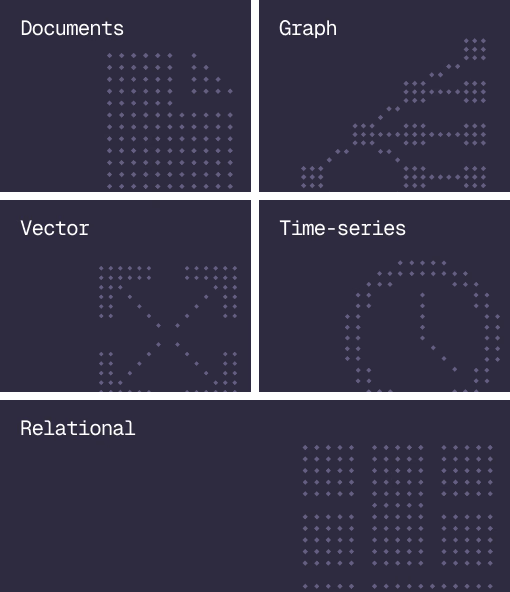
Database
Document, graph, vector, time-series and relational in one engine.
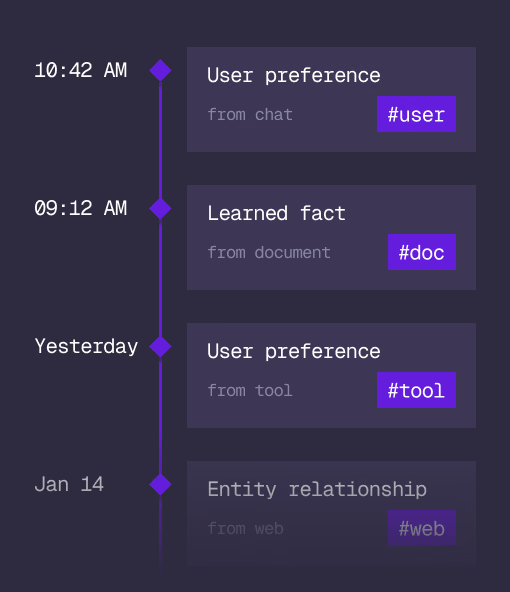
Agent Memory
What an agent learns, with its source and its time, in the same engine.
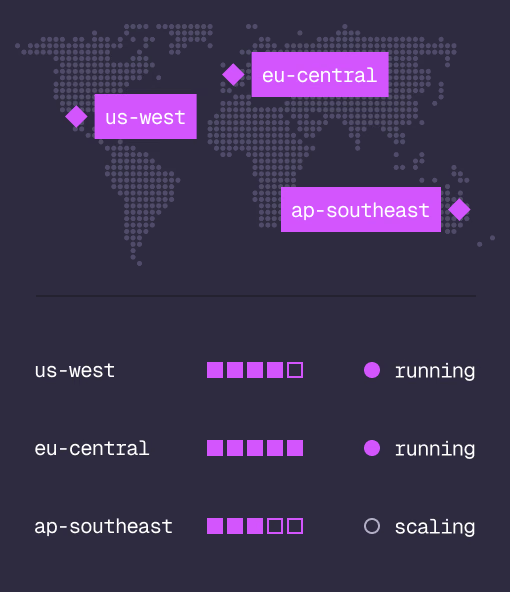
Cloud
Managed clusters in the regions you choose, scaled on demand.
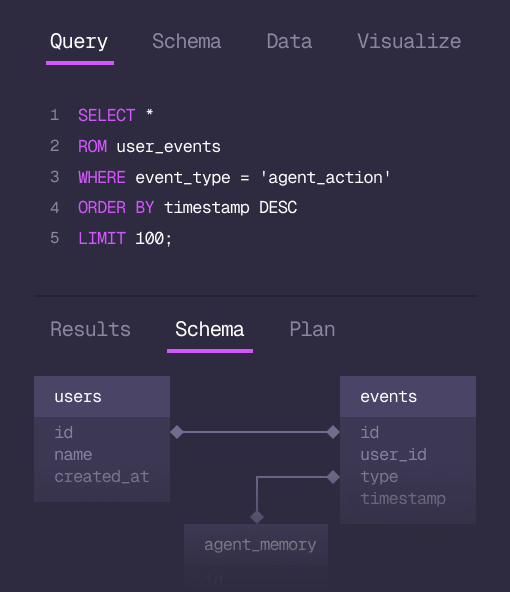
Studio
Query, explore and design the schema from the browser.
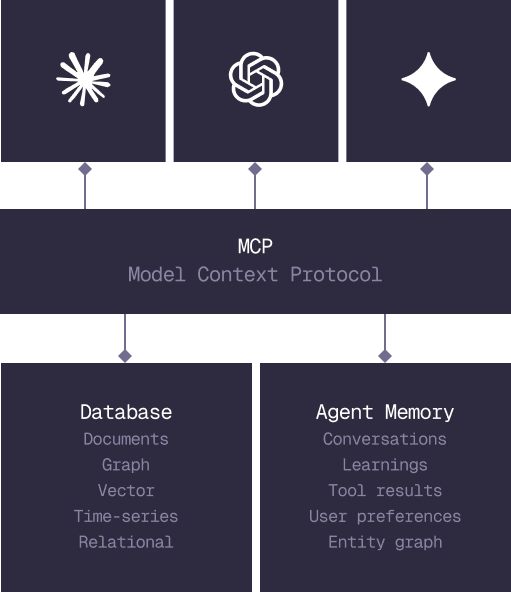
MCP
Every model that speaks MCP reaches the database and the memory directly.
IN PRODUCTION
Trusted at scale. Samsung, Nvidia, Verizon, Tencent, and Walmart run on SurrealDB.
14,000+
Developers building on SurrealDB Cloud
4M+
Developers building on SurrealDB worldwide
FROM THE TEAMS
SurrealDB gives us a foundation where we can unify semantic search, knowledge graphs, and AI-driven decision making without stitching together multiple systems. Collapsing responsibility into SurrealDB has become our default engineering posture.
VP of Engineering, Later