
3: SurrealQL data types
In this page we will start turning the existing data into more useful SurrealQL data types.
Release date, DVD release date
Since we can make a datetime from the format YYYY-MM-DD, we just need to turn the existing "03 Jul 1991" format into "1991-07-03", and put <datetime> in front.
The first thing we can do is use the string::split function. Typing .split(' ') will split by whitespace.
"03 Jul 1991".split(' ');
-- Output:
['03', 'Jul', '1991'];
We can assign this output to a parameter that we'll call $split. Then we can rearrange the order by first getting the 2nd index, then the 1st, and finally the 0th. In between we'll use + '-' to add a hyphen.
LET $split = "03 Jul 1991".split(' ');
$split[2] + '-' + $split[1] + '-' + $split[0];
-- Output:
'1991-Jul-03';
That's almost good enough. Let's define a function to hold this code.
A function is made using a DEFINE FUNCTION statement. A function's input and return value can have a type name (like string) to make it more type safe.
DEFINE FUNCTION fn::date_to_datetime($input: string) -> string {
    LET $split = $input.split(' ');
    $split[2] + '-' + $split[1] + '-' + $split[0];
};

fn::date_to_datetime("03 Jul 1991");

-- Output:
'1991-Jul-03';
By the way, you can use the RETURN keyword if you prefer. But it's not necessary since the last expression will automatically be the return value of a function. Since the function already exists, this time the statement needs the OVERWRITE clause to replace it.
DEFINE FUNCTION OVERWRITE fn::date_to_datetime($input: string) -> string {
    LET $split = $input.split(' ');
    RETURN $split[2] + '-' + $split[1] + '-' + $split[0];
};

RETURN fn::date_to_datetime("03 Jul 1991");
The only time when using RETURN makes a difference is when you use it to return a value early. For example, the following query will only show "This value shows up" and never reach the next line.
{
    RETURN "This value shows up";
    "But this one will not!";
}'This value shows up'Now let's define another function so that we can get the output '1991-07-03' instead of '1991-Jul-03'.
Fortunately, all the dates in our naive_movie records all follow the same format, with months like Jan, Feb, Mar, and so on. Changing them from this format to a number requires some typing, but looks clean enough. At the end of the function we have a THROW statement to return an error if the input is invalid.
DEFINE FUNCTION fn::month_to_num($input: string) -> string {
    IF      $input = 'Jan' { '01' }
    ELSE IF $input = 'Feb' { '02' }
    ELSE IF $input = 'Mar' { '03' }
    ELSE IF $input = 'Apr' { '04' }
    ELSE IF $input = 'May' { '05' }
    ELSE IF $input = 'Jun' { '06' }
    ELSE IF $input = 'Jul' { '07' }
    ELSE IF $input = 'Aug' { '08' }
    ELSE IF $input = 'Sep' { '09' }
    ELSE IF $input = 'Oct' { '10' }
    ELSE IF $input = 'Nov' { '11' }
    ELSE IF $input = 'Dec' { '12' }
    ELSE {
        THROW "Invalid input: `" + $input + "`. Please use a three-letter abbreviation such as 'Oct'."
    }
};
Now that the function fn::month_to_num() is done, we can redefine the existing fn::date_to_datetime() function with the OVERWRITE clause.
DEFINE FUNCTION OVERWRITE fn::date_to_datetime($input: string) -> datetime {
    LET $split = $input.split(' ');
                                        /* This part is different */
    RETURN <datetime>($split[2] + '-' + fn::month_to_num($split[1]) + '-' + $split[0]);
};
With those functions defined, we can now give this a try. Let's pick a single naive_movie using this SELECT statement. This statement has the keyword ONLY, which tells the database to return just a single record instead of an array of records. And to make the statement work, we need to add LIMIT 1 so that only up to one record will be selected.
LET $one_movie = SELECT * FROM ONLY naive_movie LIMIT 1;Then we can display the movie's Title field and modified Release field. One way to do this is by using . and then {} to open up a new space inside which we choose which fields and how to represent them. Or we can just do a SELECT statement on the $one_movie parameter that we just created. This time FROM ONLY doesn't need a LIMIT 1 because the database already knows that $one_movie is a single record.
LET $one_movie = SELECT * FROM ONLY naive_movie LIMIT 1;

$one_movie.{
    title: Title,
    released: fn::date_to_datetime(Released)
};

SELECT
  Title AS title,
  fn::date_to_datetime(Released) AS released
FROM ONLY $one_movie;
Here's the output! It's Aliens. Or Good Will Hunting, or anything else. Since each naive_movie has a random ID, the first movie returned with LIMIT 1 will depend on which IDs were generated in your case.
{
  released: d'1986-07-18T00:00:00Z',
  title: 'Aliens'
}
On the other hand, if you had specified predictable IDs like 0 to 100, then the first record returned will be the 0. The following query creates 101 records of table a with IDs from a:0 to a:100.
CREATE |a:0..=100|;
SELECT * FROM a LIMIT 1;
The output for the second statement above will always be this record.
[{ id: a:0 }]The a table has nothing to do with our movies, so we can remove it again before we continue.
REMOVE TABLE a;Movie ratings
The data on ratings is a bit more challenging, as it involves turning an object like this into separate fields with each Score cast into an integer. Each source has a different way to represent a score.
[
  {
      Source: 'Internet Movie Database',
      Score: '9.3/10'
  },
  {
      Source: 'Rotten Tomatoes',
      Score: '91%'
  },
  {
      Source: 'Metacritic',
      Score: '81/100'
  }
]
In addition, many Ratings objects don't have ratings from all three websites, so we can't guarantee that every movie will have three scores. We can show this by seeing how many NONE results show up at indexes 1 and 2 of the Ratings field. NONE is the value that shows up when no value is present.
SELECT Ratings[0] FROM naive_movie;
SELECT Ratings[1] FROM naive_movie; -- 2 NONE
SELECT Ratings[2] FROM naive_movie; -- 13 NONE
By the way, here is how you can calculate the number of movies that don't have ratings from all three of these websites: run the query above on index 2, enclose it in parentheses, add a [WHERE Ratings = NONE] filter, and then use array::len() to get the length of the array.
(SELECT Ratings[2] FROM naive_movie)[WHERE Ratings = NONE].len();We are going to work with this data by using a SELECT query with a WHERE clause, like WHERE Source = 'Metacritic'. First we will give this data the parameter $ratings.
LET $ratings = [
	{
		Score: '9.3/10',
		Source: 'Internet Movie Database'
	},
	{
		Score: '91%',
		Source: 'Rotten Tomatoes'
	},
	{
		Score: '81/100',
		Source: 'Metacritic'
	}
];
If we were to use SELECT Score... on this, the return value would be an array with the matching objects and their Score field.
SELECT Score FROM $ratings WHERE Source = 'Metacritic';
-- Output:
[
	{
		Score: '81/100'
	}
]
Since we only have one field and only care about its value, we can add the VALUE clause. Now it will return an array of the values, which in this case is just this string.
SELECT VALUE Score FROM $ratings WHERE Source = 'Metacritic';
-- Output:
[
  '81/100'
]
Finally, we can finish off with ONLY and LIMIT 1 as we learned above. This will only return a single string and nothing else.
SELECT VALUE Score FROM ONLY $ratings WHERE Source = 'Metacritic' LIMIT 1;
-- Output:
'81/100'
Then we can use the string::replace() function to replace the '/100' part with nothing.
'81/100'.replace('/100', '');
-- Output:
'81'
That output will be good enough to cast into an integer.
<int>'81';
-- Output:
81
There is one problem with SELECT ... FROM ONLY though: it returns an error when nothing matches, and that will happen for every movie that is missing a rating from one of the three websites.
SELECT VALUE Score FROM ONLY $ratings WHERE Source = 'Letterboxd' LIMIT 1;
-- Output:
'Expected a single result output when using the ONLY keyword'
Instead, we can filter the array directly. $ratings[WHERE Source = 'Metacritic'] returns the matching objects, [0] takes the first one, and .Score gets its score. If nothing matches, the result is NONE instead of an error.
$ratings[WHERE Source = 'Metacritic'][0].Score;
-- Output:
'81/100'

$ratings[WHERE Source = 'Letterboxd'][0].Score;
-- Output:
NONE
With this logic, we can create three functions to do this with each type of reviewer. The functions will take an array<object> and return an option<int>. An option is a type that can either be something, or NONE. With this as the return type, we can safely return NONE if there is no review, and a value otherwise.
The IMDB score is a number like 9.3 out of 10, so the function multiplies it by 10 and then casts the result to an integer to put it on the same scale as the other two.
All the functions together look like this.
DEFINE FUNCTION fn::get_imdb($obj: array<object>) -> option<int> {
    LET $score = $obj[WHERE Source = 'Internet Movie Database'][0].Score;
    IF $score IS NONE { NONE } ELSE { <int>(<number>$score.replace('/10', '') * 10) }
};

DEFINE FUNCTION fn::get_rt($obj: array<object>) -> option<int> {
    LET $score = $obj[WHERE Source = 'Rotten Tomatoes'][0].Score;
    IF $score IS NONE { NONE } ELSE { <int>$score.replace('%', '') }
};

DEFINE FUNCTION fn::get_metacritic($obj: array<object>) -> option<int> {
    LET $score = $obj[WHERE Source = 'Metacritic'][0].Score;
    IF $score IS NONE { NONE } ELSE { <int>$score.replace('/100', '') }
};
Movie runtimes
Turning the movie runtime values into durations will not be difficult, as they are all expressed in minutes with the same format:
Runtime: '133 min'
Runtime: '127 min'
The string::replace() function will be enough to turn the output from something like '133 min' to '133m', which SurrealDB will be able to cast into a duration. A change from min to m will do the trick.
LET $one = '133 min';
LET $two = '127 min';

RETURN
    <duration>$one.replace(' min', 'm') -
    <duration>$two.replace(' min', 'm');
This will return '6m'.
Now let's give this a try with a single movie from the naive_movie records in the database.
SELECT
    Title,
    <duration>Runtime.replace(' min', 'm') AS runtime
FROM naive_movie
LIMIT 1;[
{
Title: 'Django Unchained',
runtime: 2h45m
}
]Writers, directors, and actors
These fields each contain a single string that holds the names of one or more people. We will use this later on to create person records that will be linked to these movies. In the meantime, we will use .split(', ') on these values to have a single string for each person and make use of it later.
'Akira Kurosawa, Ryûzô Kikushima'.split(', ');
-- ['Akira Kurosawa', 'Ryûzô Kikushima']
Genres, languages, rated
Let's move on by taking a look at the data for genre, languages, and rated (the age suitability ranking for each movie). A quick query returning the languages and genre for three movies shows that this data is less than ideal.
SELECT Genre, Language FROM naive_movie LIMIT 3;[
{
Genre: 'Drama, Western',
Language: 'English, German, French, Italian'
},
{
Genre: 'Action, Crime, Drama',
Language: 'English'
},
{
Genre: 'Drama',
Language: 'English'
}
]The language and genre data is just a string - readable for human eyes, but not very useful at all for actual data analysis. Ideally, we would like to be able to use a query that shows us all the languages or genres present in all of our movies.
The first function we would like to use in such a query is one called array::distinct() that removes all duplicates. Here is a quick example of its behaviour:
[6,7,8,8].distinct();[ 6, 7, 8 ]But this function alone won't do the trick, because it will only check for distinct strings, not individual languages. Let's give this a try with eight movies:
(SELECT VALUE Genre FROM naive_movie LIMIT 8).distinct();Unfortunately, so many Genre values are unique strings made up of a combination of genres that array::distinct() hasn't filtered out all that much.
[
  'Drama, Romance',
  'Comedy, Drama, Family',
  'Crime, Drama, Mystery',
  'Comedy, Drama, War',
  'Action, Adventure, Fantasy',
  'Action, Drama',
  'Drama, Mystery, War'
]
What we really want is to have each genre treated as a separate data point instead of these big combined strings.
Fortunately, each genre is separated by ', ', making it possible to use the string::split() function to turn this into an array.
Now, we can't call .split(', ') here because that would be trying to split on the entire return value of the SELECT statement, which is an array<string>.
(SELECT VALUE Genre FROM naive_movie).split(', ')Instead, we can use the .map() method to do something on each string inside. After .map you can see a small section with |$m| where you give each item a parameter name, after which .split() can be called on it. This is what is known as a closure, and you can read more about them in the closures reference.
(SELECT VALUE Genre FROM naive_movie)
    .map(|$m| $m.split(', '));
The output is a big array<array<string>> (an array of arrays of strings).
[
  ['Action', 'Adventure', 'Sci-Fi'],
  ['Drama', 'Sci-Fi'],
  ['Western'],
  -- and so on...
]
To flatten them into a single array<string> we can use a method called .flatten().
(SELECT VALUE Genre FROM naive_movie)
    .map(|$m| $m.split(', '))
.flatten();['Action', 'Adventure', 'Sci-Fi', 'Drama', 'Sci-Fi', 'Western', ...]And then to remove the duplicate items we can call .distinct() at the end.
(SELECT VALUE Genre FROM naive_movie)
    .map(|$m| $m.split(', '))
    .flatten()
.distinct();['Action', 'Adventure', 'Sci-Fi', 'Drama', 'Western', 'War', 'Comedy', 'Crime', 'Animation', 'Family', 'Thriller', 'Music', 'Fantasy', 'Mystery', 'Romance', 'Film-Noir', 'Horror', 'Biography', 'Musical', 'History']There is also a method called .group() that does the same thing by flattening and removing duplicates in a single call!
(SELECT VALUE Genre FROM naive_movie)
    .map(|$m| $m.split(', '))
    .group();
These values will be useful later on, because we can use them to ensure that any new movies added in the future will be one of these genres. We can use DEFINE PARAM followed by the parameter name $GENRE, followed by VALUE to set the value. And its value will be the query that we just used.
DEFINE PARAM $GENRES VALUE (SELECT VALUE Genre FROM naive_movie)
    .map(|$m| $m.split(', '))
    .group();
A database parameter is just a value that you can access using its name, so just typing this is enough to display all of the available genres.
$GENRES;['Action', 'Adventure', 'Sci-Fi', 'Drama', 'Western', 'War', 'Comedy', 'Crime', 'Animation', 'Family', 'Thriller', 'Music', 'Fantasy', 'Mystery', 'Romance', 'Film-Noir', 'Horror', 'Biography', 'Musical', 'History']We can do this with the age-related ratings for movies too. As the following query shows, there is only a small number of choices here:
(SELECT VALUE Rated FROM naive_movie)
    .map(|$m| $m.split(', '))
.group();['Not Rated', 'PG-13', 'R', 'PG', 'Passed', 'Approved', 'G', 'X', 'Unrated', 'TV-PG']We can use this as an assertion too. Let's put it into a parameter in the same way we did with $GENRES.
DEFINE PARAM $RATINGS VALUE (SELECT VALUE Rated FROM naive_movie)
    .map(|$m| $m.split(', '))
    .group();
BoxOffice, DVD
These two fields are not a huge challenge. We already made our own fn::date_to_datetime function to convert date formats like '21 Dec 1999' to a datetime, and the dollar values like '$136,381,073' for BoxOffice can be converted to numbers after removing the dollar sign and commas. But there is one more small item to note. You might have noticed this already when eyeballing the data, but this query will make it more obvious:
SELECT BoxOffice, DVD
    FROM naive_movie
    WHERE
        BoxOffice.len() < 5 OR
DVD.len() < 5;[
{
BoxOffice: 'N/A',
DVD: 'N/A'
},
{
BoxOffice: 'N/A',
DVD: 'N/A'
},
{
BoxOffice: 'N/A',
DVD: '01 May 2005'
},
...
]We can see that the database we got this information from uses N/A to represent a lack of data instead of something like NULL or NONE. So we will need to do a quick check for these fields to see if they are equal to 'N/A', and set them as NONE if that is the case.
Let's give this a try now by creating some movie records with just these two fields (plus a title).
(SELECT * FROM naive_movie).map(|$movie| {
    title: $movie.Title,
    box_office: IF $movie.BoxOffice = 'N/A' { NONE } ELSE { <int>$movie.BoxOffice.replace('$', '').replace(',', '') },
    dvd_released: IF $movie.DVD = 'N/A' { NONE } ELSE { <datetime>fn::date_to_datetime($movie.DVD) }
});
We can also wrap this in a query of its own so that we can add ORDER BY box_office and LIMIT 5 to return only the five movies that made the most money.
SELECT * FROM (SELECT * FROM naive_movie).map(|$movie| {
    title: $movie.Title,
    box_office: IF $movie.BoxOffice = 'N/A' { NONE } ELSE { <int>$movie.BoxOffice.replace('$', '').replace(',', '') },
    dvd_released: IF $movie.DVD = 'N/A' { NONE } ELSE { <datetime>fn::date_to_datetime($movie.DVD) }
}) ORDER BY box_office DESC LIMIT 5;[
{
box_office: 858373000,
dvd_released: d'2019-07-30T00:00:00Z',
title: 'Avengers: Endgame'
},
{
box_office: 800588139,
dvd_released: NONE,
title: 'Spider-Man: No Way Home'
},
{
box_office: 678815482,
dvd_released: d'2018-08-14T00:00:00Z',
title: 'Avengers: Infinity War'
},
{
box_office: 534987076,
dvd_released: d'2008-12-09T00:00:00Z',
title: 'The Dark Knight'
},
{
box_office: 460998507,
dvd_released: d'2005-12-06T00:00:00Z',
title: 'Star Wars'
}
];That takes care of all of the fields that need work! There are a lot of other fields that don't need any modification such as title, plot, and poster (a url to an image of the movie's poster). But we will work with these fields soon on the schema level.
Putting everything together that we have so far, this single query will allow us to take each of the naive_movie records and turn them into movie records that are much easier to use for real data analysis.
FOR $data IN SELECT * FROM naive_movie {
    CREATE movie CONTENT {
        actors: $data.Actors.split(', '),
        awards: $data.Awards,
        box_office: IF $data.BoxOffice = 'N/A' { NONE } ELSE { <int>$data.BoxOffice.replace('$', '').replace(',', '') },
        directors: $data.Director.split(', '),
        dvd_released: IF $data.DVD = 'N/A' { NONE } ELSE { fn::date_to_datetime($data.DVD) },
        genres: $data.Genre.split(', '),
        imdb_rating: fn::get_imdb($data.Ratings),
        languages: $data.Language.split(', '),
        metacritic_rating: fn::get_metacritic($data.Ratings),
        plot: $data.Plot,
        poster: $data.Poster,
        rated: $data.Rated,
        released: fn::date_to_datetime($data.Released),
        rt_rating: fn::get_rt($data.Ratings),
        runtime: <duration>$data.Runtime.replace(' min', 'm'),
        title: $data.Title,
        writers: $data.Writer.split(', ')
    };
};
Let's grab one movie to see what the new format looks like!
SELECT * FROM ONLY movie LIMIT 1;The output is much better than the naive_movie data. Each person involved is part of an array of strings, box office data is a proper number, release dates are datetimes, and the runtime is a duration.
{
	actors: [
		'Audrey Tautou',
		'Mathieu Kassovitz',
		'Rufus'
	],
	awards: 'Nominated for 5 Oscars. 59 wins & 74 nominations total',
	box_office: 33225499,
	directors: [
		'Jean-Pierre Jeunet'
	],
	dvd_released: d'2002-07-16T00:00:00Z',
	genres: [
		'Comedy',
		'Romance'
	],
	id: movie:036j3dmh7dsmqytyse50,
	imdb_rating: 83,
	languages: [
		'French',
		'Russian',
		'English'
	],
	metacritic_rating: 69,
	plot: 'Amélie is an innocent and naive girl in Paris with her own sense of justice. She decides to help those around her and, along the way, discovers love.',
	poster: 'https://m.media-amazon.com/images/M/MV5BNDg4NjM1YjMtYmNhZC00MjM0LWFiZmYtNGY1YjA3MzZmODc5XkEyXkFqcGdeQXVyNDk3NzU2MTQ@._V1_SX300.jpg',
	rated: 'R',
	released: d'2002-02-08T00:00:00Z',
	rt_rating: 89,
	runtime: 2h2m,
	title: 'Amélie',
	writers: [
		'Guillaume Laurant',
		'Jean-Pierre Jeunet'
	]
};
That means that our attempt to order by runtime will now work. Let's give it a try!
SELECT title, runtime FROM movie ORDER BY runtime;[
{
runtime: 1h8m,
title: 'The Kid'
},
{
runtime: 1h21m,
title: 'Toy Story'
},
{
runtime: 1h27m,
title: 'City Lights'
},
{
runtime: 1h27m,
title: 'Modern Times'
},
/* Skip a lot of movies... */
{
runtime: 3h22m,
title: 'The Godfather: Part II'
},
{
runtime: 3h27m,
title: 'Seven Samurai'
},
{
runtime: 3h38m,
title: 'Lawrence of Arabia'
},
{
runtime: 3h49m,
title: 'Once Upon a Time in America'
}
];THE PLATFORM
Everything an application and its agents know. Five surfaces, one engine.
Database
Document, graph, vector, time-series and relational in one engine.

Agent Memory
What an agent learns, with its source and its time, in the same engine.

Cloud
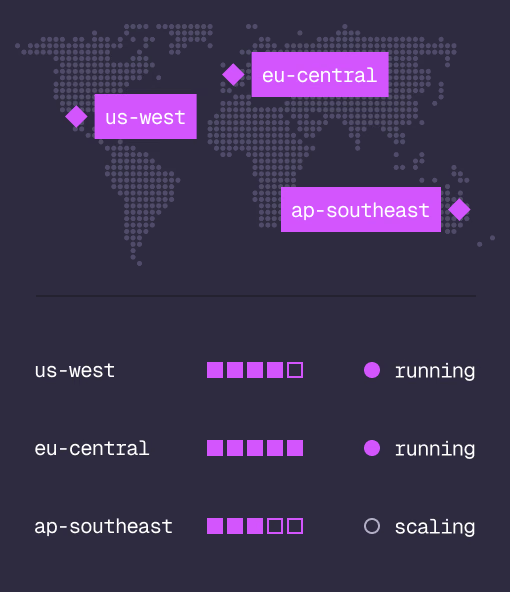
Managed clusters in the regions you choose, scaled on demand.
Studio
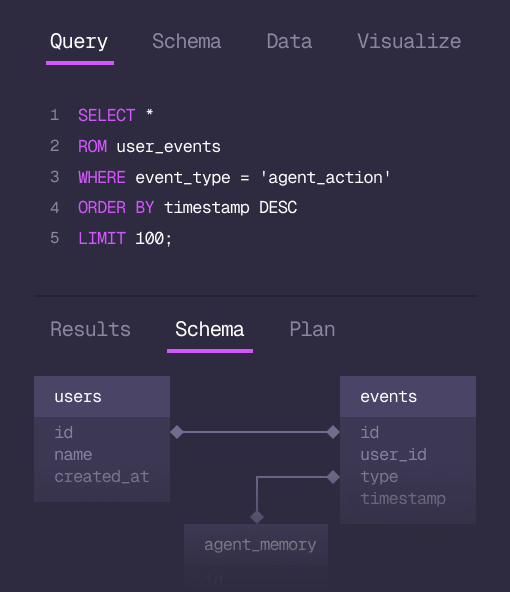
Query, explore and design the schema from the browser.
MCP
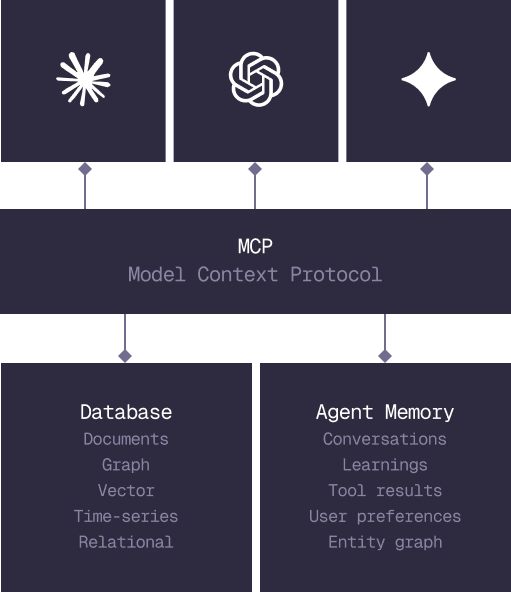
Every model that speaks MCP reaches the database and the memory directly.
IN PRODUCTION
Trusted at scale. Samsung, Nvidia, Verizon, Tencent, and Walmart run on SurrealDB.
14,000+
Developers building on SurrealDB Cloud
4M+
Developers building on SurrealDB worldwide
FROM THE TEAMS
SurrealDB gives us a foundation where we can unify semantic search, knowledge graphs, and AI-driven decision making without stitching together multiple systems. Collapsing responsibility into SurrealDB has become our default engineering posture.
VP of Engineering, Later