The DEFINE FUNCTION statement allows you to define custom functions that can be reused throughout a database. When using the DEFINE FUNCTION statement, you can define a function that takes one or more arguments and returns a value. You can then call this function in other SurrealQL statements.
Functions can be used to encapsulate logic that you want to reuse in multiple queries. They can also be used to simplify complex queries by breaking them down into smaller, more manageable pieces. They are particularly useful when you have a complex query that you need to run multiple times with different arguments.
Requirements
You must be authenticated as a root owner or editor, namespace owner or editor, or database owner or editor before you can use the
DEFINE FUNCTIONstatement.You must select your namespace and database before you can use the
DEFINE FUNCTIONstatement.
Statement syntax
DEFINE FUNCTION [ OVERWRITE | IF NOT EXISTS ] fn::@name
  ( [ @argument: @type ... ] ) [ -> @type ] {
	[ @query ... ]
	[ RETURN @returned ]
} [ COMMENT @string ] [ PERMISSIONS [ NONE | FULL | WHERE @condition]]
  [ GRAPHQL_ALIAS @string ] [ GRAPHQL_DEPRECATED @string ]
Example usage
Below shows how you can define a custom function using the DEFINE FUNCTION statement, and how to call it.
-- It is necessary to prefix the name of your function with "fn::"
-- This indicates that it's a custom function
DEFINE FUNCTION fn::greet($name: string) {
	"Hello, " + $name + "!"
};

-- Returns: "Hello, Tobie!"
RETURN fn::greet("Tobie");
To showcase a slightly more complex custom function, this will check if a relation between two nodes exists:
-- Define a function that checks if a relation exists between two nodes
DEFINE FUNCTION fn::relation_exists(
	$in: record,
	$tb: string,
	$out: record
) {
	-- Check if a relation exists between the two nodes.
	LET $results = SELECT VALUE id FROM type::table($tb) WHERE in = $in
	  AND out = $out;
	-- Return true if a relation exists, false otherwise
    RETURN array::len($results) > 0;
};
Stored procedures
A defined function is what SurrealDB has in place of a stored procedure. Its body can read and write records, it is stored in the database schema, and it runs as one transaction, so a failure part way through leaves no partial writes. Where a relational database would use CALL place_order(...), SurrealQL calls fn::place_order(...), as a statement of its own or inside any other statement.
Function bodies are written in SurrealQL. To write the logic in Rust instead, compile it into a Surrealism extension, which SurrealDB loads with DEFINE EXTENSION and calls with an ext:: path. Surrealism is experimental, so the server has to be started with --allow-experimental=files,surrealism, or the SURREAL_CAPS_ALLOW_EXPERIMENTAL environment variable set to the same value. Loading an extension archive from a bucket also needs the experimental files feature, which is why both are listed.
GraphQL names and deprecation
Available since: v3.1.0
A custom function is exposed to GraphQL as a root query field when the database's DEFINE CONFIG GRAPHQL includes functions. GRAPHQL_ALIAS sets the name of that field in place of one derived from the function name, and must match [_A-Za-z][_0-9A-Za-z]*. GRAPHQL_DEPRECATED adds [Deprecated: reason] to the start of the field's description.
DEFINE FUNCTION fn::get_user($n: string) -> string { "hi " + $n }
	GRAPHQL_ALIAS "getUser"
GRAPHQL_DEPRECATED "Use fn::greet instead";{ getUser(n: "x") }{"data":{"getUser":"hi x"}}Optional arguments
If one or more ending arguments have the option<T> type, they can be omitted when you invoke the function.
DEFINE FUNCTION fn::last_option($required: number, $optional: option<number>) {
	RETURN {
		required_present: type::is_number($required),
		optional_present: type::is_number($optional),
	}
};

RETURN fn::last_option(1, 2);
//- { required_present: true, optional_present: true }

RETURN fn::last_option(1);
//- { required_present: true, optional_present: false };
Adding a return value
Optionally, the return value of a function can be specified.
For a function that is infallible, a return value is mostly for the sake of readability.
DEFINE FUNCTION fn::greet($name: string) -> string {
	"Hello, " + $name + "!"
};
For a function that is not infallible, specifying a return value can be used to customise error output.
-- Arguments must be of type 'number'
DEFINE FUNCTION fn::combine($one: number, $two: number) -> number {
  $one + $two
};

-- Accepts any value but expects the return type 'number'
DEFINE FUNCTION fn::combine_any($one: any, $two: any) -> number {
  $one + $two
};

fn::combine("one", "two");
fn::combine_any("one", "two");
While both of these return an error, the output of the second function happens only at the point that it attempts to return the combined arguments to the function.
-------- Query 1 --------
"Expected `number` but found `'one'`"

-------- Query 2 --------
"Couldn't coerce return value from function `fn::combine_any`: Expected `number` but found `'onetwo'`"
The return value of a function can even be a literal type. The following function returns such a type by either returning an object of a certain structure, or a string. In this case this output is used in case an application prefers to return an error as a simple string instead of throwing an error or returning a NONE value.
DEFINE FUNCTION fn::age_and_name($user_num: int)
    -> { age: int, name: string } | string {
    LET $user = type::record("user", $user_num);
    IF $user.exists() {
        $user.{ name, age }
    } ELSE {
        { "Couldn't find user number " + <string>$user_num + "!" }
    }
};

CREATE user:1 SET name = "Billy", age = 15;

fn::age_and_name(1);
fn::age_and_name(2);-------- Query 1 --------
{ age: 15, name: 'Billy' }
-------- Query 2 --------
"Couldn't find user number 2!"Permissions
You can set the permissions for a custom function using the PERMISSIONS clause. The PERMISSIONS clause restricts who can call a function. It can be set to NONE, FULL, or WHERE @condition.
FULL: When Full permissions are granted record users have access to the function. This is the default permission when not specified.NONE: When this permission is granted, record users have no access to the defined function.WHERE @condition: Permissions are granted to the function based on the specified condition.
The PERMISSIONS clause decides who may call the function. It does not change what the body can do: the body runs with the permissions of the caller, so a record user's call can read and write only what that user could read and write directly. A query the user is not allowed to run returns no records rather than an error, in the same way as when the user runs it directly:
DEFINE TABLE secret_note PERMISSIONS NONE;
DEFINE FUNCTION fn::read_notes() -> array {
	SELECT * FROM secret_note
} PERMISSIONS FULL;

-- As a record user, both return [], however many notes exist
SELECT * FROM secret_note;
fn::read_notes();
To let users change data they cannot reach directly, use an event or a DEFINE API endpoint, whose bodies run without table permission checks, or a table permission clause that allows the change.
The examples below use the Surreal Deal Store dataset.
Using the FULL permission
The FULL permission grants all users access to the function. The following example defines a function that fetches all products from the product table and grants the function full permissions to access the data to all users.
Using the NONE permission
The NONE permission denies all record users access to the function. The following example defines a function that fetches all products from the product table
CREATE payment_details:1 SET stored_cards = { expiry_year: 2028 };

-- Define a function that fetches all expiration years from the payment_details table and denies access to all non-admin users
DEFINE FUNCTION fn::fetchAllPaymentDetails() -> array {
	SELECT stored_cards.expiry_year FROM payment_details LIMIT 5
} PERMISSIONS NONE;

RETURN fn::fetchAllPaymentDetails();
Using the WHERE clause
The WHERE clause allows you to specify a condition that determines the permissions granted to the function. The condition must evaluate to a boolean value. If the condition evaluates to true, the function is granted permissions. If the condition evaluates to false, the function is not granted permissions.
-- Define a function that fetches all products with the condition that only admin users can access it
DEFINE FUNCTION fn::fetchAllProducts() -> array {
	 SELECT * FROM product LIMIT 10
} PERMISSIONS WHERE $auth.admin = true;
Transactional behaviour
A function body runs as a single transaction, without BEGIN or COMMIT appearing in the definition. It commits when the body finishes, and rolls back if anything inside it fails.
BEGIN, COMMIT and CANCEL inside a function body are accepted but have no effect. A CANCEL does not undo the body's changes, and a COMMIT does not keep them if the function fails afterwards. Use THROW to roll back from inside a function.
An error rolls the whole body back, whether it is a THROW or a statement that fails on its own:
DEFINE FUNCTION fn::place_order($item: record<product>, $quantity: int) -> record<order> {
    LET $order = CREATE ONLY order SET item = $item, quantity = $quantity;
    IF $item.stock < $quantity {
        THROW "Insufficient stock for " + <string>$item;
    };
    UPDATE $item SET stock -= $quantity;
    RETURN $order.id;
};

fn::place_order(product:keyboard, 500);

-- No order exists: the THROW rolled the whole body back, so no order
-- is left behind reserving stock that was never decremented
SELECT VALUE id FROM order;
An early RETURN is not a failure, so the body commits and the work already done is kept:
DEFINE FUNCTION fn::ship_order($order: record<order>) -> record<shipment> {
    LET $shipment = CREATE ONLY shipment SET order = $order, carrier = 'DHL';
    RETURN $shipment.id;                          -- the caller only wants the id
    UPDATE $order SET status = 'shipped';         -- never runs
};
Calling a function from inside a manual transaction makes its statements part of that transaction rather than a nested one, so a failure inside the function aborts the caller's transaction too. See Transactions.
Recursive functions
A function is able to call itself, making it a recursive function. One example of a recursive function is the one below which creates a relation between each and every record passed in.
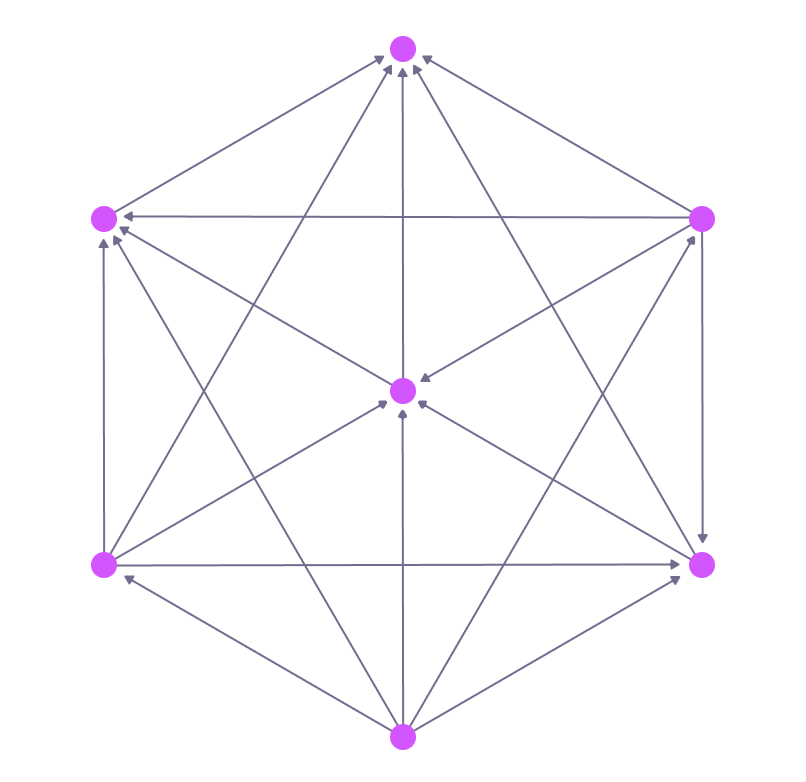
Consider a situation in which seven person records exist. First, person:1 will need to be related to the rest of the person records, after which there are no more relations to create for it. Following this, the relations for person:2 and all the other records except for person:1 will need to be created, and so on.
This can be done in a recursive function by creating all the relations between the first record and the remaining records, after which the function calls itself by passing in all the records except the first. This continues until the function receives less than two records, in which case it ceases calling itself by doing nothing, thereby ending the recursion.
DEFINE FUNCTION fn::relate_all($records: array<record>) {
  IF $records.len() < 2 {
      -- Don't do anything, ending the recursion
  }  ELSE {
      LET $first = $records[0];
      LET $remainder = $records[1..];
      FOR $counterpart IN $remainder {
          RELATE $first->to->$counterpart;
      };
      fn::relate_all($remainder);
  }
};

CREATE |person:1..8|;

fn::relate_all(SELECT VALUE id FROM person);

SELECT id, ->to->? FROM person;
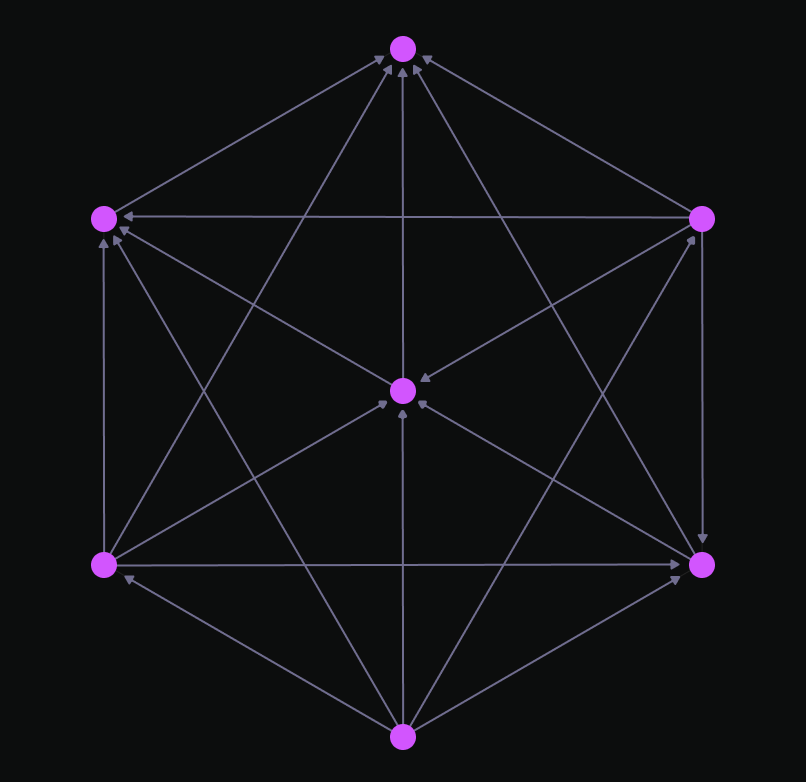
The last query can be viewed graphically inside SurrealDB Studio, leading to an output showing a seven-pointed star.
Functions called from schema clauses
Available since: v4.0.0
A custom function called from a COMPUTED, ASSERT, VALUE or DEFAULT clause, or from a PERMISSIONS clause, is held to the rules of that clause: it may not write data, change the schema or SLEEP, and outside VALUE and DEFAULT it may not call sequence::nextval(). The rules are listed in Clauses that must not have effects. The clause is checked when it is defined, and the check follows each function into the functions it calls:
DEFINE FUNCTION fn::log_access() -> bool { CREATE access_log SET at = time::now(); RETURN true; };
DEFINE TABLE product PERMISSIONS FOR select WHERE fn::log_access();'The PERMISSIONS clause must not have effects: it calls `fn::log_access`, in whose body `CREATE` writes data'A function can change after the clause that calls it was defined. DEFINE FUNCTION OVERWRITE and ALTER FUNCTION accept a body that starts to write, and the clause then fails each time it is evaluated, so check which definitions call a function before changing its body:
DEFINE FUNCTION fn::price_with_tax($price: number) -> number { RETURN $price * 1.2; };
DEFINE FIELD gross_price ON product COMPUTED fn::price_with_tax(price);

-- Accepted, but every read of `gross_price` now fails
DEFINE FUNCTION OVERWRITE fn::price_with_tax($price: number) -> number {
	CREATE price_change SET price = $price, at = time::now();
	RETURN $price * 1.2;
};

CREATE product:1 SET price = 10;'The COMPUTED clause must not have effects: `CREATE` writes data' Using IF NOT EXISTS clause
The IF NOT EXISTS clause can be used to define a function only if it does not already exist. You should use the IF NOT EXISTS clause when defining a function in SurrealDB if you want to ensure that the function is only created if it does not already exist. If the function already exists, the DEFINE FUNCTION statement will return an error.
It's particularly useful when you want to safely attempt to define a function without manually checking its existence first.
On the other hand, you should not use the IF NOT EXISTS clause when you want to ensure that the function definition is updated regardless of whether it already exists. In such cases, you might prefer using the OVERWRITE clause, which allows you to define a function and overwrite an existing one if it already exists, ensuring that the latest version of the function definition is always in use.
-- Create a FUNCTION if it does not already exist
DEFINE FUNCTION IF NOT EXISTS fn::example() {};
Using OVERWRITE clause
The OVERWRITE clause can be used to define a function and overwrite an existing one if it already exists. You should use the OVERWRITE clause when you want to modify an existing function definition. If the function already exists, the DEFINE FUNCTION statement will overwrite the existing definition with the new one.
-- Create a FUNCTION and overwrite if it already exists
DEFINE FUNCTION OVERWRITE fn::example() {};
Functions as custom middleware
Available since: v3.0.0
A DEFINE FUNCTION statement can be used to define a function for use as custom middleware. For more details on defining a custom function in this manner, see the DEFINE API page.