This page contains built-in functions and constants on the math module for analysing numeric data and numeric collections.
Math functions
Function | Description |
|---|---|
math::abs() | Returns the absolute value of a number |
math::acos() | Computes the arccosine (inverse cosine) of a value |
math::acot() | Computes the arccotangent (inverse cotangent) of an angle given in radians |
math::asin() | Computes the arcsine (inverse sine) of a value |
math::atan() | Computes the arctangent (inverse tangent) of a value |
math::bottom() | Returns the bottom X set of numbers in a set of numbers |
math::ceil() | Rounds a number up to the next largest integer |
math::clamp() | Clamps a value between a specified minimum and maximum |
math::cos() | Computes the cosine of an angle given in radians |
math::cot() | Computes the cotangent of an angle given in radians |
math::deg2rad() | Converts an angle from degrees to radians |
math::fixed() | Returns a number with the specified number of decimal places |
math::floor() | Rounds a number down to the nearest integer |
math::interquartile() | Returns the interquartile of an array of numbers |
math::lerp() | Linearly interpolates between two values based on a factor |
math::lerpangle() | Linearly interpolates between two angles in degrees |
math::ln() | Computes the natural logarithm (base e) of a value |
math::log() | Computes the logarithm of a value with the specified base |
math::log10() | Computes the base-10 logarithm of a value |
math::log2() | Computes the base-2 logarithm of a value |
math::max() | Returns the greatest number from an array of numbers |
math::mean() | Returns the mean of a set of numbers |
math::median() | Returns the median of a set of numbers |
math::midhinge() | Returns the midhinge of a set of numbers |
math::min() | Returns the least number from an array of numbers |
math::mode() | Returns the value that occurs most often in a set of numbers |
math::nearestrank() | Returns the nearest rank of an array of numbers |
math::percentile() | Returns the value below which a percentage of data falls |
math::pow() | Returns a number raised to a power |
math::product() | Returns the product of a set of numbers |
math::rad2deg() | Converts an angle from radians to degrees |
math::round() | Rounds a number up or down to the nearest integer |
math::sign() | Returns the sign of a value (-1, 0, or 1) |
math::sin() | Computes the sine of an angle given in radians |
math::spread() | Returns the spread of an array of numbers |
math::sqrt() | Returns the square root of a number |
math::stddev() | Calculates how far a set of numbers are away from the mean |
math::sum() | Returns the total sum of a set of numbers |
math::tan() | Computes the tangent of an angle given in radians. |
math::top() | Returns the top X set of numbers in a set of numbers |
math::trimean() | The weighted average of the median and the two quartiles |
math::variance() | Calculates how far a set of numbers are spread out from the mean |
Math constants
Constant | Description |
|---|---|
math::e | Constant representing the base of the natural logarithm (Euler's number) |
math::frac_1_pi | Constant representing the fraction 1/π |
math::frac_1_sqrt_2 | Constant representing the fraction 1/sqrt(2) |
math::frac_2_pi | Constant representing the fraction 2/π |
math::frac_2_sqrt_pi | Constant representing the fraction 2/sqrt(π) |
math::frac_pi_2 | Constant representing the fraction π/2 |
math::frac_pi_3 | Constant representing the fraction π/3 |
math::frac_pi_4 | Constant representing the fraction π/4 |
math::frac_pi_6 | Constant representing the fraction π/6 |
math::frac_pi_8 | Constant representing the fraction π/8 |
math::infinity | Constant representing positive infinity |
math::ln_10 | Constant representing the natural logarithm (base e) of 10 |
math::ln_2 | Constant representing the natural logarithm (base e) of 2 |
math::log10_2 | Constant representing the base-10 logarithm of 2 |
math::log10_e | Constant representing the base-10 logarithm of e, the base of the natural logarithm (Euler’s number) |
math::log2_10 | Constant representing the base-2 logarithm of 10 |
math::log2_e | Constant representing the base-2 logarithm of e, the base of the natural logarithm (Euler’s number) |
math::neg_infinity | Constant representing negative infinity |
math::pi | Constant representing the mathematical constant π. |
math::sqrt_2 | Constant representing the square root of 2 |
math::tau | Represents the mathematical constant τ, which is equal to 2π |
math::abs
The math::abs function returns the absolute value of a number.
math::abs(number) -> numberThe following example shows this function, and its output:
math::abs(-13.746189);13.746189f math::acos
The math::acos function returns the arccosine (inverse cosine) of a number, which must be in the range -1 to 1. The result is expressed in radians.
math::acos(number) -> numberThe following example shows this function, and its output:
math::acos(0.5);1.0471975511965976f math::acot
The math::acot function returns the arccotangent (inverse cotangent) of a number. The result is expressed in radians.
math::acot(number) -> numberThe following example shows this function, and its output:
math::acot(1);0.7853981633974483f math::asin
The math::asin function returns the arcsine (inverse sine) of a number, which must be in the range -1 to 1. The result is expressed in radians.
math::asin(number) -> numberThe following example shows this function, and its output:
math::asin(0.5);0.5235987755982988f math::atan
The math::atan function returns the arctangent (inverse tangent) of a number. The result is expressed in radians.
math::atan(number) -> numberThe following example shows this function, and its output:
math::atan(1);0.7853981633974483f math::bottom
The math::bottom function returns the bottom X set of numbers in an array of numbers.
math::bottom(array<number>, $quantity: number) -> numberThe following example shows this function, and its output:
math::bottom([1, 2, 3], 2);[2, 1] math::ceil
The math::ceil function rounds a number up to the next largest whole number.
math::ceil(number) -> numberThe following example shows this function, and its output:
math::ceil(13.146572);14f math::clamp
The math::clamp function constrains a number within the specified range, defined by a minimum and a maximum value. If the number is less than the minimum, it returns the minimum. If it is greater than the maximum, it returns the maximum.
math::clamp(number, $min: number, $max: number) -> numberThe following example shows this function, and its output:
math::clamp(1, 5, 10);5 math::cos
The math::cos function returns the cosine of a number, which is assumed to be in radians. The result is a value between -1 and 1.
math::cos(number) -> numberThe following example shows this function, and its output:
math::cos(1);0.5403023058681398f math::cot
The math::cot function returns the cotangent of a number, which is assumed to be in radians. The cotangent is the reciprocal of the tangent function.
math::cot(number) -> numberThe following example shows this function, and its output:
math::cot(1);0.6420926159343308f math::deg2rad
The math::deg2rad function converts an angle from degrees to radians.
math::deg2rad(number) -> numberThe following example shows this function, and its output:
math::deg2rad(180);3.141592653589793f math::e
The math::e constant represents the base of the natural logarithm (Euler’s number).
math::e -> numberThe following example shows this function, and its output:
math::e;2.718281828459045f math::fixed
The math::fixed function returns a number with the specified number of decimal places.
math::fixed(number, $places: number) -> numberThe following example shows this function, and its output:
math::fixed(13.146572, 2);13.15f math::floor
The math::floor function rounds a number down to the nearest integer.
math::floor(number) -> numberThe following example shows this function, and its output:
math::floor(13.746189);13f math::frac_1_pi
The math::frac_1_pi constant represents the fraction 1/π.
math::frac_1_pi -> numberThe following example shows this function, and its output:
math::frac_1_pi;0.3183098861837907f math::frac_1_sqrt_2
The math::frac_1_sqrt_2 constant represents the fraction 1/sqrt(2).
math::frac_1_sqrt_2 -> numberThe following example shows this function, and its output:
math::frac_1_sqrt_2;0.7071067811865476f math::frac_2_pi
The math::frac_2_pi constant represents the fraction 2/π.
math::frac_2_pi -> numberThe following example shows this function, and its output:
math::frac_2_pi;0.6366197723675814f math::frac_2_sqrt_pi
The math::frac_2_sqrt_pi constant represents the fraction 2/sqrt(π).
math::frac_2_sqrt_pi -> numberThe following example shows this function, and its output:
math::frac_2_sqrt_pi;1.1283791670955126f math::frac_pi_2
The math::frac_pi_2 constant represents the fraction π/2.
math::frac_pi_2 -> numberThe following example shows this function, and its output:
math::frac_pi_2;1.5707963267948966f math::frac_pi_3
The math::frac_pi_3 constant represents the fraction π/3.
math::frac_pi_3 -> numberThe following example shows this function, and its output:
math::frac_pi_3;1.0471975511965979f math::frac_pi_4
The math::frac_pi_4 constant represents the fraction π/4.
math::frac_pi_4 -> numberThe following example shows this function, and its output:
math::frac_pi_4;0.7853981633974483f math::frac_pi_6
The math::frac_pi_6 constant represents the fraction π/6.
math::frac_pi_6 -> numberThe following example shows this function, and its output:
math::frac_pi_6;0.5235987755982989f math::frac_pi_8
The math::frac_pi_8 constant represents the fraction π/8.
math::frac_pi_8 -> numberThe following example shows this function, and its output:
math::frac_pi_8;0.39269908169872414f math::infinity
This constant was known as math::inf in versions before SurrealDB 3.0.5. The previous path also returns the same value and thus the change to math::infinity is not a breaking change.
The math::infinity constant represents positive infinity.
math::infinity -> numberThe following example shows this function, and its output:
math::infinity;Infinity math::interquartile
The math::interquartile function returns the interquartile of an array of numbers.
math::interquartile(array<number>) -> numberThe following example shows this function, and its output:
math::interquartile([ 1, 40, 60, 10, 2, 901 ]);51f math::lerp
The math::lerp function performs a linear interpolation between two numbers based on a given fraction. The fraction will usually be between 0 and 1, where 0 returns $num_1 and 1 returns $num_2.
math::lerp($num_1: number, $num_2: number, $fraction: number) -> numberThe following example shows this function, and its output:
math::lerp(0, 10, 0.5);5fThe function will not return an error if the third argument is not in the range of 0 to 1. Instead, it will extrapolate linearly beyond the first two numbers.
math::lerp(0, 10, 2);20 math::lerpangle
The math::lerpangle function interpolates between two angles ($num_1 and $num_2) by the given fraction. This is useful for smoothly transitioning between angles.
math::lerpangle($num_1: number, $num_2: number, $fraction: number) -> numberThe following example shows this function, and its output:
math::lerpangle(0, 180, 0.5);90f math::ln
The math::ln function returns the natural logarithm (base e) of a number.
math::ln(number) -> numberThe following example shows this function, and its output:
math::ln(10);2.302585092994046f math::ln_10
The math::ln_10 constant represents the natural logarithm (base e) of 10.
math::ln_10 -> numberThe following example shows this function, and its output:
math::ln_10;2.302585092994046f math::ln_2
The math::ln_2 constant represents the natural logarithm (base e) of 2.
math::ln_2 -> numberThe following example shows this function, and its output:
math::ln_2;0.6931471805599453f math::log
The math::log function returns the logarithm of a number with a specified base.
math::log(number, $base: number) -> numberThe following example shows this function, and its output:
math::log(100, 10);2f math::log10
The math::log10 function returns the base-10 logarithm of a number.
math::log10(number) -> numberThe following example shows this function, and its output:
math::log10(1000);3f math::log10_2
The math::log10_2 constant represents the base-10 logarithm of 2.
math::log10_2 -> numberThe following example shows this function, and its output:
math::log10_2;0.3010299956639812f math::log10_e
The math::log10_e constant represents the base-10 logarithm of e, the base of the natural logarithm (Euler’s number).
math::log10_e -> numberThe following example shows this function, and its output:
math::log10_e;0.4342944819032518f math::log2
The math::log2 function returns the base-2 logarithm of a number.
math::log2(number) -> numberThe following example shows this function, and its output:
math::log2(8);3f math::log2_10
The math::log2_10 constant represents the base-2 logarithm of 10.
math::log2_10 -> numberThe following example shows this function, and its output:
math::log2_10;3.321928094887362f math::log2_e
The math::log2_e constant represents the base-2 logarithm of e, the base of the natural logarithm (Euler’s number).
math::log2_e -> numberThe following example shows this function, and its output:
math::log2_e;1.4426950408889634f math::max
The math::max function returns the greatest number from an array of numbers.
math::max(array<number>) -> numberThe following example shows this function, and its output:
math::max([ 26.164, 13.746189, 23, 16.4, 41.42 ]);41.42fSee also:
array::max, which extracts the greatest value from an array of valuestime::max, which extracts the greatest datetime from an array of datetimes
math::mean
The math::mean function returns the mean of a set of numbers.
math::mean(array<number>) -> numberThe following example shows this function, and its output:
math::mean([ 26.164, 13.746189, 23, 16.4, 41.42 ]);24.146037800000002f math::median
The math::median function returns the median of a set of numbers.
math::median(array<number>) -> numberThe following example shows this function, and its output:
math::median([ 26.164, 13.746189, 23, 16.4, 41.42 ]);23f math::midhinge
The math::midhinge function returns the midhinge of an array of numbers.
math::midhinge(array<number>) -> numberThe following example shows this function, and its output:
math::midhinge([ 1, 40, 60, 10, 2, 901 ]);29.5f math::min
The math::min function returns the least number from an array of numbers.
math::min(array<number>) -> numberThe following example shows this function, and its output:
math::min([ 26.164, 13.746189, 23, 16.4, 41.42 ]);13.746189fSee also:
array::min, which extracts the least value from an array of valuestime::min, which extracts the least datetime from an array of datetimes
math::mode
The math::mode function returns the value that occurs most often in a set of numbers. In case of a tie, the highest one is returned.
math::mode(array<number>) -> numberThe following example shows this function, and its output:
math::mode([ 1, 40, 60, 10, 2, 901 ]);
//- 901

math::mode([ 1, 40, 60, 10, 2, 901, 2 ]);
//- 2
math::nearestrank
The math::nearestrank function returns the nearest rank of an array of numbers by pulling the closest extant record from the dataset at the %-th percentile.
math::nearestrank(array<number>, $percentile: number) -> numberThe following example shows this function, and its output:
math::nearestrank([1, 40, 60, 10, 2, 901], 50);40A number for the percentile outside of the range 0 to 100 will return the output NaN.
-- Nan
math::nearestrank([1, 40, 60, 10, 2, 901], 101);

-- Also Nan
math::nearestrank([1, 40, 60, 10, 2, 901], -1);
math::neg_infinity
This constant was known as math::neg_inf in versions before SurrealDB 3.0.5. The previous path also returns the same value and thus the change to math::neg_infinity is not a breaking change.
The math::neg_infinity constant represents negative infinity.
math::neg_infinity -> numberThe following example shows this function, and its output:
math::neg_infinity;

-- -Infinity
math::percentile
The math::percentile function returns the value below which a percentage of data falls by getting the N percentile, averaging neighboring records if non-exact.
math::percentile(array<number>, $percentile: number) -> numberThe following example shows this function, and its output:
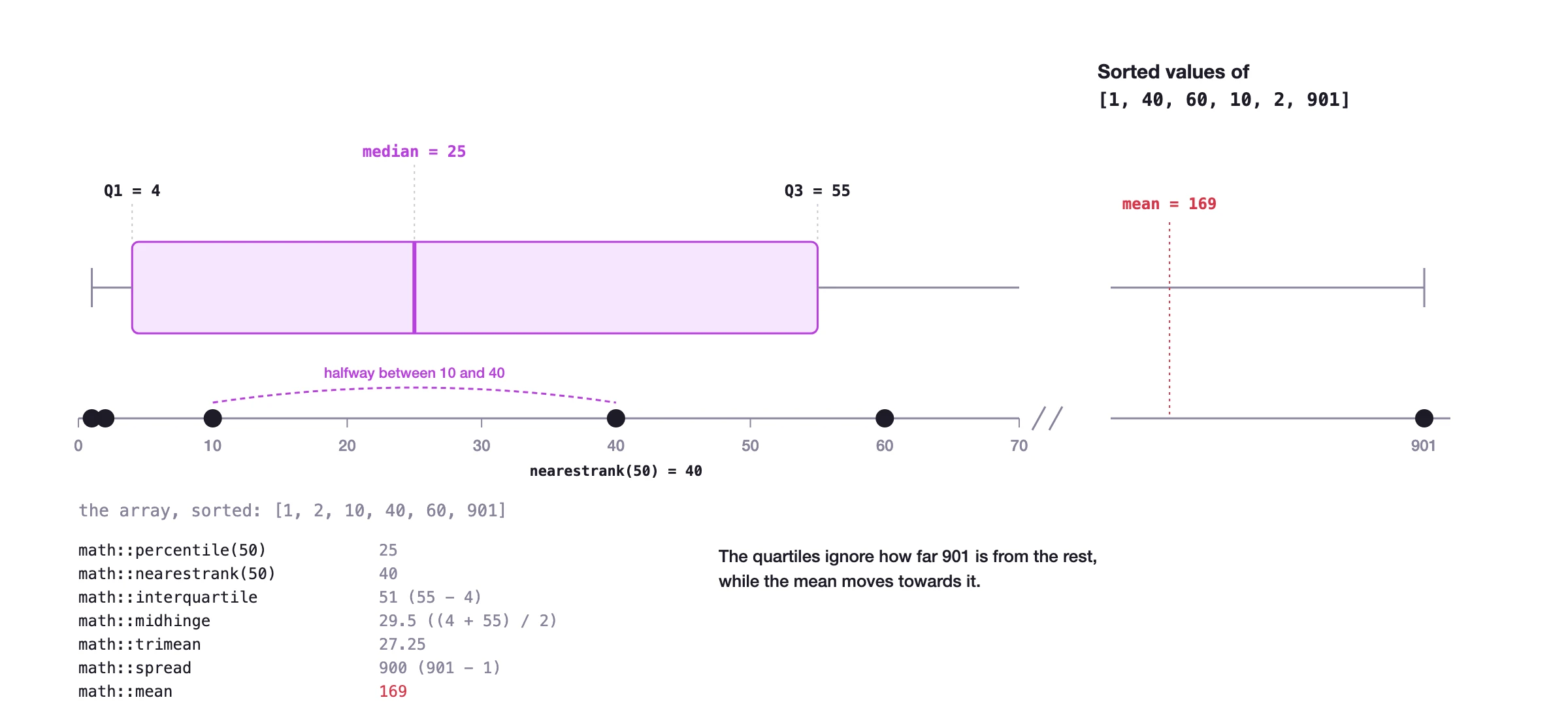
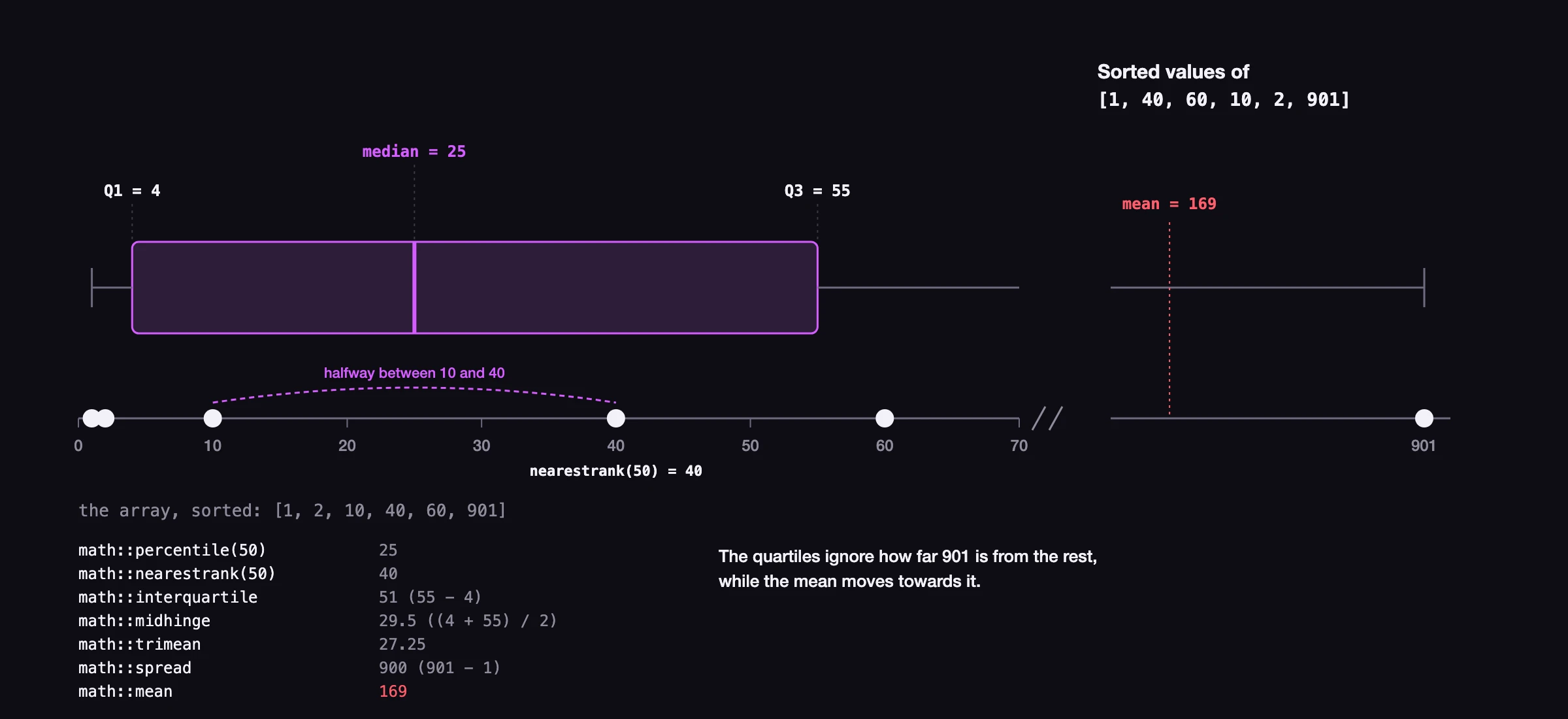
math::percentile([1, 40, 60, 10, 2, 901], 50);25fThe statistics functions on this page use the same array in their examples. On the sorted array, the quartiles, the median and the mean fall as follows:
A number for the percentile outside of the range 0 to 100 will return the output NaN.
-- Nan
math::percentile([1, 40, 60, 10, 2, 901], 101);

-- Also Nan
math::percentile([1, 40, 60, 10, 2, 901], -1);
math::pi
The math::pi constant represents the mathematical constant π.
math::pi -> numberThe following example shows this function, and its output:
math::pi;3.141592653589793f math::pow
The math::pow function returns a number raised to the power of a second number.
math::pow(number, $raise_to: number) -> numberThe following example shows this function, and its output:
math::pow(1.07, 10);1.9671513572895665f math::product
The math::product function returns the product of a set of numbers.
math::product(array<number>) -> numberThe following example shows this function, and its output:
math::product([ 26.164, 13.746189, 23, 16.4, 41.42 ]);5619119.004884841fIf the product of integers is outside the range of an int, the function raises an error instead of returning a wrong value. A float in the array makes the product a float, which has a much larger range.
math::product([9223372036854775807, 2]);"Cannot perform multiplication with '9223372036854775807' and '2'" math::rad2deg
The math::rad2deg function converts an angle from radians to degrees.
math::rad2deg(number) -> numberThe following example shows this function, and its output:
math::rad2deg(3.141592653589793);180f math::round
The math::round function rounds a number up or down to the nearest integer.
math::round(number) -> numberThe following example shows this function, and its output:
math::round(13.53124);14f math::sign
The math::sign function returns the sign of a number, indicating whether the number is positive, negative, or zero. It returns 1 for positive numbers, -1 for negative numbers, and 0 for zero. Both 0.0 and -0.0 return 0f.
math::sign(number) -> numberThe following example shows this function, and its output:
math::sign(-42);-1 math::sin
The math::sin function returns the sine of a number, which is assumed to be in radians.
math::sin(number) -> numberThe following example shows this function, and its output:
math::sin(1);0.8414709848078965f math::spread
The math::spread function returns the spread of an array of numbers.
math::spread(array<number>) -> numberThe following example shows this function, and its output:
math::spread([ 1, 40, 60, 10, 2, 901 ]);900If the spread of integers is outside the range of an int, as in math::spread([-9223372036854775807, 9223372036854775807]), the function raises an error instead of returning a wrong value.
math::sqrt
The math::sqrt function returns the square root of a number.
math::sqrt(number) -> numberThe following example shows this function, and its output:
math::sqrt(15);3.872983346207417f math::sqrt_2
The math::sqrt_2 constant represents the square root of 2.
math::sqrt_2 -> numberThe following example shows this function, and its output:
math::sqrt_2;1.4142135623730951f math::stddev
The math::stddev function calculates how far a set of numbers are away from the mean.
math::stddev(array<number>) -> numberThe following example shows this function, and its output:
math::stddev([ 1, 40, 60, 10, 2, 901 ]);359.37167389765153fAs of SurrealDB 3.0.0, this function can be used inside a table view.
DEFINE TABLE person SCHEMALESS;
DEFINE TABLE person_stats AS
	SELECT
		count(),
		age,
		math::stddev(score) AS score_stddev
	FROM person
	GROUP BY age;
math::sum
The math::sum function returns the total sum of an array of numbers.
math::sum(array<number>) -> numberThe following example shows this function, and its output:
math::sum([ 26.164, 13.746189, 23, 16.4, 41.42 ]);120.730189To add up a field across the records of a table, use math::sum as an aggregate function with GROUP ALL, or pass it the values from a SELECT VALUE:
CREATE sale SET amount = 10;
CREATE sale SET amount = 25.5;

SELECT math::sum(amount) AS total FROM sale GROUP ALL;
//- [{ total: 35.5 }]

math::sum(SELECT VALUE amount FROM sale);
//- 35.5
GROUP BY instead of GROUP ALL gives a total for each group, such as SELECT customer, math::sum(amount) AS total FROM sale GROUP BY customer.
This function on its own expects a numeric value at each point in an array, meaning that on its own it will not be able to be used on an array that contains NONE or NULL values.
math::sum([0, NONE, 10dec, 10.7, NULL]);"Error: Incorrect arguments for function math::sum().
Argument 1 was the wrong type.
Expected `number` but found `NONE` when coercing an element of `array<number>`"However, NONE and NULL can be coalesced into a default value by using the ?? operator (the "null coalescing operator").
NONE ?? 0; -- Finds NONE so returns latter value: 0
1000 ?? 0; -- Finds 1000 so returns 1000 instead of 0
Inside an array the array::map() function can be used to ensure that each value is the number 0 if a NONE or NULL is encountered.
Classic array filtering can also be used to simply remove any NONE or NULL values before math::sum() is called.
-- Classic array filtering, removes NONE / NULL
[0,NONE,10dec,10.7,NULL][? $this];
-- array::map() function, turns NONE / NULL to 0
[0, NONE, 10dec, 10.7, NULL].map(|$num| $num ?? 0);
With this mapping in place, math::sum() will be guaranteed to work.
-- Classic array filtering
math::sum([0,NONE,10dec,10.7,NULL][? $this]);
-- array::map() function
math::sum([0, NONE, 10dec, 10.7, NULL].map(|$num| $num ?? 0));20.7dec math::tan
The math::tan function returns the tangent of a number, which is assumed to be in radians.
math::tan(number) -> numberThe following example shows this function, and its output:
math::tan(1);1.557407724654902f math::tau
The math::tau constant represents the mathematical constant τ, which is equal to 2π.
math::tau -> numberThe following example shows this function, and its output:
math::tau;6.283185307179586f math::top
The math::top function returns the top of an array of numbers.
math::top(array<number>, $quantity: number) -> numberThe following example shows this function, and its output:
math::top([1, 40, 60, 10, 2, 901], 3);[40, 901, 60] math::trimean
The math::trimean function returns the trimean of an array of numbers.
math::trimean(array<number>) -> numberThe following example shows this function, and its output:
math::trimean([ 1, 40, 60, 10, 2, 901 ]);27.25f math::variance
The math::variance function returns the variance of an array of numbers.
math::variance(array<number>) -> numberThe following example shows this function, and its output:
math::variance([ 1, 40, 60, 10, 2, 901 ]);129148As of SurrealDB 3.0.0, this function can be used inside a table view.
DEFINE TABLE person SCHEMALESS;
DEFINE TABLE person_stats AS
	SELECT
		count(),
		age,
		math::variance(score) AS score_variance
	FROM person
	GROUP BY age;