A variety of operators in SurrealQL allow for complex manipulation of data, and advanced logic.
Operator | Description |
|---|---|
&&AND | Checks whether both of two values are truthy |
||OR | Checks whether either of two values is truthy |
! | Reverses the truthiness of a value |
!! | Determines the truthiness of a value |
?? | Check whether either of two values are truthy and not NULL |
?: | Check whether either of two values are truthy |
=IS | Check whether two values are equal |
!=IS NOT | Check whether two values are not equal |
== | Check whether two values are exactly equal |
?= | Check whether any value in a set is equal to a value |
*= | Check whether all values in a set are equal to a value |
~ | Compare two values for equality using fuzzy matching |
!~ | Compare two values for inequality using fuzzy matching |
?~ | Check whether any value in a set is equal to a value using fuzzy matching |
*~ | Check whether all values in a set are equal to a value using fuzzy matching |
< | Check whether a value is less than another value |
<= | Check whether a value is less than or equal to another value |
> | Check whether a value is greater than another value |
>= | Check whether a value is greater than or equal to another value |
+ | Add two values together |
- | Subtract a value from another value |
*× | Multiply two values together |
/÷ | Divide a value by another value |
** | Raises a base value by another value |
CONTAINS∋ | Checks whether a value contains another value |
CONTAINSNOT∌ | Checks whether a value does not contain another value |
CONTAINSALL⊇ | Checks whether a value contains all other values |
CONTAINSANY⊃ | Checks whether a value contains any other value |
CONTAINSNONE⊅ | Checks whether a value contains none of the following values |
INSIDEIN∈ | Checks whether a value is contained within another value |
NOTINSIDENOT IN∉ | Checks whether a value is not contained within another value |
ALLINSIDE⊆ | Checks whether all values are contained within other values |
ANYINSIDE⊂ | Checks whether any value is contained within other values |
NONEINSIDE⊄ | Checks whether no value is contained within other values |
OUTSIDE | Checks whether a geometry type is outside of another geometry type |
INTERSECTS | Checks whether a geometry type intersects another geometry type |
@@@[ref]@ | Checks whether the terms are found in a full-text indexed field |
<|4|> <|3,HAMMING| > | Performs a K-Nearest Neighbors (KNN) search to find a specified number of records closest to a given data point, optionally using a defined distance metric. Supports customising the number of results and choice of distance calculation method. |
&& or AND
The and operator checks whether both of two values are truthy.
10 AND 20 AND 30;30 || or OR
The or operator checks whether either of two values are truthy.
0 OR false OR 10;10 !
The not operator reverses the truthiness of a value.
!(TRUE OR FALSE);
//- false

!"Has a value";
//- false
Inside an UPDATE, ! toggles a boolean field, because the right side of SET reads the value from before the statement:
CREATE light:one SET on = false;
UPDATE light:one SET on = !on;[{ id: light:one, on: true }] !!
The not not operator is simply an application of the ! operator twice. It can be used to determine the truthiness of a value.
!!"Has a value";true ??
The null coalescing operator checks whether either of two values are truthy and not NONE or NULL.
NULL ?? 0 ?? false ?? 10;0 ?:
The truthy coalescing operator checks whether either of two values are truthy.
NULL ?: 0 ?: false ?: 10;10 = or IS
The equal operator checks whether two values are equal.
true = "true";false10 = "10";false10 = 10.00;true10 = "10.3";false[1, 2, 3] = [1, 2, 3];true[1, 2, 3] = [1, 2, 3, 4];false{ this: "object" } = { this: "object" };true{ this: "object" } = { another: "object" };false != or IS NOT
The not equal operator checks whether two values are not equal.
10 != "15";true10 != "test";true[1, 2, 3] != [3, 4, 5];true ==
The exact operator checks whether two values are exact. This operator also checks that each value has the same type.
10 == 10;true10 == "10";falsetrue == "true";false ?=
The any equal operator checks whether any value in an array equals another value.
[10, 15, 20] ?= 10;true *=
The all equal operator checks whether all values in an array equals another value.
[10, 10, 10] *= 10;true ~ ?~ !~ *~
These operators used to compare two values for equality using fuzzy matching. They have been removed since 3.0 to avoid implicitly preferring one algorithm over another, as the type of fuzzy matching to use will depend on each individual case.
Please use the string::similarity::* functions instead:
let $threshold = 10;

string::similarity::smithwaterman("test text", "Test") > $threshold;true <
The less than operator checks whether a value is less than another value.
10 < 15;true <=
The less than or equal operator checks whether a value is less than or equal to another value.
10 <= 15;true >
The greater than operator checks whether a value is less than another value.
15 > 10;true >=
The greater than or equal operator checks whether a value is less than or equal to another value.
15 >= 10;true +
The add operator adds two values together.
10 + 10;20"test" + " " + "this";"test this"13h + 30m;13h30m -
The subtract operator subtracts a value from another value.
20 - 10;102m - 1m;1m * or ×
The multiply operator multiplies a value by another value.
20 * 2;40 / or ÷
The divide operator divides a value by another value.
20 / 2;10 **
The power operator raises a base value by another value.
20 ** 3;8000A power of integers or decimals whose result is outside the range of its type fails instead of wrapping around, and so does zero raised to a negative power:
2u8 ** 8u8;
//- "Cannot raise the value '2u8' with '8u8'"

0 ** -1;
//- "Cannot raise the value '0' with '-1'"
CONTAINS or ∋
The contains operator checks whether a value contains another value.
[10, 20, 30] CONTAINS 10;true"this is some text" CONTAINS "text";true{
type: "Polygon",
coordinates: [[
[-0.38314819, 51.37692386], [0.1785278, 51.37692386],
[0.1785278, 51.61460570], [-0.38314819, 51.61460570],
[-0.38314819, 51.37692386]
]]
} CONTAINS (-0.118092, 51.509865);true CONTAINSNOT or ∌
The not contains operator checks whether a value does not contain another value.
[10, 20, 30] CONTAINSNOT 15;true"this is some text" CONTAINSNOT "other";true{
type: "Polygon",
coordinates: [[
[-0.38314819, 51.37692386], [0.1785278, 51.37692386],
[0.1785278, 51.61460570], [-0.38314819, 51.61460570],
[-0.38314819, 51.37692386]
]]
} CONTAINSNOT (-0.518092, 53.509865);true CONTAINSALL or ⊇
The contains all operator checks whether a value contains all of multiple values.
[10, 20, 30] CONTAINSALL [10, 20, 10];true CONTAINSANY or ⊃
The contains any operator checks whether a value contains any of multiple values.
[10, 20, 30] CONTAINSANY [10, 15, 25];true CONTAINSNONE or ⊅
The contains none operator checks whether a value contains none of multiple values.
[10, 20, 30] CONTAINSNONE [15, 25, 35];true INSIDE or ∈ or IN
The inside operator checks whether a value is contained within another value.
10 INSIDE [10, 20, 30];true"text" INSIDE "this is some text";true(-0.118092, 51.509865) INSIDE {
type: "Polygon",
coordinates: [[
[-0.38314819, 51.37692386], [0.1785278, 51.37692386],
[0.1785278, 51.61460570], [-0.38314819, 51.61460570],
[-0.38314819, 51.37692386]
]]
};trueThis operator can also be used to check for the existence of a key inside an object. To do so, precede IN with the field name as a string.
"name" IN {
    name: "Riga",
    country: "Latvia"
};trueIN can also be used with a record ID as long as the ID is expanded to include the fields. Both of the following queries will return true.
CREATE city:riga SET name = "Riga", country = "Latvia", population = 605273;

"name" IN city:riga.*;
"name" IN city:riga.{ name, country };
NOTINSIDE or ∉ or NOT IN
The not inside operator checks whether a value is not contained within another value.
15 NOTINSIDE [10, 20, 30];true"other" NOTINSIDE "this is some text";true(-0.518092, 53.509865) NOTINSIDE {
type: "Polygon",
coordinates: [[
[-0.38314819, 51.37692386], [0.1785278, 51.37692386],
[0.1785278, 51.61460570], [-0.38314819, 51.61460570],
[-0.38314819, 51.37692386]
]]
};true ALLINSIDE or ⊆
The all inside operator checks whether all of multiple values are contained within another value.
[10, 20, 10] ALLINSIDE [10, 20, 30];true ANYINSIDE or ⊂
The any inside operator checks whether any of multiple values are contained within another value.
[10, 15, 25] ANYINSIDE [10, 20, 30];true NONEINSIDE or ⊄
The none inside operator checks whether none of multiple values are contained within another value.
[15, 25, 35] NONEINSIDE [10, 20, 30];true OUTSIDE
The outside operator checks whether a geometry value is outside another geometry value.
(-0.518092, 53.509865) OUTSIDE {
	type: "Polygon",
	coordinates: [[
		[-0.38314819, 51.37692386], [0.1785278, 51.37692386],
		[0.1785278, 51.61460570], [-0.38314819, 51.61460570],
		[-0.38314819, 51.37692386]
	]]
};true INTERSECTS
The intersects operator checks whether a geometry value intersects another geometry value.
{
	type: "Polygon",
	coordinates: [[
		[-0.38314819, 51.37692386], [0.1785278, 51.37692386],
		[0.1785278, 51.61460570], [-0.38314819, 51.61460570],
		[-0.38314819, 51.37692386]
	]]
} INTERSECTS {
	type: "Polygon",
	coordinates: [[
		[-0.11123657, 51.53160074], [-0.16925811, 51.51921169],
		[-0.11466979, 51.48223813], [-0.07381439, 51.51322956],
		[-0.11123657, 51.53160074]
	]]
};true MATCHES
The matches operator checks whether the terms are found in a full-text indexed field.
SELECT * FROM book WHERE title @@ 'rust web';

[
	{
		id: book:1,
		title: 'Rust Web Programming'
	}
]
Using the matches operator with a reference checks whether the terms are found, highlights the searched terms, and computes the full-text score.
SELECT id,
		search::highlight('<b>', '</b>', 1) AS title,
		search::score(1) AS score
FROM book
WHERE title @1@ 'rust web'
ORDER BY score DESC;

[
	{
		id: book:1,
		score: 0.9227996468544006f,
		title: '<b>Rust</b> <b>Web</b> Programming'
	}
] AND, OR, and numeric operators inside @@
Available since: v3.0.0
In addition to the AND keyword, the OR matches operator can also be used. This allows a single string to be compared against instead of needing to specify individual parts of the string.
CREATE document:1 SET text = "It is rare that I find myself penning a personal note in my chronicles.";
DEFINE ANALYZER simple TOKENIZERS blank,class FILTERS lowercase;
DEFINE INDEX some_index ON document FIELDS text FULLTEXT ANALYZER simple;

-- @AND@ and @OR@: can use the entire string
SELECT * FROM document WHERE text @AND@ "personal rare";
SELECT * FROM document WHERE text @OR@ "personal nice weather today";

-- Separate AND and OR outside of matches operator:
-- Must specify parts of string to check for match
SELECT * FROM document WHERE text @@ "personal" AND text @@ "rare";
SELECT * FROM document WHERE text @@ "personal note";
SELECT * FROM document WHERE text @@ "personal"
OR text @@ "nice weather today"; Before SurrealDB 3.3.1, the default query planner could ignore part of a condition with more than one MATCHES. When a full-text index served one MATCHES in an AND, the other MATCHES conditions in that AND were not checked, so text @@ "personal" AND text @@ "rare" could also return records that matched only "personal". A MATCHES whose search text was read from a field, such as $user.groups[0] or user:alice.groups[0], failed with There was no suitable index supporting the expression. Both are fixed in 3.3.1. If a query uses MATCHES to limit which records a user can see, check its results on earlier versions.
KNN
K-Nearest Neighbors (KNN) is an algorithm used for classification or regression based on the closest data points in the feature space.
The efficiency and scalability of the KNN algorithm matter most when dealing with large datasets. Different implementations of KNN are tailored to optimise these aspects without compromising the accuracy of the results.
SurrealDB supports different K-Nearest Neighbors methods to perform KNN searches, each with unique requirements for syntax. Below are the details for each method, including how to format your query with examples:
Brute force method
Best for smaller datasets or when the highest accuracy is required.
<|K,DISTANCE_METRIC|>K: The number of nearest neighbors to retrieve.
DISTANCE_METRIC: The metric used to calculate distances, such as EUCLIDEAN or MANHATTAN.
CREATE pts:3 SET point = [8,9,10,11];
SELECT id FROM pts WHERE point <|2,EUCLIDEAN|> [2,3,4,5];
Approximate graph indexes
HNSW
Recommended for very large datasets where speed is essential and some loss of accuracy is acceptable, while the graph fits in memory.
<|K,EF|>K: The number of nearest neighbors.
EF: The size of the dynamic candidate list during the search, affecting the search's accuracy and speed.
CREATE pts:3 SET point = [8,9,10,11];
DEFINE INDEX mt_pts
  ON pts FIELDS point HNSW DIMENSION 4;
SELECT id FROM pts WHERE point <|10,40|> [2,3,4,5];
Combining a KNN search with a filter
A KNN search over an indexed field can be combined with additional WHERE conditions. When the vector field is indexed (HNSW or DISKANN), such a condition is pushed into the index search and evaluated during the graph traversal, so non-matching candidates are rejected before they occupy one of the K slots - rather than being filtered out after the neighbours have been retrieved.
You can confirm this by using the EXPLAIN clause after a query to see its plan. Here, the condition appears as a predicate attribute on the KnnScan operator in the output. See Filtering through vector search for a worked example.
Using the ANY/ALL operators for string indexes
Available since: v2.4.0
An index on a string field is used by = and by IN with an array of values. The containment operators CONTAINS, CONTAINSANY, ALLINSIDE and ANYINSIDE return the same records on such a field, but they scan the table, because they only use an index defined on the elements of an array field (such as tags.*). CONTAINS on a string is a substring match. See Using the ANY/ALL operators for string indexes for an example that shows both plans.
In SurrealDB 2.4 and later 2.x releases, CONTAINSANY, ALLINSIDE and ANYINSIDE with the values in an array used an index on a string field, and CONTAINS did not. From 3.0.0, use = or IN to query a string index.
Types of operators, order of operations and binding power
To determine which operator is executed first, a concept called "binding power" is used. Operators with greater binding power will operate directly on their neighbours before those with lower binding power. The following is a list of all operator types from greatest to lowest binding power. Unary and Cast share one level, so a run of them applies from right to left, as in <string>-4.
Operator name | Description |
|---|---|
| The |
| The |
| The
`. |
| The only |
| The |
| The |
| The |
| The |
| The |
| The |
| The |
?? and ?: bind less tightly than any other operator, so 1 ?? 2 AND false is 1 ?? (2 AND false) and returns 1:
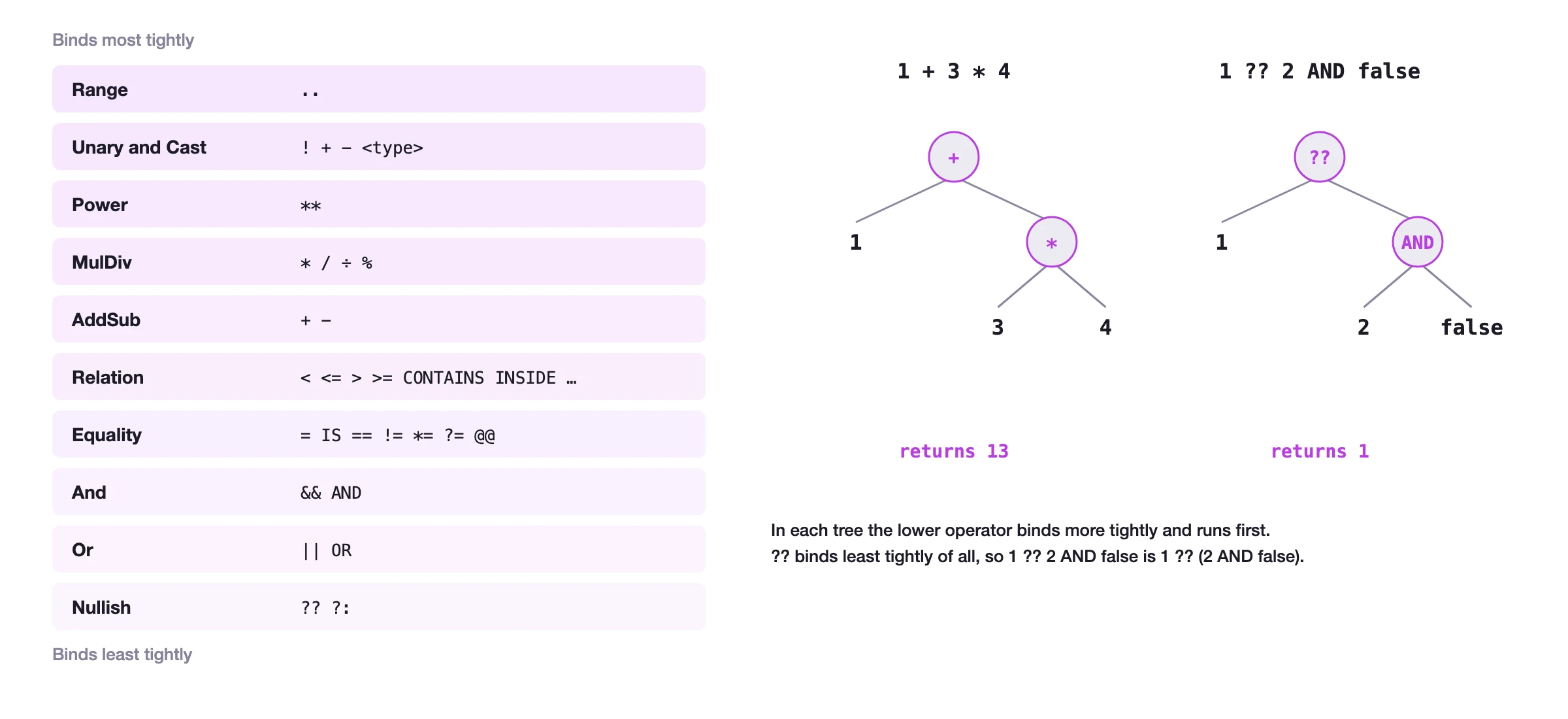
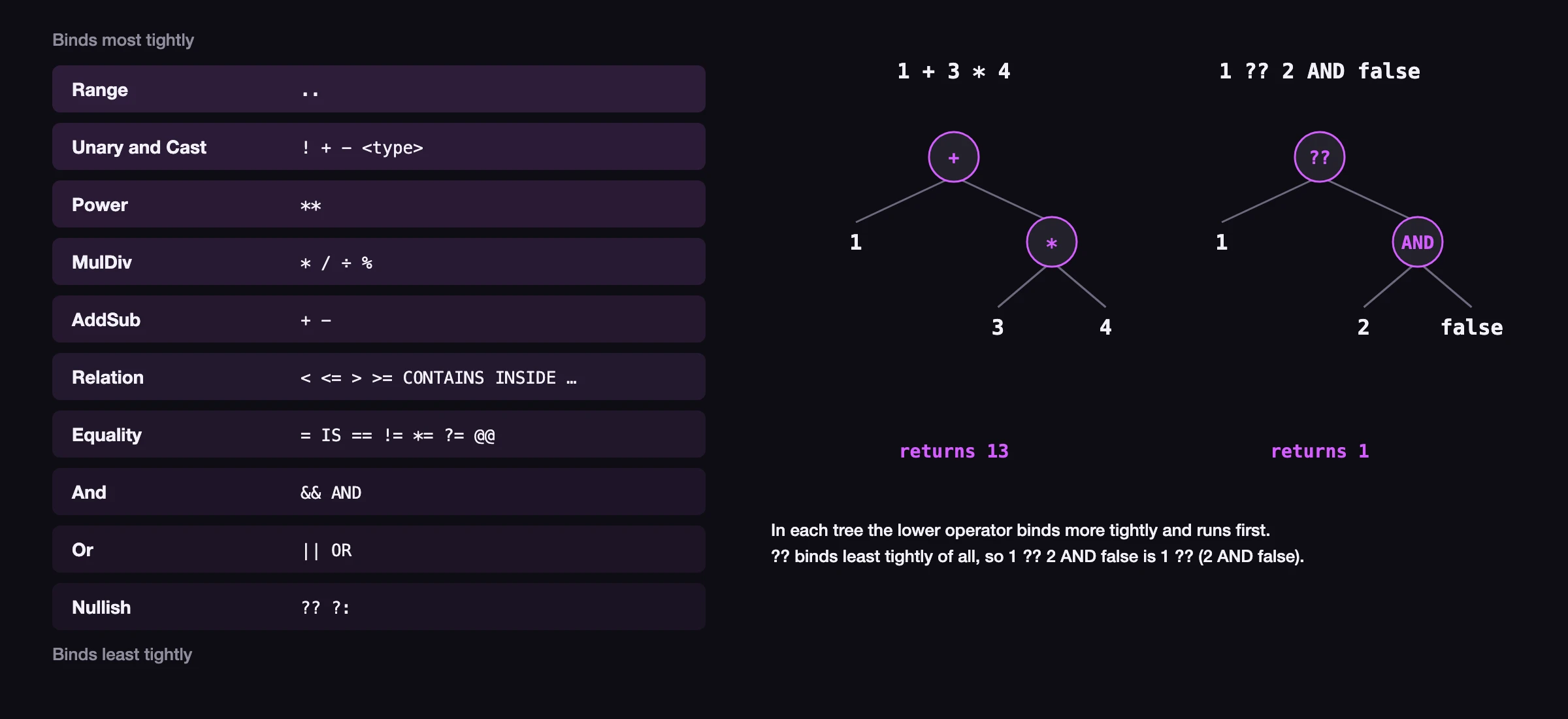
Examples of binding power
The following samples show examples of basic operations of varying binding power. The original example is followed by the same example with the parts with higher binding power in parentheses, then the final expression after the first bound portion is calculated, and finally the output.
1 + 3 * 4;
1 + (3 * 4);
-- Final expression
1 + 12;
-- Output
132**3 * 3;
(2**3) * 3;
-- Final expression
8*3;
-- Output
24<string>-4;
<string>(-4);
-- Output
"-4"<number>"9"**9;
(<number>"9")**9;
-- Final expression
9**9;
-- Output
387420489"c" + "at" IN "cats";
("c" + "at") IN "cats";
-- Final expression
"cat" IN "cats";
-- Output
truetrue AND false OR true;
(true AND false) OR true;
-- Final expression
false OR true;
-- Output
true<decimal>-4**2+4;
((<decimal>(-4))**2)+4;
-- Output
20dec