Instances are backed up for you: snapshots run on a schedule and are kept under a retention policy.
There is nothing to install or script, and the same mechanism applies on Start and Scale. A restore creates a new instance from a chosen snapshot.
Snapshots live inside the platform. They are not files you can download, copy to your own object storage, or open locally. For a portable copy, see Import and export.
Where backups are managed
Open the instance in SurrealDB Studio, then go to Instance settings → Backups.
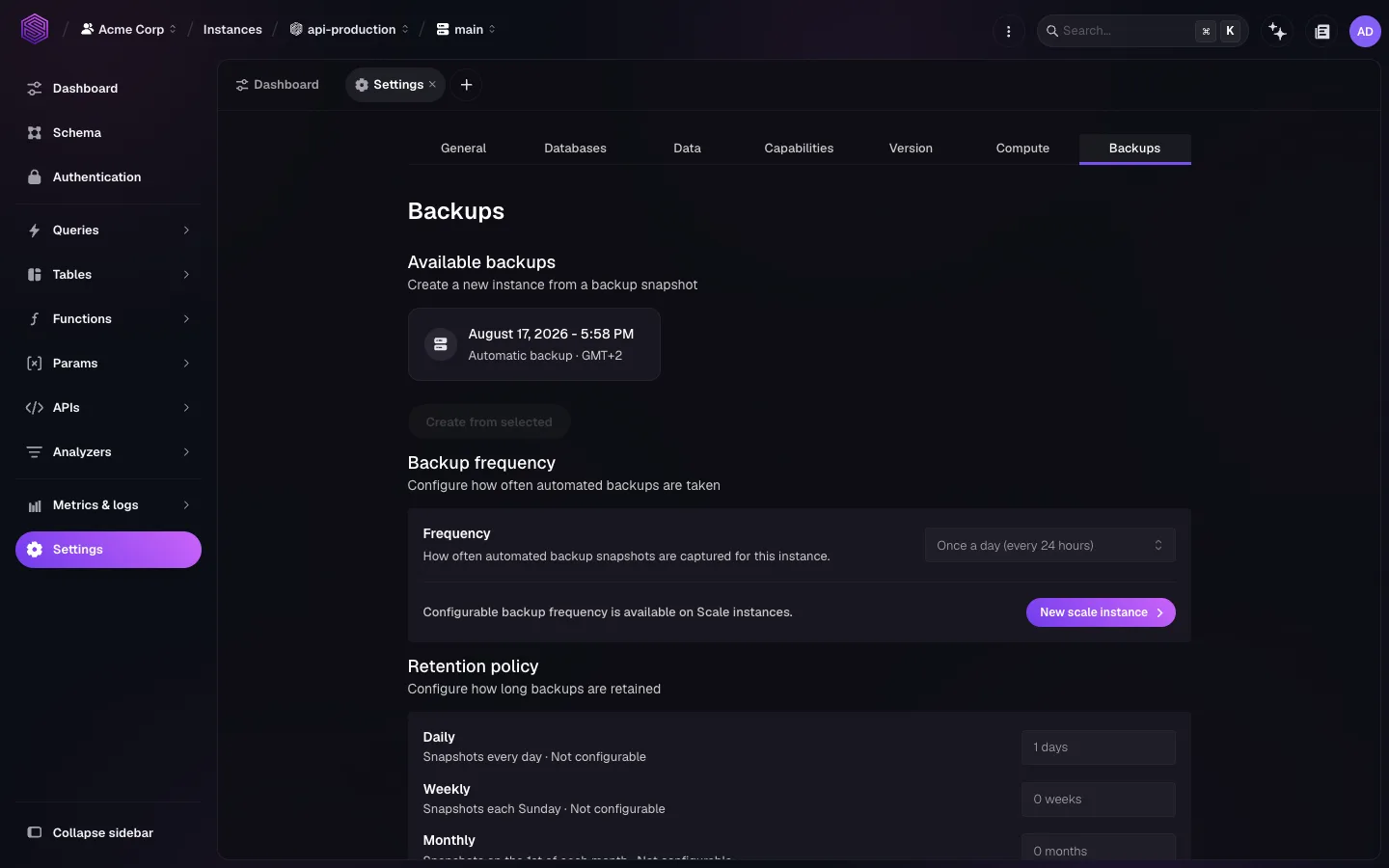
The tab has three parts:
Available backups: the list of snapshots you can restore from.
Backup frequency: how often a new snapshot is taken.
Retention policy: how long each snapshot is kept.
Frequency and retention
Automated snapshots run daily by default. Configurable backup frequency is available on Scale instances. On other instance types the schedule is fixed.
Retention is tiered, and each tier is kept for its own period.
| Tier | When the snapshot is taken | Retention setting |
|---|---|---|
| Daily | Every day | The number of days of daily snapshots kept |
| Weekly | Each Sunday | The number of weeks of weekly snapshots kept |
| Monthly | The first of each month | The number of months of monthly snapshots kept |
Which tiers you can change depends on the instance type. Tiers that are fixed on your plan are shown but not editable.
Longer retention lets you recover from further back and increases storage cost. Set it against your actual recovery objectives rather than taking the maximum. If you need more retention than the plan allows, contact support.
Taking a backup before a risky change
Take an on-demand snapshot before anything you might want to undo, such as a major version upgrade, a schema migration, or a bulk delete. On-demand snapshots appear in the same list as scheduled ones and follow the same retention.
surreal cloud instance backup triggers one from a terminal, which is what you want in a deployment pipeline that runs a migration. See surreal cloud instances.
Restoring from a snapshot
A restore produces a new instance. The original is left untouched, and there is no in-place restore.
Open Instance settings → Backups on the source instance.
Select the snapshot you want.
Select Create from selected.
That opens the deploy flow with the snapshot already chosen as the starting data. You can reach the same result from the other direction: start a new deploy and pick Restore from backup as the data source.
Because the result is a new instance, cutting over is an application change. The new instance has its own name and endpoint. Verify the data before you repoint traffic, then delete or pause the old instance.
Three constraints apply to a restore:
The new instance must be in the same region as the source.
Its storage size must be at least as large as the size of the source.
Its SurrealDB version must be compatible with the snapshot. The deploy form only offers versions that are.
What backups do not cover
They are not portable. You cannot download a snapshot. It is not an archival format, not a way to seed a local development database, and not a route to another provider. Use
surreal db exportfor those cases. See Import and export.They are not cross-region disaster recovery. A snapshot restores into the region it was taken in. Recovering into a different region needs a logical export and import.
They are not a substitute for testing a restore. Restore into a throwaway instance periodically and check that the data is what you expect. That is the only way to know the recovery path works.
Related pages
Import and export: portable data with
surreal db exportandsurreal db import.Versions and upgrades: snapshot first, then upgrade.
High availability: what redundancy covers and what backups cover.