The JavaScript SDK allows you to create multiple isolated sessions within a single connection. Each session maintains its own namespace, database, variables, and authentication state, while sharing the underlying connection to SurrealDB. This is useful when different parts of your application need to operate under different credentials or contexts simultaneously.
API references
Method | Description |
|---|---|
db.newSession() | Creates a new isolated session on the connection |
session.forkSession() | Creates a copy of a session, inheriting its state |
session.closeSession() | Destroys a session and releases its resources |
session.reset() | Resets a session's state without destroying it |
Creating isolated sessions
Call .newSession() on a Surreal instance to create a new session. The new session starts with no namespace, database, or authentication, and must be configured independently.
const session = await db.newSession();

await session.use({ namespace: 'production', database: 'main' });

await session.signin({
    namespace: 'production',
    database: 'main',
    access: 'user_access',
    variables: {
        email: 'user@example.com',
        password: 'secure_password',
    },
});

const users = await session.select(new Table('users'));
Sessions support all the same query methods as the main Surreal instance, including .query(), .select(), .create(), .update(), .delete(), and the rest of the query methods.
Forking an existing session
The .forkSession() method creates a new session that inherits the namespace, database, variables, and authentication state from the parent session. This is useful when you need a temporary context that starts with the same setup.
const primary = await db.newSession();
await primary.use({ namespace: 'app', database: 'main' });
await primary.signin({ username: 'admin', password: 'secret' });

const forked = await primary.forkSession();
await forked.use({ database: 'analytics' });
The forked session operates independently after creation. Changes to the parent session do not affect the fork, and vice versa.
Automatic cleanup with await using
Sessions support the await using declaration. When you declare a session with await using, JavaScript automatically closes the session when execution leaves the current scope.
{
    await using session = await db.newSession();
    await session.use({ namespace: 'main', database: 'main' });
    const data = await session.select(new Table('users'));
}
This is equivalent to manually calling session.closeSession() in a finally block, but with cleaner syntax.
Closing and resetting sessions
When you are done with a session, call .closeSession() to destroy it and release server-side resources.
const session = await db.newSession();

await session.select(new Table('users'));

await session.closeSession();
If you want to clear a session's state without destroying it, use .reset(). This removes all variables and invalidates authentication, but keeps the session alive for reuse.
await session.reset(); Using a session after it has been closed throws an InvalidSessionError.
Reconnection behaviour
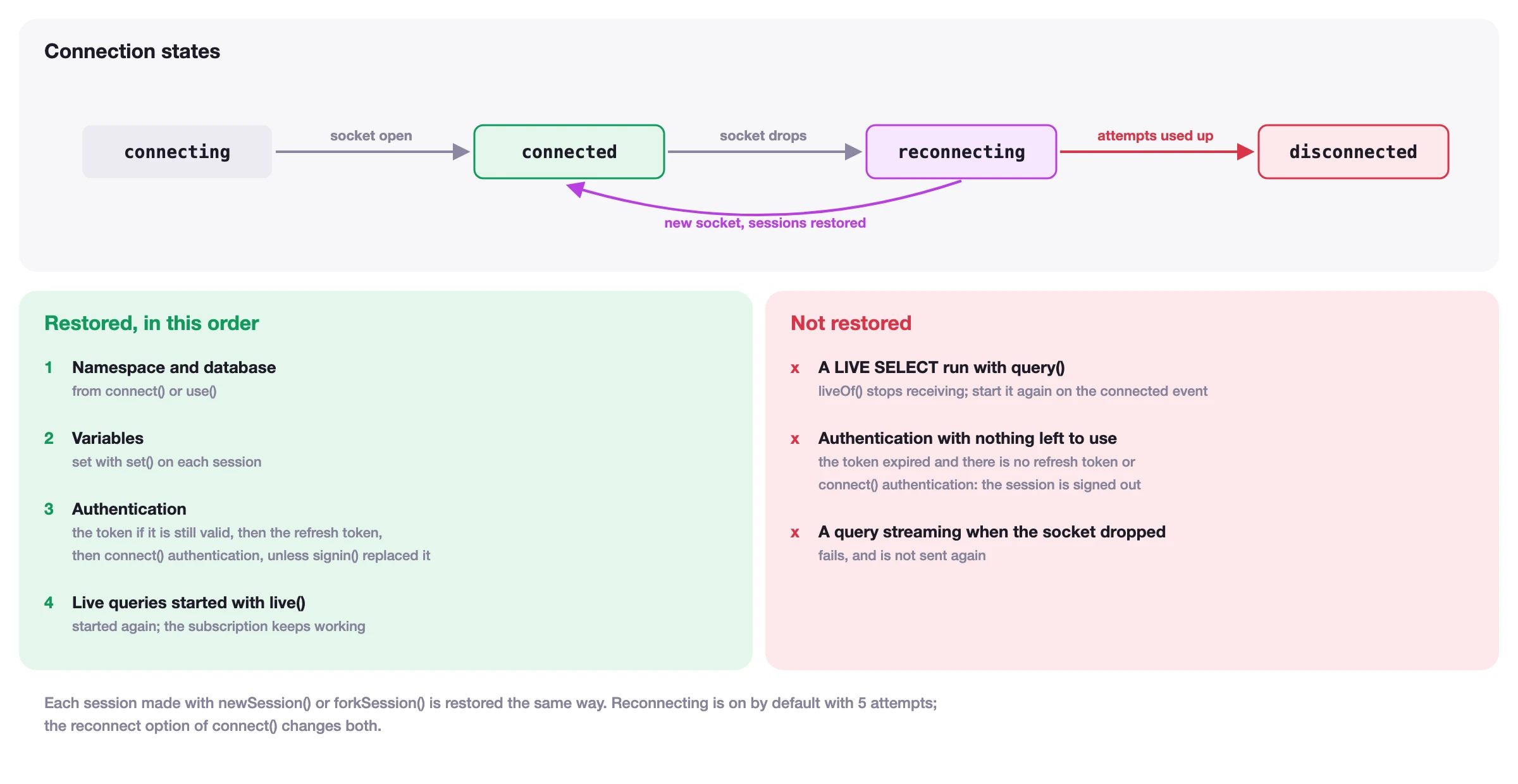
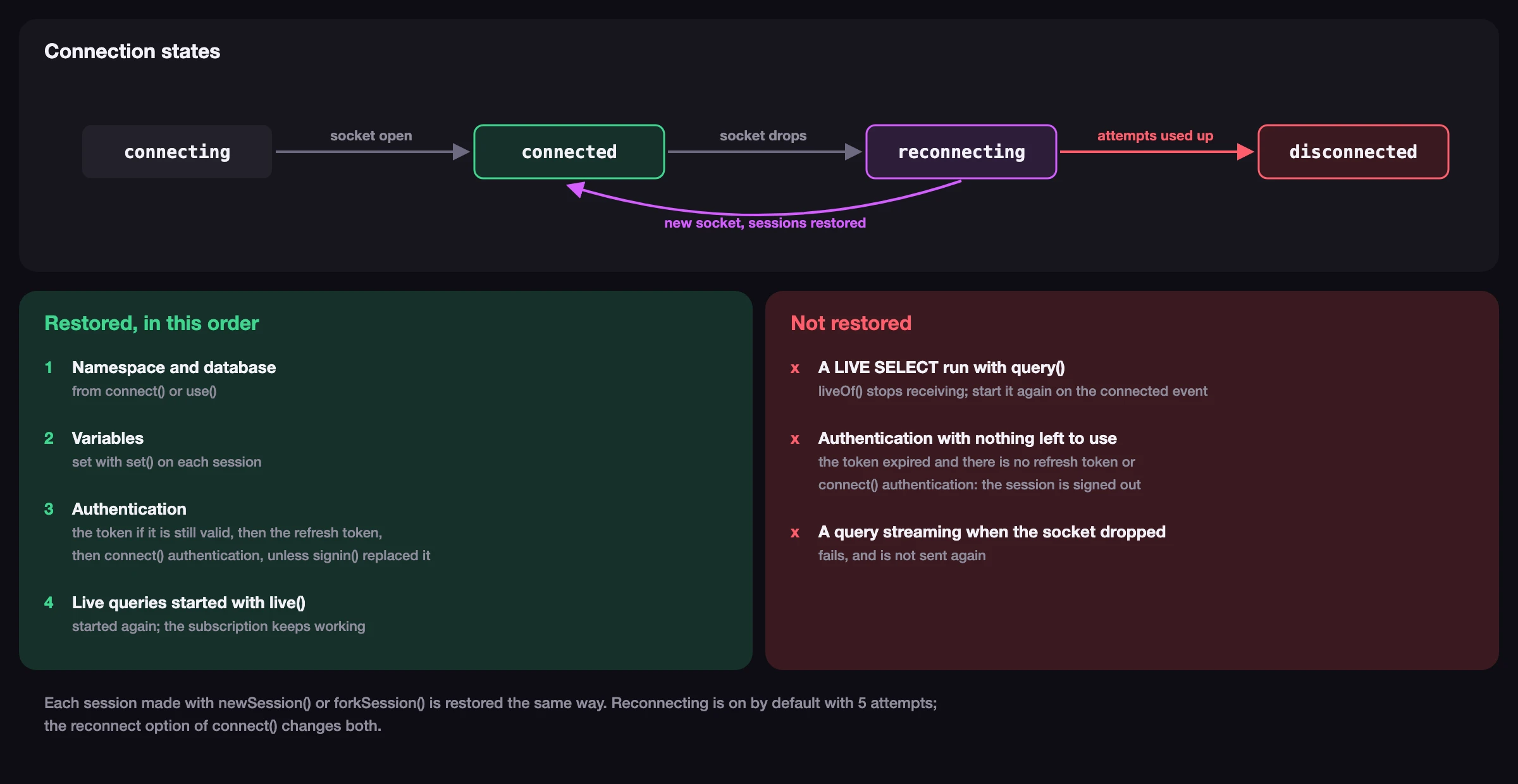
Sessions are automatically restored when the underlying connection reconnects after a drop. The SDK re-establishes each session's namespace, database, variables, and authentication state on the server. If a session used the authentication property from the original .connect() call, it will be re-authenticated automatically.
Sessions that were authenticated via .signin() or .signup() are re-authenticated with their token while it is still valid, or with their refresh token. Once neither works, the session is signed out, and the auth event lets the application sign it in again. See Authentication for details.
The figure below shows the order in which each session is restored, and what is not restored.
Subscribing to session events
Each session emits its own events, independent of other sessions and the main Surreal instance. You can subscribe to the auth and using events on any session.
session.subscribe('auth', (tokens) => {
    if (tokens) {
        console.log('Session authenticated');
    } else {
        console.log('Session signed out');
    }
});

session.subscribe('using', (using) => {
    console.log('Now using:', using.namespace, '/', using.database);
});
Learn more
SurrealSession API reference for the full session interface
Surreal.newSession() for session creation details
Authentication for session-level authentication
Transactions for atomic operations within sessions