The first step towards interacting with SurrealDB is to create a new connection to a database instance. This involves initialising a new Surreal instance, connecting it to an endpoint, and selecting a namespace and database. The SDK supports remote connections over WebSocket and HTTP, as well as embedded in-process databases.
API references
Method | Description |
|---|---|
new Surreal() | Creates a new Surreal instance |
db.connect(url) | Connects to a SurrealDB instance |
db.close() | Closes the active connection |
db.useNs(namespace) | Switches to a specific namespace |
db.useDb(database) | Switches to a specific database |
db.useDefaults() | Uses the default namespace and database |
db.version() | Returns the server version |
db.health() | Checks the server health |
Opening a connection
Create a new Surreal instance and call .connect() with a connection string pointing to your SurrealDB instance. The Surreal class implements AutoCloseable, so you can use it in a try-with-resources block to ensure the connection is closed automatically.
Surreal db = new Surreal();
db.connect("ws://localhost:8000");
Connection string protocols
The connection string determines the protocol and transport used to communicate with SurrealDB. For more on server configuration, see the start command documentation.
| Protocol | Description |
|---|---|
ws:// | Plain WebSocket connection |
wss:// | Secure WebSocket connection (TLS) |
http:// | Plain HTTP connection |
https:// | Secure HTTP connection (TLS) |
memory:// | In-memory embedded database |
surrealkv:// | Disk-based embedded database |
The memory:// and surrealkv:// protocols run SurrealDB in-process using JNI, which eliminates network overhead. See Embedded databases for details on configuring embedded connections.
Feature support by protocol
Not all features are available on every protocol. The table below summarizes what is supported for each connection type.
| Feature | WebSocket | HTTP | Embedded |
|---|---|---|---|
| Authentication | Yes | Yes | Yes |
| Queries | Yes | Yes | Yes |
| CRUD operations | Yes | Yes | Yes |
| Live queries | Yes | No | No |
| Transactions | Yes | No | Yes |
| Multiple sessions | Yes | No | Yes |
| Export / Import | Yes | Yes | Yes |
Selecting a namespace and database
After connecting, select a namespace and database using .useNs() and .useDb(). These methods return the Surreal instance, so they can be chained.
db.useNs("surrealdb").useDb("docs");To reset the namespace and database to the server defaults, call .useDefaults().
db.useDefaults();Using try-with-resources
Since Surreal implements AutoCloseable, Java's try-with-resources statement ensures that .close() is called when the block exits, even if an exception is thrown. This is the recommended pattern for managing connections.
import com.surrealdb.Surreal;
import com.surrealdb.signin.RootCredential;

public class Example {

    public static void main(String[] args) {
        try (Surreal db = new Surreal()) {
            db.connect("ws://localhost:8000");
            db.useNs("surrealdb").useDb("docs");
            db.signin(new RootCredential("root", "root"));

            String version = db.version();
            System.out.println("Connected to SurrealDB " + version);
        }
    }

}
Effect of connection protocol on token and session duration
The connection protocol affects how authentication tokens and sessions behave.
WebSocket connections are stateful and long-lived. After the initial authentication, the session persists for the lifetime of the connection. The session duration defaults to
NONE, meaning it never expires unless explicitly configured.HTTP connections are stateless, so each request carries its own credentials and the server creates a short-lived session for that request. After a system user signs in, the SDK sends the username and password with every request, so the token duration does not apply. After a record user signs in, the SDK sends the token, so requests fail once the token expires. The token duration defaults to 1 hour.
The figure below shows which duration ends the session in each case, with the default durations.
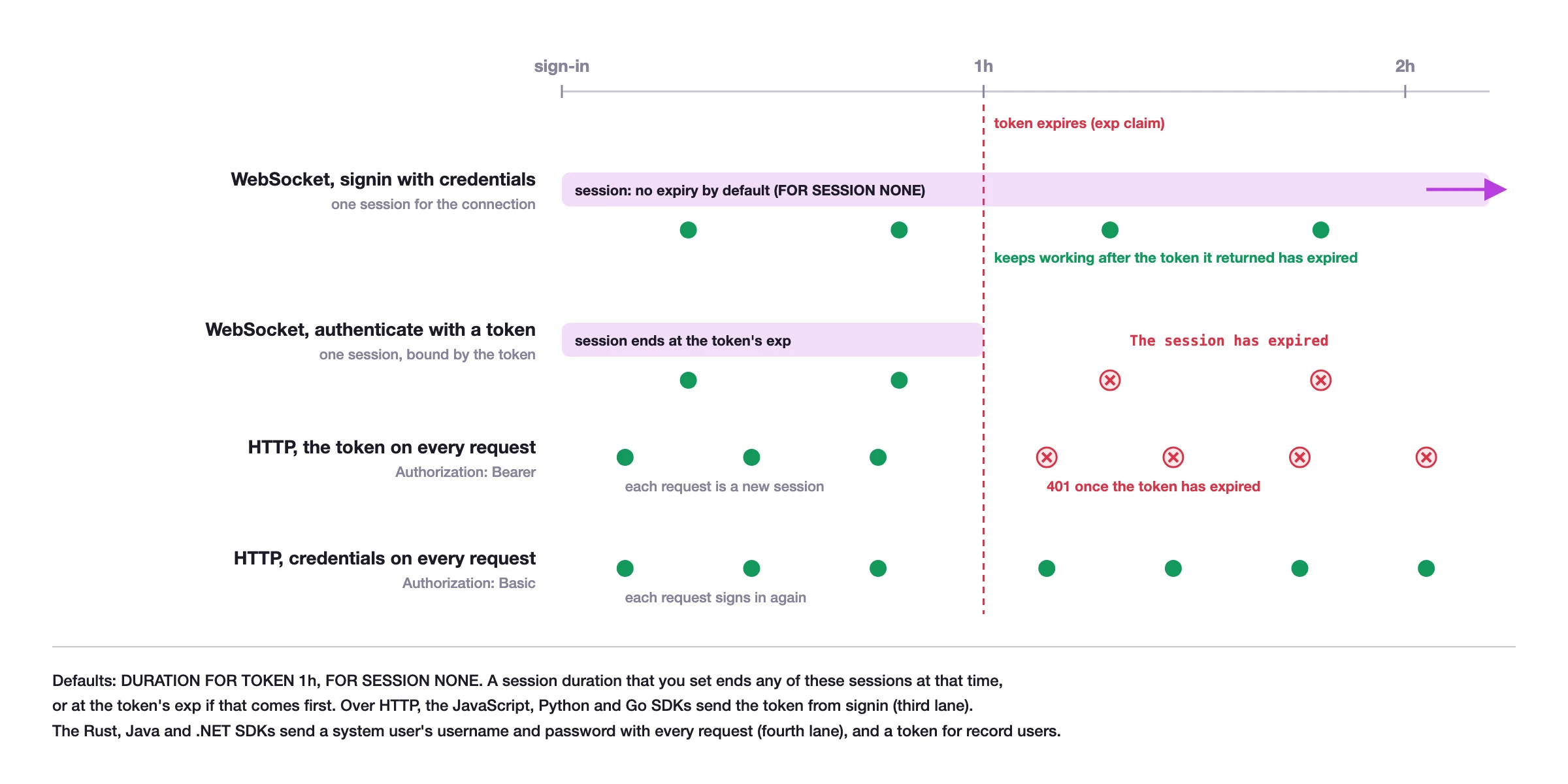
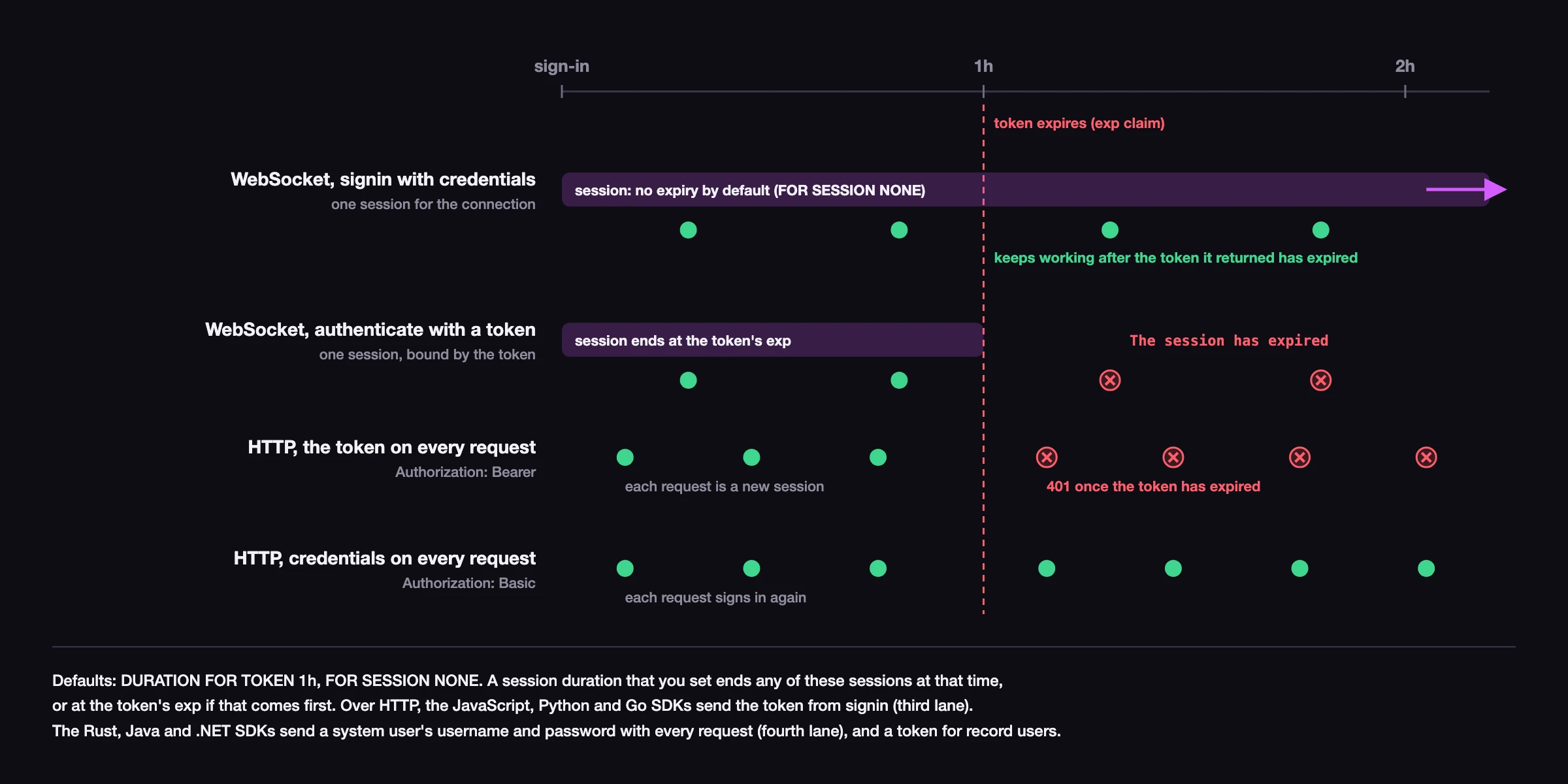
You can configure token and session durations using the DURATION clause on DEFINE ACCESS or DEFINE USER statements. See the security best practices documentation for guidance on choosing appropriate durations.
Closing a connection
The .close() method releases all resources associated with the connection. If you are not using try-with-resources, call .close() explicitly when you are done with the connection.
db.close();Learn more
Surreal API reference for complete method signatures
Authentication for signing in and managing sessions
Embedded databases for running SurrealDB in-process
Error handling for handling connection errors
SurrealDB authentication for an overview of authentication concepts
DEFINE NAMESPACE and DEFINE DATABASE for namespace and database configuration