Export an existing database as a SurrealQL script, either to a file or to stdout, using the installed surreal CLI.
surreal db export [OPTIONS] --namespace <NAMESPACE> --database <DATABASE> [FILE]Authenticate with either --username and --password, or with --token. Neither is needed against a server started with --unauthenticated.
Export options
By default an export contains everything in the database. These flags narrow it down.
Example usage
To perform a SurrealQL database export into a local file, in a terminal run the surreal db export command with the required arguments.
surreal db export --endpoint http://localhost:8000 --user root --pass secret --ns main --db main export.surqlUsing token-based authentication:
surreal db export --endpoint http://localhost:8000 --token <token> --ns main --db main export.surqlTo write the export to standard output instead of a file, for example to pipe it into another command, use - as the file name and add --log none. Without it, the command writes its log line INFO surrealdb::method::export: Exporting bytes to standard output as well, ahead of the export, and importing the result fails with a parse error on that line.
surreal db export --endpoint http://localhost:8000 --user root --pass secret --ns main --db main --log none - > export.surqlChoosing what to export
--only starts from an empty export, and each resource flag after it adds that resource back. The following command exports the table definitions and their records, and leaves out users, access methods, functions and every other definition:
surreal db export --endpoint http://localhost:8000 --user root --pass secret --ns main --db main --only --tables --records -- export.surqlWithout --records, the same command exports only the table definitions, which gives the schema without the data. --tables also takes a comma-separated list, such as --tables person,order, to export only those tables.
The resource flags accept an optional value, so a flag directly before the file name reads the file name as its value and the command fails with invalid value. Put -- before the file name, as in the example above, or put the file name before the flags.
Choosing in SurrealDB Studio
SurrealDB Studio builds the same command for you. Open Export database and choose Choose what to include, then select the tables and the definitions you want. Record data corresponds to --records, and each other checkbox to the flag of the same name.
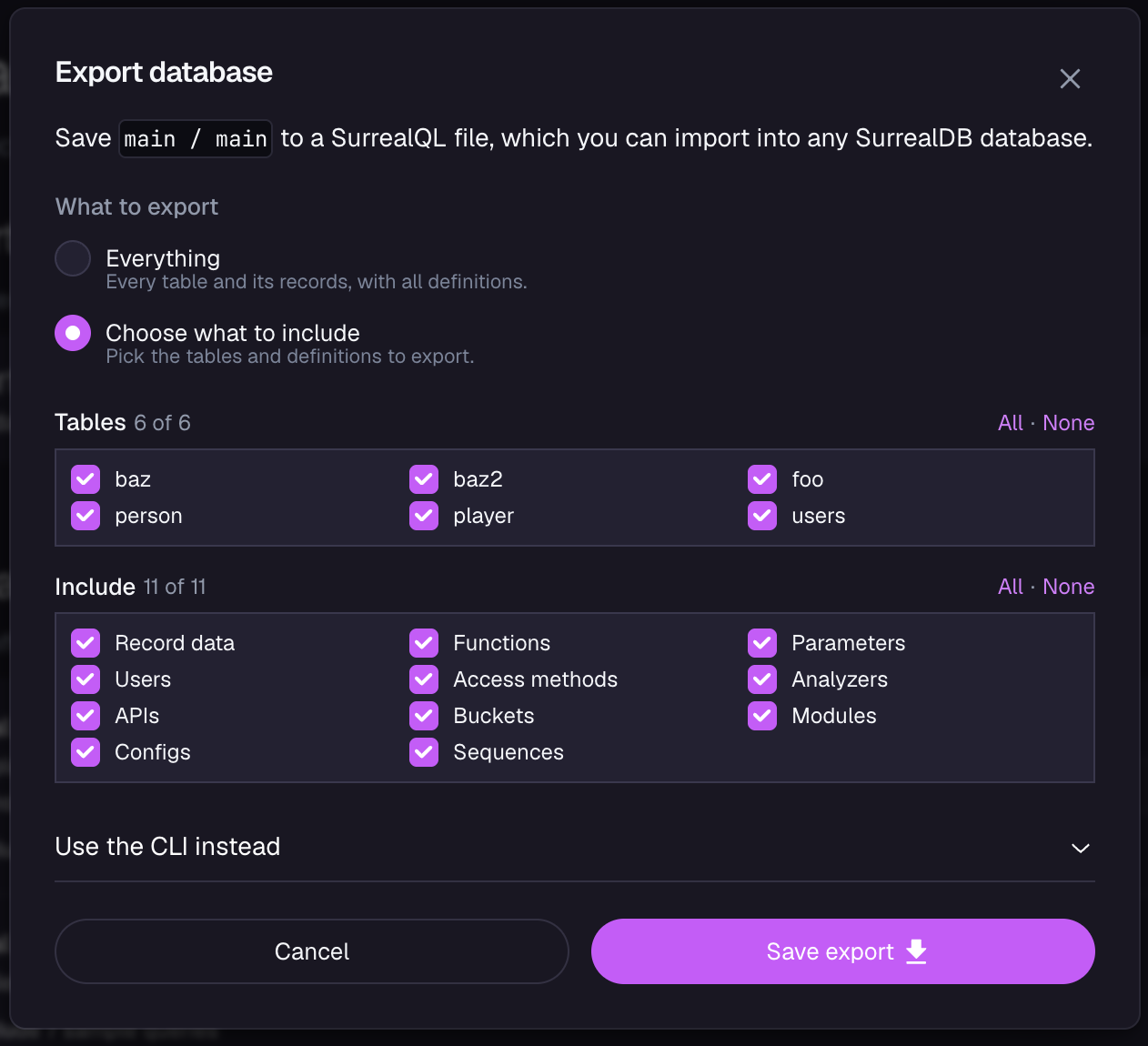
The Use the CLI instead section below the checkboxes shows the surreal db export command for that selection, with your connection's endpoint, namespace and database filled in. Running it from a terminal is faster for a large database, and it does not depend on the Studio window staying open.
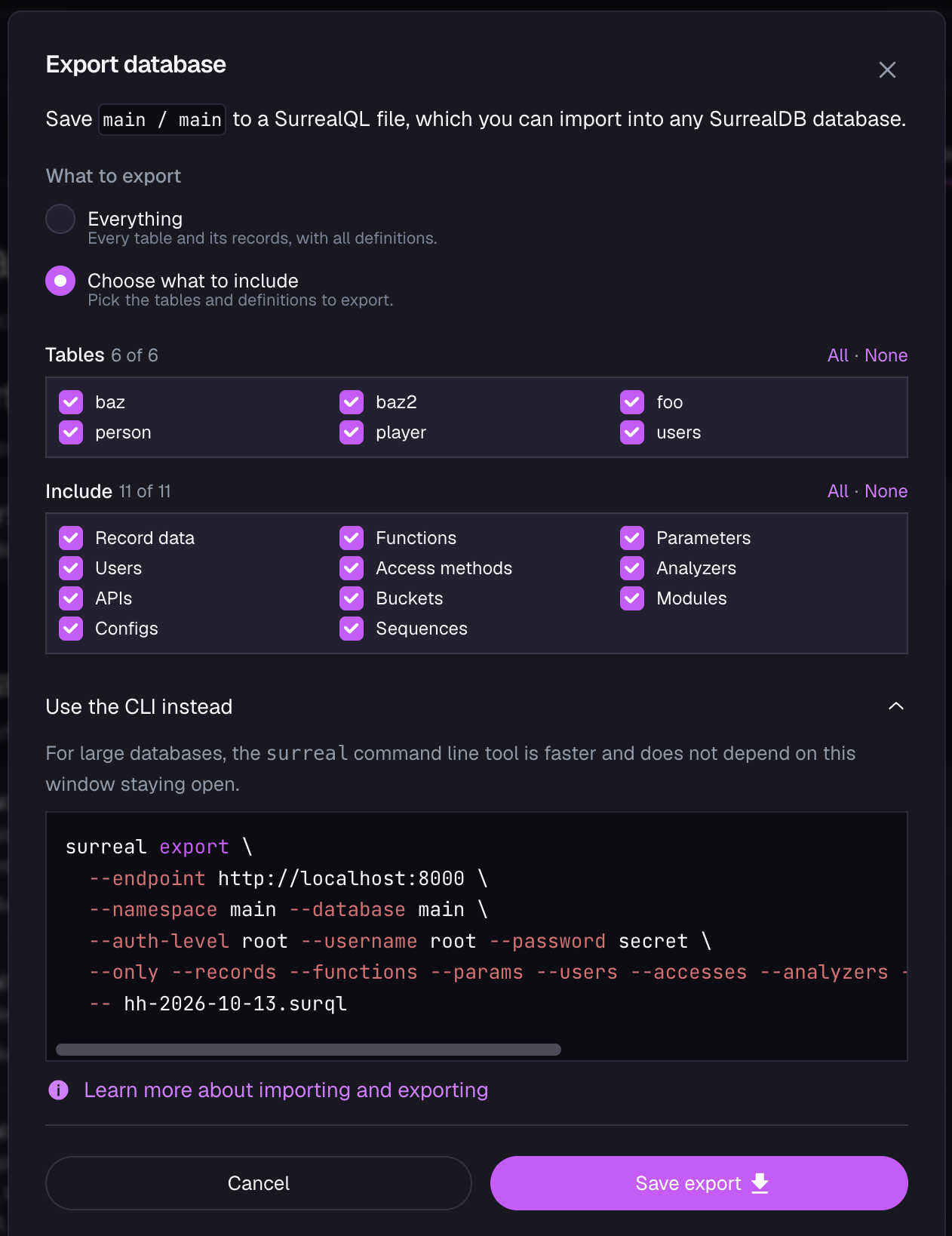
If you select Sequences, add --sequences to the command yourself: Studio currently leaves that flag out of the command it shows.
Using environment variables
Most of the flags above have a corresponding environment variable.
For example, the --username flag can be configured with the SURREAL_USER environment variable instead.
When using the surreal db export command, you can also use environment variables to set the values for the command-line flags.
For more on the environment variables available for CLI commands or SurrealDB instances in general, see the environment variables page.
Managing a Cloud instance
To export from a SurrealDB Cloud instance by name, surreal cloud resolves the endpoint and credentials for you and then runs this command. The flags and file-format notes on this page still apply.
OPTION IMPORT keyword
The output of a database export includes a line that contains the keywords OPTION IMPORT. This command is used internally to ensure that side effects do not run when the data is imported, such as events and table views.
As of SurrealDB 3.0.4, imports via the surreal db import and /import HTTP endpoint require the automatically generated OPTION IMPORT line to be present in order to disable events, live queries, field processing, and result output for optimal import performance. If side effects are desired when importing data, remove the line and use the /sql endpoint instead.
Command help
To see the help information and usage instructions, in a terminal run the surreal db export --help command without any further arguments. This command gives general information on the arguments, inputs, and additional options for the export command.
surreal db export --helpThe output of the above command:
Export an existing database as a SurrealQL script

Usage: surreal export [OPTIONS] --namespace <NAMESPACE> --database <DATABASE> [FILE]

Arguments:
  [FILE]  Path to the SurrealQL file to export. Use dash - to write into stdout. [default: -]

Options:
  -e, --endpoint <ENDPOINT>      Database endpoint to export from [default: http://localhost:8000]
  -u, --username <USERNAME>      Database authentication username to use when connecting [env: SURREAL_USER=] [aliases: --user]
  -p, --password <PASSWORD>      Database authentication password to use when connecting [env: SURREAL_PASS=] [aliases: --pass]
  -t, --token <TOKEN>            Authentication token in JWT format to use when connecting [env: SURREAL_TOKEN=]
      --auth-level <AUTH_LEVEL>  Level on which the authenticating user is defined [env: SURREAL_AUTH_LEVEL=] [default: root] [possible
                                 values: root, namespace, ns, database, db]
      --namespace <NAMESPACE>    The namespace selected for the operation [env: SURREAL_NAMESPACE=] [aliases: --ns]
      --database <DATABASE>      The database selected for the operation [env: SURREAL_DATABASE=] [aliases: --db]
      --only                     Whether only specific resources should be exported
      --users [<USERS>]          Whether users should be exported [possible values: true, false]
      --accesses [<ACCESSES>]    Whether access methods should be exported [possible values: true, false]
      --params [<PARAMS>]        Whether params should be exported [possible values: true, false]
      --functions [<FUNCTIONS>]  Whether functions should be exported [possible values: true, false]
      --analyzers [<ANALYZERS>]  Whether analyzers should be exported [possible values: true, false]
      --tables [<TABLES>]        Whether tables should be exported, optionally providing a list of tables
      --versions [<VERSIONS>]    Whether versions should be exported [possible values: true, false]
      --records [<RECORDS>]      Whether records should be exported [possible values: true, false]
  -h, --help                     Print help

Logging:
  -l, --log <LOG>                              The logging level for the command-line tool [env: SURREAL_LOG=] [default: info] [possible
                                               values: none, full, error, warn, info, debug, trace]
      --log-format <LOG_FORMAT>                The format for terminal log output [env: SURREAL_LOG_FORMAT=] [default: text] [possible
                                               values: text, json]
      --log-socket <LOG_SOCKET>                Send logs to the specified host:port [env: SURREAL_LOG_SOCKET=]
      --log-file-level <LOG_FILE_LEVEL>        Override the logging level for file output [env: SURREAL_LOG_FILE_LEVEL=] [possible values:
                                               none, full, error, warn, info, debug, trace]
      --log-otel-level <LOG_OTEL_LEVEL>        Override the logging level for OpenTelemetry output [env: SURREAL_LOG_OTEL_LEVEL=] [possible
                                               values: none, full, error, warn, info, debug, trace]
      --log-socket-level <LOG_SOCKET_LEVEL>    Override the logging level for unix socket output [env: SURREAL_LOG_SOCKET_LEVEL=] [possible
                                               values: none, full, error, warn, info, debug, trace]
      --log-socket-format <LOG_SOCKET_FORMAT>  The format for socket output [env: SURREAL_LOG_SOCKET_FORMAT=] [default: text] [possible
                                               values: text, json]
      --log-file-enabled                       Whether to enable log file output [env: SURREAL_LOG_FILE_ENABLED=]
      --log-file-path <LOG_FILE_PATH>          The directory where log files will be stored [env: SURREAL_LOG_FILE_PATH=] [default: logs]
      --log-file-name <LOG_FILE_NAME>          The name of the log file [env: SURREAL_LOG_FILE_NAME=] [default: surrealdb.log]
      --log-file-format <LOG_FILE_FORMAT>      The format for log file output [env: SURREAL_LOG_FILE_FORMAT=] [default: text] [possible
                                               values: text, json]
      --log-file-rotation <LOG_FILE_ROTATION>  The log file rotation interval [env: SURREAL_LOG_FILE_ROTATION=] [default: daily] [possible
                                               values: daily, hourly, never]