A transaction is a group of changes that a database makes all together or not at all. If any change in the group fails, the database discards the others as well, so the data never stays half changed.
Why changes need to stay together
Many tasks change more than one record. Moving money from one account to another takes two changes: one account loses the money, and the other gains it.
Imagine a bank that keeps its accounts on paper, where a clerk makes each transfer by hand. The clerk takes 500 out of Alice's account, writes down the new balance, and goes for lunch before adding the 500 to Bob's account. For the whole lunch break, the 500 is in neither account. If the bank adds up its money during that hour, 500 is missing. If the clerk forgets the transfer after lunch, the 500 is gone for good.
A database can stop between two changes in the same way, because of an error, a crash, or a rule that the second change breaks. A transaction prevents this. The database treats the changes inside it as one unit:
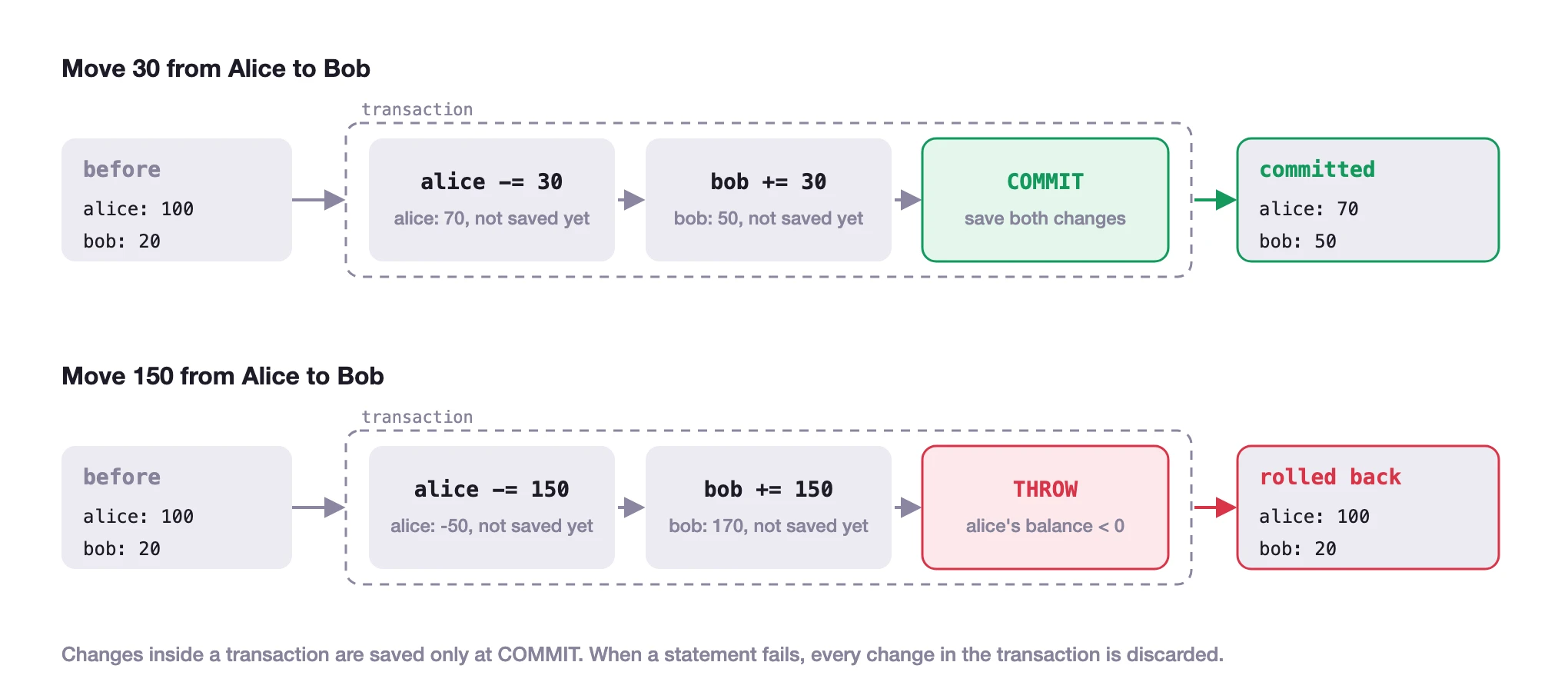
When every change succeeds, the transaction commits, and all of the changes are saved together.
When any change fails, the transaction rolls back, and the database discards every change in it, so the data is as it was before the transaction started.
Until a transaction commits, no one else sees its changes. In the bank, that is a clerk who makes both entries before anyone can look at the books.
Writing a transaction
In SurrealQL, every statement runs in a transaction of its own by default. To make several statements one transaction, put them between BEGIN and COMMIT.
The transfer below moves 30 from Alice to Bob. Both updates commit together.
CREATE account:alice SET balance = 100;
CREATE account:bob SET balance = 20;

BEGIN;
UPDATE account:alice SET balance -= 30;
UPDATE account:bob SET balance += 30;
COMMIT;

SELECT id, balance FROM account;[
{
balance: 70,
id: account:alice
},
{
balance: 50,
id: account:bob
}
]Rolling back a transaction
A transaction rolls back when one of its statements fails. THROW makes a statement fail on purpose, with a message that you choose, so you can write a rule that stops the transaction. The transfer below tries to move 150 from an account that holds 100. The IF checks the new balance, and when it is below zero, the THROW fails the transaction and rolls back both updates.
CREATE account:alice SET balance = 100;
CREATE account:bob SET balance = 20;

BEGIN;
UPDATE account:alice SET balance -= 150;
UPDATE account:bob SET balance += 150;
IF account:alice.balance < 0 {
	THROW 'Alice does not have enough money';
};
COMMIT;

SELECT id, balance FROM account;[
{
balance: 100,
id: account:alice
},
{
balance: 20,
id: account:bob
}
]Both balances are unchanged, although the two updates ran before the check. Inside the transaction, each update reports The query was not executed due to a failed transaction, the THROW reports its own message, and COMMIT reports that the transaction was aborted.
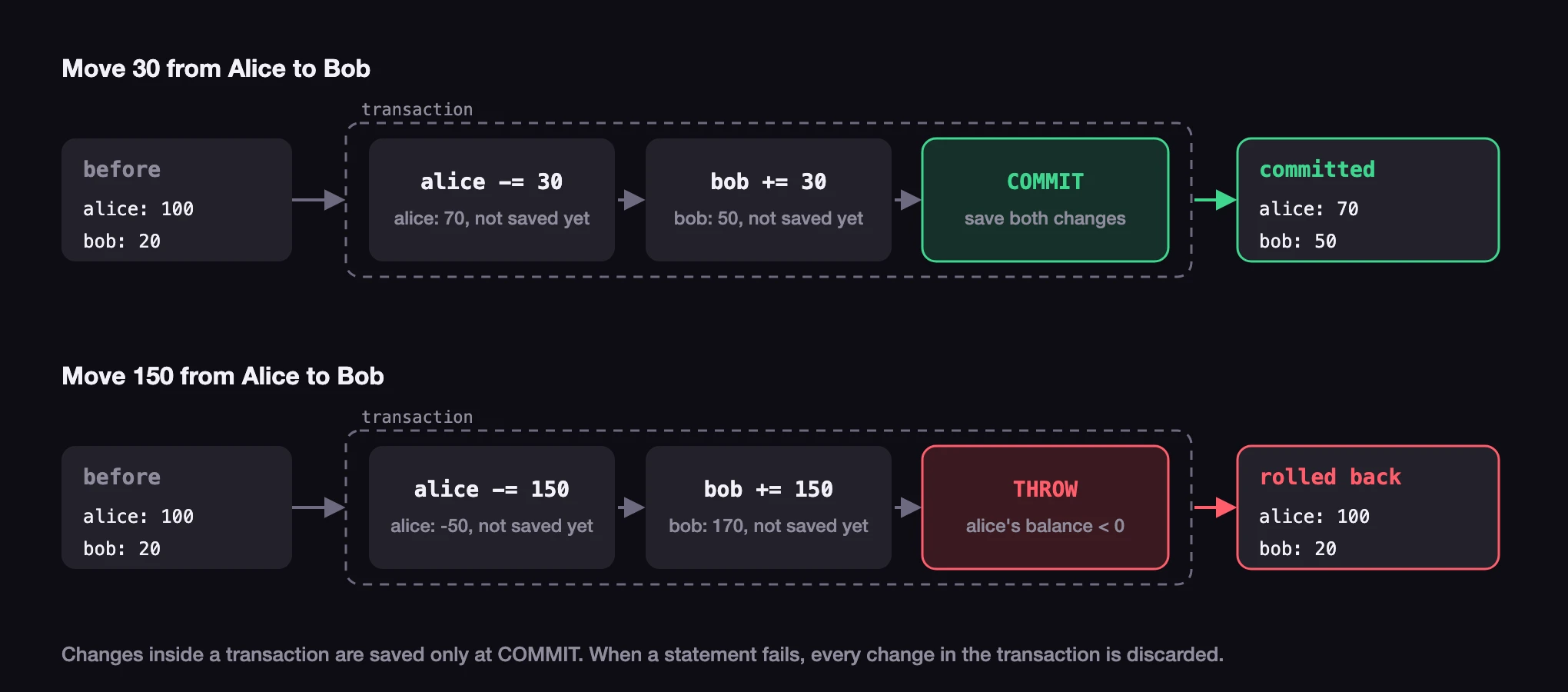
The diagram shows the two transfers side by side. Each change inside the transaction exists only in the transaction until COMMIT saves all of them, and a failed statement discards all of them.
You can also roll back a transaction without an error. CANCEL in place of COMMIT discards every change since BEGIN.
CREATE account:alice SET balance = 100;

BEGIN;
UPDATE account:alice SET balance -= 10;
CANCEL;

SELECT id, balance FROM account;[
{
balance: 100,
id: account:alice
}
]ACID
Database documentation often describes transactions as ACID, a name made from the first letters of four guarantees:
| Letter | Guarantee | What it means |
|---|---|---|
| A | Atomicity | All of the changes in a transaction happen, or none of them do. |
| C | Consistency | A transaction cannot leave the data in a state that breaks the rules defined for it. |
| I | Isolation | Transactions that run at the same time do not see each other's changes before they commit. |
| D | Durability | After a transaction commits, its changes stay, and a database stored on disk keeps them after a restart. |
Atomicity takes its name from the atom, which comes from a Greek word for something that cannot be divided. A transaction cannot be divided either: the database applies the whole of it or none of it.
SurrealDB transactions have all four guarantees. A database that runs in memory keeps its data only while it runs, so durability across a restart needs a database stored on disk.
Two transactions that change the same record
A database usually serves many clients at once, and two of them can change the same record at the same time. Suppose two transfers both read Alice's balance of 100 and both take 30 from it. If both saved their result, Alice would end with 70 instead of 40, and 30 would be lost.
SurrealDB prevents this. Each transaction works on a view of the data as it was when the transaction started, and when two transactions change the same record, only the first to commit succeeds. The second fails with a conflict error, and the application runs it again. On its second attempt, it reads the new balance of 70 and saves 40.
For a single statement outside BEGIN and COMMIT, the server runs it again for you. For a BEGIN ... COMMIT block, your application decides whether to run it again.
Two transactions that read the same record
The conflict check compares the records that two transactions change. A transaction can also make a decision based on a record that it only reads, and a record that is only read is not checked by default, because reading a record does not change it. When two transactions read the same data, make a decision based on it, and then each change a different record, both commit. This is called write skew.
A hospital shows how this happens. Two doctors, Ana and Ben, are on call for the night, and the hospital's rule is that at least one of them stays on call. Both feel unwell, and each opens the app to sign off at the same moment:
Ana's transaction reads Ben's record, sees that he is on call, and takes Ana off call.
Ben's transaction reads Ana's record. Ana's change is not committed yet, so it sees that she is on call, and takes Ben off call.
Ana's transaction changed only Ana's record, and Ben's changed only Ben's, so there is no conflict and both commit.
Each transaction followed the rule, and each one is complete, so none of the four ACID guarantees is broken. The result still breaks the rule, because nobody is on call.
Whether write skew matters depends on what the decision protects, and you choose whether to guard against it:
When it must not happen: the doctors on call, or two managers who each check that a budget has money left and each approve a payment from it, when the budget only has enough for one. In each case, two decisions that are correct on their own add up to a result that breaks the rule.
When it does no harm: a game that gives a badge to the first player to reach 1,000 points. If two players reach it at the same moment, both get the badge, and nobody loses anything. Guarding against write skew here would only cause more conflicts and retries.
To guard against it, read the records the decision depends on with SELECT ... FOR UPDATE. The record is then checked at COMMIT in the same way as a record the transaction changed. In the example below, LET stores Ben's record under the name $ben, and ONLY returns the record itself rather than a list that holds one record.
CREATE doctor:ana SET on_call = true;
CREATE doctor:ben SET on_call = true;

BEGIN;
LET $ben = SELECT * FROM ONLY doctor:ben FOR UPDATE;
IF $ben.on_call {
	UPDATE doctor:ana SET on_call = false;
};
COMMIT;

SELECT id, on_call FROM doctor;[
{
id: doctor:ana,
on_call: false
},
{
id: doctor:ben,
on_call: true
}
]When Ben's transaction takes him off call before Ana's commits, Ana's COMMIT now fails with a conflict. Her transaction runs again, reads that Ben is off call, and leaves her on call.
The transactions guide explains isolation in detail, including serializable isolation, which checks every record a transaction reads and also covers decisions based on a query, such as the total of every payment made from a budget.
Next steps
Schemas and data types explains how a database checks the data you give it.
The transactions guide covers control flow inside transactions, isolation levels and locked reads.