A data model is a way of shaping data: how a record is laid out, and how one record connects to another. Many databases support only one data model, so the word often names a kind of database, such as a "document database" or a "graph database". In SurrealDB, every style below is built in and needs no setting to turn it on. A table can hold records in more than one style, and a single query can use several of them at once.
Where data models came from
Most of the ideas in today's databases come from one paper. In 1970, Edgar F. Codd published A Relational Model of Data for Large Shared Data Banks, which described data as tables that connect to each other. A few years later, Donald Chamberlin and Raymond Boyce designed a language to use those ideas in practice, called SEQUEL and later renamed SQL. The first commercial SQL database followed in 1979.
Other data models appeared when applications started to need things that tables did not do well, as the SurrealDB blog's beginner guide explains:
As we were searching for new ways to interact with this digital world, especially with the advent of e-commerce and social media, we found that it can be very tricky to express complex networks as text in Word documents (document model) or jigsaw puzzles (relational model).
From The ultimate beginners guide to databases
Relational style
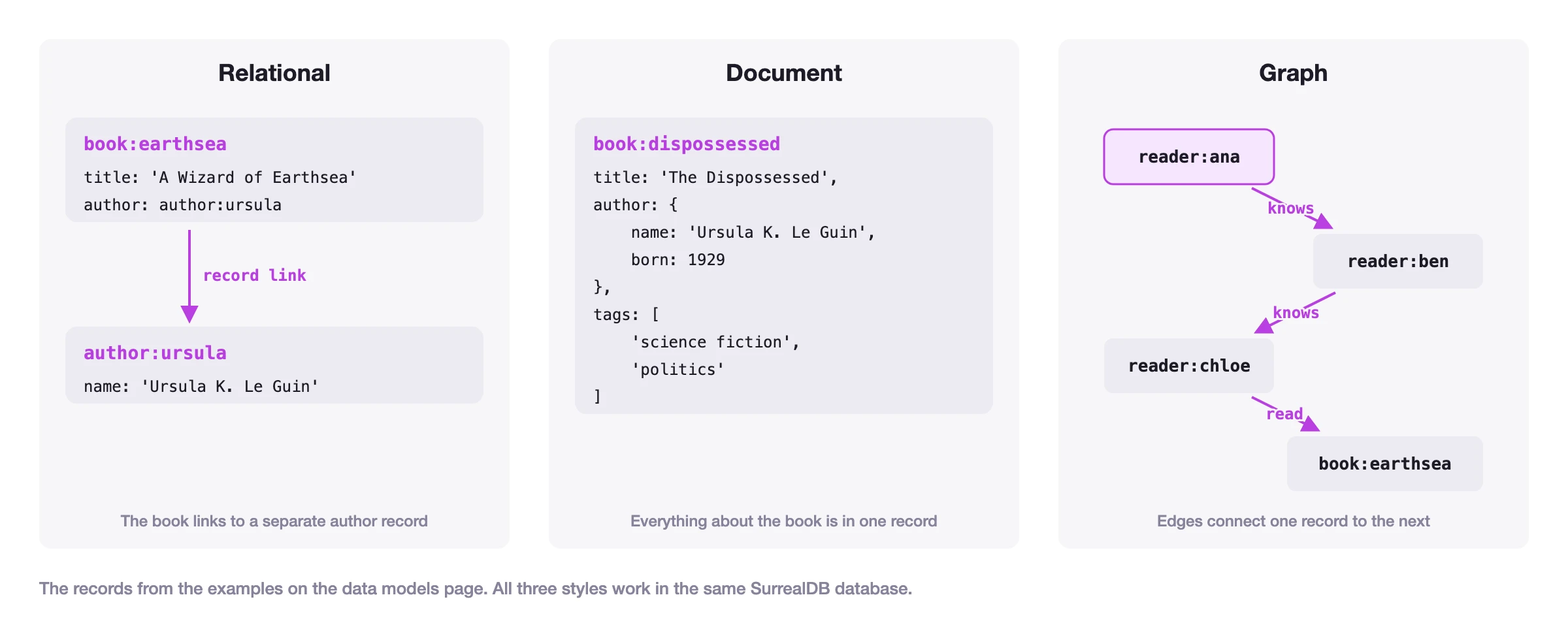
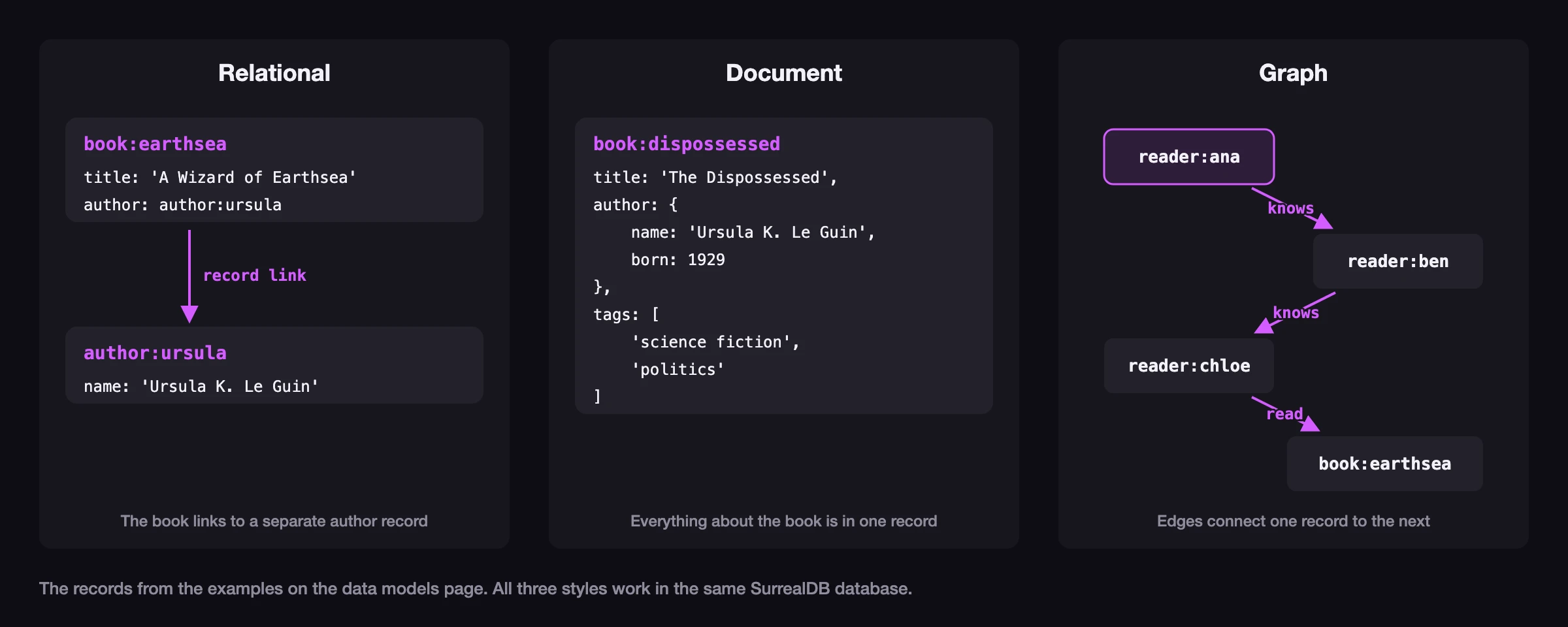
In the relational style, each kind of thing has its own table, and records refer to records in other tables. A book does not hold its author's details. It holds a reference to an author record, and a query joins the two when it needs both. The beginner guide compares this to a jigsaw puzzle:
In the simplest terms, relational databases are like a jigsaw puzzle, where each puzzle piece represents an Excel-like table.
From The ultimate beginners guide to databases
In SurrealQL, a field can hold the record ID of another record. This is called a record link, and a query follows it with a dot.
CREATE author:ursula SET name = 'Ursula K. Le Guin';
CREATE book:earthsea SET title = 'A Wizard of Earthsea', author = author:ursula;
SELECT title, author.name AS author FROM book;[
{
author: 'Ursula K. Le Guin',
title: 'A Wizard of Earthsea'
}
]The author's name is kept in one place only. If it changes, you update one record, and every book that links to it shows the new name.
Document style
In the document style, a record holds everything about one thing, including nested objects and lists. A query reads one record and has all it needs. The beginner guide compares this to a Word document, "where you make sure that the document has all the relevant information in one place".
CREATE book:dispossessed CONTENT {
	title: 'The Dispossessed',
	author: { name: 'Ursula K. Le Guin', born: 1929 },
	tags: ['science fiction', 'politics']
};
SELECT title, author.born, tags FROM book:dispossessed;[
{
author: {
born: 1929
},
tags: [
'science fiction',
'politics'
],
title: 'The Dispossessed'
}
]The cost is duplication. If ten books nest the same author, a change to the author's details has to be made ten times.
Graph style
In the graph style, the connections between records are records too, called edges. An edge has a direction and a name, and it can hold fields of its own. A query moves along edges from one record to the next, which suits questions about networks:
In the simplest terms, graph databases are like your social network, where when you're looking for help you might know somebody that knows somebody that can help you.
From The ultimate beginners guide to databases
In SurrealQL, RELATE creates an edge, and an arrow -> follows one. The query below starts at Ana, follows two knows edges to a friend of a friend, and then a read edge to the books that person read.
CREATE book:earthsea SET title = 'A Wizard of Earthsea';
CREATE reader:ana, reader:ben, reader:chloe;
RELATE reader:ana->knows->reader:ben;
RELATE reader:ben->knows->reader:chloe;
RELATE reader:chloe->read->book:earthsea;

SELECT ->knows->reader->knows->reader->read->book.title AS titles
FROM reader:ana;[
{
titles: [
'A Wizard of Earthsea'
]
}
]Looking up a record by its ID
The simplest way to read data is to ask for one record by its key. Some databases, called key-value stores, do only this: each value is stored under a unique key, and you read it back with that key. A lookup like this is very fast, but on its own it cannot answer a question about the values, such as which books were published before 1970.
In SurrealDB, the record ID is the key. Selecting a record by its ID goes straight to that record, without searching the table, and the same record can still be found by any other query.
CREATE book:earthsea SET title = 'A Wizard of Earthsea';
SELECT * FROM book:earthsea;[
{
id: book:earthsea,
title: 'A Wizard of Earthsea'
}
]Multi-model databases
Each style fits some questions better than others:
| Style | Fits well | Fits less well |
|---|---|---|
| Relational | Data with a fixed structure that many records share | Deep networks of connections |
| Document | Reading or writing one complete item at a time | The same details repeated across many records |
| Graph | Questions about how things connect | Records with few connections |
| Lookup by ID | Fast lookups by a known key | Questions about the values themselves |
An application usually has data of more than one shape. An online shop has a product catalogue that suits documents, orders that suit tables, and recommendations that suit a graph. One option is to run a separate database for each shape. A database that supports several styles is called a multi-model database. It keeps all of the data in one place, behind one query language, so a single query can use more than one style. What are multi-model databases? on the SurrealDB blog compares the two approaches.
The data models section explains each style in SurrealDB in more detail, along with vector, full-text, time-series and geospatial data.
Next steps
Transactions explains how a database keeps a group of changes together.
Schemas and data types explains how a database checks the data you give it.