SurrealDB Earth is in beta. Features, limits and pricing can change before general availability.
SurrealDB Earth is serverless SurrealDB that runs on the Cloudflare network.
You get a full SurrealDB database with SurrealQL, transactions and live queries. You do not choose an instance type or a node count: Earth adds compute when traffic grows, up to the number of cells you set, and scales to zero when the instance is idle.
Earth is a separate product from the Start and Scale plans. Some SurrealDB features are not available on Earth yet. See Features not available yet before you move a workload to it.
Connect this project to my SurrealDB Earth instance. Read https://surrealdb.com/docs/manage/instances/earth.md for the endpoint and how to connect, and ask me for the instance id.When to use Earth
| Use Earth when | Use Start or Scale when |
|---|---|
| Traffic is irregular, or the database is idle for long periods | Traffic is steady and you want fixed capacity |
| Clients connect from many locations | Clients run in one cloud region, next to the database |
| You want no capacity planning | You want to choose the instance type and the number of nodes |
| The workload does not need the features listed below | The workload needs change feeds, extensions, JavaScript functions or file storage in buckets |
How Earth works
An Earth instance has three parts:
Compute: SurrealDB runs on the Cloudflare network, close to the clients that connect to it. Each client session is served by one unit of compute, called a cell. When the sessions on the current cells fill them, Earth starts more cells for the instance.
Commit order: each instance has one commit log. Every transaction commits in one strict order, so a transaction sees a consistent snapshot of the data and conflicting writes fail at commit, as they do on any SurrealDB server.
Storage: the data of an instance is kept in Cloudflare object storage in one location. Earth writes a commit to durable storage before it acknowledges the commit.
These parts give the behaviour that follows:
Single-location storage, queries from many locations. The data lives in one place, and queries arrive through the Cloudflare location nearest to each client.
Scale to zero. About 60 seconds after its last query, commit or delivered live update, an idle instance stops using compute. The next request wakes it. The first request after an idle period can take longer than later requests.
Fully transactional. Explicit transactions (
BEGINandCOMMIT) and single statements both commit in the instance's one commit order.Highly available. No single cell holds data that only it can serve. If a cell fails, a new cell serves its sessions and reads the data from storage.
Deploy an Earth instance
Deploy an Earth instance from the deploy page in SurrealDB Studio, in the same way as any other instance. Earth is offered to organisations that have it enabled, and its settings differ from those of a dedicated instance:
| Setting | What it sets |
|---|---|
| Data residency | Where the data may be stored: Worldwide, European Union, or United States, which keeps the data in FedRAMP-compliant data centres. It cannot be changed after the instance is created. |
| Preferred location | Where Earth places storage and compute. Automatic places the storage near where the instance's first requests come from, and the storage then stays in that location, so choose a fixed location, or the United States residency, when you know where most of the traffic will come from. Each residency also offers fixed locations: Western and Eastern North America, Western and Eastern Europe, Asia-Pacific and Oceania for Worldwide, the two European locations for the European Union, and the two North American locations for the United States. |
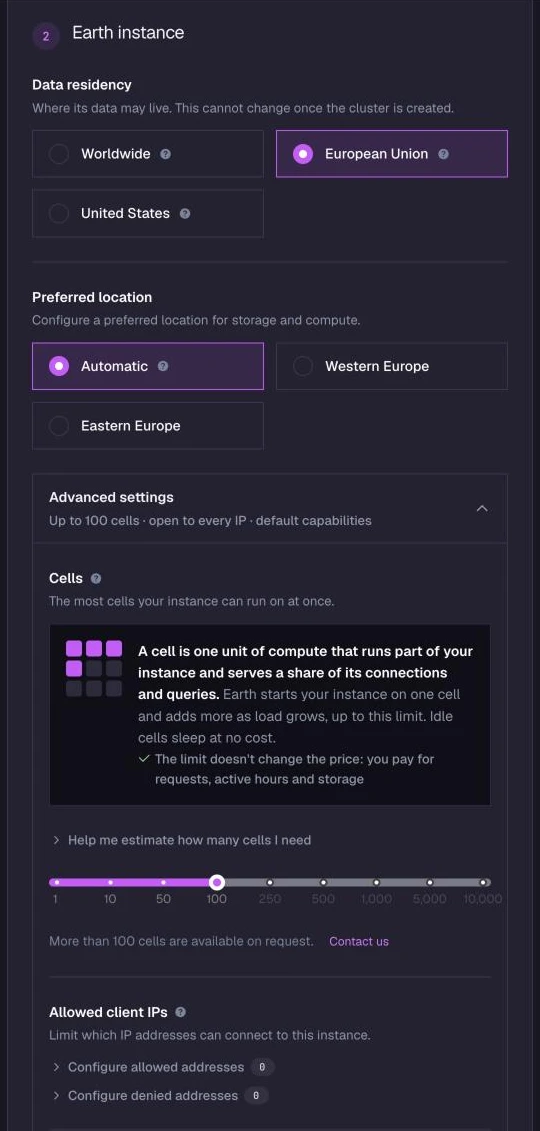
| Cells | The most cells the instance can run at once. The default is 100, which Studio also offers as the most, and a larger count is available on request. The count can be changed later. See Cells for how to choose a count. |
| Network policy | Optional. Which client addresses can connect. See Limit the addresses that can connect. |
| Capabilities | What the instance permits at runtime, such as guest access, the functions it can use and the hosts it can reach. See Capabilities. They can be changed later. |
Cells, the network policy and capabilities are in the Advanced settings panel, which is closed by default, so an instance deployed without opening it takes the defaults.
Cells
A cell is one unit of compute that runs part of an Earth instance. Each cell holds a share of the instance's client connections and runs their queries. The Cells setting is the most cells that the instance can run at once. It is a limit, not capacity that is reserved for the instance: an instance runs only the cells that its load needs, and you do not pay for the cells it does not use.
How Earth adds cells
An instance starts on one cell. Earth sends each new connection to a cell that has room for it.
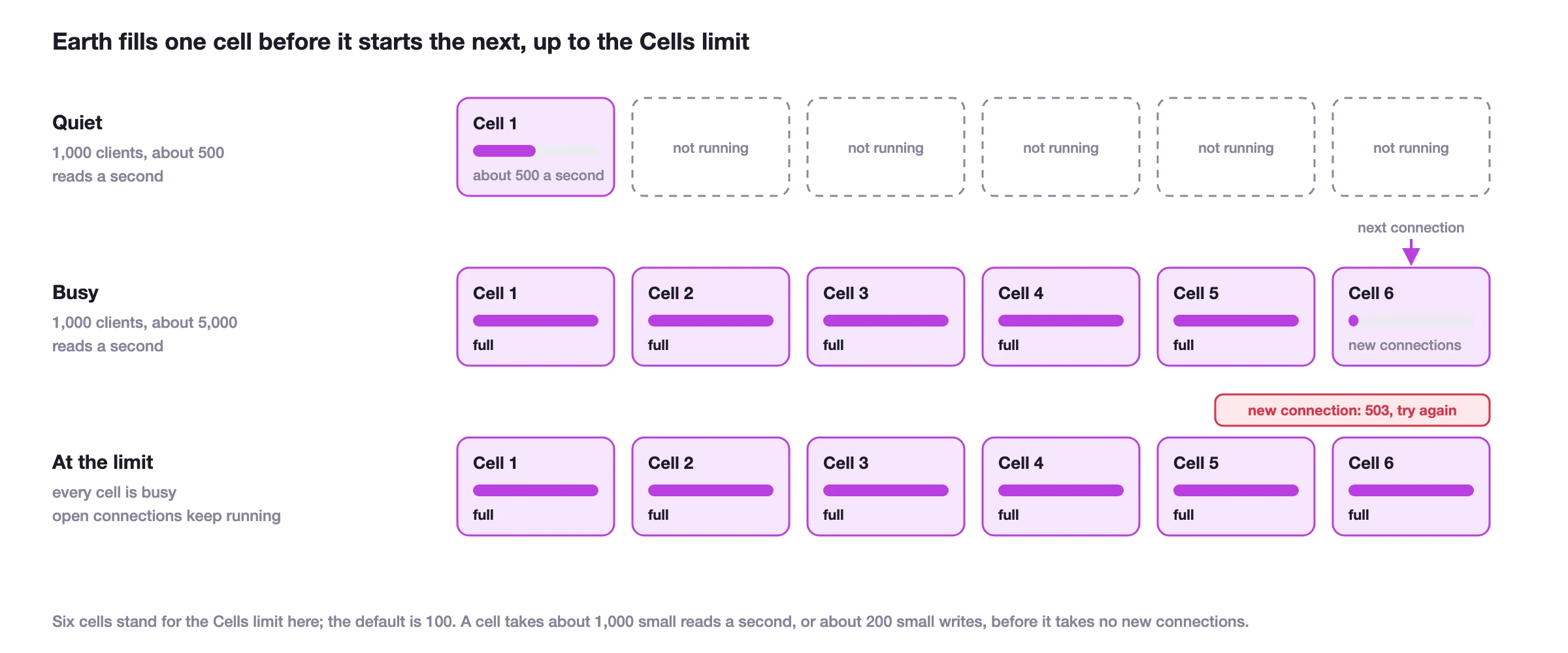
A cell accepts new connections until it is busy or its memory is nearly full. Then it refuses new connections, and Earth starts one more cell for them. So Earth fills one cell before it starts the next.
A cell never refuses a message on a connection that it already holds. A connection stays on its cell until the connection closes.
A cell that gets no requests goes idle and stops using active hours. Its connections stay open while it is idle: a WebSocket connection that waits between messages costs almost nothing to hold.
When the instance runs as many cells as its limit and every cell is busy, Earth answers a new connection, or an HTTP request that is not part of a session, with HTTP status
503. The client can send it again. See Handle busy responses.
What cells change
Concurrent work. More cells let more clients send queries at the same time. A cell can serve about 1,000 small reads a second, such as reads of a record by its ID, or about 200 small writes, before it stops taking new connections. A write costs a cell more than a read because the cell also sends it on to be committed. Larger queries use more of a cell, so a cell serves fewer of them.
Not the speed of one query. A query runs on the cell that holds its connection, so more cells let more queries run at the same time, but do not make one query faster.
Not the amount of data on its own. The data of an instance is kept in storage, not in its cells. An instance with 10 GiB of data needs more cells than one with 1 GiB only when its queries scan more of that data.
Not the commit rate in the same way. Every transaction commits in the instance's one commit order. More cells let more clients send writes at the same time, but the number of commits a second does not grow in proportion to the cells.
Not the number of connections. The plan sets the most clients that can connect to an instance at once. See Plans and usage.
As a guide, find the reads and the writes a second that your clients send at peak. Divide the reads by about 1,000 and the writes by about 200, and add the two. For example, 1,000 WebSocket clients that each read one record every two seconds send about 500 reads a second, which one cell can serve. If each of the same clients reads five records a second, they send about 5,000 reads a second, and the instance runs on about five cells. If 200 of the clients also write one record a second, those 200 writes a second add about one more cell.
What cells cost
You do not pay for cells. You pay for request units, active hours and storage.
Request units are the same on any number of cells. A query costs the same request units on one cell or on fifty.
Active hours add up the time each cell is awake. Because Earth fills a cell before it starts the next, an instance runs only the cells that its load needs. A higher limit does not add active hours to a workload that fits on fewer cells.
A lower limit sets a maximum on active hours. An instance with 10 cells uses at most 10 active hours in an hour. When the load needs more cells than the limit, clients get busy responses instead of more cells. The peak cost is lower, but clients wait and send their requests again.
Choose a cell count
| Workload | Cells |
|---|---|
| Production applications | 100, the default. The instance runs only the cells its load needs, so the default costs no more than a lower limit while the load is low |
| Development, tests and prototypes | 1 to 10, to keep a load test or a bug that sends many queries from adding cells and active hours |
| An instance with a fixed limit on active hours | The most active hours an hour that you accept. For example, 5 cells use at most 5 active hours in an hour |
| A load that keeps all 100 cells busy at peak | More than 100 cells. Contact SurrealDB to ask for a larger count |
Earth Pro has no spending limit yet, so a lower cell count is one way to limit the peak cost of an instance on Earth Pro. On Earth Free, the monthly allowance already limits usage.
To change the cell count of a running instance, open the Cells tab of its settings in Studio, move the slider and select Apply. An Owner or an Admin of the organisation can apply a change, and a Member sees the current count. A higher count takes effect within a minute. A lower count stops Earth from starting more cells, and the cells already running stay until the instance goes quiet.
The Cloud API can also change the count, through the surreal cloud CLI. First read the instance's id, its organisation's id and the id of its Earth resource:
surreal cloud instance get <instance> --json \
  | jq '{id, organization, resource: .earth.resources[0].id, cells: .earth.resources[0].replicas}'
Then send the new cell count as replicas for that resource:
surreal cloud api patch \
  /api/cloud/v0/organizations/<organization>/clusters/<id>/resources/<resource> \
  -d '{"replicas":10}'
The instance shows the state updating and returns to ready within a few seconds. surreal cloud instance update does not change cells, and it refuses --compute-units for an Earth instance.
Plans and usage
Every Earth instance in an organisation runs on the organisation's Earth plan.
Earth Free includes a monthly allowance of request units, active hours, storage, live updates and client time. When the allowance is spent, the organisation's Earth instances pause until the first day of the next month (UTC). The data is kept. Studio warns when 80% of the allowance is used, and shows a paused instance as Paused · Free allowance used, with the date it resumes.
Earth Pro is a monthly subscription for the organisation. Instances keep running after the allowance is spent, and the usage beyond it is billed.
Upgrade to Earth Pro from the deploy page, or from the SurrealDB Earth section of the organisation's billing page, where an owner can also cancel it. A cancelled subscription stays active until the end of the month. See Pricing for the allowances and prices.
The allowance belongs to the organisation, so all of its Earth instances use the same allowance. The plans also differ in these limits:
| Limit | Earth Free | Earth Pro |
|---|---|---|
| Earth instances in the organisation | 100 | No limit |
| Clients connected to one instance at once | 100 | 10,000 |
| Cells per instance | Up to 100 | Up to 100 |
On Earth Free, deploying an instance is refused when the organisation already has 100 Earth instances, or has spent this month's allowance. Subscribe to Earth Pro to deploy more.
Connected clients are WebSocket connections that are open at the same time, counted for each instance. An open WebSocket counts even when it is idle, and HTTP requests do not count. When an instance holds as many WebSocket connections as its plan allows, it refuses a new one with HTTP status 503 and a Retry-After header. Connections that are already open are not affected.
What is measured
Earth measures five things for each instance: request units, active hours, storage, live updates and client time. The dashboard of an instance shows its requests, active hours and storage for the current billing period, and surreal cloud instance usage shows every meter. Network egress is not billed on either plan.
Request units measure the work that requests do. The pricing page lists them as Requests, but a request can cost more than one unit. A request is one HTTP request, or one WebSocket message that carries a query or another RPC method. A query of several statements is one request, and its request units add up the reads and writes of all its statements.
Reads: one unit for each started 16 KiB of a record or index entry that a request fetches by its key, including a check that finds nothing. A scan, such as a
SELECTover a table or a range of an index, costs one unit for each started 16 KiB that it returns. Reads of table and field definitions cost nothing.Writes: three units for each started 4 KiB of each record, index entry or graph edge that a committed transaction writes. A delete counts as one write. A transaction that fails or is cancelled writes nothing, so its writes cost nothing.
Minimum: a request that writes nothing costs at least one unit.
HTTP: a request over HTTP costs two units more than the same request over WebSocket.
Outbound calls: each call that a function such as
http::get()makes to another host costs one more unit.
So a small record read by its ID costs about one unit, and the same record created costs about three units, plus three for each index entry that the write adds.
Active hours measure how long the cells of an instance run. They are added up over all the cells, so one cell that runs for an hour and ten cells that run for six minutes each are both one active hour. A cell counts from when it starts to serve the instance until it is stopped, about 60 seconds after its last query, commit or delivered live update. The 60 seconds cannot be changed. A few requests spread over an hour can therefore keep a cell running for most of it, while a WebSocket that is open but sends no queries does not keep it running. Active hours are not CPU time. An idle instance that has scaled to zero uses no active hours.
Storage is the size of the instance's data, averaged over the month.
Live updates count the notifications that live queries send. One live update is one notification to one connection for one matching live query, so a change that 50 subscribers see counts as 50.
Client time is how long WebSocket connections stay open, counted in client-months: one client-month is one connection that is open for a whole month. An idle connection adds client time but no active hours. HTTP requests add no client time, and cost two more request units each instead.
Control usage
Earth Pro has no setting for a spending limit or for billing alerts yet. These settings limit what an instance can use:
Cells are the most cells that an instance runs at once, so they also limit its active hours: an instance with 10 cells uses at most 10 active hours in an hour. Fewer cells mean lower peak cost, and less work that the instance can do at the same time. See What cells cost.
Capabilities set the functions that queries can call and whether guests can connect. Deny a function that costs a lot to run, such as
crypto::argon2::generate(), when the application does not need it. See Capabilities.Permissions on tables and fields limit what a record user can read and write. See Table permissions.
A network policy limits the addresses that can connect. See Limit the addresses that can connect.
To keep an organisation's Earth usage within a fixed amount, stay on Earth Free, which pauses the instances at its allowance instead of billing more.
Connect to an Earth instance
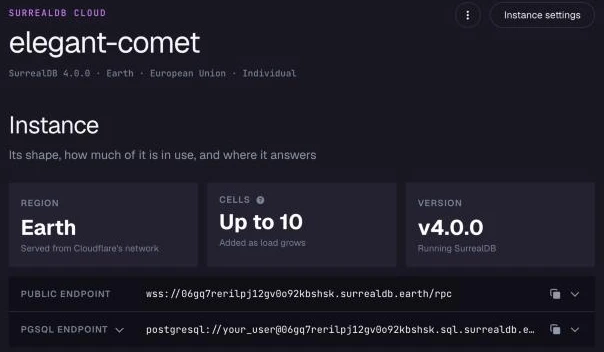
You connect to an Earth instance in the same way as to any other instance: with SurrealDB Studio, an SDK, the CLI or HTTP. Use the public endpoint that the instance's dashboard in Studio shows, in the form wss://<instance-id>.surrealdb.earth/rpc. The dashboard also shows the instance's cell limit and its PostgreSQL endpoint, and its Usage section shows the requests, active hours and storage the instance has used in the current billing period, each with a projection to the end of the month.
A session that does not select a namespace and a database uses the namespace main and the database main.
Use a WebSocket connection when a client sends many queries. Each HTTP request is routed and authenticated separately, so a long series of HTTP requests is slower than the same queries on one open WebSocket.
A Cloudflare Worker that connects to Earth opens its connection inside each request, because a Worker cannot use a connection that another request opened. To run a transaction without a WebSocket connection, send its queries as one request. See Connecting from serverless and edge.
Connect with PostgreSQL or MySQL clients
PostgreSQL and MySQL clients connect to an Earth instance over TCP. TLS is required, and a connection without TLS is closed.
A client names the instance in one of two ways: in the TLS server name (SNI), or in the user name as <user>@<instance-id>.
| Client | Host | Port | User name |
|---|---|---|---|
| PostgreSQL client that sends SNI | <instance-id>.sql.surrealdb.earth | 5432 | <user> |
| PostgreSQL client that does not send SNI | sql.surrealdb.earth | 5432 | <user>@<instance-id> |
| MySQL client | sql.surrealdb.earth | 3306 | <user>@<instance-id> |
MySQL clients, such as the mysql CLI and other clients built on libmysqlclient, do not send SNI, so a MySQL user name always includes @<instance-id>.
When a client does not send SNI and the user name has no @<instance-id>, Earth closes the connection without an error message. psql then reports server closed the connection unexpectedly. Add @<instance-id> to the user name, or connect to <instance-id>.sql.surrealdb.earth with a client that sends SNI.
Sign in with a user defined ON DATABASE. Users defined ON ROOT or ON NAMESPACE cannot run queries over PostgreSQL or MySQL, so define a database user first:
DEFINE USER app ON DATABASE PASSWORD 'change-me' ROLES EDITOR;Name the namespace and database as <namespace>/<database>, with a slash:
psql "host=<instance-id>.sql.surrealdb.earth port=5432 user=app dbname=main/main sslmode=require"psql "host=sql.surrealdb.earth port=5432 user=app@<instance-id> dbname=main/main sslmode=require"mysql -h sql.surrealdb.earth -P 3306 -u 'app@<instance-id>' -p --ssl-mode=REQUIRED main/mainMove a database to Earth
Move a database from a self-hosted server, or from another instance, with surreal db export and surreal db import. An export holds one database, so move a namespace one database at a time.
Upgrade the source to SurrealDB 4.0 first, and export after the upgrade. Earth runs 4.0, so the export is then written by the version that imports it. See 3.x to 4.0 for the upgrade. Then export each database from the source:
surreal db export \
  --endpoint https://<source-host> \
  --user root --pass <password> \
  --ns app --db production \
  ./production.surql
Then import each file into the Earth instance, with the token from the instance's Connect menu in Studio:
surreal db import \
  --endpoint https://<instance-id>.surrealdb.earth \
  --token <token> \
  --ns app --db production \
  ./production.surql
Use an https:// endpoint for both commands. Export and import run over HTTP, and fail on a wss:// endpoint.
Earth defines the namespace and the database on the first request that uses them, so you do not need to create them first. After the import, define these again on the Earth instance:
Definitions on the namespace, such as users and access methods defined
ON NAMESPACE. A database export does not hold them.Access methods with a signing key. An export writes a placeholder in place of the key, and the import refuses it. See Exports and imports.
An import commits each statement as it runs, so a failure partway through keeps the statements before it. When Earth stops an import partway, it answers with HTTP status 409 and the number of the last statement it committed, so the import can be sent again from the statement after it. See Import and export for how to retry a partial import.
Limit the addresses that can connect
A network policy lists the client addresses that can connect to an Earth instance, as IP addresses and CIDR blocks such as 203.0.113.0/24. Set it on the deploy page, or later in the Network policy subsection of the instance's Capabilities settings.
Allowed: when the list has entries, only those addresses can connect. When it is empty, every address can connect.
Denied: these addresses cannot connect, even when they are also in the allowed list.
A policy holds at most 256 entries. An address that the policy refuses gets HTTP status 403.
The policy applies to HTTP and WebSocket connections. It does not apply to PostgreSQL and MySQL clients yet.
Handle busy responses
When an instance is adding compute, Earth can answer a new request with HTTP status 503. The request did not start, so it is safe to send again. Retry it after a short delay, and increase the delay for each retry.
A request that needs more memory than a cell can give it is stopped before it commits, and answered with HTTP status 507, or with an error over a WebSocket connection. Nothing of it is written. Send it again, and split the work into smaller requests if it fails again.
Earth does not refuse work that belongs to a transaction it has already accepted. A transaction that has started continues to its commit or rollback.
Features not available yet
The features below are not available on Earth. They are planned for a future release.
| Feature | What happens on Earth | Documentation |
|---|---|---|
| Change feeds | SHOW CHANGES returns an error, and a table or database defined with CHANGEFEED records no changes | Change feeds |
| Extensions | WebAssembly extensions cannot be loaded or called | Extensions |
| JavaScript functions | Embedded scripting functions, written as function() { ... }, are turned off. The scripting capability cannot be turned on | Scripting |
| Files | A bucket defined with DEFINE BUCKET does not keep its files reliably, so a file written with the file:: functions can be missing from a later request. Do not store files on Earth yet | Buckets |
If your workload needs one of these features now, deploy it on the Start or Scale plan.
Check the changelog for features as they become available on Earth.
Things to know
Define a table before a long transaction writes to it. A transaction that creates a table by its first write, and stays open for a long time, can fail at commit with a transaction conflict. Run
DEFINE TABLEfirst, outside the transaction, and the same transaction commits.Build a large index with
CONCURRENTLY. ADEFINE INDEXorREBUILD INDEXwithoutCONCURRENTLYruns its whole build within the request, as on any SurrealDB server, so aUNIQUEindex is enforced as soon as the statement returns. The build is then limited by the query timeout. If the build is not finished in time, aDEFINE INDEXfails and its definition is removed, while aREBUILD INDEXreports that the rebuild continues in the background. AddCONCURRENTLYto build an index over a large table in the background.Send a schema as one transaction. Each statement outside a transaction is a commit of its own, and every commit waits for durable storage. A schema of many
DEFINEstatements therefore loads faster inside oneBEGIN...COMMITblock, which also applies all of it or none of it.A transaction covers one instance. Each Earth instance has its own commit log, and Earth does not coordinate a transaction across several instances. To keep the data of each tenant, user or agent apart and still write to several of them in one transaction, give each one its own namespace or database in one instance, and use separate instances where they need different data residency.
Capabilities still apply. You can allow guest access, and allow or deny functions and other capabilities, for an Earth instance. The scripting capability always stays off. Outbound network access is off until you allow it: list the hosts that functions such as
http::get()may reach, as host names with an optional port, IP addresses or CIDR blocks, in the instance's capabilities.Earth takes no snapshots. An Earth instance has no backup schedule and cannot be restored from a snapshot. To keep a copy of the data, export it over an
https://endpoint withsurreal db export. See Import and export.Earth has no metrics or logs. The dashboard of an instance shows its requests, active hours and storage, the Usage page of the organisation shows its Earth allowance, and
surreal cloud instance usageshows every meter.An Earth instance can be renamed. Change its name in the General tab of its settings. The instance id and the endpoints stay the same.
The first request after an idle period is slower. An instance that has scaled to zero starts again on its next request.
Related pages
Instances: the Start and Scale plans and how they differ.
Connect to an instance: Studio, SDKs, the CLI and HTTP.
Live queries: real-time notifications, which Earth supports.
Pricing: how Earth usage is billed.