Capabilities control features such as scripting, functions and network access. Most capabilities are disabled by default and must be explicitly enabled by an administrator per use case.
Capabilities are configured per instance from Instance settings in SurrealDB Studio. See Configure an instance for the available settings.
When a query wants to use a capability that is not allowed, SurrealDB will reject it.
http::get("https://www.surrealdb.com");

["Access to network target 'www.surrealdb.com:443' is not allowed"]
This rejection will also be logged in the SurrealDB server.
WARN surrealdb_core::ctx::context: Capabilities denied outgoing network connection attempt, target: 'www.surrealdb.com:443'In production deployments, we recommend denying all capabilities by default and specifically allowing only those required.
surreal db start --deny-all --allow-funcs "array, string, crypto::argon2, http::get" --allow-net api.example.comYou can learn more about best practices when using capabilities in our Security Best Practices guide.
Priority
By default, all capabilities are denied unless allowed. Some few capabilities (e.g. functions) are allowed by default.
Capabilities can be configured globally (e.g. --allow-all, --deny-all), generally (e.g. --allow-net, --deny-funcs) or specifically (e.g. --deny-net 192.168.1.1, --allow-funcs string::len). When capabilities are configured, the more specific capabilities prevail over the less specific. At the same level of specificity, denies always prevail over allows.
Examples
Capabilities configured generally prevail over those defined globally:
Running with
--deny-all --allow-scriptingwill deny all capabilities except for scripting.Running with
--allow-all --deny-netwill allow all capabilities except for network.
Capabilities configured specifically prevail over those defined globally or generally:
Running with
--deny-all --allow-net example.comwill deny all capabilities except network connections toexample.com.Running with
--allow-all --deny-funcs httpwill allow all capabilities except for calling functions of thehttpfamily.Running with
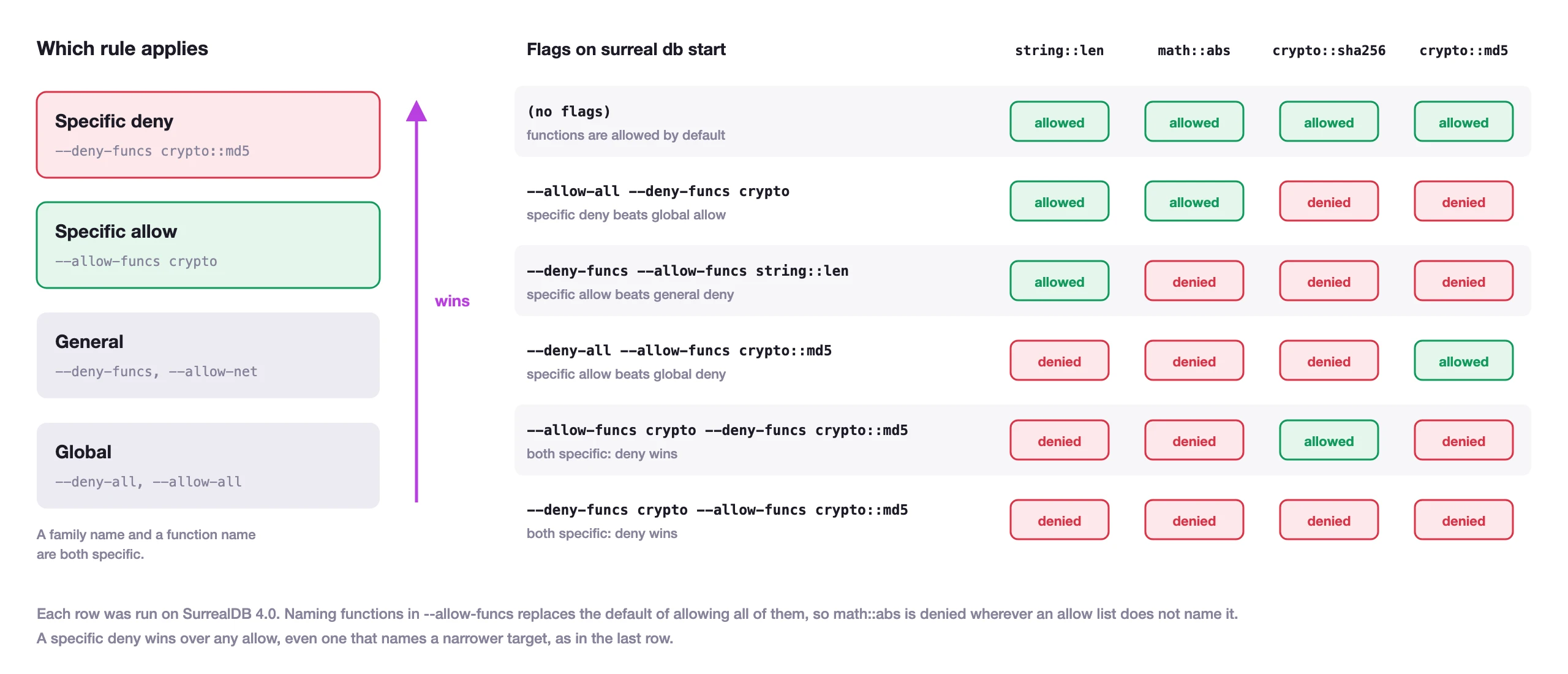
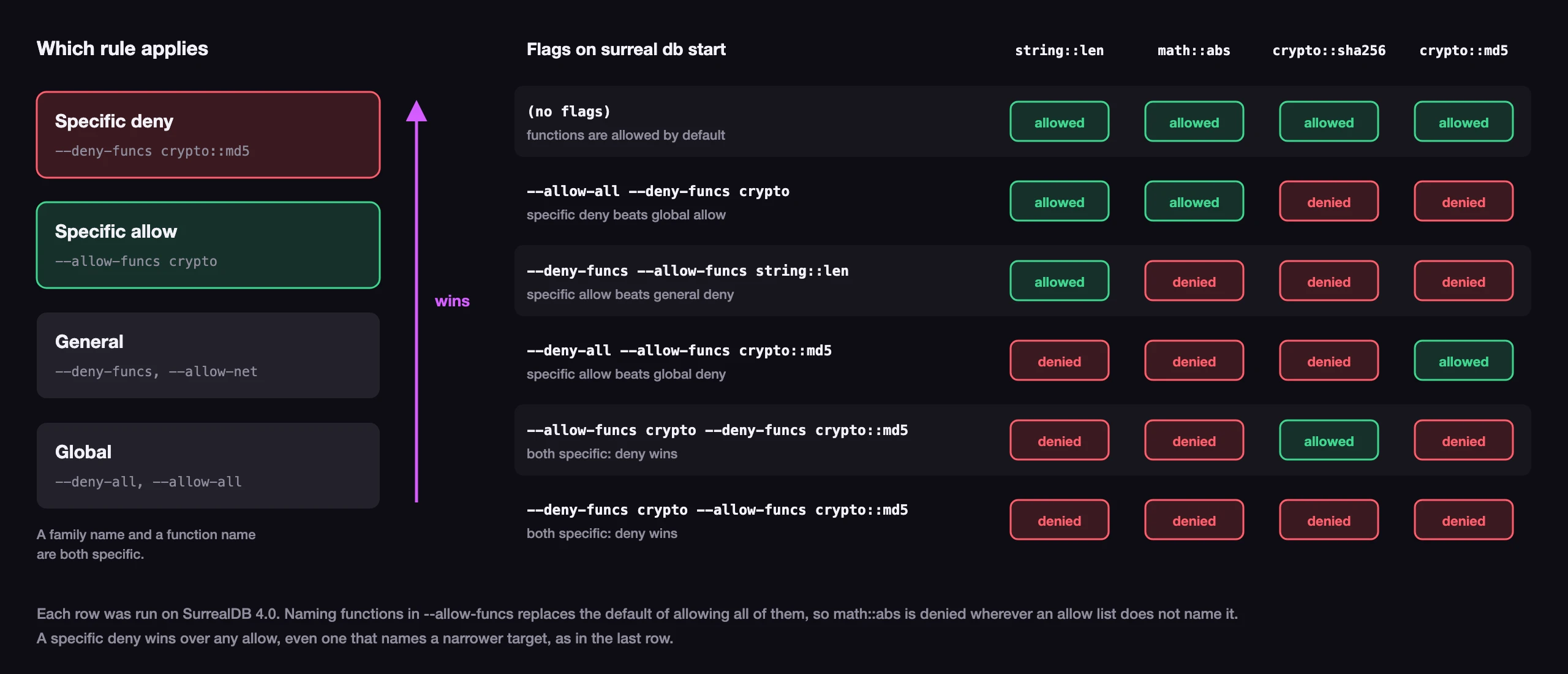
--deny-funcs --allow-funcs string::lenwill deny all functions except forstring::len.Running with
--allow-net --deny-net 10.0.0.0/8will allow all network connections except to the10.0.0.0/8block.
Capabilities denied specifically prevail over those allowed specifically:
Running with
--deny-funcs crypto --allow-funcs crypto::md5will deny all functions of thecryptofamily, includingcrypto::md5.Running with
--allow-funcs crypto --deny-funcs crypto::md5will allow all functions of thecryptofamily except forcrypto::md5.
A function target names a family (crypto) or one function in it (crypto::md5). A bare name such as md5 is read as a family of its own, so it matches no crypto function. In both examples, functions outside the allow list, such as string::len, are denied.
The diagram below shows which functions each set of flags allows, as run on SurrealDB 4.0.
Server versus client configuration
Capability flags on surreal db start configure the running database instance. That is what enforces permissions when clients connect over HTTP, WebSocket, RPC, or surreal db sql to a remote endpoint.
surreal db sql accepts the same flags, but they apply differently:
| How you connect | Configure capabilities on |
|---|---|
Remote server (ws://, http://, …) | surreal db start (or server env vars) |
Embedded storage (memory, surrealkv://…, …) | surreal db sql |
When using a remote server, flags on surreal db sql do not enable or disable execution-time checks such as eval::*, arbitrary-query gates, or experimental features. They can still affect REPL line parsing before a query is sent.
See Capabilities and remote connections for detail.
Capabilities in the startup log
Available since: v4.0.0
The server logs the capabilities it starts with at the info level, in a line that begins Server capabilities:, so the default log output shows them. It also logs a warning at startup for each of these settings:
| Setting | The warning begins |
|---|---|
--allow-all | You are allowing all capabilities by default (--allow-all). |
Guest access, with --allow-guests | Guest (anonymous) access is enabled |
Scripting, with --allow-scripting | Scripting is enabled |
Network access to every target, with --allow-net and no target list, and no --deny-net | Outbound network access is unrestricted (--allow-net) |
--allow-all allows guest access, scripting and network access too, so it logs all four warnings, except for a capability that is denied separately, as with --allow-all --deny-net. The server also logs a warning when it starts with --unauthenticated. The warnings change nothing about what the server allows.
WARN surrealdb_server::dbs: ⚠️ You are allowing all capabilities by default (--allow-all). This is not recommended for production use.List
List of options for allowing capabilities:
Option | Description | Default |
|---|---|---|
-A, --allow-all | Allow all capabilities except for those more specifically denied like experimental features | False |
-A, --allow-arbitrary-query | Denies arbitrary queries to be used by user groups. Possible user groups are: 'guest', 'record', and 'system'. | False |
--allow-experimental | Allow the usage of one or more experimental features. Possible values are raw keyspace export route), separated by a comma. See experimental capabilities for which tag enables each feature. GQL, files and buckets are on by default and are not experimental features. From 4.0, the tags gqland filesare refused as invalid names, so a server given either one does not start. | None |
--allow-eval-query target,... | Allow the eval::surqland eval::gqlfunctions for certain user groups ( guest, record, system). Denied for everyone by default, even under --allow-all. Cannot bypass --deny-arbitrary-queryfor the same subject. See eval queries . | None |
--allow-funcs target,... | Allow execution of all functions except for functions that are specifically denied. Alternatively, you can provide a comma-separated list of function names to allow | None |
--allow-guests | Allow non-authenticated users to execute queries when authentication is enabled | False |
--allow-net target,... | Allow all outbound network access except for network targets that are specifically denied. Alternatively, you can provide a comma-separated list of network targets to allow | None |
--allow-scripting | Allow execution of embedded scripting functions | False |
List of options for denying capabilities:
Option | Description | Default |
|---|---|---|
-D, --deny-all | Deny all capabilities except for those more specifically allowed | False |
-D, --deny-arbitrary-query | Denies arbitrary queries from being used by user groups. Possible user groups are: 'guest', 'record', and 'system' | False |
--deny-eval-query target,... | Deny the eval::surqland eval::gqlfunctions for certain user groups ( guest, record, system). Specifically denied groups prevail over allowed groups. See eval queries . | None |
--deny-funcs target,... | Deny execution of all functions except for functions that are specifically allowed. Alternatively, you can provide a comma-separated list of function names to deny | None |
--deny-guests | Prevent non-authenticated users from executing queries when authentication is enabled | False |
--deny-net target,... | Deny all outbound network access except for network targets that are specifically allowed. Alternatively, you can provide a comma-separated list of network targets to deny | None |
--deny-scripting | Deny execution of embedded scripting functions | False |
Guest access
Guest access is used when you want to expose certain parts of a database to non-authenticated users. It's useful when you want to serve datasets publicly and still require authentication for the rest of the system.
Even when this capability is allowed, a guest user can only execute functions or data operations like SELECT, CREATE, etc, and only if the PERMISSIONS clause for the resource being used in the query allows it.
-- Prepare tables with custom PERMISSIONS
test/test> DEFINE TABLE protected PERMISSIONS NONE;
test/test> DEFINE TABLE public PERMISSIONS FULL;

-- When guest access is allowed
$ surreal db start --allow-guests

test/test> CREATE public;
[{ id: public:uy0qzy31v4xox8vivrd4 }]

test/test> SELECT * FROM public;
[{ id: public:uy0qzy31v4xox8vivrd4 }]

test/test> CREATE protected;
[]

test/test> SELECT * FROM protected;
[]

-- When guest access is denied
$ surreal db start --deny-guests

test/test> CREATE public;
Anonymous access not allowed: Not enough permissions to perform this action

test/test> SELECT * FROM public;
Anonymous access not allowed: Not enough permissions to perform this action

test/test> CREATE protected;
Anonymous access not allowed: Not enough permissions to perform this action

test/test> SELECT * FROM protected;
Anonymous access not allowed: Not enough permissions to perform this action
Functions
SurrealDB offers built-in functions to perform common operations like string manipulation, math, etc. Users can also define their own functions with custom logic.
In certain environments, you may not want users to use specific functions (i.e. http::*) or execute any custom function at all. You can use the allow/deny lists to configure what functions are allowed and what functions are denied.
// Allow all functions except the http family and crypto::md5()
surreal db start --allow-funcs --deny-funcs "http","crypto::md5"

// Allow certain custom functions only (all custom functions start with "fn::")
surreal db start --allow-funcs "fn::shared_fn"
A denied function is refused however a query calls it, including through method syntax. With --deny-funcs string::len, both string::len('abcd') and 'abcd'.len() return the error Function 'string::len' is not allowed to be executed. From SurrealDB 4.0, this also applies to a call from an embedded script through surrealdb.functions, such as surrealdb.functions.string.len('abcd').
Before SurrealDB 3.3.1, method syntax was able to call some denied functions: 'abcd'.len() returned 4 while string::len('abcd') was refused. SurrealDB 3.3.1 fixes this.
Network
SurrealDB can make outbound network connections from http::* functions and from JWKS fetches used by JWT access methods. Use --allow-net and --deny-net to control which targets those connections may reach.
# Deny network access to localhost and private IPv4 ranges
surreal db start --allow-net --deny-net "127.0.0.1","localhost","10.0.0.0/8","192.168.0.0/16","172.16.0.0/12"

# Allow access to one host, on any port
surreal db start --allow-net internal.example.com

# Allow access to one IP address on port 443 only
surreal db start --allow-net 10.1.2.3:443

# Allow access to some private networks but not to others
surreal db start --allow-net 10.0.0.0/16 --deny-net 10.10.0.0/24
A target without a port, such as internal.example.com, allows or denies every port of that host. A target with a port allows or denies only that port. A port wildcard such as internal.example.com:* is not accepted, and the server refuses to start with The provided network target is not a valid host name, IP address or CIDR block, so leave the port out to cover every port.
An allow rule that names a host with a port, such as internal.example.com:443, currently refuses every request to that host. The host name is checked again without a port when it is resolved, and the rule does not match it, so the request fails with There was an error processing a remote HTTP request: error sending request for url rather than a capability error. Allow the host without a port. A port in an allow rule works only for a request whose URL names an IP address, such as https://10.1.2.3:443, and a deny rule with a port works in both cases.
From SurrealDB 4.0, a target can name every subdomain of a domain with *. as its leftmost label. *.example.com matches api.example.com and a.b.example.com, but not example.com itself, so list both to include the domain. A wildcard never matches an IP address, and a deny rule with a wildcard wins over an allow rule in the same way as any other.
# Allow any subdomain of example.com
surreal db start --allow-net "*.example.com"

# Allow all network access except to one domain and its subdomains
surreal db start --allow-net --deny-net "tracker.example","*.tracker.example"
A wildcard must be the whole leftmost label and be followed by at least two labels, so *.com, a.*.example.com and *example.com are refused when the server starts. Before 4.0, a target such as *.example.com was read as an exact host name, which matches nothing.
SurrealDB resolves hostnames with DNS, then checks every resulting IP address against --allow-net and --deny-net. A hostname that resolves to an address listed in --deny-net is blocked.
Note that allowlisting a hostname alone is not enough when that name resolves to a private or special-use address (loopback, link-local, RFC1918 ranges, cloud metadata endpoints, etc.). SurrealDB blocks those addresses unless you also list the IP or CIDR in --allow-net, or you pass --allow-net with no target filter. This reduces SSRF risk from DNS rebinding or HTTP redirects into the local network.
Example for an in-cluster JWKS issuer whose service name resolves inside 10.0.0.0/8:
surreal db start --deny-all --allow-net idp.namespace.svc,10.0.0.0/8 SurrealDB does not perform reverse DNS lookups. A client can still reach an IP address directly even when a hostname that resolves to that IP is listed in --deny-net. This matters when network access is allowed by default (for example --allow-net --deny-net www.example.com) or when an IP is allowlisted while its hostname is denylisted (for example --allow-net 203.0.113.10 --deny-net www.example.com).
Deny by default: list only the --allow-net targets you need, and keep additional network controls in your infrastructure.
Arbitrary queries
The --allow-arbitrary-query and --deny-arbitrary-query allow database administrators to allow or deny arbitrary querying by either guest, record or system users, or a combination of those. This capability setting affects the following: /sql endpoint, /key endpoints, /graphql endpoint, /gql endpoint, the Postgres wire protocol listener, RPC methods use, select, create, update, merge, patch, delete, relate, insert, insert_relation, query, gql, graphql, pgsql and mysql, and the eval::* functions. From SurrealDB 4.0, it also affects the surrealdb.query() and surrealdb.value() functions inside an embedded script, so a script that a record user runs through a defined function or a DEFINE API endpoint fails with Function 'surrealdb.query' is not allowed to be executed when arbitrary queries are denied for record users.
Endpoints that do not accept arbitrary queries such as /version and authentication endpoints are not affected.
The --deny-arbitrary-query flag is often preceded with a DEFINE API statement to set up certain endpoints that users can use to access database resources in place of arbitrary queries.
Eval queries
Available since: v3.2.0
The eval::surql and eval::gql functions evaluate query strings at runtime. They are controlled by --allow-eval-query and --deny-eval-query, with subject groups guest, record, and system.
Unlike most capabilities, eval is denied for every subject by default, including when you pass --allow-all. You must opt in explicitly:
surreal db start --allow-eval-queryArbitrary queries are allowed by default on the server, so you do not need --allow-arbitrary-query for eval unless you have restricted arbitrary queries (for example with --deny-arbitrary-query or --deny-all). If a subject is denied arbitrary queries - a common pattern alongside DEFINE API - eval is denied for that subject too, even when --allow-eval-query includes them. eval cannot bypass arbitrary-query lockdown.
Deny rules at the same specificity prevail over allow rules. A record user calling an owner-defined function that invokes eval is still checked as record - auth limiting never escalates the subject.
Configure --allow-eval-query on surreal db start when clients connect to a remote instance. It is not required on surreal db sql for remote connections - only for embedded REPL sessions.
eval::gql does not need an experimental capability from 3.3.0 (on 3.2.x, also allow gql). See Eval functions and Representations and codecs.
HTTP routes and RPC methods
Two capabilities switch individual entry points off rather than whole classes of behaviour. --allow-http and --deny-http take HTTP route names, and --allow-rpc and --deny-rpc take RPC method names. Each takes a comma-separated list, or no value at all to mean every route or every method.
# Close the SQL and import endpoints, leave the rest open
surreal db start --deny-http sql,import

# Open only the RPC methods a read-only client needs
surreal db start --deny-rpc --allow-rpc use,select,query
These follow the same priority rules as every other capability, so a specific deny beats a specific allow, and both beat the blanket form.
HTTP route names
A route name covers every method and path under it, so key covers all ten /key endpoints.
| Name | Covers |
|---|---|
health | GET /health and the gRPC Health call, but not the /status and /ready probes |
version | GET /version |
import | POST /import |
export | POST /export |
signin | POST /signin |
signup | POST /signup |
key | The /key table and record endpoints |
sql | POST /sql |
gql | POST /gql, and the gql dialect on the Postgres and MySQL listeners |
graphql | POST /graphql |
api | Endpoints defined with DEFINE API |
bucket Available since: v4.0.0 | The /bucket file routes, including requests with a presigned URL |
mcp | The MCP server endpoint |
rpc | The HTTP /rpc endpoint |
sync | The internal sync endpoint |
postgres Available since: v3.3.0 | The Postgres wire protocol listener, and the PostgreSQL dialect on the MySQL listener |
mysql Available since: v4.0.0 | The MySQL wire protocol listener |
rpc closes the HTTP /rpc endpoint as a whole. To leave it open and restrict what can be called through it, use the RPC method names below, which apply to the WebSocket and gRPC transports as well.
RPC method names
| Group | Names |
|---|---|
| Session | use, info, ping, version, reset |
| Authentication | signup, signin, authenticate, invalidate, refresh, revoke |
| Querying | query, run, gql, graphql, pgsql, mysql |
| Reading and writing | select, create, insert, insert_relation, relate, update, upsert, merge, patch, delete |
| Parameters | set, unset |
| Live queries | live, kill |
| Transactions | begin, commit, cancel |
| Streaming | query_stream, query_cancel |
| Attached sessions | attach, detach, sessions |
Names are matched case-insensitively, so --deny-rpc GraphQL and --deny-rpc graphql are the same. gql and graphql are separate methods.
MCP tools
Available since: v4.0.0
--allow-mcp and --deny-mcp allow or deny individual tools of the built-in MCP server that surreal db start serves at /mcp. They take tool names in the same way as the HTTP and RPC flags, and follow the same priority rules. Every tool is allowed by default.
# Leave the MCP server open, without its GraphQL tools
surreal db start --deny-mcp graphql,gql

# Allow only the tools that read
surreal db start --deny-mcp --allow-mcp use,info,list,select
The tool names are query, select, create, insert, upsert, update, delete, relate, info, list, use, run, gql and graphql, matched case-insensitively. A call to a denied tool runs nothing, and the client receives a tool error that says the tool is denied by the server's capability configuration. The flags apply to tool calls only, and do not affect the server's resources and prompts. To close the MCP server as a whole, deny the mcp HTTP route instead.
GQL entry surfaces
ISO GQL is on by default from 3.3.0, and the GQL executor is reachable from four entry surfaces. Each has its own switch, so a deployment that serves no GQL closes each surface it exposes:
| Entry surface | Switch |
|---|---|
The /gql endpoint | --deny-http gql |
The gql RPC method, over WebSocket, HTTP /rpc and gRPC | --deny-rpc gql |
eval::gql() inside any SurrealQL | --deny-eval-query, which is also the default state. --deny-funcs reaches it as well. |
The Postgres wire protocol dialect=gql Available since: v3.3.0 | --deny-http gql |
--deny-http gql covers the /gql endpoint and the Postgres dialect together, because both are checked against the same gql route target. The gql RPC method answers to --deny-rpc gql instead, so the HTTP route and the RPC method are closed separately. The Postgres listener has a route name of its own, so --deny-http postgres closes the port whatever dialect a client asks for, and --deny-http gql leaves the port open while refusing the GQL dialect on it.
Selecting the Postgres dialect
Available since: v3.3.0
A Postgres client selects the dialect in two places, and both are checked from 3.3.0. A connection that asks for GQL at connect time with options=-c dialect=gql is refused and closed. A session that runs SET dialect = 'gql' receives 42501 insufficient_privilege and stays usable for SurrealQL.
The check runs where the dialect is selected rather than where a query runs, so a client learns the reason at that point instead of receiving parse errors from a connection left in SurrealQL.
--deny-arbitrary-query reaches all four surfaces as well, since each of them accepts a query string.