The Python SDK connects to SurrealDB over a WebSocket, over HTTP, or to an embedded engine that runs in your own process. This page shows how to open, configure and close a connection, how to select a namespace and database, and what a connection does when the network fails. It is for readers who have installed the SDK and want to choose and set up a connection.
API references
Method | Description |
|---|---|
Surreal(url, **options) | Creates a blocking connection of the type that the URL names |
AsyncSurreal(url, **options) | Creates an asynchronous connection of the type that the URL names |
db.connect(url?) | Opens the connection, or points it at another URL |
db.close() | Closes the connection |
db.use(namespace?, database?) | Selects a namespace, a database, or both |
db.timeout(seconds) | Changes how long requests wait for a reply inside a withblock |
db.is_feature_supported(feature) | Returns whether the connected server offers a feature |
db.status | The state of a WebSocket connection |
db.subscribe(event, listener) | Calls a function each time a WebSocket connection changes state |
db.health() | Asks the server whether it is healthy |
db.server_version | The version that the server reported when the connection opened |
db.version() | Asks the server for its version |
db.wire_format | The CBOR format that the connection uses |
Choosing synchronous or asynchronous
The SDK has two factory functions. Surreal returns a blocking connection, whose methods return when the request is complete. AsyncSurreal returns an asynchronous connection, whose methods you await in an asyncio event loop. Both kinds of connection have the same methods.
Use Surreal in scripts, command-line tools and other synchronous code. Use AsyncSurreal in applications that run on asyncio, such as FastAPI and aiohttp services.
from surrealdb import Surreal

with Surreal("ws://localhost:8000") as db:
    db.signin({"username": "root", "password": "secret"})
    db.use("surrealdb", "docs")
print(db.query("RETURN session::db()").first())docsSurreal and AsyncSurreal are functions that choose a connection class from the URL, so they cannot be used as type annotations. Annotate a connection with the type aliases BlockingSurrealConnection and AsyncSurrealConnection instead:
from surrealdb import AsyncSurrealConnection, Table


async def count_people(db: AsyncSurrealConnection) -> int:
    people = await db.select(Table("person"))
    return len(people)
Opening a connection
A context manager is the simplest way to open a connection. with or async with opens the connection when the block starts and closes it when the block ends, also when the code in the block raises an exception. The example above uses this form.
Without a context manager, call connect() to open the connection and close() when you no longer need it:
from surrealdb import Surreal

db = Surreal("ws://localhost:8000")
db.connect()
db.signin({"username": "root", "password": "secret"})
db.use("surrealdb", "docs")

db.close()
A WebSocket connection also opens on its first request, so connect() is optional there. If you call it, a server that cannot be reached raises ConnectionUnavailableError at connect(), instead of at the first query. An HTTP connection holds nothing open: its connect() only asks the server for its version.
Connection URLs
The scheme of the URL chooses the type of connection.
| Scheme | Connection | Description |
|---|---|---|
ws://, wss:// | WebSocket | A long-lived connection that supports every SDK feature, including sessions, transactions, live queries and automatic reconnection. wss:// uses TLS. |
http://, https:// | HTTP | One HTTP request for each call, with no connection held open. https:// uses TLS. |
mem://, memory://, memory | Embedded, in memory | An engine in your process whose data is lost when the connection closes. |
file://, surrealkv:// | Embedded, on disk | An engine in your process that stores its data in a SurrealKV directory. |
surrealkv+versioned:// | Embedded, on disk | As surrealkv://, and it also keeps earlier versions of each record. |
For a WebSocket or HTTP URL, the SDK adds the /rpc path itself, so ws://localhost:8000 and ws://localhost:8000/rpc reach the same endpoint. It also drops a trailing slash.
The embedded schemes need the embedded extra, as described in Embedded databases. memory is the only scheme that the SDK accepts without ://.
A URL with an unknown scheme, or with no scheme, raises UnsupportedEngineError. A URL that cannot be parsed, such as one with a port above 65535, raises InvalidUrlError. Both are subclasses of SurrealError.
Selecting a namespace and database
Most requests need a namespace and a database. Select them with use() after you connect:
db.use("surrealdb", "docs")Each argument can be given alone. use(database="reports") changes only the database, and use(namespace="other") changes only the namespace. An argument that you leave out, or pass as None, keeps its current value. To clear a value, pass Null:
from surrealdb import Null

db.use(database="reports")
print(db.query("RETURN [session::ns(), session::db()]").first())

db.use(Null, Null)
print(db.query("RETURN [session::ns(), session::db()]").first())['surrealdb', 'reports']
[None, None]On a WebSocket connection, the namespace and database properties hold the selection of the connection's own session. Each session from new_session() has a selection of its own, as described in Multiple sessions.
Closing and reopening a connection
close() closes the connection. It does nothing on a connection that is already closed, so you can call it more than once.
db.close()After close(), connect() opens a WebSocket connection again. The new socket is a new session on the server, so the namespace, database, variables and sign-in of the old socket are gone, and so are the sessions from new_session():
db.close()
db.connect()
print(db.namespace, db.database, db.token)None None NoneSign in and call use() again after you reopen a connection. A connection created with the auth option signs in again by itself.
An HTTP connection keeps its sign-in, namespace and database across close(), because the SDK holds them and sends them with each request. Closing an HTTP connection only releases the HTTP connections that it reused between requests.
To point a connection at another server, pass the URL to connect(). A WebSocket connection closes its open socket first, and an HTTP connection removes its sign-in, because a token belongs to the server that issued it. On a WebSocket connection, a URL that the connection already uses changes nothing, so the sign-in stays.
Connection options
Surreal() and AsyncSurreal() take keyword options after the URL. The options table in the API reference lists each one with its default. A WebSocket connection uses every option. An HTTP connection uses timeout, version_check, auth and renew_access. An embedded connection ignores all of them.
The sections below describe the options that control the connection itself. auth and renew_access are described in Authentication, and streaming in Streaming results.
Request timeouts
Each request waits timeout seconds for its reply, 30 by default, and raises TransportTimeoutError if no reply arrives in that time. timeout=None waits without a limit.
To change the limit for some requests only, use timeout() as a context manager. The limit applies to each request made inside the with block:
from surrealdb import Surreal, TransportTimeoutError

with Surreal("ws://localhost:8000", timeout=10) as db:
    db.signin({"username": "root", "password": "secret"})
    db.use("surrealdb", "docs")

    try:
        with db.timeout(0.5):
            db.query("SLEEP 2s").execute()
    except TransportTimeoutError as error:
        print(error)

    with db.timeout(300):
print(db.query("SLEEP 2s; RETURN 'done'").execute())timed out while query: no answer within 0.5s
[None, 'done']When a request times out, the SDK stops waiting, but the server can still run the request to the end. A write that timed out can therefore still be applied.
On an asynchronous connection the block is also a plain with. The limit follows the code inside the block across await, applies to tasks that are started inside the block, and does not change the limit for other tasks or threads that use the same connection.
Sessions and transactions have the same timeout() method. The embedded engine accepts it and ignores it. export(), export_to() and import_() are not limited by the timeout option, only by a timeout() block, as described in Import and export.
Automatic reconnection
A WebSocket connection reconnects by itself when its socket drops, for example when the network fails or the server restarts. It opens a new socket and restores what the server held for the old one:
Sessions: for the connection's own session and for every other session on the connection, the namespace and database, the variables set with
let(), and the sign-in.Live queries: every live query started with
live(). The query starts again on the server under a new id, and its notifications keep arriving on the same subscription object.
If the access token of a session expired while the socket was down, the connection renews it with the refresh token of that session, if it holds one.
A request that was waiting for its reply when the socket dropped raises ConnectionUnavailableError. The SDK does not send it again, because the server might have run it already. A request made while the connection reconnects waits until the restore is complete, or until its timeout.
The asynchronous connection notices a dropped socket immediately and starts to reconnect. The blocking connection has no background work, so it notices the drop when the next request or live subscription uses the socket, and makes its first attempt then.
By default, the connection makes 5 attempts. Each wait between attempts is twice as long as the one before, starting at 2 seconds and never longer than 60 seconds, and changes at random by up to 10%, so that many clients do not reconnect at the same moment. ReconnectOptions changes these values. attempts=-1 tries without a limit:
from surrealdb import ReconnectOptions, Surreal

db = Surreal(
    "ws://localhost:8000",
    reconnect=ReconnectOptions(attempts=-1, retry_delay_max=10.0),
)
When the last attempt fails, the connection stops. It forgets the state of every session, ends each live subscription with ConnectionUnavailableError, and reports a "disconnected" and an "error" event. The next request opens a new socket that has no sign-in, namespace or database, unless the connection was created with the auth option.
Two kinds of live query do not start again. A query attached with live_of() belongs to the code that started it, so the connection does not know how to restart it. A query whose session has signed in as a different user since the query started ends with ConnectionUnavailableError, so that it does not run again for another user.
reconnect=False turns reconnection off. A connection whose socket drops then behaves as one that stopped after its last attempt.
Keepalive pings
A WebSocket connection sends a ping every ping_interval seconds, 30 by default, and treats the connection as lost when the reply does not arrive within ping_timeout seconds, 10 by default. A server that has gone away is therefore noticed within about 40 seconds, and the connection then reconnects as described above.
To notice a lost server sooner, use smaller values:
db = Surreal("ws://localhost:8000", ping_interval=10, ping_timeout=5)ping_interval=None sends no pings, and ping_timeout=None waits for each reply without a limit. These suit a connection through a proxy that checks the connection itself. A value of zero or less raises ValueError.
Server version check
When a remote connection opens, it asks the server for its version. A WebSocket connection asks when the socket opens, and an HTTP connection asks before its first request.
The SDK supports SurrealDB 2.x, 3.x and 4.x, which is the range from MINIMUM_VERSION up to but not including MAXIMUM_VERSION. Both constants are exported from surrealdb. A server outside that range is refused with UnsupportedVersionError, which holds the reported version, the minimum and the maximum. A pre-release or nightly build counts as the release that it leads up to.
from surrealdb import Surreal, UnsupportedVersionError

db = Surreal("ws://localhost:8000")
try:
    db.connect()
except UnsupportedVersionError as error:
    print(f"SurrealDB {error.version} is not supported")
version_check=False connects to such a server anyway. Embedded connections are not checked.
Checking server features
Some SDK features need a newer server than the oldest version that the SDK supports. is_feature_supported() returns whether the connected server offers a feature. It reads the version that the server reported, so call it after the connection has opened. Before that, it raises ConnectionUnavailableError.
from surrealdb import Features, Surreal

with Surreal("ws://localhost:8000") as db:
    db.signin({"username": "root", "password": "secret"})

    if db.is_feature_supported(Features.SESSIONS):
reports = db.new_session()| Feature | Needs | Covers |
|---|---|---|
Features.LIVE_QUERIES | Any supported version | Live queries |
Features.SESSIONS | SurrealDB 3.0 or later | new_session(), fork_session(), sessions(), attach() and reset() |
Features.API | SurrealDB 3.0 or later | api() |
Features.REFRESH_TOKENS | SurrealDB 3.0 or later | refresh(), revoke(), and signing in with a refresh token |
Features.TRANSACTIONS | SurrealDB 3.0 or later | begin_transaction() and begin() |
Features.IMPORT_FAILURE_REPORTING | SurrealDB 3.1 or later | An import that reports only the statements that failed |
Features.QUERY_STREAMING | SurrealDB 3.3 or later | Query answers that arrive as a stream |
A method that needs a feature which the server does not offer raises UnavailableFeatureError before it sends anything. This is a subclass of UnsupportedFeatureError that holds the feature, the server version and the version that the feature needs, since. Against SurrealDB 2.7, new_session() raises:
UnavailableFeatureError: sessions needs SurrealDB 3.0.0 or later, but this server is 2.7.0. Upgrade the server, or avoid this feature on this connection.is_feature_supported() checks the server version only, not the type of connection. Over HTTP it returns True for Features.SESSIONS against SurrealDB 3.0 or later, but new_session() still raises UnsupportedFeatureError, because sessions need a WebSocket connection.
Connection status and events
A WebSocket connection reports its state in the status property, which is "disconnected", "connecting", "reconnecting" or "connected". is_connected is True when status is "connected". Status and events are features of WebSocket connections only. HTTP and embedded connections do not report them.
subscribe() calls a function each time an event happens. It returns a function that removes the listener again:
from surrealdb import Surreal


def on_using(namespace, database, session_id):
    print("using", namespace, database)


db = Surreal("ws://localhost:8000")
db.subscribe("connected", lambda version: print("connected", version))
unsubscribe = db.subscribe("using", on_using)

db.connect()
db.signin({"username": "root", "password": "secret"})
db.use("surrealdb", "docs")

unsubscribe()
db.use("surrealdb", "reports")
db.close()connected 4.0.0
using surrealdb docsThe second use() prints nothing, because unsubscribe() removed the listener.
| Event | Listener arguments | Happens when |
|---|---|---|
"connecting" | None | The connection starts to open a socket. |
"connected" | The server version, such as "4.0.0" | The socket is open and the server version is known, also after a reconnect. |
"reconnecting" | None | The socket dropped and the connection starts to reconnect. |
"disconnected" | None | The connection closed, or it stopped after its last reconnect attempt. |
"error" | The exception | A reconnect attempt or a token renewal failed. |
"auth" | The new Tokens, or None after a sign-out, then the session id | A session signed in, renewed its token, or signed out. |
"using" | The namespace, the database, then the session id | A session selected a namespace or a database. |
The session id is None for the connection's own session, and the UUID of the session for a session from new_session().
A listener runs on the thread or task that noticed the change, so it must return quickly. On an asynchronous connection, a listener can be a coroutine function, which runs as a separate task. An exception raised in a listener is logged, and does not affect the connection or the other listeners.
The blocking connection notices a dropped socket only when it next uses the socket. Until then, its status can still be "connected".
Checking server health
health() asks the server's /health endpoint whether the server is healthy. It returns None when the server is healthy. It raises ConnectionUnavailableError when the server is unhealthy or cannot be reached, and TransportTimeoutError when the server does not answer in time.
from surrealdb import ConnectionUnavailableError, Surreal

db = Surreal("ws://localhost:8000")
try:
    db.health()
    print("healthy")
except ConnectionUnavailableError as error:
print("unhealthy:", error)healthyA WebSocket connection asks over HTTP, at the same host and port, with https for a wss:// URL. health() needs no sign-in and opens no socket, so it suits readiness checks. An embedded connection raises UnsupportedFeatureError, because it has no endpoint to ask.
Server version and wire format
After the connection opens, server_version holds the version that the server reported, such as "4.0.0", without the surrealdb- prefix. It is None until the connection opens. version() asks the server for its version text:
with Surreal("ws://localhost:8000") as db:
    print(db.server_version)
    print(db.version())
print(db.wire_format)4.0.0
surrealdb-4.0.0
cbor.2wire_format names the CBOR format of the connection. "cbor.2" is the format of SurrealDB 4.0, which can carry the value types that SurrealDB 4.0 added, such as sized numbers and dates without a time. Against an earlier server, the connection uses "cbor". See Value types for how each Python type is sent in each format.
A WebSocket connection chooses the format when the socket opens. An HTTP connection asks for cbor.2 and changes to it when a response comes back in that format, so it reads "cbor" until the first reply arrives.
Effect of connection protocol on token and session duration
The connection protocol affects how authentication tokens and sessions behave.
WebSocket connections (ws://, wss://) are long-lived and stateful. After a sign-in with credentials, the session lasts as long as the connection, or until its session duration ends. The session duration defaults to NONE, which means that the session does not expire unless configured otherwise.
HTTP connections (http://, https://) are short-lived and stateless. The SDK sends the access token from the sign-in with each request, so requests fail when the token expires. The token duration defaults to 1 hour.
The figure below shows which duration ends the session in each case, with the default durations.
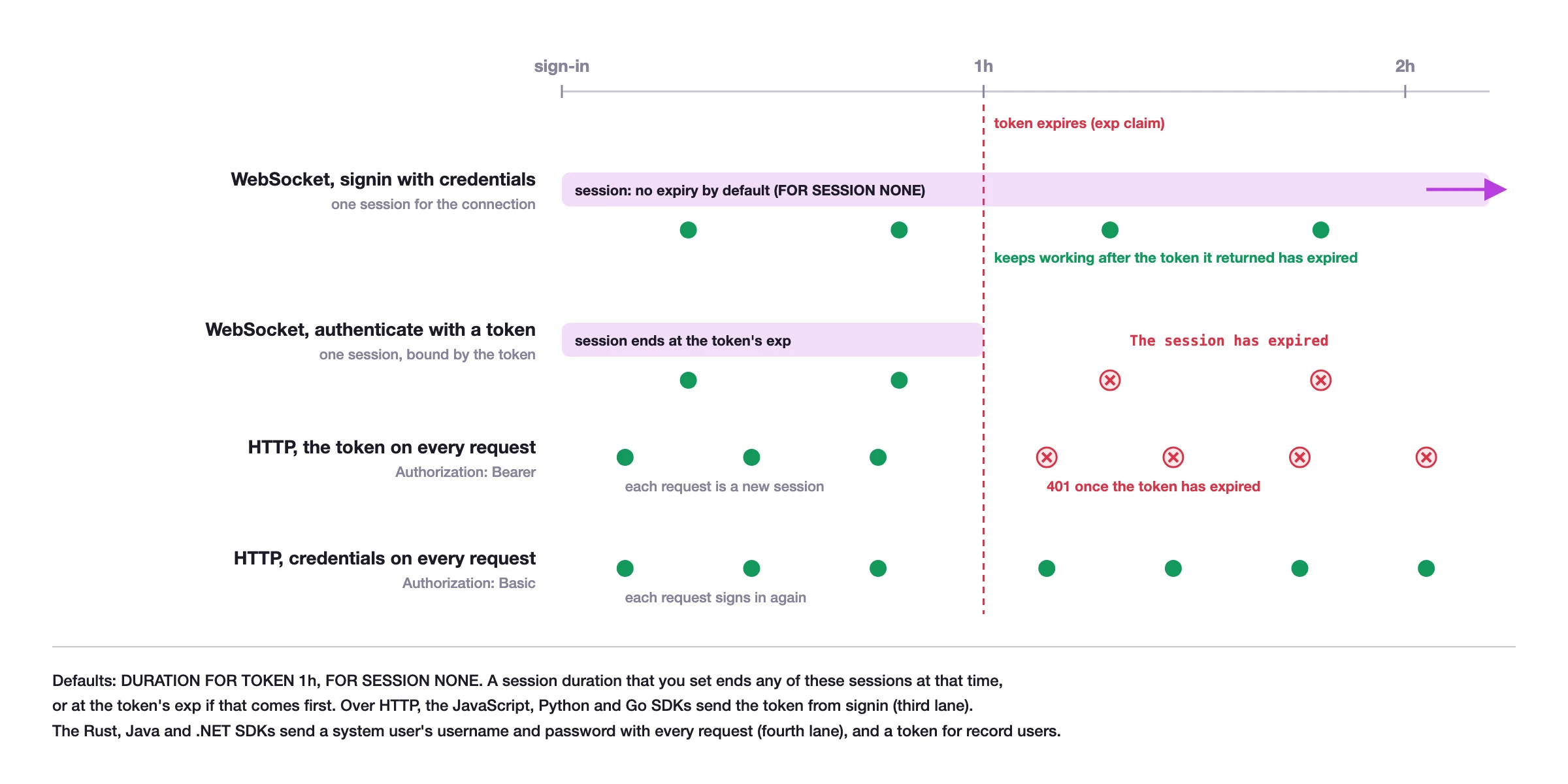
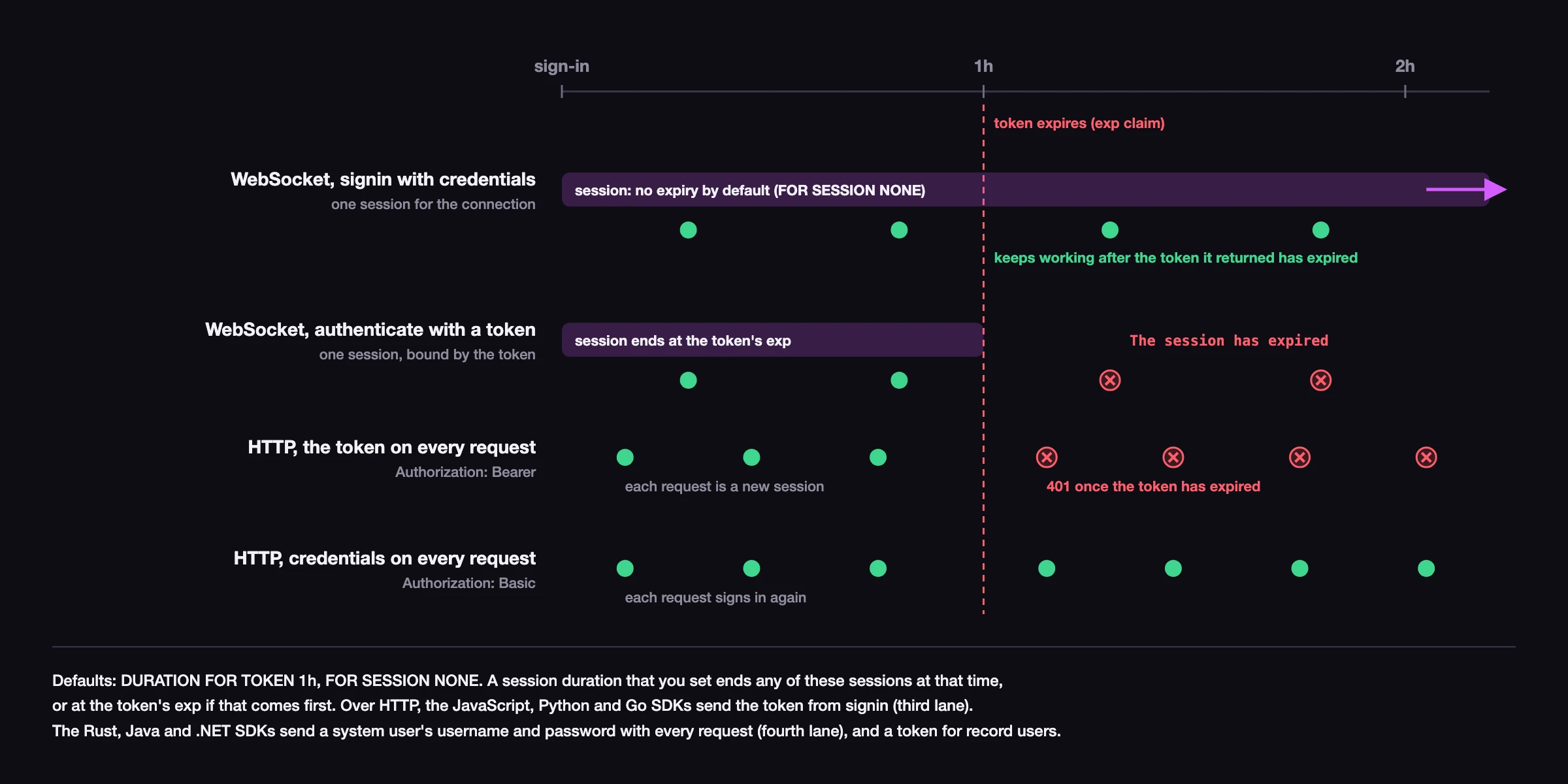
The figure shows SurrealDB 4.0. Before SurrealDB 4.0, a WebSocket session that authenticated with a token lasts for the session duration, as a session that signed in with credentials does.
The SDK renews the access token before it expires when it has a refresh token or the auth option to renew it with, so an HTTP connection and a session that authenticated with a token can keep working past the token duration. See Automatic token renewal.
You can configure token and session durations using the DURATION clause in the DEFINE ACCESS METHOD or DEFINE USER statements.
Learn more about token and session duration in the security best practices documentation.
Learn more
Surreal API reference for every method and option of a connection
Authentication for signing in, the
authoption and token renewalMultiple sessions for several sessions on one WebSocket connection
Embedded databases for running SurrealDB in your own process
Error handling for the errors that a connection raises
Migrating to 3.x for the changes from SDK 2.x