After installing the SDK, you can initialise a new instance of a SurrealDB client. When creating a new connection to a SurrealDB instance, you can choose to connect to a local or remote endpoint. Every asynchronous method in the SDK takes an optional cancellationToken, which cancels the operation.
using SurrealDb.Net;

using var db = new SurrealDbClient("ws://127.0.0.1:8000/rpc");

await db.Connect();
await db.Use("main", "main");
From the code snippet above, you can see that the .NET SDK has a couple of methods that you can use to initialise a new project with SurrealDB.
SurrealDbClient
Creates a new client, detecting the right protocol from the provided endpoint.
new SurrealDbClient(endpoint)Connection options
You can specify your connection protocol either as http, https, ws, or wss. Since SurrealDB also supports RPC over WebSocket, by default, it is specified with a /rpc suffix.
// Creates a new client using a local endpoint
using var db = new SurrealDbClient("http://127.0.0.1:8000"); Having to manually set all these options into a SurrealDbOptions object can be cumbersome. If you are familiar with the concept of Connection Strings, you can simply pass a connection string to the SurrealDbClient constructor. See the Connection Strings section for more information.
Effect of connection protocol on token & session duration
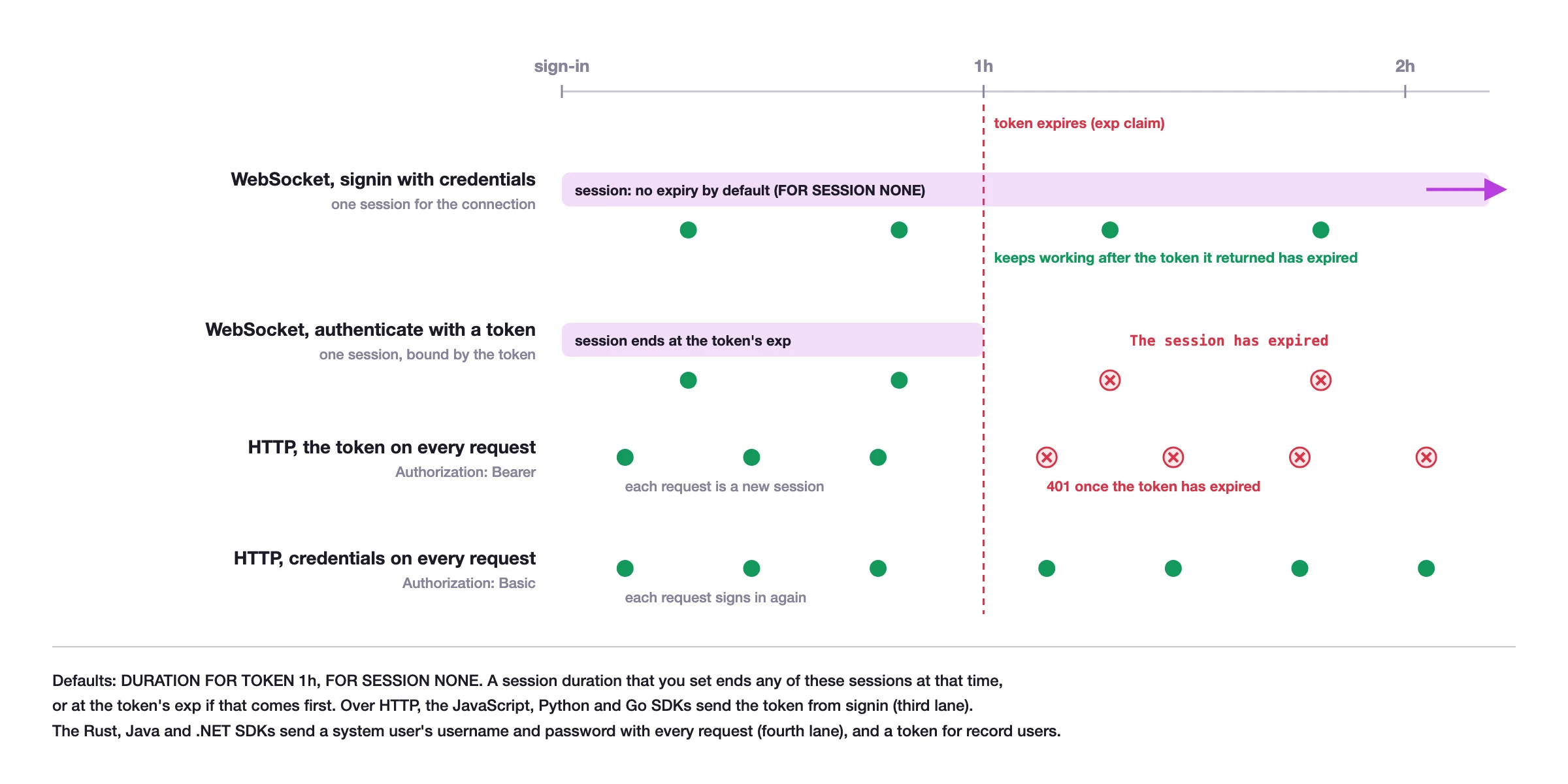
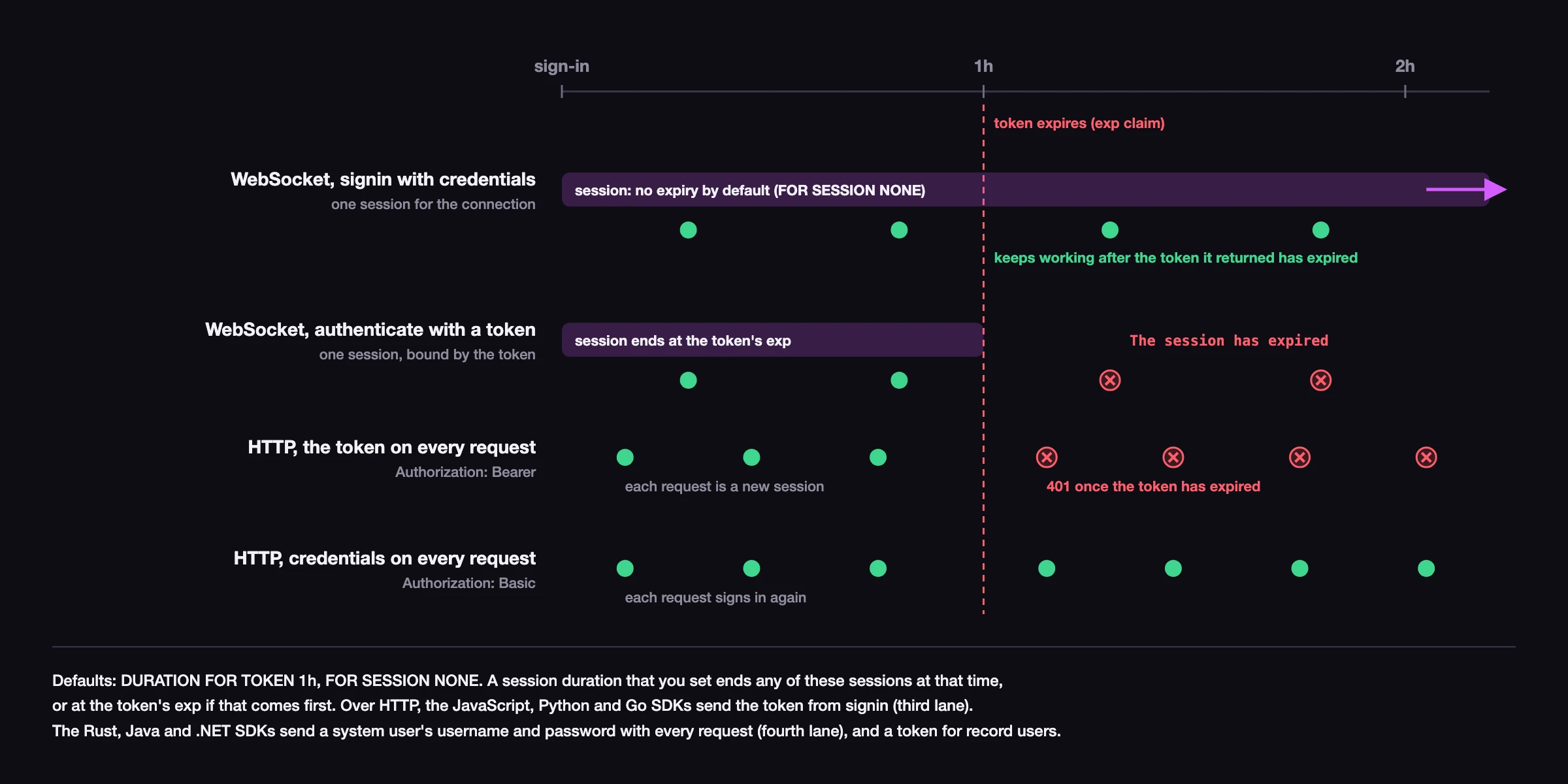
The connection protocol you choose affects how authentication tokens and sessions work:
With websockets connections (ws://, wss://) you open a single long-lived stateful connection where after the initial authentication, the session duration applies and if not specified, defaults to NONE meaning that the session never expires unless otherwise specified.
When you connect with an HTTP connection (http://, https://), every request is short-lived and stateless, so each one is authenticated on its own and creates a short-lived session. After a system user signs in, the SDK sends the username and password with every request, so the token duration does not apply. After a record user signs in, the SDK sends the token, so the token duration applies and requests fail once it expires. The token duration defaults to 1 hour.
The figure below shows which duration ends the session in each case, with the default durations.
You can extend the session duration of a token or a session by setting the DURATION clause when creating a new access method with the DEFINE ACCESS METHOD statement or when defining a new user with the DEFINE USER statement.
Learn more about token and session duration in our security best practices documentation.
.Connect()
The .Connect() executes a connection attempt to the underlying endpoint using the provided connection options.
await db.Connect()Arguments
Arguments | Description |
|---|---|
cancellationToken | The cancellationToken enables graceful cancellation of asynchronous operations. |
This method is automatically called before executing any other call to the SurrealDB instance. It means that you do not have to explicitly call this method. In some contexts, calling this method beforehand can improve performance by avoiding cold starts.
Example usage
await db.Connect(); .Use()
Depending on the complexity of your use case, you can switch to a specific namespace and database using the .Use() method. This is particularly useful if you want to switch to a different setup after connecting.
await db.Use(ns, db)Arguments
Arguments | Description |
|---|---|
namespace | Switches to a specific namespace. |
database | Switches to a specific database. |
cancellationToken | The cancellationToken enables graceful cancellation of asynchronous operations. |
Example usage
await db.Use("main", "main"); .Health()
Checks the status of the database server and storage engine.
await db.Health()Arguments
Arguments | Description |
|---|---|
cancellationToken | The cancellationToken enables graceful cancellation of asynchronous operations. |
Example usage
bool status = await db.Health(); .Version()
Retrieves the version of the SurrealDB instance.
await db.Version()Arguments
Arguments | Description |
|---|---|
cancellationToken | The cancellationToken enables graceful cancellation of asynchronous operations. |
Example usage
string version = await db.Version(); // Will return "surrealdb-1.1.1"Connection strings
Connection Strings are an easy way to configure your application to connect to a SurrealDB instance. They are stored in the appsettings.json file and can be used to configure the SurrealDbClient.
It is good practice to:
set a development Connection String in
appsettings.Development.json,store your production Connection String in a Secret environment variable, or even better in a Vault.
Keys | Description | Aliases |
|---|---|---|
Endpoint | The database endpoint to connect to. The disctinction between Serverand Clientcan help you ensure you only call a distant database (server mode) or a local database (client mode). | ServerClient |
Namespace | Switches to a specific namespace. | NS |
Database | Switches to a specific database. | DB |
Username | Username used to have root access. | User |
Password | Password used to have root access. | Pass |
Token | Token (JWT) used to have user access. | |
AuthLevel | Auth level when connecting to the SurrealDB instance. Valid options are Root, Namespaceor{" "} Database. Defaults to Root. |
Examples
Here are a couple of examples of Connection Strings:
Server=http://127.0.0.1:8000;Namespace=test;Database=test;Username=root;Password=secretEndpoint=http://127.0.0.1:8000;NS=test;DB=test;User=root;Pass=secretServer=ws://127.0.0.1:8000;AuthLevel=Namespace;NS=test;DB=test;User=root;Pass=secretClient=mem://;Namespace=test;Database=test