SurrealDB has a variety of statements that let you configure and query a database. This page covers the different types of statements that are available.
Types of statements
SurrealDB has a large variety of statements. They can be divided into three types:
Statements that define and access database resources,
Statements used for control flow and handling manual transactions,
Statements used in the context of queries, usually in CRUD (create, read, update, delete) operations.
Database resource statements
These statements pertain to defining, removing, altering, and rebuilding database resources. Some examples are:
DEFINEstatements to define database resources,ALTERstatements to alter certain resources,REBUILDto rebuild an index.
Some other statements pertain to using defined resources. They are:
USEto move from one namespace or database to another,INFOstatements to see the definitions for resources.
Control flow statements
These statements are used to describe how query execution should progress.
Some control flow statements only pertain to manual transactions. While all statements in SurrealDB are conducted inside their own transaction, these statements can be used to manually set up a larger transaction composed of multiple statements. They are:
Other control flow statements are used in the same manner as in other programming languages. Some examples are:
FORto begin a for loop,CONTINUEto continue to the next iteration of a loop,BREAKto break out of a for loop, internal scope, function, etc.,THROWto cancel execution and return an error.
Query statements
These statements are used to execute queries, most often but not always in the context of a CRUD operation.
Some examples of query statements are:
CREATEto create one or more records of one or more types of tables,INSERTto create one or more regular records or graph edges,RELATEto create a single graph edge between two records,LIVE SELECTto stream all the changes to a table,DELETEto delete one or more records.
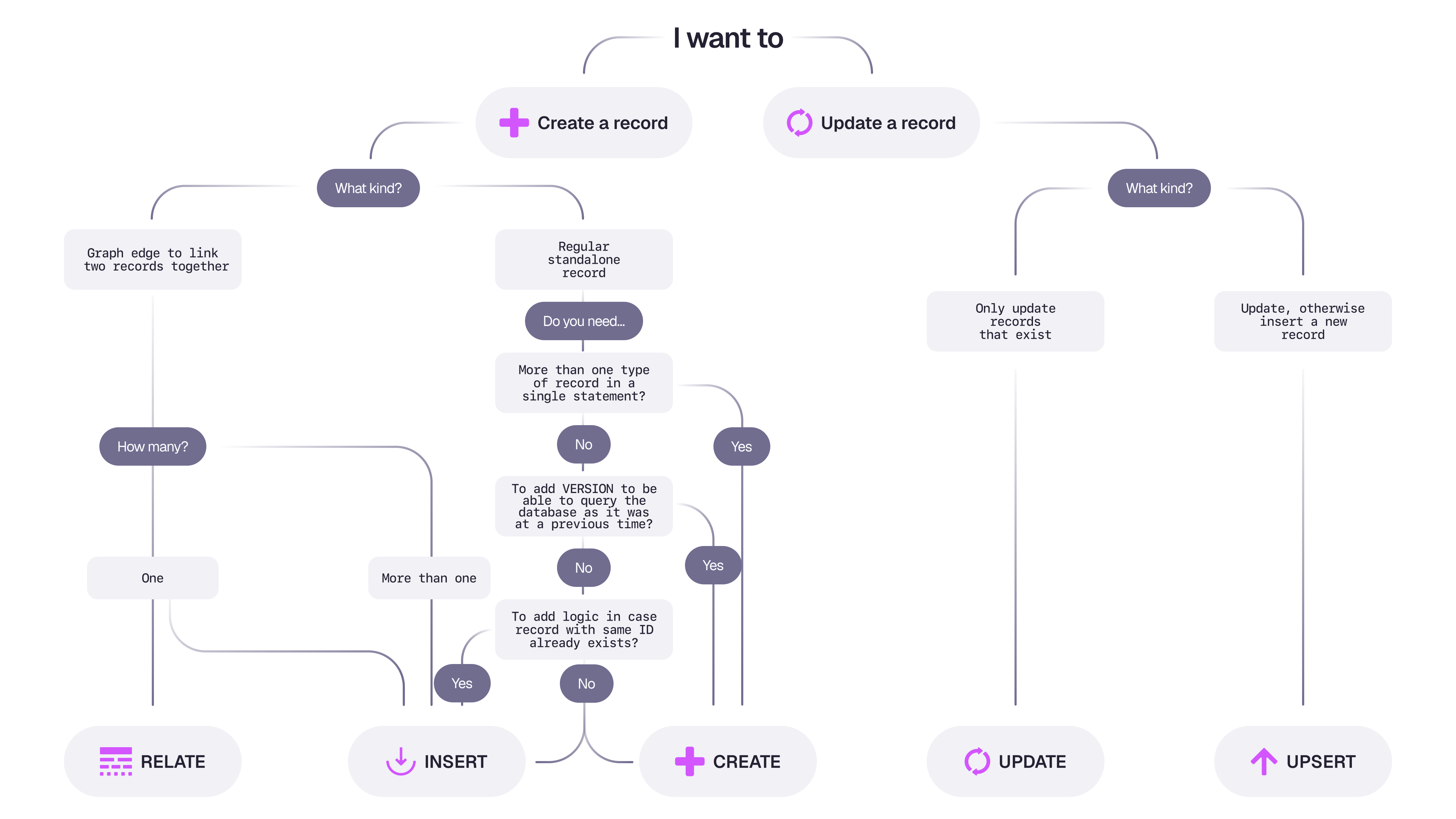
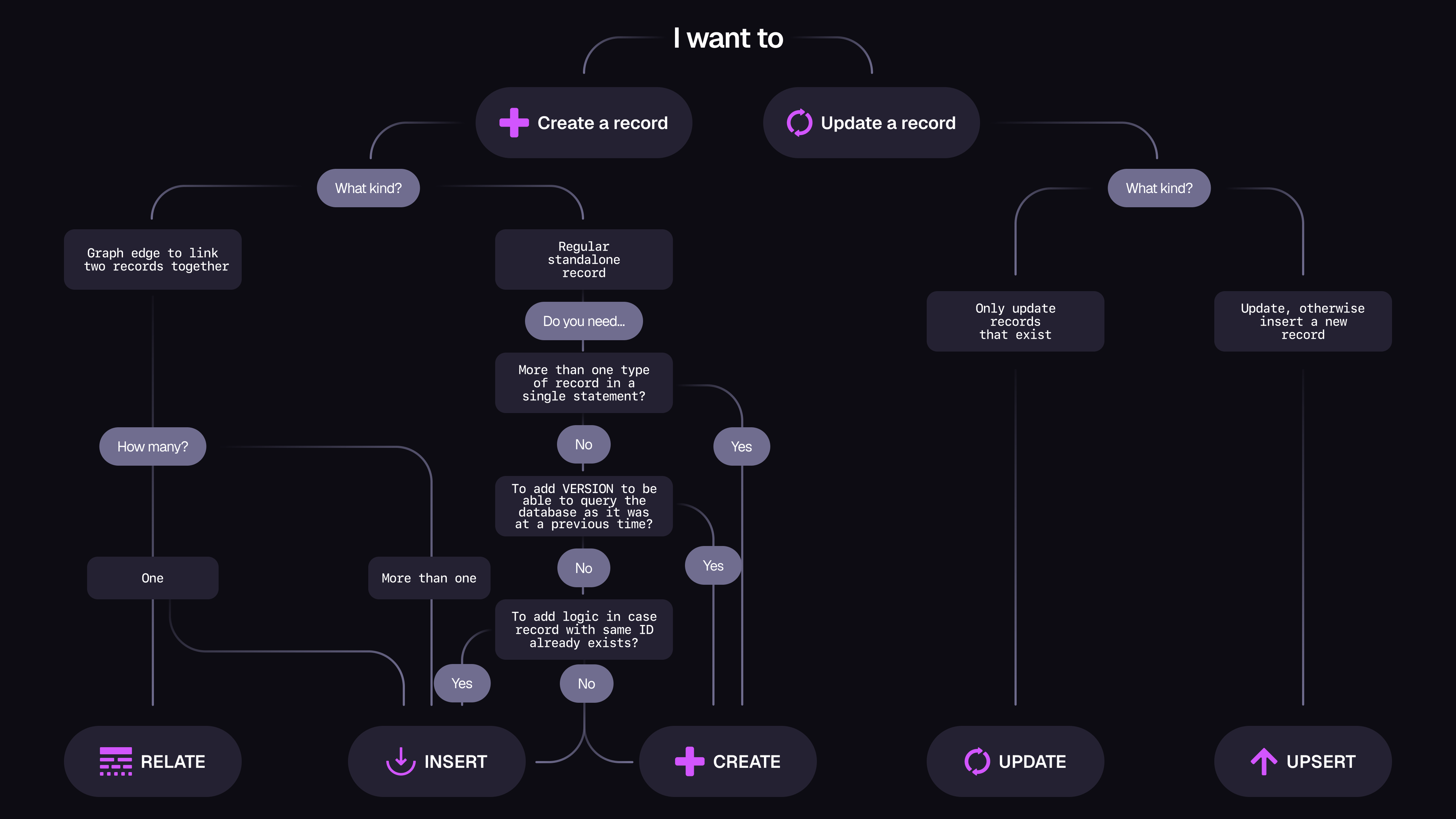
The following flowchart can be used to get a sense of when it makes sense to use CREATE, INSERT, UPDATE, UPSERT, and RELATE.
Statement parameters
A number of parameters prefixed with $ are automatically available within a statement that provide access to relevant context inside the statement. These are known as reserved variable names. For example:
$before and $after can be accessed in statements that mutate values to see the values before and after an update,
$session provides context on the current session,
$parent provides access to the value in a primary query while inside a subquery.
For a full list of these automatically generated parameters, see the parameters page.
Values
Each of the types mentioned in the data model is a subset of an all-encompassing type called a value.
Comparing and ordering values
As every data type is a subset of value, any value can be compared with another one.
9 > 1;            // Returns true
null > none;      // Also returns true
Being able to compare a value with any other value is what makes SurrealDB's record range syntax possible.
CREATE time_data:[d'2024-07-23T00:00:00.000Z'];
CREATE time_data:[d'2024-07-24T00:00:00.000Z'];
CREATE time_data:[d'2024-07-25T00:00:00.000Z'];
-- Records from the 24th to the 25th
SELECT * FROM time_data:[d'2024-07-24']..[d'2024-07-25'];
-- Records from the 24th
SELECT * FROM time_data:[d'2024-07-24']..;
-- All records
SELECT * FROM time_data:[NONE]..;
The .. open-range syntax also represents an infinite value inside a record range query, making it the greatest possible value and the inverse of NONE, the lowest possible value. A part of a record range query that begins with NONE and ends with .. will thus filter out nothing.
CREATE temperature:['London', d'2025-02-19T00:00:00.000Z'] SET val = 5.5;
CREATE temperature:['London', d'2025-02-20T00:00:00.000Z'] SET val = 5.7;

-- Return all records as long as index 0 = 'London'
SELECT * FROM temperature:['London', NONE]..=['London', ..];[
{
id: temperature:[
'London',
d'2025-02-19T00:00:00Z'
],
val: 5.5f
},
{
id: temperature:[
'London',
d'2025-02-20T00:00:00Z'
],
val: 5.7f
}
]Inside a schema, the keyword any is used to denote any possible value.
DEFINE FIELD anything ON TABLE person TYPE any;Values and truthiness
Any value is considered to be truthy if it is not NONE, NULL, or a default value for the data type. A data type at its default value is one that is empty, such as an empty string or array or object, or a number set to 0.
The following example shows the result of the array::all() method, which checks to see if all of the items inside an array are truthy or not.
array::all(["", 1, 2, 3]); // false because of ""
array::all([{}, 1, 2, 3]); // false because of {}
array::all(["SurrealDB", { is_nice_database: true }, 1, 2, 3]);  // true
As the ! operator reverses the truthiness of a value, a doubling of this operator can also be used to check for truthiness.
[
    !!"Has a value", !!"",             // true, false
    !!true, !!false,                   // true, false
    !!{ is_nice_database: true }, !!{} // true, false
    ];
The following example shows how !! can be conveniently used along with the object::entries() and object::from_entries() function to set fields from one table in another as long as they are not empty, NULL, or NONE. The filtering itself is done using the array::filter() function which returns any values that match a pattern such as the !! operator.
CREATE person:one CONTENT {
    this: NULL,
    that: "that",
    and: "and",
    the: NONE,
    other: ""
};

CREATE person:two CONTENT {
    this: "this",
    that: NONE,
    and: NULL,
    the: "",
    other: "other"
};

FOR $person IN SELECT * FROM person {
    LET $filtered = $person.*.entries().filter(|$entry| !!$entry[1]);
    CREATE new_table CONTENT object::from_entries($filtered);

    -- Or all in one line:
    -- CREATE new_table CONTENT object::from_entries($person.*.entries().filter(|$n| !!$n[1]))
};

SELECT * FROM new_table;
The output shows two new records that only contain fields that were truthy in the original person records.
[
	{
		and: 'and',
		id: new_table:one,
		that: 'that'
	},
	{
		id: new_table:two,
		other: 'other',
		this: 'this'
	}
]