Available since: v4.0.0
The SurrealDB operator runs SurrealDS groups on Kubernetes. You describe a group in one SurrealDS resource, and the operator creates the nodes, their storage, their configuration and the Services that clients connect to.
When you finish this guide, you will have a three-node SurrealDS group, each node in its own zone, that you can query with the Surreal CLI.
The public operator image and Helm chart are coming soon. Until they are published, contact SurrealDB for access. The commands on this page show the published names, and they will work without changes when the chart is available.
How the operator runs a group
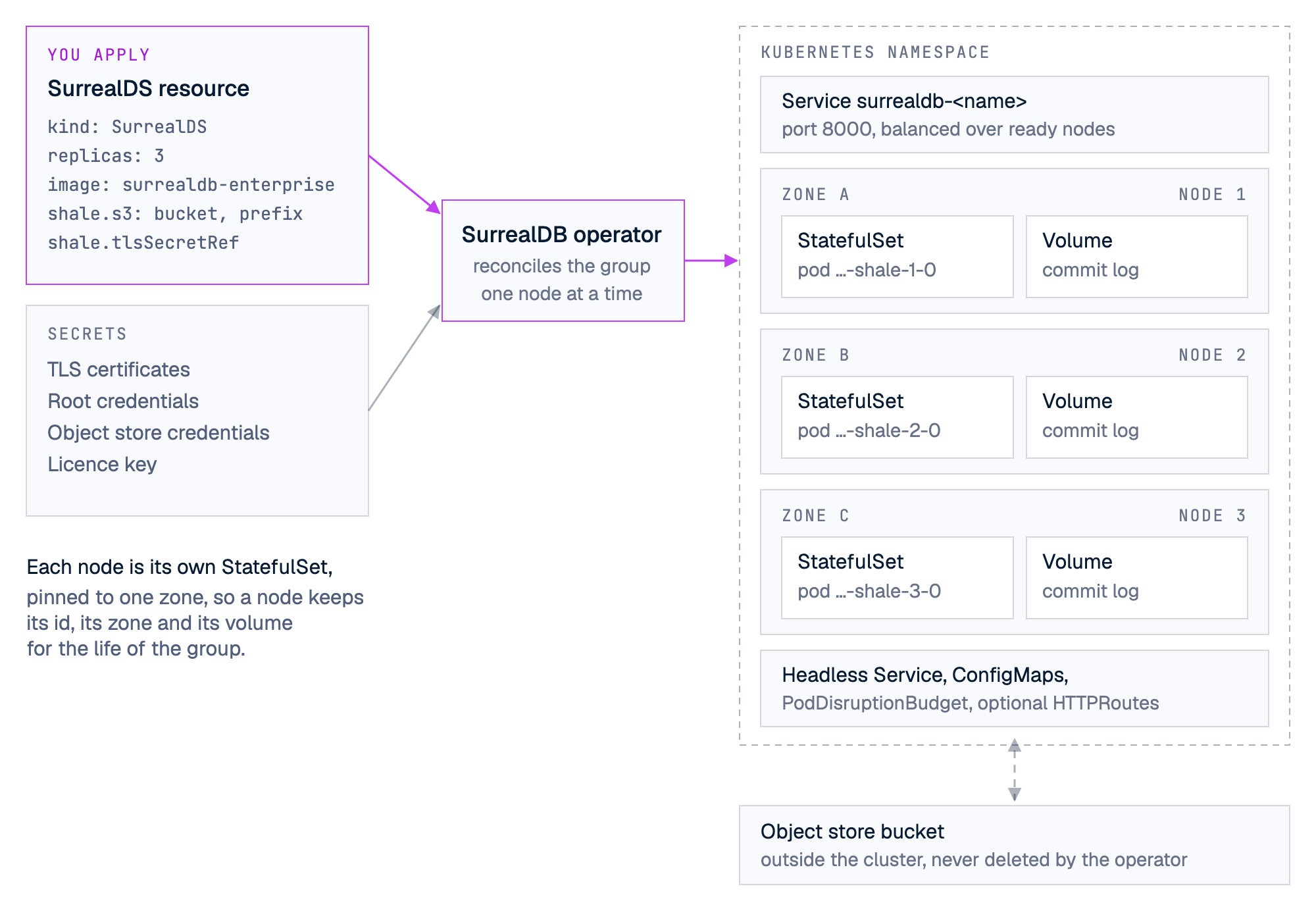
For a SurrealDS resource named <name>, the operator creates:
| Resource | Name | Purpose |
|---|---|---|
| StatefulSet, one per node | surrealdb-<name>-shale-<id> | Runs node <id> as pod surrealdb-<name>-shale-<id>-0, pinned to one zone. |
| PersistentVolumeClaim, one per node | data-surrealdb-<name>-shale-<id>-0 | Holds the node's commit log, mounted at /var/lib/shale. |
| Service | surrealdb-<name> | The client endpoint on port 8000. It balances over the ready nodes. |
| Headless Service | surrealdb-<name>-shale-headless | Lets the nodes find each other on ports 7400 (UDP) and 7401 (TCP). |
| ConfigMaps | surrealdb-<name>-shale-config and surrealdb-<name>-shale-config-<id> | The node configuration. |
| PodDisruptionBudget | surrealdb-<name>-shale | Keeps all nodes but one available during a drain. |
| HTTPRoute, one per route | <name>-shale-<index> | Optional. Publishes the client Service through a Gateway API Gateway. |
Node ids start at 1. Each node is its own StatefulSet with one replica, because each node has a fixed identity and a fixed zone.
Requirements
Kubernetes 1.34 or later, with
kubectlandhelm.Zone labels on your Kubernetes nodes. Each node that can run SurrealDS needs a
topology.kubernetes.io/zonelabel. By default the operator gives each SurrealDS node a zone that no other SurrealDS node has, so a group of three needs three zones. To choose the zones yourself, seespec.shale.zones.A StorageClass with
volumeBindingMode: WaitForFirstConsumer. The operator creates each volume before its pod, and a class that binds at once can create the volume in a zone other than the pod's.An object store bucket and credentials that can read, write, list and delete in it. See What a deployment needs.
A licence key. See Licensing.
openssl, to make the TLS certificates.The Surreal CLI, to connect when the group is running.
Optional: Gateway API. Only needed if you publish the group with
spec.routes.
Check the zone labels of your Kubernetes nodes:
kubectl get nodes -L topology.kubernetes.io/zoneInstall the operator
Install the chart into its own namespace:
helm repo add surrealdb https://helm.surrealdb.com
helm repo update
helm install surrealdb-operator surrealdb/surrealdb-operator -n surrealdb-operator-system --create-namespace
The chart installs the SurrealDS CustomResourceDefinition (surrealds.operator.surrealdb.com), the operator Deployment, its ServiceAccount, and two ClusterRoles: one to manage the resources of a group, and one to read Kubernetes nodes for their zone labels.
Check that the operator is running:
kubectl -n surrealdb-operator-system get podsChart values
| Value | Default | Meaning |
|---|---|---|
watchAllNamespaces | true | Manage SurrealDS resources in every namespace. With false, the operator manages only its own namespace. |
rustLog | info | The operator's log level. |
resources | requests 10m CPU and 64Mi memory, limits 500m CPU and 128Mi memory | The operator container's resources. |
image.repository, image.tag | the published image | The operator image. An empty tag uses the chart's appVersion. |
imagePullSecrets, nodeSelector, tolerations, affinity | empty | Pod settings for the operator itself. |
Upgrade the operator
Helm installs a chart's CustomResourceDefinitions on the first install only, and never upgrades them. Apply the new definition before you upgrade the chart:
helm repo update
helm pull surrealdb/surrealdb-operator --untar
kubectl apply --server-side -f surrealdb-operator/crds/
helm upgrade surrealdb-operator surrealdb/surrealdb-operator -n surrealdb-operator-system
An operator upgrade does not restart running nodes unless it must change their pod template for another reason. Uninstalling the chart leaves the CustomResourceDefinition and your SurrealDS resources in place.
Create a group
The steps below create a group named surrealds in the namespace surrealds. Change both names as you need.
kubectl create namespace surrealds1. Store the object store credentials
For an S3-compatible store, the Secret holds AWS_ACCESS_KEY_ID and AWS_SECRET_ACCESS_KEY. The operator passes every key in this Secret to the nodes as an environment variable.
kubectl -n surrealds create secret generic surrealds-s3 \
  --from-literal=AWS_ACCESS_KEY_ID='<access-key-id>' \
  --from-literal=AWS_SECRET_ACCESS_KEY='<secret-access-key>'
For Azure Blob Storage, store AZURE_STORAGE_ACCOUNT_KEY instead, or use AKS workload identity with no Secret.
2. Make the TLS certificates
Nodes authenticate each other with mutual TLS. Each group needs one certificate authority, and one certificate and private key for each node. The certificate of node <id> must carry the DNS name shale-<id>, and the private key must be in PKCS#8 format.
Save this script as surrealds-certs.sh. It works with OpenSSL and with the LibreSSL that macOS includes. It creates the certificate authority once, and creates a certificate only for a node that does not have one yet, so you can run it again to add nodes.
#!/usr/bin/env bash
# Usage: surrealds-certs.sh <output-directory> <node-count>
set -euo pipefail
out="$1"; count="$2"; days=3650
mkdir -p "$out"
if [ ! -f "$out/ca.key" ]; then
  openssl req -x509 -newkey rsa:2048 -nodes -sha256 -days "$days" \
    -subj "/CN=surrealds-ca" -keyout "$out/ca.key" -out "$out/ca.crt" 2>/dev/null
fi
for i in $(seq 1 "$count"); do
  [ -f "$out/node-$i.crt" ] && continue
  printf 'subjectAltName=DNS:shale-%s\nextendedKeyUsage=serverAuth,clientAuth\nbasicConstraints=CA:FALSE\n' "$i" > "$out/node-$i.ext"
  openssl req -new -newkey rsa:2048 -nodes -sha256 -subj "/CN=shale-$i" \
    -keyout "$out/node-$i.rsa.key" -out "$out/node-$i.csr" 2>/dev/null
  openssl pkcs8 -topk8 -nocrypt -in "$out/node-$i.rsa.key" -out "$out/node-$i.key"
  openssl x509 -req -in "$out/node-$i.csr" -CA "$out/ca.crt" -CAkey "$out/ca.key" -CAcreateserial \
    -sha256 -days "$days" -extfile "$out/node-$i.ext" -out "$out/node-$i.crt" 2>/dev/null
  rm -f "$out/node-$i.rsa.key" "$out/node-$i.csr" "$out/node-$i.ext"
done
chmod 600 "$out"/*.key
echo "Wrote ca.crt and node-1 to node-$count certificates in $out"
Run it for three nodes, and store everything except the certificate authority's private key in a Secret:
bash surrealds-certs.sh ./surrealds-tls 3
kubectl -n surrealds create secret generic surrealds-tls \
  --from-file=ca.crt=surrealds-tls/ca.crt \
  --from-file=surrealds-tls/node-1.crt --from-file=surrealds-tls/node-1.key \
  --from-file=surrealds-tls/node-2.crt --from-file=surrealds-tls/node-2.key \
  --from-file=surrealds-tls/node-3.crt --from-file=surrealds-tls/node-3.key
Keep ca.key outside the cluster in a safe place. You need it to make certificates for nodes that you add later.
Each node trusts its peers by their exact certificates, not only by the certificate authority. A new certificate for an existing node therefore changes that node's identity for its peers. The script uses a ten-year validity for this reason. Do not replace the certificate of an existing node without guidance from SurrealDB support.
3. Store the root credentials
The root user is the first user of the database. The Secret keys are username and password by default.
kubectl -n surrealds create secret generic surrealds-root \
  --from-literal=username=root \
  --from-literal=password='<a-strong-password>'
4. Store the licence key
kubectl -n surrealds create secret generic surrealdb-license --from-literal=key='<your-licence-key>' 5. Create the SurrealDS resource
Save this as surrealds.yaml. Replace the bucket, prefix, region, endpoint and storage class with your own values.
apiVersion: operator.surrealdb.com/v1alpha1
kind: SurrealDS
metadata:
  name: surrealds
  namespace: surrealds
spec:
  image: surrealdb/surrealdb-enterprise:v4.0.0-beta.1
  replicas: 3
  rootCredentials:
    secretRef:
      name: surrealds-root
  env:
    - name: SURREAL_LICENSE_KEY
      valueFrom:
        secretKeyRef:
          name: surrealdb-license
          key: key
    - name: SURREAL_LICENSE_STATE_PATH
      value: /var/lib/shale/license-state.json
  resources:
    requests:
      cpu: "2"
      memory: 8Gi
    limits:
      memory: 8Gi
  shale:
    volumeClaimTemplate:
      storageClassName: <your-storage-class>
      resources:
        requests:
          storage: 50Gi
    tlsSecretRef:
      name: surrealds-tls
    s3:
      bucket: <your-bucket>
      prefix: surrealds
      region: <your-region>
      # Leave out `endpoint` for Amazon S3. Set it for any other S3-compatible store.
      # endpoint: https://<your-s3-endpoint>
      credentialsSecretRef:
        name: surrealds-s3
Apply it:
kubectl apply -f surrealds.yamlUse a prefix that no other group uses. A prefix holds one database. Two groups that write to the same bucket and prefix damage each other's data.
Set a memory limit. Each node sizes its caches from the container's memory limit, and without a limit it uses the allocatable memory of the Kubernetes node that it runs on.
6. Wait for the group
kubectl -n surrealds get surrealds surrealds -wThe Ready column becomes True when every node serves. A new group can take a few minutes. Node 1 creates the database, and the other nodes join it.
Show each node's zone and readiness:
kubectl -n surrealds get surrealds surrealds -o jsonpath='{range .status.nodes[*]}{.id}{"\t"}{.zone}{"\t"}{.statefulSet}{"\t"}{.ready}{"\n"}{end}'Connect to the group
Clients connect to the Service surrealdb-<name> on port 8000. From your machine, forward the port:
kubectl -n surrealds port-forward svc/surrealdb-surrealds 8000:8000Then connect with the root credentials:
surreal sql -e ws://127.0.0.1:8000 -u root -p '<a-strong-password>'Applications in the cluster connect to ws://surrealdb-surrealds.surrealds.svc.cluster.local:8000.
Publish the group through a Gateway
To publish the client Service outside the cluster, add one or more routes. Each route becomes an HTTPRoute that sends traffic to the Service on port 8000. The cluster needs the Gateway API and a Gateway.
spec:
  routes:
    - gatewayRef:
        name: <your-gateway>
        namespace: <gateway-namespace>
      hostnames:
        - surrealds.example.com
Each route takes either hostnames or matches, not both. If the Gateway API is not installed, a resource with routes reports HTTPRouteReady=False with the reason GatewayAPINotInstalled, and it does not become ready.
Operate the group
Change the configuration
The operator applies a change to one node at a time, in node order, and continues to the next node only after the previous node is ready again. Changes that restart nodes this way include the image, spec.env, probes, extraAnnotations, and the contents of the TLS, object store credentials and root credentials Secrets. While nodes wait for their turn, the StatefulSetReady condition reports RollingConfig.
These fields cannot change after the group exists: spec.shale.s3 (all of it), spec.shale.scope, spec.shale.tlsSecretRef and the zone of each node. A change to one of them sets SpecValid=False.
Add nodes
Make certificates for the new nodes. Run the certificate script again with the new node count. It keeps the existing certificates.
Add the new certificates to the TLS Secret, and keep the existing keys. The nodes restart one at a time to read the new Secret.
Raise
spec.replicas.
bash surrealds-certs.sh ./surrealds-tls 5
kubectl -n surrealds create secret generic surrealds-tls \
  --from-file=ca.crt=surrealds-tls/ca.crt \
  $(for i in 1 2 3 4 5; do printf -- '--from-file=surrealds-tls/node-%s.crt --from-file=surrealds-tls/node-%s.key ' "$i" "$i"; done) \
  --dry-run=client -o yaml | kubectl apply -f -
kubectl -n surrealds patch surrealds surrealds --type merge -p '{"spec":{"replicas":5}}'
Each new node needs a zone. Without spec.shale.zones, each new node needs a zone that no other SurrealDS node in the group has. To put more nodes than you have zones into a group, list a zone for every node in spec.shale.zones. A zone can repeat in that list.
Remove nodes
Lower spec.replicas. The operator removes the nodes with the highest ids. Their volumes stay, so delete the PersistentVolumeClaims yourself when you no longer need them. A group that has had more than one node cannot go to one node.
Pause and resume
Set spec.replicas to 0 to stop every node. The volumes and the object store keep the data. Set it back to the previous value to start the group again.
Grow the commit log volumes
Raise spec.shale.volumeClaimTemplate.resources.requests.storage. The StorageClass must allow volume expansion. The operator refuses to shrink a volume.
Delete the group
kubectl -n surrealds delete surrealds surrealdsThis deletes every resource the operator created for the group, including the PersistentVolumeClaims. The operator never deletes data in the object store. To remove the database completely, delete the bucket prefix yourself.
Status and troubleshooting
The resource reports these conditions. All of them except StorageResizeComplete must be True for Ready to be True.
| Condition | Reports |
|---|---|
SpecValid | The spec is valid and the Secrets it names are complete. |
ZonesResolved | Each node has a zone. InsufficientZones means there are fewer zones than nodes. |
ConfigMapReady, HeadlessServiceReady, ServiceReady | The configuration and the Services exist. |
StatefulSetReady | The nodes are running. RollingConfig means a change is being applied one node at a time. |
StorageReady | The volumes are bound. |
HTTPRouteReady | The routes exist, or none are configured. |
StorageResizeComplete | A volume expansion has finished. |
kubectl -n surrealds describe surrealds surrealds
kubectl -n surrealds logs surrealdb-surrealds-shale-1-0
Common causes of a group that does not become ready:
SpecValid=False. A Secret is missing or incomplete. For example, the TLS Secret has no certificate for one of the nodes. The operator checks again every minute, and at once when a named Secret changes.ZonesResolved=FalsewithInsufficientZones. There are fewer zone-labelled Kubernetes nodes than SurrealDS nodes. Label more nodes, or setspec.shale.zones.A pod stays
Pending. No Kubernetes node in its zone has capacity, or its volume was created in another zone. Check the StorageClass binding mode.A node does not start. Read its log. A licence problem stops the process with a message that names the cause. See Licensing.
A node does not open its client port until it has recovered its log and joined the group, so the readiness probe fails with connection refused while a node starts. That is expected. The startup probe allows two minutes for this before the liveness probe starts. Each node also starts with SURREAL_STARTUP_OPERATION_TIMEOUT=1200s, so that SurrealDB waits for a long recovery.
SurrealDS reference
The resource is SurrealDS in the API group operator.surrealdb.com/v1alpha1. Its short name is sds.
Spec fields
| Field | Default | Meaning |
|---|---|---|
image | Required | A SurrealDB Enterprise image, 4.0.0 or later. |
replicas | 3 | The number of nodes. 0 pauses the group. |
imagePullPolicy, imagePullSecrets | - | Passed to the pods. |
serviceAccountName | - | The pods' ServiceAccount. If not set, the operator creates surrealdb-sa. |
serviceAccountAnnotations | - | Annotations for the ServiceAccount, for example for workload identity. |
resources | - | The node container's resources. Set a memory limit. |
scheduling | - | nodeSelector, tolerations, affinity and topologySpreadConstraints for the pods. Do not use the topology.kubernetes.io/zone key here: the operator sets it. |
env | - | Extra environment variables, as Kubernetes EnvVar entries, so valueFrom works. Variables that the operator sets itself are refused. |
extraLabels, extraPodLabels, extraAnnotations | - | Labels and annotations for the created resources, for the pods, or for both. |
rootCredentials.secretRef.name | - | The Secret with the root user. |
rootCredentials.usernameKey, rootCredentials.passwordKey | username, password | The keys in that Secret. |
importScript | - | SurrealQL that each node runs at every start. A change restarts the nodes. |
routes | - | HTTPRoutes for the client Service. Each has gatewayRef (name, namespace, sectionName) and either hostnames or matches, and optional timeouts (request, backendRequest). |
startupProbe, readinessProbe, livenessProbe | See below | Replace the default probes. |
shale | Required | The SurrealDS settings below. |
shale fields
| Field | Default | Meaning |
|---|---|---|
s3.kind | s3 | s3 or azure. |
s3.bucket | Required | The S3 bucket, or the Azure container. |
s3.prefix | Required | The key prefix that holds this group's database. |
s3.endpoint | - | The store's URL. Leave it out for Amazon S3. |
s3.region | - | The S3 region. |
s3.account | - | The Azure storage account. If not set, the node reads AZURE_STORAGE_ACCOUNT_NAME. |
s3.credentialsSecretRef.name | - | A Secret whose keys become environment variables of the nodes. |
tlsSecretRef.name | Required | The TLS Secret: ca.crt, and node-<id>.crt and node-<id>.key for every node. |
volumeClaimTemplate | Required | storageClassName and resources.requests.storage for each node's commit log volume. |
zones | - | The zone of each node, in node order: the first entry is node 1. A zone can repeat. If not set, the operator reads zones from the Kubernetes nodes. |
scope | 1 | The scope number. Keep the default. |
versioned | false | Keep a window of old versions, so that SELECT ... VERSION works. It can change on a running group, and a node that turns it on answers only versions from about its restart onward. |
progressDeadlineSeconds | 600 | How long the operator waits for a changed node to become ready before it stops waiting for that node and continues with the next one. StatefulSetReady then reports the node as stalled. Set it longer than your nodes take to stop, start and recover. |
Default probes
| Probe | Check | Timing |
|---|---|---|
| Startup | GET /live on port 7401 | Every 2 seconds, 60 failures allowed. |
| Readiness | GET /health on port 8000 | Every 2 seconds, timeout 1 second, 1 failure. |
| Liveness | TCP connection to port 8000 | Every 5 seconds, timeout 2 seconds, 4 failures. |
Azure Blob Storage
Set s3.kind: azure, set s3.bucket to the container and s3.account to the storage account. For AKS workload identity, do not set credentialsSecretRef. Instead, label the pods and annotate the ServiceAccount:
spec:
  extraPodLabels:
    azure.workload.identity/use: "true"
  serviceAccountAnnotations:
    azure.workload.identity/client-id: <managed-identity-client-id>
  shale:
    s3:
      kind: azure
      bucket: <container>
      prefix: surrealds
      account: <storage-account>
One-node groups
A resource with replicas: 1 runs one node with no peers. It still needs the TLS Secret, with ca.crt, node-1.crt and node-1.key. There is one copy of the data, on the node's volume, until the node uploads it to the object store. A restart or a drain stops the database until the node is back. You can raise replicas later.