This page details some common PostgreSQL patterns and their SurrealQL equivalents, followed by links to the Surreal Sync tool which allows data from PostgreSQL to be automatically imported to SurrealDB.
Importing from PostgreSQL using Surreal Sync
For more on how to import data from PostgreSQL to SurrealDB, please see the following pages in the Surreal Sync repo.
Surreal Sync reads from a running PostgreSQL server through a connection string, and has no source that reads a pg_dump file. surreal db import cannot read one either, because it expects SurrealQL. To migrate from a dump, restore it into a PostgreSQL server first, such as a temporary one in Docker, and run Surreal Sync against that server. For a small number of tables, another option is to export each table to CSV with the PostgreSQL COPY command and import the CSV files.
Data types
The following chart shows PostgreSQL data types along with the equivalent or near-equivalent SurrealQL data type for each.
| PostgreSQL Data Type | Wire Protocol Type | SQL Representation | SurrealDB Mapping | Notes |
|---|---|---|---|---|
| BOOLEAN | Boolean | true/false | bool | |
| SMALLINT | Int2 | 32767 | int | |
| INTEGER | Int4 | 2147483647 | int | |
| BIGINT | Int8 | 9223372036854775807 | int | |
| SERIAL | Int4 | 1, 2, 3... | int | Auto-increment converted to regular integer |
| BIGSERIAL | Int8 | 1, 2, 3... | int | Auto-increment converted to regular integer |
| REAL | Float4 | 3.14 | float (f64) | Converted to double precision |
| DOUBLE PRECISION | Float8 | 3.141592653589793 | float (f64) | |
| NUMERIC/DECIMAL | Numeric | 123.45 | number | Converted to SurrealDB Number with exact precision preserved |
| MONEY | Money | $123.45 | number | Currency symbol removed, converted to number |
| CHAR(n) | Bpchar | 'text' | string | Fixed-length, padding removed |
| VARCHAR(n) | Varchar | 'text' | string | Variable-length string |
| TEXT | Text | 'long text' | string | Unlimited length string |
| BYTEA | Bytea | \\x48656c6c6f | bytes | Binary data, hex decoded |
| DATE | Date | '2024-01-15' | datetime | Converted to datetime at midnight UTC |
| TIME | Time | '14:30:00' | string | Time-only as string (SurrealDB has no pure time type) |
| TIMESTAMP | Timestamp | '2024-01-15 14:30:00' | datetime | Converted to UTC datetime |
| TIMESTAMPTZ | Timestamptz | '2024-01-15 14:30:00+00' | datetime | Timezone-aware, converted to UTC |
| INTERVAL | Interval | '1 day 2 hours' | duration | Converted to SurrealDB duration |
| UUID | Uuid | '550e8400-e29b-41d4-a716-446655440000' | string | UUID string representation |
| JSON | Json | '{"key": "value"}' | string | JSON stored as string representation |
| JSONB | Jsonb | '{"key": "value"}' | string | Binary JSON stored as string representation |
| ARRAY | Array | '{1,2,3}' | array | Recursively processed, element types converted |
| POINT | Point | '(1.5, 2.5)' | object | Convert to {"x": 1.5, "y": 2.5} object |
| LINE | Line | '{1,2,3}' | object | Convert to coefficient object |
| LSEG | Lseg | '[(1,2),(3,4)]' | object | Line segment as start/end point object |
| BOX | Box | '(1,2),(3,4)' | object | Bounding box as corner points object |
| PATH | Path | '[(1,2),(3,4)]' | array | Array of point objects |
| POLYGON | Polygon | '((1,2),(3,4),(5,6))' | array | Array of point objects |
| CIRCLE | Circle | '<(1,2),3>' | object | Center point and radius object |
| INET | Inet | '192.168.1.1' | string | IP address as string |
| CIDR | Cidr | '192.168.0.0/24' | string | Network address as string |
| MACADDR | Macaddr | '08:00:2b:01:02:03' | string | MAC address as string |
Inserting data
// PostgreSQL
INSERT INTO product
    (name, description, price, category, images, options)
    VALUES
    ("Shirt", "Slim fit", 6, "clothing", ARRAY['image1.jpg', 'image2.jpg', 'image3.jpg'])
;
-- SurrealQL
CREATE product CONTENT {
name: 'Shirt',
id: 'shirt',
description: 'Slim fit',
price: 6,
category: 'clothing',
images: ['image1.jpg', 'image2.jpg', 'image3.jpg']
};Defining a schemafull table
A table in PostgreSQL might be defined as follows.
CREATE TABLE product (
    id SERIAL PRIMARY KEY,
    name TEXT,
    description TEXT,
    price NUMERIC(8,2),
    category TEXT,
    images TEXT[]
);
In SurrealQL, a table does not by default need to be defined before it can be used. However, the following statements will produce a strict schema similar to the PostgreSQL one above.
DEFINE TABLE product SCHEMAFULL;
DEFINE FIELD name ON TABLE product TYPE string;
DEFINE FIELD description ON TABLE product TYPE string;
DEFINE FIELD price ON TABLE product
    TYPE number
    -- Only show two digits after decimal point
    VALUE math::fixed($value, 2)
    -- Price must be within this range
    ASSERT $value IN 0..=99999999;
DEFINE FIELD category ON TABLE product TYPE string;
DEFINE FIELD images ON TABLE product TYPE array<string>;
One difference between this and the PostgreSQL schema above is that a product will have a randomly generated ID as opposed to an incrementing one.
CREATE product SET
    name = 'Shirt',
    description = 'Nice shirt',
    price = 20.449,
    category = 'Clothing',
    images = ["some_img.ping", "another_img.png"];

-- Output
[
	{
		category: 'Clothing',
		description: 'Nice shirt',
		id: product:1j29aq5q0do48k6xvyem,
		images: [
			'some_img.ping',
			'another_img.png'
		],
		name: 'Shirt',
		price: 20.45f
	}
]
Selecting data
Selecting records using an ID:
// PostgreSQL
SELECT * FROM product WHERE id=1;
-- SurrealQL
SELECT * FROM product:shirt;Selecting multiple specific records:
// PostgreSQL
SELECT * FROM product WHERE id IN (1, 2, 3);
-- SurrealQL
SELECT * FROM [product:1, product:2, product:3];Counting the number of records in a table:
// PostgreSQL
SELECT COUNT(*) FROM product;
-- SurrealQL
SELECT count() FROM product GROUP ALL;Queries with identical syntax
As SurrealQL is inspired by SQL, many queries between it and PostgreSQL are identical.
SELECT * FROM product LIMIT 5;
SELECT name, price FROM product;
SELECT * FROM product ORDER BY price DESC;
SELECT * FROM order_item WHERE quantity = 2;
Using record ID instead of the WHERE clause
If a record ID is known ahead of time and you are using a version of SurrealDB before 3.0, be sure to query by the record ID itself instead of using a WHERE clause in SurrealQL. This will avoid a full table scan if the field is not indexed.
// PostgreSQL
SELECT * FROM product WHERE id = 1;

// Immediate access in SurrealDB 3.0+, table scan in previous versions
SELECT * FROM product WHERE id = product:1;

// Accessing the record directly will
// take a fraction of the time in 2.x
product:1.*;
Joining and querying related tables
Take the following query with joins in PostgreSQL:
SELECT p.id AS product_id, p.name AS product_name
FROM product p
JOIN order_item oi ON p.id = oi.product_id
JOIN customer_order co ON oi.order_id = co.order_id
JOIN customer c ON co.customer_id = c.customer_id
WHERE c.name = 'Pratim'
ORDER BY p.id;
In SurrealQL, tables can be joined to each other via edges, such as the bought edge in this example.
-- Relate a 'customer' to a 'product' via 'bought'
RELATE customer:tobie->bought->product:iphone CONTENT {
    option: { Size: 'M', Color: 'Max' },
    quantity: 1,
    total: 600,
    status: 'Pending',
    created_at: time::now()
};
Once the tables have been related (joined), they can be queried with this syntax.
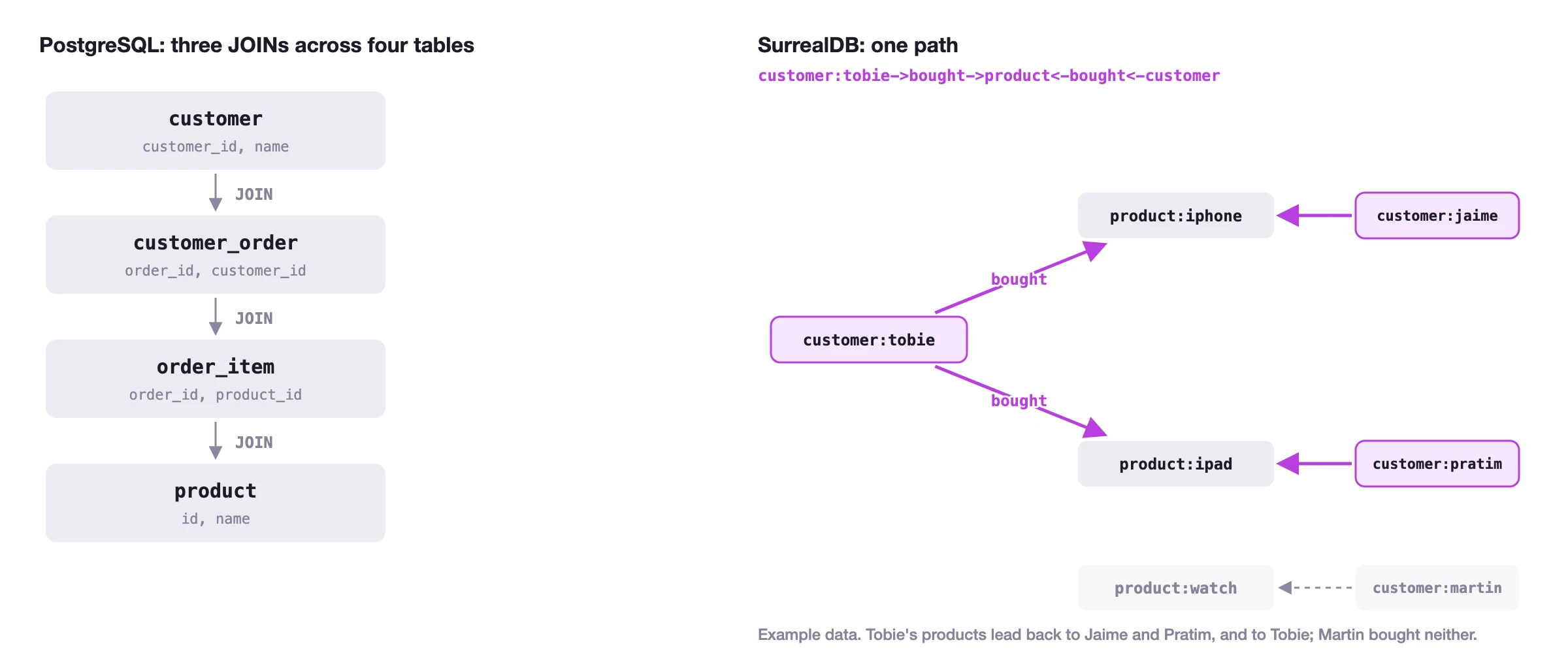
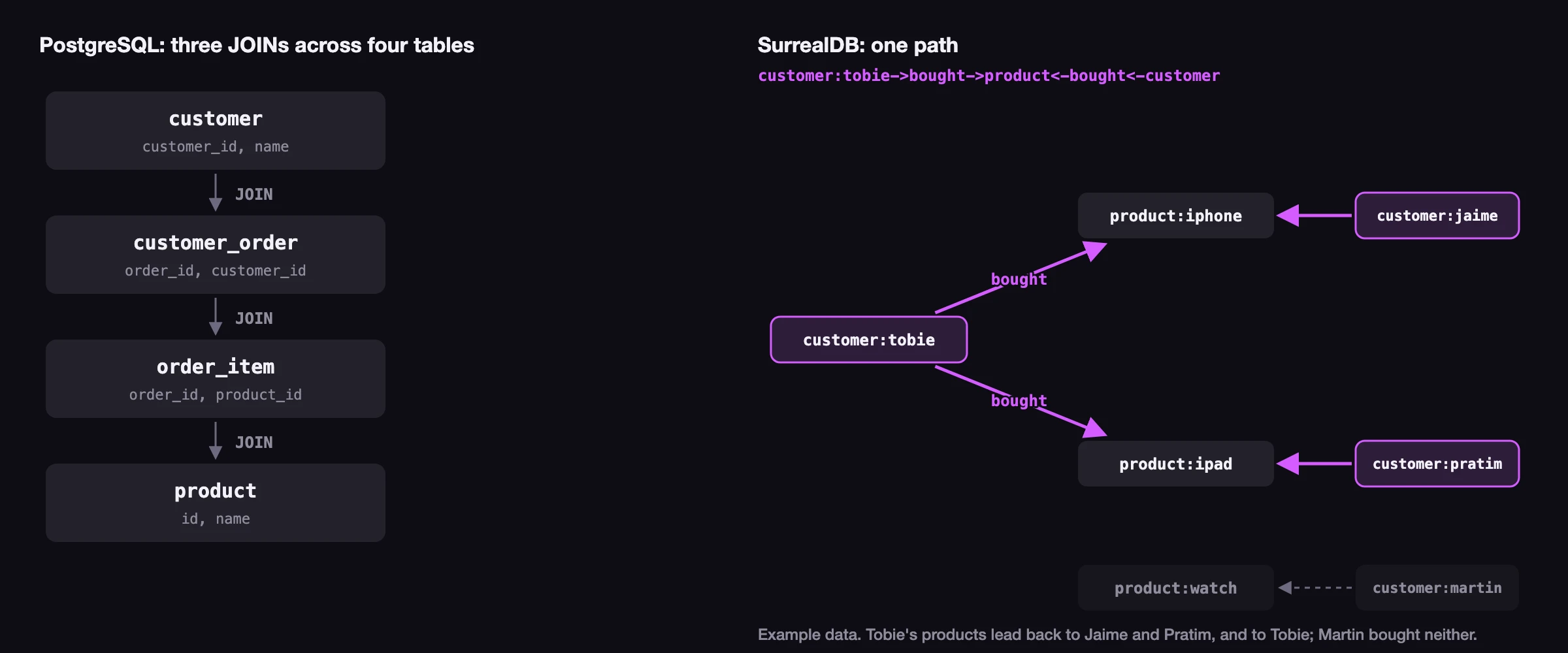
SELECT * FROM customer:tobie->bought;An example of more complex query with joins to return all people who bought the same products as a certain customer (including the original customer).
// PostgreSQL
SELECT DISTINCT c.*
FROM customer c
JOIN customer_order co ON c.customer_id = co.customer_id
JOIN order_item oi ON co.order_id = oi.order_id
JOIN product p ON oi.product_id = p.id
WHERE p.id IN (
    -- Subquery: Get all product IDs bought by Tobie
    SELECT p2.id
    FROM product p2
    JOIN order_item oi2 ON p2.id = oi2.product_id
    JOIN customer_order co2 ON oi2.order_id = co2.order_id
    JOIN customer c2 ON co2.customer_id = c2.customer_id
    WHERE c2.name = 'Tobie'
)
-- SurrealQL
customer:tobie->bought->product<-bought<-customer.*;Each JOIN in the PostgreSQL query crosses a foreign key, while the SurrealQL path walks the bought edges out to Tobie's products and back to everyone who bought them: