A record ID is chosen once and queried forever, so its format decides how easily records can be looked up, ranged over and kept unique. This page collects the tips and trade-offs for choosing one.
Tips and best practices for record IDs
This page contains a number of tips and best practices when working with record IDs in SurrealDB.
Why choose the right record ID format
Choosing an apt record ID format is especially important because record IDs in SurrealQL are immutable. Take the following user records for example:
FOR $i IN 0..5 {
    CREATE user SET user_num = $i, name = "User number " + <string>user_num;
};
Each of these user records will have a random ID, such as user:wvjqjc5ebqvfg3aw7g61. If a decision is made to move away from random IDs to some other form, such as an incrementing number, this will have to be done manually.
FOR $user IN SELECT * FROM user {
    -- Use type::record to make a record ID
    -- from the user_num field
    CREATE type::record("user", $user.user_num);
    -- Then delete the old user
    DELETE $user;
};

SELECT * FROM user;
The final query returning just the IDs shows that they have been recreated with new IDs.
[
	{
		id: user:0,
		name: 'User number 0'
	},
	{
		id: user:1,
		name: 'User number 1'
	},
	{
		id: user:2,
		name: 'User number 2'
	},
	{
		id: user:3,
		name: 'User number 3'
	},
	{
		id: user:4,
		name: 'User number 4'
	}
]
However, record IDs are also used as record links and to create graph relations. If this is the case, more work will have to be done in order to recreate the former state.
The following example shows five user records, which each have a 50% chance of liking each of the other users.
FOR $i IN 0..5 {
    CREATE user SET user_num = $i, name = "User number " + <string>user_num;
};

LET $users = SELECT * FROM user;
FOR $user IN $users {
    LET $others = array::complement($users, [$user.id]);
    FOR $counterpart IN $others {
        IF rand::bool() {
            RELATE $user->likes->$counterpart;
        }
    }
};
Finding out the current relational state can be done with a query like the following which shows all of the graph tables in which a record is located at the in or out point. The ? is a wildcard operator, returning any and all tables found at this point of the graph query.
SELECT
    id,
    ->?->? AS did,
    <-?<-? AS done_to
FROM user;[
{
did: [
user:zwfnk4by9gmopf6eeqm0
],
done_to: [
user:d6bx6sch5li8qmhq3ljl,
user:ekovipptanvmgr8f48v6
],
id: user:6ycb63zr0k3cpzwel1ga
},
{
did: [
user:ekovipptanvmgr8f48v6,
user:6ycb63zr0k3cpzwel1ga,
user:zk7tpaduzaiuswll58sg
],
done_to: [],
id: user:d6bx6sch5li8qmhq3ljl
}
-- and so on..
]SurrealDB Studio's graph visualisation view can help as well.
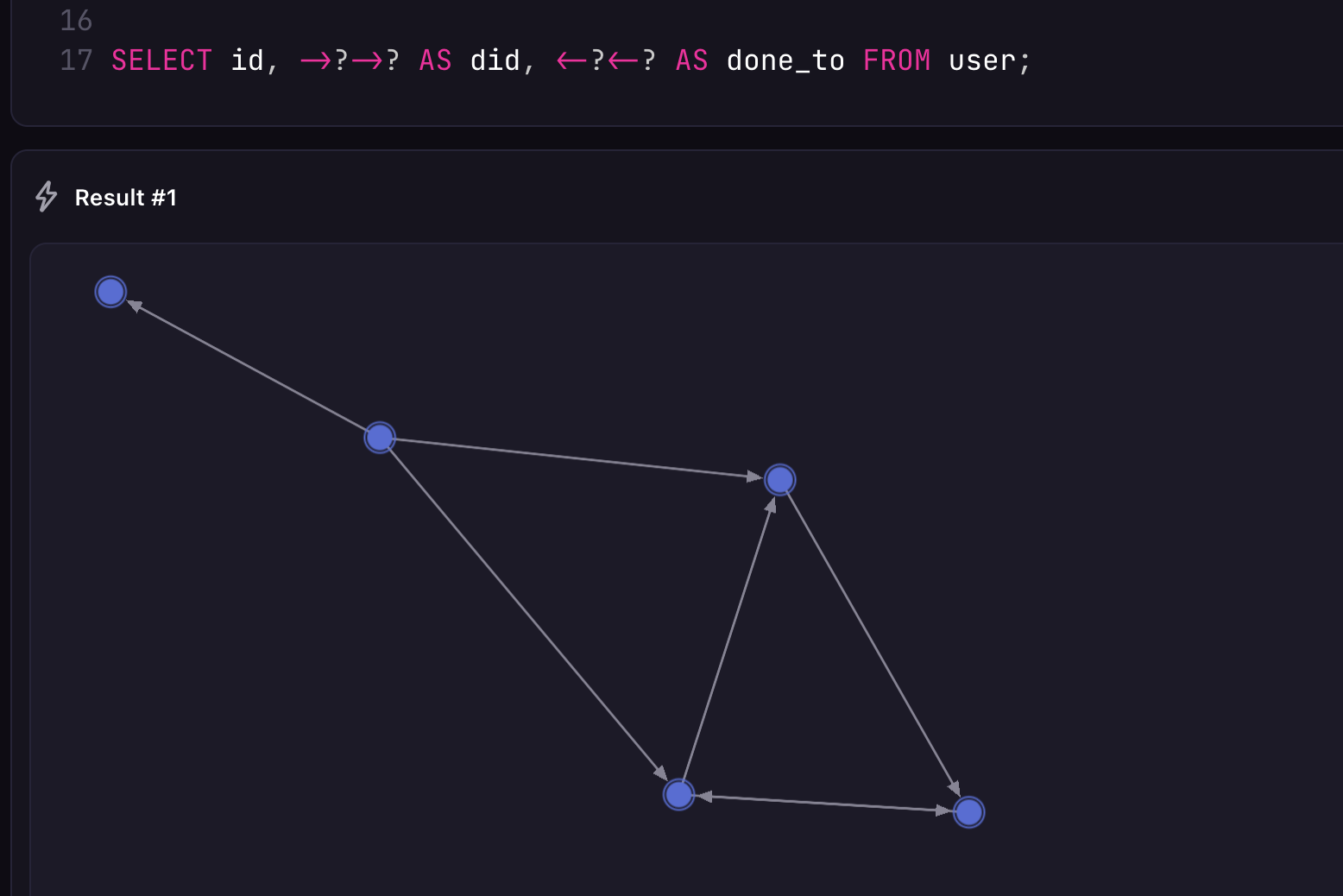
The following sections cover what to consider when deciding what sort of record ID format to use.
Meaningful sortable IDs are faster to query
Records are returned in ascending record ID order by default. As the following query shows, a SELECT statement on a large number of user records with random IDs will show those with record identifiers starting with a large number of zeroes. While the IDs are sortable, the IDs themselves are completely random.
CREATE |user:200000| RETURN NONE;
SELECT VALUE id FROM user LIMIT 4;[
user:0001th0nnywnczi7mrvk,
user:000t5r3y7u8stqtecvht,
user:000tjk1nbi1it1bedplc,
user:001dfral92ltbdznypcd
]For a large number of records, pagination can be used to retrieve a certain amount of records at a time.
-- Returns the same four records as above
SELECT VALUE id FROM user START 0 LIMIT 2;
SELECT VALUE id FROM user START 2 LIMIT 2;-------- Query --------
[
user:0001th0nnywnczi7mrvk,
user:000t5r3y7u8stqtecvht
]
-------- Query --------
[
user:001dfral92ltbdznypcd,
user:001hv9g1uzh32nophrpo
]As record ranges are very performant, consider moving any fields that may be used in a WHERE clause into the ID itself.
In the following example, a number of user records are created using the default random ID, plus a num field that tracks in which order the user was created.
FOR $num IN 0..100 {
    CREATE user SET num = $num;
    sleep(1ms); -- Simulate a bit of time between user creation
};

SELECT * FROM user WHERE num IN 50..=51;
SELECT * FROM user START 50 LIMIT 2;
As the output from the SELECT statements shows, a WHERE clause is needed to find two users starting at a num of 50, as START 50 starts based on the order of the record IDs, which are entirely random.
-------- Query --------

[
	{
		id: user:pqpeg0edt8kpda907o01,
		num: 50
	},
	{
		id: user:ty6qr7zyob5dh882it08,
		num: 51
	}
]

-------- Query --------

[
	{
		id: user:hvfp5m5ty7n2k95dbamv,
		num: 70
	},
	{
		id: user:hvfumcmmveuolg4e2h26,
		num: 36
	}
]
Using a ULID in this case will allow the IDs to remain random, but still sorted by date of creation.
FOR $num IN 0..100 {
    CREATE user:ulid() SET num = $num;
    sleep(1ms);
};

SELECT * FROM user WHERE num IN 50..=51;
SELECT * FROM user START 50 LIMIT 2;
The START 50 LIMIT 2 query is more performant, and the entire num field could be removed if its only use is to return records by order of creation.
-------- Query --------

[
	{
		id: user:01JM1AHN7DDN7XM5KZ2RR2YM1S,
		num: 50
	},
	{
		id: user:01JM1AHN7FS4A3B6RNFCF64H90,
		num: 51
	}
]

-------- Query --------

[
	{
		id: user:01JM1AHN7DDN7XM5KZ2RR2YM1S,
		num: 50
	},
	{
		id: user:01JM1AHN7FS4A3B6RNFCF64H90,
		num: 51
	}
]
Move exact matches in array-based record IDs to the front
Take the following event records which can be queried as a performant record range.
CREATE event:[d'2025-05-05T08:00:00Z', user:one, "debug"] SET info = "Logged in";
CREATE event:[d'2025-05-05T08:10:00Z', user:one, "debug"] SET info = "Logged out";
CREATE event:[d'2025-05-05T08:01:00Z', user:two, "debug"] SET info = "Logged in";
The ordering of the ID in this case is likely not ideal, because the first item in the array, a datetime, will be the first to be evaluated in a range scan. A query such as the one below on a range of dates will effectively ignore the second and third parts of the ID.
SELECT * FROM event:[d'2025-05-05', user:one, "debug"]..[d'2025-05-06', user:one, "debug"];

-- Same result! user name and "debug" are irrelevant
-- SELECT * FROM event:[d'2025-05-05']..[d'2025-05-06'];[
{
id: event:[
d'2025-05-05T08:00:00Z',
user:one,
'debug'
],
info: 'Logged in'
},
{
id: event:[
d'2025-05-05T08:01:00Z',
user:two,
'debug'
],
info: 'Logged in'
},
{
id: event:[
d'2025-05-05T08:10:00Z',
user:one,
'debug'
],
info: 'Logged out'
}
]Instead, the parts of the array that are more likely to be exactly matched (such as user:one and "debug") should be moved to the front.
CREATE event:[user:one, "debug", d'2025-05-05T08:00:00Z'] SET info = "Logged in";
CREATE event:[user:one, "debug", d'2025-05-05T08:10:00Z'] SET info = "Logged out";
CREATE event:[user:two, "debug", d'2025-05-05T08:01:00Z'] SET info = "Logged in";
Using this format, queries can now be performed for a certain user and logging level, over a range of datetimes.
-- Only returns events for user:one and "debug"
SELECT * FROM event:[user:one, "debug", d'2025-05-05']..[user:one, "debug", d'2025-05-06'];[
{
id: event:[
user:one,
'debug',
d'2025-05-05T08:00:00Z'
],
info: 'Logged in'
},
{
id: event:[
user:one,
'debug',
d'2025-05-05T08:10:00Z'
],
info: 'Logged out'
}
]Auto-incrementing IDs
While SurrealDB does not use auto-incrementing IDs by default, this behaviour can be achieved in a number of ways. From SurrealDB 3.0.0, the shortest is a sequence, whose sequence::nextval() function returns the next number each time it is called.
DEFINE SEQUENCE person_id START 1;
CREATE type::record("person", sequence::nextval("person_id"));
CREATE type::record("person", sequence::nextval("person_id"));[
{
id: person:2
}
]A sequence value is not returned when the transaction that took it fails, so the IDs it produces are unique and increasing but can have gaps.
Another way is to use the record::id() function on the latest record, which returns the latter part of a record ID (the '1' in the record ID person:1). This can then be followed up with the type::record() function to create a new record ID.
-- Create records from person:1 to person:10
CREATE |person:1..11|;
LET $latest = SELECT VALUE id FROM ONLY person ORDER BY id DESC LIMIT 1;
CREATE type::record("person", $latest.id() + 1);[
{
id: person:11
}
]The ORDER BY id DESC LIMIT 1 query scans the table backwards and stops at the first record, so it stays fast on a large table.
Before SurrealDB 2.3.0, ORDER BY id DESC read and sorted every record in the table, which made this query slow on large tables.
Where the IDs must have no gaps, use a separate record that holds a single value representing the latest ID. An UPSERT statement is best here, which will allow the counter to be initialised if it does not yet exist, and updated otherwise. This is best done inside a manual transaction so that the latest ID will be rolled back if any failures occur when creating the next record.
BEGIN TRANSACTION;
UPSERT person_id:counter SET num += 1;
-- Creates a person:1
CREATE type::record("person", person_id:counter.num);
COMMIT TRANSACTION;

BEGIN TRANSACTION;
-- Latest ID is now 2
UPSERT person_id:counter SET num += 1;
-- Whoops, invalid datetime format
-- Transaction fails and all changes are rolled back
CREATE type::record("person", person_id:counter.num) SET created_at = <datetime>'2025_01+01';
COMMIT TRANSACTION;

-- Latest ID is still 1
RETURN person_id:counter.num;
Record IDs are record links
As a record ID is a pointer to all of the data of a record, a single record ID is enough to access all of a record's fields. This behaviour is the key to the convenience of record links in SurrealDB, as holding a record ID is all that is needed for one record to have a link to another.
When using a standalone record ID as a record pointer, be sure to use the record ID itself.
CREATE person:1 SET data = {
    some: "demo",
    data: "for",
    demonstration: "purposes"
};

LET $record = SELECT id FROM person:1;
SELECT * FROM $record;
The output of the above query is just the id field on its own, as the $record parameter is an object with an id field, not the id field (the pointer) itself.
[
	{
		id: person:1
	}
]
To rectify this, id.* can be used to follow the pointer to the entire data for the record.
SELECT id.* FROM $record;[
{
id: {
data: {
data: 'for',
demonstration: 'purposes',
some: 'demo'
},
id: person:1
}
}
]