---
title: "Chapter 13: The outsiders | SurrealDB University"
description: "The outsiders. A chapter of Aeon's Surreal Renaissance, SurrealDB's narrative SurrealQL course."
url: https://surrealdb.com/learn/book/chapter-13
---

[Back to Courses](https://surrealdb.com/learn)
Course chapters
[Aeon's Surreal Renaissance](https://surrealdb.com/learn/book) [Prologue - your story](https://surrealdb.com/learn/book/welcome/prologue) [Chapter 1: One year later](https://surrealdb.com/learn/book/chapter-01) [Chapter 2: The grey book](https://surrealdb.com/learn/book/chapter-02) [Chapter 3: Gone in an instant](https://surrealdb.com/learn/book/chapter-03) [Chapter 4: The security door](https://surrealdb.com/learn/book/chapter-04) [Chapter 5: A long road to travel](https://surrealdb.com/learn/book/chapter-05) [Chapter 6: Inspiration from the past](https://surrealdb.com/learn/book/chapter-06) [Chapter 7: A rude surprise](https://surrealdb.com/learn/book/chapter-07) [Chapter 8: A nice surprise](https://surrealdb.com/learn/book/chapter-08) [Chapter 9: A peaceful interlude](https://surrealdb.com/learn/book/chapter-09) [Chapter 10: The ancient world reappears](https://surrealdb.com/learn/book/chapter-10) [Chapter 11: A growing map](https://surrealdb.com/learn/book/chapter-11) [Chapter 12: The wires return](https://surrealdb.com/learn/book/chapter-12) [Chapter 13: The outsiders](https://surrealdb.com/learn/book/chapter-13) [Chapter 14: Learning from each other](https://surrealdb.com/learn/book/chapter-14) [Chapter 15: France saves the day again](https://surrealdb.com/learn/book/chapter-15) [Chapter 16: Keeping knowledge free](https://surrealdb.com/learn/book/chapter-16) [Chapter 17: Landevin's journey](https://surrealdb.com/learn/book/chapter-17) [Chapter 18: Restoring civilisation](https://surrealdb.com/learn/book/chapter-18) [What now?](https://surrealdb.com/learn/book/chapter-18/what-happens-now) [Chapter 19: Aeons later](https://surrealdb.com/learn/book/chapter-19) [Chapter 20: Take three](https://surrealdb.com/learn/book/chapter-20) [Chapter 21: Breaking out](https://surrealdb.com/learn/book/chapter-21) [Congratulations](https://surrealdb.com/learn/book/the-end) [FAQ (no spoilers)](https://surrealdb.com/learn/book/faq-no-spoilers) [FAQ (contains spoilers)](https://surrealdb.com/learn/book/faq-with-spoilers)
# Chapter 13: The outsiders
**Time elapsed: 20y2m**
> *The invaders had clearly prepared years in advance. They arrived in large ships and boasted firearms that could strike from a distance. They were well trained, and had not come to talk.*
>
>
>
> *Their invasion failed, spectacularly.*
>
>
>
> *Twenty years ago you would have stood no chance against them, but today is a different story. As the enemy marched past the telegraph poles, thinking them to be religious symbols, their positions were relayed in real time to your commanders. Your troops destroyed their supply lines from behind, and every town they reached was already prepared for their arrival. The troops defending your towns had weapons that fire faster, farther, and more accurately than theirs. And your new financial system made it easy to send funds whenever necessary. After a month it was over.*
>
>
>
> *The invaders even got sick! It turns out that the common flu for your people is a devastating disease for them, as they had never had it before.*
>
>
>
> *Strangely enough, at this point you all began to feel pity for them and set about giving them medical care. You confiscated most of their ships, leaving a few for them to get back home. But some of them were amazed at your society, and you let them stay. All in all, they seemed rather embarrassed by the whole thing.*
>
>
>
> *The incident makes you chuckle and shudder at the same time. What if, twenty years ago, you hadn't noticed that the mysterious devices in the tunnel were computers? Or if nobody had discovered the tunnel the first place?*
>
>
>
> *After all this time spent on financial and military matters, you feel a strong urge to get back to your true love: books. You remember reading that SurrealDB has some impressive ways to search through text, and begin learning how they work.*
## Full text search
Full text search is a feature that allows you to customise how to search through text in an intuitive way, instead of just comparing for equality. Full text search is something we interact with every day. When you do a search for a word like "sArrealdb" in a search engine and it asks you if you meant to search for "surrealdb", that's thanks to full text search.
Enabling full text search in SurrealDB is fairly straightforward, but it requires a certain amount of setup. It all starts with a `DEFINE ANALYZER` statement. An example of the syntax may look intimidating at first:
```surql
/**
[test]
[[test.results]]
value = "NONE"
*/
DEFINE ANALYZER book_analyzer
TOKENIZERS blank, class, camel, punct
FILTERS snowball(english);
```
But the syntax for `DEFINE ANALYZER` is really just a list of menu items that you choose to modify text in the way you prefer.
Everyone who uses full text search will want to use it in a different way. For example, imagine that you would like to search through the first two sentences from this book:
> "You manage the town's library, one of the largest in the known world at over 200 books in size thanks to your hard work. Every month or so you manage to add a new book or two to the collection from a passing traveler or merchant."
Manually searching through the string is a possibility, but will return `false` if you don't have an exact match:
```
LET $string = "You manage the town's library, one of the largest in the known world at over 200 books in size thanks to your hard work. Every month or so you manage to add a new book or two to the collection from a passing traveler or merchant.";RETURN "pass" IN $string; -- trueRETURN "passing" IN $string; -- trueRETURN "passed" IN $string; -- false, even though it contains 'pass' and 'passing'RETURN "every" IN $string; -- false, even though it contains 'Every'
```
 Run Query
You could work with this a little bit using functions like `string::lowercase`, but for anything more complex you will want to use full text search. This allows you to search through text in a number of ways, such as:
- Splitting by whitespace, so that you can search by word instead of over the whole string.
- Making every letter lowercase or uppercase. Without this, the words `You` and `you` will be treated as different words.
- Splitting punctuation and other symbols into their own tokens. Without this, the last word will be seen as "merchant." and not "merchant" without a period at the end.
- Turning the words into their root forms, such as `town's` to `town`, `passing` to `pass`, and `known` to `know`.
- Chopping up the words in certain other ways, so that the word `book` will show up once a user has typed `bo`, or so that a search for `ollectio` matches `collection`.
This can all be done automatically by choosing tokenizers and filters.
Tokenisers come first, splitting the input into individual tokens. Here are the tokenizers that are available to choose from:
- `blank`: Creates a new token each time it encounters a space, tab, or newline character. This tokenizer turns `"The invaders have been defeated!"` into `["The", "invaders", "have", "been", "defeated!"]`.
- `class`: Splits based on digit, letter, punctuation, and blank. This tokenizer turns `"123abc! XYZ"` into `["123", "abc", "!", "XYZ"]`.
- `punct`: Splits based on punctuation. This tokenizer turns `"Hello, World!"` into `["Hello", ",", "World", "!"]`.
- `camel`: This creates a new token each time a capital letter is encountered and is mostly useful for parsing programming language syntax. This tokenizer turns `"AeonsFirstRustStruct"` into `["Aeons", "First", "Rust", "Struct"]`.
SurrealDB has a function called `search::analyze()` which lets you confirm this output for yourself. This function takes two strings: one string that holds the name of the analyzer, followed by a string to process. Here is the output of the first example for the `blank` tokenizer given above:
```
DEFINE ANALYZER blank TOKENIZERS blank;search::analyze("blank", "The invaders have been defeated!");
```
 Run Query
Response
```surql
[
'The',
'invaders',
'have',
'been',
'defeated!'
]
```
Here is another example, this time using three tokenizers.
```
DEFINE ANALYZER three_tokenizers TOKENIZERS blank, camel, class;search::analyze("three_tokenizers", "The invaders have been defeated! Time to finish implementing AeonsFirstRustStruct");
```
 Run Query
Response
```surql
[
'The',
'invaders',
'have',
'been',
'defeated',
'!',
'Time',
'to',
'finish',
'implementing',
'Aeons',
'First',
'Rust',
'Struct'
]
```
At this point, the text will have been split up into tokens but has not been modified in any way. This is where filters come in, which modify the tokens. Some filters are pretty self-explanatory:
- `lowercase`: Turns into lowercase, changing `["Hello", "World"]` to `"hello world"`.
- `uppercase`: Turns into uppercase, changing `["Hello", "World"]` to `["HELLO", "WORLD"]`.
- `ascii`: Changes any non-ascii characters into [ascii](https://en.wikipedia.org/w/index.php?title=ASCII&oldid=1225921892#Character_set), such as `"résumé café"` to `"resume cafe"`.
After these basic filters come the most interesting ones. They are:
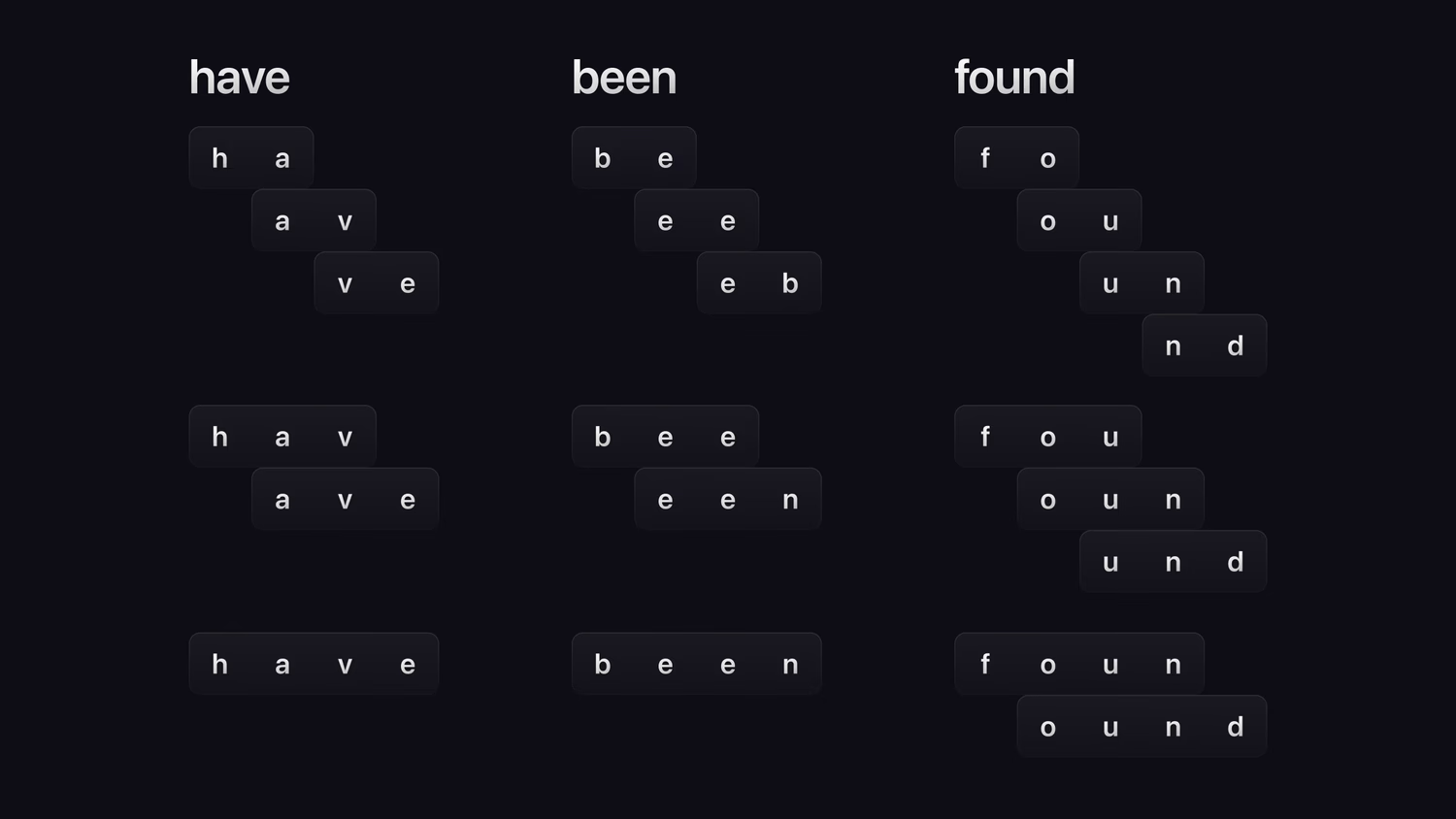
`ngram`: This keyword is followed by two numbers inside parentheses such as `(2,4)`. An `ngram` will create a token for every possible part of a word of a length between the first and last number. So if you tokenise `"have been found"` by `blank` and then follow up with `ngram(2,4)`, the transformed output will be: **have** into "ha", "av", "ve", "hav", "ave", "have", **been** into "be", "ee", "en", "bee", "een", "been", and **found** into "fo" "ou", "un", "nd", "fou", "oun", "und", "foun", "ound".
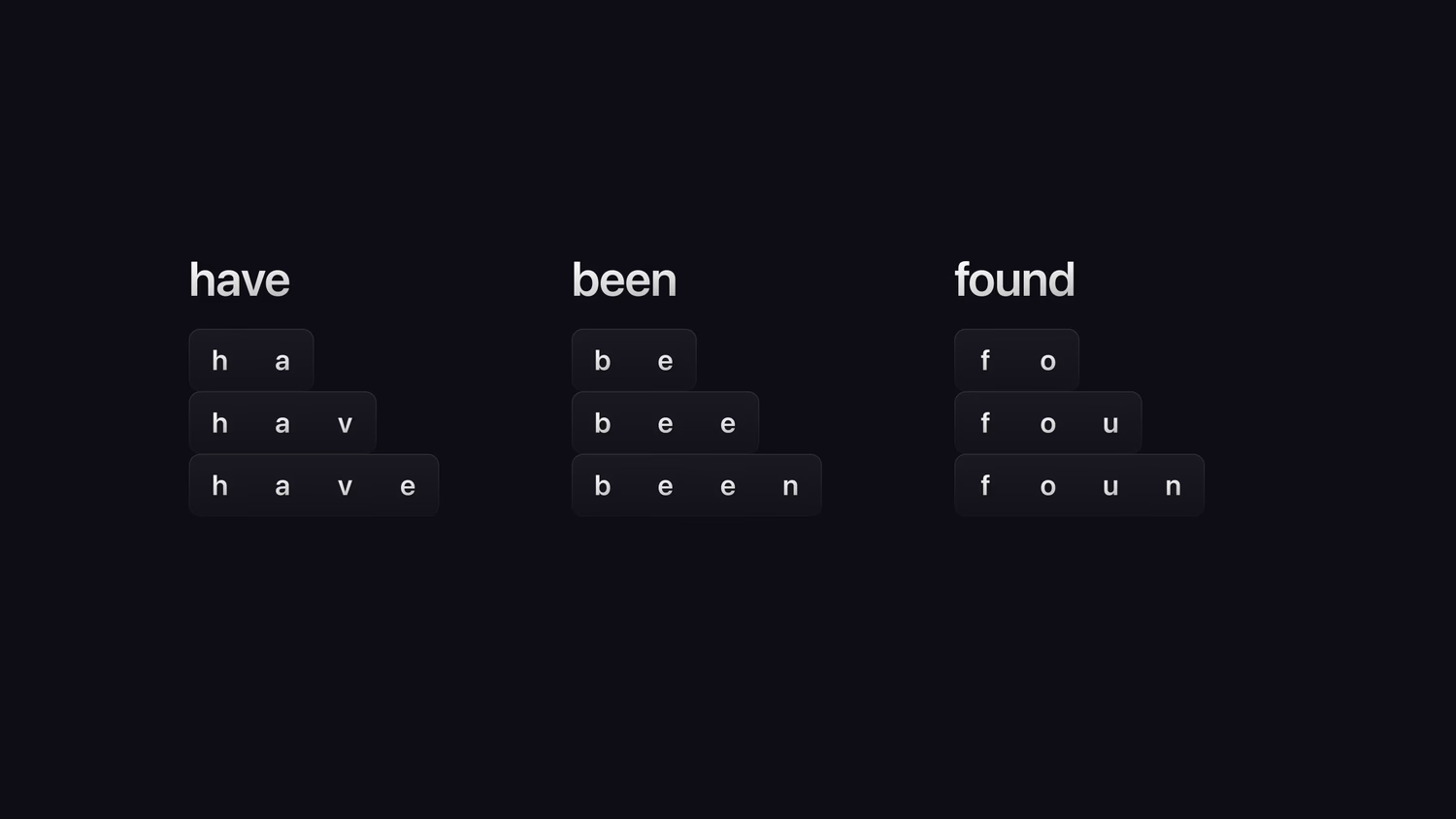
`edgengram` ("edge ngram"): This keyword is also followed by two numbers inside parentheses such as `(2,4)`. An `edgengram` will create a token for every possible size starting at the beginning of the word of a length between the two numbers. So if you tokenise `"have been found"` by `blank` and then follow up with `edgengram(2,4)`, the transformed output will be: **have** into "ha", "hav", "have", **been** into "be", "bee", "been", and **found** into "fo", "fou", "foun".
In short:
- `ngram` matches substrings anywhere inside a word.
- `edgengram` only matches the beginning of words (prefixes), making it ideal for autocomplete.
`snowball`: This reduces each word to a root form and converts it to lowercase. If you take the sentence "You manage the town's library, one of the largest in the known world at over 200 books in size thanks to your hard work." and use the `punct` tokenizer to remove the punctuation, the snowballed output will be: "you", "manag", "the", "town", "library", "one", "of", "the", "largest", "in", "the", "known", "world", "at", "over", "200", "book", "in", "size", "thank", "to", "your", "hard", "work".
Snowball filtering is implemented differently depending on the language. For example, the root form for `"manage"` is not `"manage"` itself, but `"manag"`, in order to match forms like `"managing"` that do not follow the g with an e. Snowball is currently available for Arabic, Danish, Dutch, English, French, German, Greek, Hungarian, Italian, Norwegian, Portuguese, Romanian, Russian, Spanish, Swedish, Tamil, and Turkish.
So as you can see, the syntax for `DEFINE ANALYZER` simply involves picking from a menu of tokenizers and analyzers depending on how you would like to modify text in order to search through it.
## Aeon's full text search
Let's think about how Aeon and the team will want to define an analyzer. There is a good possibility that they have enjoyed reading the stories of Sherlock Holmes, and these books are old enough to be free of copyright in our time too, so let's go with them.
Take a look at this sample from the first book of Sherlock Holmes and think about how you might want to tokenise and filter it.
> “His face - his dress - didn’t you notice them?” Holmes broke in impatiently.
>
>
>
> “I should think I did notice them, seeing that I had to prop him up - me and Murcher between us. He was a long chap, with a red face, the lower part muffled round--”
>
>
>
> “That will do,” cried Holmes. “What became of him?”
As we just learned, a `class` tokenizer will split up the input into tokens separated from all of the punctuation around them, while a `snowball(english)` filter will turn the words into their root forms. This gives us a statement that looks like this:
```surql
/**
[test]
[[test.results]]
value = "NONE"
*/
DEFINE ANALYZER english_analyzer
TOKENIZERS class
FILTERS snowball(english);
```
This analyzer that we have chosen to call `english_analyzer` is now ready to be used, but SurrealDB doesn't know where we want to use it yet. In order to apply it, we will need to define an index and tell SurrealDB which fields we want to apply it to. Once this index is applied, we will be able to use the `@@` operator (the "matches operator"), which is used for full text search instead of the equals sign.
Let's give it a try with just the analyzer and the matches operator so that we aren't hit with too much information at the same time. This will generate an error that informs us that we now need to put an index together.
```
DEFINE ANALYZER english_analyzer TOKENIZERS class FILTERS snowball(english);CREATE sentence SET title = "A Study in Scarlet", text = "IN the year 1878 I took my degree of Doctor of Medicine of the University of London, and proceeded to Netley to go through the course prescribed for surgeons in the army.";SELECT text FROM sentence WHERE text @@ "course";
```
 Run Query
Response
```surql
"There was no suitable index supporting the expression 'text @@ 'course''"
```
We've used `DEFINE INDEX` to define an index in this book before to ensure that fields are unique, but `DEFINE INDEX` has many other options such as `FULLTEXT ANALYZER` and its name, in which case it will become a full text search index.
The parts of the `DEFINE INDEX` that apply to us look like this:
```surql
DEFINE INDEX index_name
ON TABLE table_name
FIELDS fields_to_index
FULLTEXT ANALYZER name_of_analyzer [ BM25 ] [ HIGHLIGHTS ];
```
Note the optional clauses called `BM25` and `HIGHLIGHTS`. The BM in [BM25](https://en.wikipedia.org/w/index.php?title=Okapi_BM25&oldid=1194828429) stands for "Best Matching", and is a function that ranks results by relevance, while `HIGHLIGHTS` allows you to highlight words that match so that they are easy to see in the search results. Those sound convenient, so let's add them too.
Putting everything together, we have our analyzer, index, two example sentences, and our first query using the matches operator.
```
DEFINE ANALYZER english_analyzer TOKENIZERS class FILTERS snowball(english);DEFINE INDEX english_index ON TABLE sentence FIELDS text FULLTEXT ANALYZER english_analyzer BM25 HIGHLIGHTS;CREATE sentence SET title = "A Study in Scarlet", text = "IN the year 1878 I took my degree of Doctor of Medicine of the University of London, and proceeded to Netley to go through the course prescribed for surgeons in the army.";CREATE sentence SET title = "A Study in Scarlet", text = "Having completed my studies there, I was duly attached to the Fifth Northumberland Fusiliers as Assistant Surgeon.";SELECT text FROM sentence WHERE text @@ "SURGEONS";
```
 Run Query
The query works! A search for "SURGEONS" still turned up the sentences with `"surgeons"` and `"Surgeon."` without needing to directly work with any of the text ourselves.
```surql
[
{
text: 'IN the year 1878 I took my degree of Doctor of Medicine of the University of London, and proceeded to Netley to go through the course prescribed for surgeons in the army.'
},
{
text: 'Having completed my studies there, I was duly attached to the Fifth Northumberland Fusiliers as Assistant Surgeon.'
}
]
```
It makes sense that people would also want to search by the title of a book, so we should build an index for the titles of books as well. This will allow people to find what they are looking for even if they can only remember vague details like "I remember that my favourite part had the word 'night' in it", or "A book that had the word 'hound' in the title".
Because our analyzer is already defined, we can do this by just adding another `DEFINE INDEX` to this field as well. This time, we probably don't want to add `HIGHLIGHTS` because titles are always quite short.
We'll also add a few more sentences from some other books to make the search more interesting.
```
DEFINE ANALYZER english_analyzer TOKENIZERS class FILTERS snowball(english);DEFINE INDEX text_index ON TABLE sentence FIELDS text FULLTEXT ANALYZER english_analyzer BM25 HIGHLIGHTS;DEFINE INDEX title_index ON TABLE sentence FIELDS title FULLTEXT ANALYZER english_analyzer BM25;INSERT INTO sentence (title, text) VALUES ("A Study in Scarlet", "IN the year 1878 I took my degree of Doctor of Medicine of the University of London, and proceeded to Netley to go through the course prescribed for surgeons in the army."), ("A Study in Scarlet", "Having completed my studies there, I was duly attached to the Fifth Northumberland Fusiliers as Assistant Surgeon."), ("The Sign of the Four", "SHERLOCK HOLMES took his bottle from the corner of the mantel-piece and his hypodermic syringe from its neat morocco case."), ("The Hound of the Baskervilles", "MR. SHERLOCK HOLMES, who was usually very late in the mornings, save upon those not infrequent occasions when he was up all night, was seated at the breakfast table."), ("The Hound of the Baskervilles", "I stood upon the hearth-rug and picked up the stick which our visitor had left behind him the night before.");SELECT text, title FROM sentence WHERE text @@ "night" AND title @@ "hound";
```
 Run Query
As requested, we get the two sentences that are from "the book with 'hound' in the title" and have the word "night" (or nights, or other forms of the word).
```surql
[
{
text: 'MR. SHERLOCK HOLMES, who was usually very late in the mornings, save upon those not infrequent occasions when he was up all night, was seated at the breakfast table.',
title: 'The Hound of the Baskervilles'
},
{
text: 'I stood upon the hearth-rug and picked up the stick which our visitor had left behind him the night before.',
title: 'The Hound of the Baskervilles'
}
]
```
Now what about the highlighting and search relevance that we added with the `BM25 HIGHLIGHTS` keywords? We haven't seen any of that in the output yet. There is a reason for this: we don't always want to see this output in our queries. However, the index has prepared the data in these records for us to use one of the rest of SurrealDB's [search functions](https://surrealdb.com/docs/reference/query-language/functions/database-functions/search) when we need to use them. These search functions are as follows:
- `search::score()`: Returns the relevance score. Searching for "Aeon" will return a much higher score in a sentence like `"Aeon Aeon Aeon"` than in a sentence that is 500 words and only has "Aeon" in it once.
- `search::highlight()`: Highlights matching keywords.
- `search::offsets()`: Returns the position of the matching keywords.
We'll start with `search::score()`, which is the most commonly used of the three. This function takes a single number. Why a number? The following query - which doesn't work - will make this clear. Imagine that we want to include the relevance score of both the text and the title, and changed our query at the end to this:
```surql
SELECT
text,
title,
search::score() AS text_score,
search::score() AS title_score
FROM sentence
WHERE
text @@ "night" AND
title @@ "hound";
```
It doesn't quite work because SurrealDB doesn't know what `search::score()` is supposed to apply to in the `WHERE` clause: the `text` field, or the `title` field? To let SurrealDB know which is which, we add one number between the `@@` marks of the matches operator, and then pass these numbers into the functions. It will now know that `text_score` should apply to the search for "night", and `title_score` to "hound".
```surql
SELECT
text,
title,
search::score(0) AS text_score,
search::score(1) AS title_score
FROM sentence
WHERE
text @0@ "night" AND
title @1@ "hound";
```
Putting it all together, the definitions and query look like this.
```
DEFINE ANALYZER english_analyzer TOKENIZERS class FILTERS snowball(english);DEFINE INDEX text_index ON TABLE sentence FIELDS text FULLTEXT ANALYZER english_analyzer BM25 HIGHLIGHTS;DEFINE INDEX title_index ON TABLE sentence FIELDS title FULLTEXT ANALYZER english_analyzer BM25;INSERT INTO sentence (title, text) VALUES ("A Study in Scarlet", "IN the year 1878 I took my degree of Doctor of Medicine of the University of London, and proceeded to Netley to go through the course prescribed for surgeons in the army."), ("A Study in Scarlet", "Having completed my studies there, I was duly attached to the Fifth Northumberland Fusiliers as Assistant Surgeon."), ("The Sign of the Four", "SHERLOCK HOLMES took his bottle from the corner of the mantel-piece and his hypodermic syringe from its neat morocco case."), ("The Hound of the Baskervilles", "MR. SHERLOCK HOLMES, who was usually very late in the mornings, save upon those not infrequent occasions when he was up all night, was seated at the breakfast table."), ("The Hound of the Baskervilles", "I stood upon the hearth-rug and picked up the stick which our visitor had left behind him the night before.");SELECT text, title, search::score(0) AS text_score, search::score(1) AS title_score FROM sentence WHERE text @0@ "night" AND title @1@ "hound";
```
 Run Query
And now it works!
```surql
[
{
text: 'MR. SHERLOCK HOLMES, who was usually very late in the mornings, save upon those not infrequent occasions when he was up all night, was seated at the breakfast table.',
text_score: 0.30209195613861084f,
title: 'The Hound of the Baskervilles',
title_score: 0.32491400837898254f
},
{
text: 'I stood upon the hearth-rug and picked up the stick which our visitor had left behind him the night before.',
text_score: 0.35619309544563293f,
title: 'The Hound of the Baskervilles',
title_score: 0.32491400837898254f
}
]
```
With this, we can assign weights to parts that we think are most important, and order the queries based on this score. Let's decide that we want the `title` of the book to be most important for determining relevance, so we will double its score before adding it to the relevance of the `text`, and replace the `AND` with `OR` so that anything matching either of these fields will show up.
```
DEFINE ANALYZER english_analyzer TOKENIZERS class FILTERS snowball(english);DEFINE INDEX text_index ON TABLE sentence FIELDS text FULLTEXT ANALYZER english_analyzer BM25 HIGHLIGHTS;DEFINE INDEX title_index ON TABLE sentence FIELDS title FULLTEXT ANALYZER english_analyzer BM25;INSERT INTO sentence (title, text) VALUES ("A Study in Scarlet", "IN the year 1878 I took my degree of Doctor of Medicine of the University of London, and proceeded to Netley to go through the course prescribed for surgeons in the army."), ("A Study in Scarlet", "Having completed my studies there, I was duly attached to the Fifth Northumberland Fusiliers as Assistant Surgeon."), ("The Sign of the Four", "SHERLOCK HOLMES took his bottle from the corner of the mantel-piece and his hypodermic syringe from its neat morocco case."), ("The Hound of the Baskervilles", "MR. SHERLOCK HOLMES, who was usually very late in the mornings, save upon those not infrequent occasions when he was up all night, was seated at the breakfast table."), ("The Hound of the Baskervilles", "I stood upon the hearth-rug and picked up the stick which our visitor had left behind him the night before.");SELECT text, title, search::score(0) * 2.0 + search::score(1) AS score FROM sentence WHERE title @0@ "hound" OR text @1@ "holmes" ORDER BY score DESC;
```
 Run Query
The output shows one sentence that matches on both title and text, followed by one that matches on title but not text, and finally the least relevant sentence: a match on just the text but not the title.
```surql
[
{
score: 0.9519199728965759f,
text: 'MR. SHERLOCK HOLMES, who was usually very late in the mornings, save upon those not infrequent occasions when he was up all night, was seated at the breakfast table.',
title: 'The Hound of the Baskervilles'
},
{
score: 0.6498280167579651f,
text: 'I stood upon the hearth-rug and picked up the stick which our visitor had left behind him the night before.',
title: 'The Hound of the Baskervilles'
},
{
score: 0.35619309544563293f,
text: 'SHERLOCK HOLMES took his bottle from the corner of the mantel-piece and his hypodermic syringe from its neat morocco case.',
title: 'The Sign of the Four'
}
]
```
The `search::highlight()` function is pretty similar, except that you need to tell SurrealDB how to highlight the text on both the left and the right. This is because you might want the word to show up like `word`, or `*word*`, or any other way.
Let's give this a try with hand emojis! Don't forget that we have only enabled `HIGHLIGHTS` in the index for `text`, not `title`.
```
SELECT title, search::highlight('👉', '👈', 1) AS text, search::score(0) * 2.0 + search::score(1) AS score FROM sentence WHERE title @0@ "hound" OR text @1@ "holmes" ORDER BY score DESC;
```
 Run Query
Now it's much clearer where Sherlock Holmes shows up in the text.
```surql
[
{
score: 0.9519199728965759f,
text: 'MR. SHERLOCK 👉HOLMES👈, who was usually very late in the mornings, save upon those not infrequent occasions when he was up all night, was seated at the breakfast table.',
title: 'The Hound of the Baskervilles'
},
{
score: 0.6498280167579651f,
text: 'I stood upon the hearth-rug and picked up the stick which our visitor had left behind him the night before.',
title: 'The Hound of the Baskervilles'
},
{
score: 0.35619309544563293f,
text: 'SHERLOCK 👉HOLMES👈 took his bottle from the corner of the mantel-piece and his hypodermic syringe from its neat morocco case.',
title: 'The Sign of the Four'
}
]
```
### HTTP methods and enabling HTTP requests
And now for a bit of fun, let's put the entire content of one of these books - The Hound of the Baskervilles - into our database to do some text searching! Unlike Aeon and the team, we have full access to the internet and can simply pull in the content from websites like Project Gutenberg.
SurrealDB has built-in methods to fetch the content of these books, in a module called `http`. The function names are not surprising:
```surql
http::head()
http::get()
http::put()
http::post()
http::patch()
http::delete()
```
Also unsurprisingly, this functionality is disabled by default. You certainly don't want to have your database making remote calls unless you say that it should! We will get into more detail on the subject of security in Chapter 15.
To allow these functions to work, we will have to pass in the `--allow-net` parameter when starting the database. This command will allow us to restart the database in a mode in which these functions can be used.
```surql
surreal start --user root --pass secret --allow-net
```
With HTTP enabled, the rest of our work is pretty simple: we'll use the `string::split()` function to split the content by "." as a quick way to divide the book into smaller parts, and create a `sentence` record if the split value is at least a certain length. The statements below will take a few seconds to process, as SurrealDB needs to fetch the content of the book and then split it up into a huge number of tokens for easy searching.
```surql
DEFINE ANALYZER english_analyzer TOKENIZERS class FILTERS snowball(english);
DEFINE INDEX text_index ON TABLE sentence FIELDS text FULLTEXT ANALYZER english_analyzer BM25 HIGHLIGHTS;
LET $title = "The Hound of the Baskervilles";
LET $content = http::get("https://www.gutenberg.org/cache/epub/2852/pg2852.txt");
FOR $sentence IN $content.split(".") {
IF $sentence.len() > 5 {
CREATE sentence SET
title = $title,
text = $sentence;
};
};
```
Once this is done though, the magic begins! Let's see which sentences in the book have the most relevance to the word "Watson London", and highlight them too.
And while we are at it, let's take a look at the `search::offsets()` function to see what the output looks like for this last of SurrealDB's three search functions.
```surql
SELECT
search::score(0) AS score,
search::highlight('_', '_', 0) AS text,
search::offsets(0) AS offsets
FROM sentence
WHERE text @0@ "Watson London"
ORDER BY score DESC;
```
It looks like there are three results for sentences that include both the word Watson and London. The first one is very relevant, because the sentence includes only eight words besides Watson and London. Also note how the offsets function works: it shows us the start (`s`) and end (`e`) index for each word.
```surql
{
offsets: {
0: [
{
e: 30,
s: 24
},
{
e: 54,
s: 48
}
]
},
score: 9.495235443115234f,
text: '”
“I fear that _Watson_ and I must go to _London_'
}
```
The last of the results is much less relevant in terms of "Watson" and "London", being quite a long paragraph with London and Watson somewhere in the middle.
```surql
{
offsets: {
0: [
{
e: 269,
s: 263
},
{
e: 277,
s: 271
}
]
},
score: 2.5910158157348633f,
text: ' It was
a cunning device, for, apart from the chance of driving your
victim to his death, what peasant would venture to inquire too
closely into such a creature should he get sight of it, as many
have done, upon the moor? I said it in _London_, _Watson_, and I say
it again now, that never yet have we helped to hunt down a more
dangerous man than he who is lying yonder”-he swept his long arm
towards the huge mottled expanse of green-splotched bog which
stretched away until it merged into the russet slopes of the
moor'
}
```
We should be pretty used to full text search by now. Let's get back to the financial service set up by Aeon and the team and think about what else they could use to make it more rigorous.
## Defining events
We learned in the last chapter about how to make a changefeed, either for a certain table or across the whole database.
```surql
/**
[test]
[[test.results]]
value = "NONE"
[[test.results]]
value = "[{ changes: [{ define_table: { changefeed: { expiry: 3d, original: false }, drop: false, kind: { kind: 'ANY' }, name: 'person', permissions: { create: false, delete: false, select: false, update: false }, schemafull: false } }], versionstamp: 65536 }]"
*/
DEFINE TABLE person CHANGEFEED 3d;
SHOW CHANGES FOR TABLE person SINCE 1;
```
A changefeed is good to keep a general eye on all the activities of a table or database, but a changefeed is entirely passive. Sometimes we want to do something more active, by triggering some activity when a change in the data takes place. To do this, we can use a `DEFINE EVENT` statement. A `DEFINE` event needs a name, a table to be defined on, and the word `THEN`.
```surql
/**
[test]
[[test.results]]
value = "NONE"
*/
DEFINE EVENT some_event ON some_table THEN {
-- do something here
};
```
Let's warm up by creating the simplest possible event: an event that creates a record every time some change happens to a table.
```
DEFINE EVENT track_everything ON person THEN { CREATE track_everything_event SET info = "Something happened to a person record!";};
```
 Run Query
This isn't the most useful event, but it's enough to demonstrate that the event does indeed work.
```
DEFINE EVENT track_everything ON person THEN { CREATE track_everything_event SET info = "Something happened to a person record!";};CREATE person;UPDATE person SET name = "Aeon";DELETE person;SELECT * FROM track_everything_event;
```
 Run Query
As the output shows, a `track_everything_event` record is being created every time we do something to any `person` record.
```surql
[
{
id: track_everything_event:uap4x2edvt22762e1vaq,
info: 'Something happened to a person record!'
},
{
id: track_everything_event:yrxa0rvcut7tmrztidxt,
info: 'Something happened to a person record!'
},
{
id: track_everything_event:zfqxk3yaqlmg29i6mfnj,
info: 'Something happened to a person record!'
}
]
```
One important thing to know about events is that they are processed in the same transaction that triggers them. If an error occurs at any point in the transaction, then the whole thing is rolled back including the statement or statements that happened before the event. We can show this by adding a `THROW` statement in this event. This error will cause the entire `CREATE`person`statement to fail too, meaning that`SELECT * FROM person` will return nothing at all.
```
DEFINE EVENT track_everything ON person THEN { CREATE track_everything_event SET info = "Something happened to a person record!"; THROW "Stop this transaction!!";};CREATE person;SELECT * FROM person;
```
 Run Query
Let's make this `track_everything` event a little more useful by adding a timestamp, as well as a parameter called `$event` that is always set during an event. Let's see what the `$event` parameter contains.
```
DELETE track_everything_event;DEFINE EVENT OVERWRITE track_everything ON person THEN { CREATE track_everything_event SET info = $event, at = time::now();};CREATE person;UPDATE person SET name = "Aeon";DELETE person;SELECT * FROM track_everything_event;
```
 Run Query
This is now starting to look a little like a custom changefeed. We can now see that the `$event` parameter is simply the type of operation performed, such as `UPDATE` or `DELETE`.
```surql
[
{
at: d'2025-09-02T06:16:51.663591Z',
id: track_everything_event:0b1sm9cvbcnc8zp4ned5,
info: 'DELETE'
},
{
at: d'2025-09-02T06:16:51.662943Z',
id: track_everything_event:4bqnzmcx52gdquqhwvih,
info: 'UPDATE'
},
{
at: d'2025-09-02T06:16:51.662259Z',
id: track_everything_event:amkyha26wazj941cjzzn,
info: 'CREATE'
}
]
```
With this information, we can add a condition to an event such as `WHEN $event = "CREATE"`.
An event also holds other parameters related to the operation itself, such as `$before` and `$after`. Let's experiment with that a little bit.
This next event makes it impossible for any record on the `person` table to be deleted by throwing an error if it sees a DELETE event. Because a `DELETE` statement also has a `$before`, we can add that to the error message to taunt the user who is trying to delete the record(s).
```
DEFINE EVENT alive_forever ON person WHEN $event = "DELETE" THEN { THROW "\n\nTrying to delete this stuff here?\n\n" + $before + "\n\nNope, still there. ";};
```
 Run Query
Now no `person` record deletions can ever happen on this database, as the query below shows.
```
DEFINE EVENT alive_forever ON person WHEN $event = "DELETE" THEN { THROW "\n\nTrying to delete this stuff here?\n\n" + $before + "\n\nNope, still there. ";};CREATE person SET name = "Just a test";DELETE person WHERE name = "Just a test";
```
 Run Query
Response
```surql
"An error occurred:
Trying to delete this stuff here?
{ id: person:t8pz0sh9guzgmtsjtr22, name: 'Just a test' }
Nope, still there. "
```
This next event makes it impossible to create a `person` with the foul names "Dummy" or "Stupidhead", instead changing the name to "Daisy".
```surql
/**
[test]
[[test.results]]
value = "NONE"
*/
DEFINE EVENT no_bad_names ON person WHEN $event = "CREATE" THEN {
IF $after.name IN ["Dummy", "Stupidhead"] {
UPDATE $after SET name = "Daisy";
}
};
```
If we combine these two, we now have a situation where a user who tried to create a user called "Stupidhead" now has to use the name "Daisy", and cannot even delete the record.
```
DEFINE EVENT alive_forever ON person WHEN $event = "DELETE" THEN { THROW "\n\nTrying to delete this stuff here?\n\n" + $before + "\n\nNaw, still there. ";};DEFINE EVENT no_bad_names ON person WHEN $event = "CREATE" THEN { IF $after.name IN ["Dummy", "Stupidhead"] { UPDATE $after SET name = "Daisy"; }};CREATE person SET name = "Stupidhead";DELETE person;SELECT * FROM person;
```
 Run Query
Response
```surql
-------- Query --------
[
{
id: person:4xk4392xi0gv0b1f5uy0,
name: 'Stupidhead'
}
]
-------- Query --------
"An error occurred:
Trying to delete this stuff here?
{ id: person:4xk4392xi0gv0b1f5uy0, name: 'Daisy' }
Naw, still there. "
-------- Query --------
[
{
id: person:4xk4392xi0gv0b1f5uy0,
name: 'Daisy'
},
{
id: person:t8pz0sh9guzgmtsjtr22,
name: 'Just a test'
}
]
```
So that was pretty fun. But how might Aeon and Landevin and the rest want to use an event? Well, this part of the world in Aeon's time has some access to top-of-the-line 21st century database technology, but still needs to communicate via telegrams. At the end of each business day, it might be nice to have a lot of automatically generated messages that can be turned into telegrams and sent to all the customers that visited the bank. We can give them the table name `bank_record`.
In addition to the customer service aspect, it could also be useful to track down imposters. If an imposter managed to withdraw funds from your account one day, at least you would get a telegram the same day letting you know that the funds were withdrawn!
This is a good case for a record that uses an id based on the time when the transaction took place, because then employees at the end of the day will be able to query all of the `bank_record` records in between midnight of that day and midnight of the nest.
We can implement this with a quick function that puts together a standard message for the customers of the bank. Note the `time::format()` function, which when followed by `%Y-%m-%d` will turn a datetime into a nice readable format like `2025-06-28`. The `$transaction_type` passed into the function will be a literal that can be one of two strings: "withdrew", or "received".
```
DEFINE FUNCTION fn::customer_message($transaction_type: "withdrew" | "received") -> string { RETURN "Thank you for your patronage over the years. We see that you " + $transaction_type + " money at " + time::format(time::now(), "%Y-%m-%d") + ". If this is incorrect, please contact us at 67-98-10."};
```
 Run Query
Whether to pass in "withdrew" or "received" can be determined by `$before.talers` to `$after.talers` inside the `UPDATE` event.
We should also check to see if `$before.talers` and `$after.talers` are equal, because if that is the case then the account balance has not changed and we don't need to tell the user. We won't check for a person's `pennings` either, which are small units of money that nobody cares about.
All together, the event looks like this.
```
DEFINE EVENT make_statement ON person WHEN $event = "UPDATE" AND $before.talers != $after.talers THEN { LET $operation = IF $before.talers > $after.talers { "withdrew" } ELSE { "received" }; CREATE bank_record SET id = time::now(), note = fn::customer_message($operation);};
```
 Run Query
And now we should be able to do the same transaction as in the last chapter. At the very end, we can then query the `bank_record` records for the whole day. Don't forget to change the range to one that goes from today's date to tomorrow's date.
```
INSERT INTO person [ { name: "Laurence Molkier", talers: 100, pennings: 50 }, { name: "Asmodean Fitch", talers: 200, pennings: 10 },];BEGIN TRANSACTION;LET $sender = UPDATE ONLY person SET talers -= 10 WHERE name = "Laurence Molkier";SLEEP 10ms;LET $receiver = UPDATE ONLY person SET talers += 10 WHERE name = "Asmodean Fitch";COMMIT TRANSACTION;SELECT * FROM bank_record:`2025-09-02T00:00:00`..`2025-09-03T00:00:00`;
```
 Run Query
The output should now show two records, one for each customer. Not bad at all!
```surql
[
{
id: bank_record:`2025-09-02T06:57:39.241426Z`,
note: 'Thank you for your patronage over the years. We see that you withdrew money at 2025-09-02. If this is incorrect, please contact us at 67-98-10. Thank you very much.'
},
{
id: bank_record:`2025-09-02T06:57:39.256491Z`,
note: 'Thank you for your patronage over the years. We see that you received money at 2025-09-02. If this is incorrect, please contact us at 67-98-10. Thank you very much.'
}
]
```
## DEFINE PARAM and incrementing numbers
The above solution would work pretty well for us in the 21st century. But what about the world in Aeon's time in which the `time::now()` function doesn't work? It's likely that Aeon's computer attempted to connect to a server to synchronise its time, failed, and defaulted to the date January 1, 1970. And in any case, the date in terms of the 21st century calendar would be meaningless for Aeon's world because they use their own calendar to track time.
Fortunately, precise time to the millisecond or microsecond isn't a necessity for them either. All they need is some sort of general database-wide parameter that can be referenced.
As we've seen in a few parts of the book, Aeon's part of the world uses a calendar based on the number of years since an important date: the founding of Toria. At this part of the book, the current date for Aeon is 444-07-15: the 15th day of the 7th month, 444 years after the founding of Toria.
So how can this be automated for them? One way is to use the `DEFINE PARAM` statement, which creates a parameter that can be referenced across the entire database. The syntax is quite short: `DEFINE PARAM`, the parameter name, `VALUE`, and finally the value of the parameter itself.
```
DEFINE PARAM $DATE VALUE { year: 444, month: 7, day: 15};
```
 Run Query
And since the people in Aeon's time don't need a precise time, they can use an incrementing number instead.
We learned back in Chapter 3 that an `UPSERT` statement on a record ID will create a record if it does not yet exist. This makes it a good way to create a counter. Take a look at the following query and see if you notice anything interesting about it.
```
UPSERT ONLY counter:aeons_counter SET value += 1;
```
 Run Query
Response
```surql
{
id: counter:aeons_counter,
value: 1
}
```
As we learned back in Chapter 4, instead of writing `SET value = 1` (which also would have worked), we were able to write `SET value += 1`. This is because SurrealDB is able to infer that `value` is a number, and since it was not yet set, it begins with its default value: 0.
Putting these two together, we can now start to see how a counter will work for Aeon's team and their new banking system. They can use `DEFINE PARAM OVERWRITE` at the start of each day to set the new day, and follow the same `UPDATE` logic for each transaction.
```surql
/**
[test]
[[test.results]]
value = "NONE"
[[test.results]]
value = "{ id: counter:[{ day: 15, month: 7, year: 444 }], value: 1 }"
*/
DEFINE PARAM $DATE VALUE {
year: 444,
month: 7,
day: 15
};
UPSERT ONLY counter:[$DATE] SET value += 1;
```
As the days go by, this will eventually lead to a nice output like the one below that shows the number of bank transactions that took place over each day. Let's give this a try by overwriting the `$DATE` parameter a few times and `UPSERT`ing the `counter` multiple times to simulate a number of bank transactions.
```
-- Change the dateDEFINE PARAM OVERWRITE $DATE VALUE { year: 444, month: 7, day: 16};-- Run this a few times...UPSERT counter:[$DATE] SET value += 1;-- And repeat...DEFINE PARAM OVERWRITE $DATE VALUE { year: 444, month: 7, day: 16};UPSERT counter:[$DATE] SET value += 1;
```
 Run Query
After a few days, the query `SELECT * FROM counter` will produce an output like this which shows the number of transactions that took place per day.
```surql
[
{
id: counter:[
{
day: 15,
month: 7,
year: 444
}
],
value: 23
},
{
id: counter:[
{
day: 16,
month: 7,
year: 444
}
],
value: 21
},
{
id: counter:[
{
day: 17,
month: 7,
year: 444
}
],
value: 29
}
]
```
With this `$DATE` param and counter, we can now change our sample above a bit to fit Aeon's world. We'll also add a `fn::readable_date()` function to turn `$DATE` into something a bit more readable for a customer.
```
DEFINE PARAM $DATE VALUE { year: 444, month: 7, day: 15};DEFINE FUNCTION fn::readable_date() -> string { RETURN "Day " + $DATE.day + " of month " + $DATE.month + " of year " + $DATE.year};DEFINE FUNCTION fn::customer_message($transaction_type: string) -> string { RETURN "Thank you for your patronage over the years. We see that you " + $transaction_type + " money at " + fn::readable_date() + ". If this is incorrect, please contact us at 67-98-10."};DEFINE EVENT make_statement ON person WHEN $event = "UPDATE" THEN { LET $stamp = (UPSERT counter:[$DATE] SET value += 1); IF $before.talers > $after.talers { CREATE type::record("bank_record", $stamp) SET note = fn::customer_message("withdrew"); } ELSE IF $before.talers < $after.talers { CREATE type::record("bank_record", $stamp) SET note = fn::customer_message("received"); };};INSERT INTO person [ { name: "Laurence Molkier", talers: 100, pennings: 50 }, { name: "Asmodean Fitch", talers: 200, pennings: 10 },];BEGIN TRANSACTION;LET $sender = UPDATE ONLY person SET talers -= 10 WHERE name = "Laurence Molkier";LET $receiver = UPDATE ONLY person SET talers += 10 WHERE name = "Asmodean Fitch";COMMIT TRANSACTION;SELECT * FROM bank_record;
```
 Run Query
Precise timestamps won't be available anymore, but at least they will be able to see the date at which a transaction was performed, and which transaction of the day it was.
```surql
[
{
id: bank_record:[
{
id: counter:[
{
day: 15,
month: 7,
year: 444
}
],
value: 1
}
],
note: 'Thank you for your patronage over the years.
We see that you withdrew money at Day 15 of month 7 of year 444.
If this is incorrect, please contact us at 67-98-10.'
},
{
id: bank_record:[
{
id: counter:[
{
day: 15,
month: 7,
year: 444
}
],
value: 2
}
],
note: 'Thank you for your patronage over the years.
We see that you received money at Day 15 of month 7 of year 444.
If this is incorrect, please contact us at 67-98-10.'
}
]
```
In the next chapter, we are going to take a deeper look at the tool we've been using throughout this book: SurrealDB Studio.
**Practice time**
**Answer**
You could create an event that simply goes straight to `THEN` without any checks such as `WHEN $event = "CREATE"` or `WHEN $before.name != $after.name`. Inside, you can create a record that keeps track of all these parameters, and maybe a timestamp too.
```surql
/**
[test]
[[test.results]]
value = "NONE"
*/
DEFINE EVENT watch_all ON person THEN {
CREATE log SET time = time::now(), event = $event, before = $before, after = $after;
};
```
A few simple operations on the `person` table will then result in the input below.
```surql
CREATE person:one;
UPDATE person SET name = "Billy";
DELETE person;
SELECT * FROM log;
```
```surql
[
{
after: {
id: person:one,
name: 'Billy'
},
before: {
id: person:one
},
event: 'UPDATE',
id: log:5gcl4yrkuq4psu76q3n3,
time: d'2025-09-03T01:21:51.231213Z'
},
{
before: {
id: person:one,
name: 'Billy'
},
event: 'DELETE',
id: log:eavgxdmw6sqpne8vuxbo,
time: d'2025-09-03T01:21:51.232075Z'
},
{
after: {
id: person:one
},
event: 'CREATE',
id: log:jxjf6vrz0u9yzrdi7ge4,
time: d'2025-09-03T01:21:51.228911Z'
}
]
```
### 2. What sort of analyzer would you need if you want the user input of 'natio' to show the result 'international'?
**Answer**
The shortest possible analyzer to make this happen would be one with a tokenizer like `class` to split text into separate words, followed by an `ngram` filter. This would have to be quite long since the "natio" in "international" goes from the 6th to the 10th letter. To be sure, an `ngram(3,15)` should work. We'll also put a `lowercase` filter in to ensure that search queries don't have to worry about capitalization.
```surql
/**
[test]
[[test.results]]
value = "NONE"
*/
DEFINE ANALYZER long_ngram TOKENIZERS class FILTERS lowercase, ngram(3,15);
```
You can then use the `search::analyze()` function to test the output, and add `"natio" IN` to the front of it to make sure that "natio" is one of the tokens generated.
```surql
"natio" IN search::analyze("long_ngram", "international");
```
The output for this query will be `true`.
### 3. How would you define an index to apply the analyzer to a table?
**Answer**
We can follow the syntax of the `DEFINE INDEX` statement by giving it a name and specifying the table and fields it will be applied to. Plus `BM25 HIGHLIGHTS` at the end which will be useful for the functions that determine relevance and highlight matching text.
```surql
/**
[test]
[[test.results]]
value = "NONE"
[[test.results]]
value = "NONE"
*/
DEFINE ANALYZER long_ngram TOKENIZERS class FILTERS lowercase, ngram(3,15);
DEFINE INDEX nice_index ON TABLE text FIELDS content FULLTEXT ANALYZER long_ngram BM25 HIGHLIGHTS;
```
### 4. How can you use the matches operator to find a match? And relevance, and highlighting?
Here is some sample text to get started:
```surql
CREATE text SET content = "Many constructed auxiliary languages have been proposed as international languages. The first was known as Universalglot, and was created in...";
CREATE text SET content = "During the intermission, I helped myself to a glass of water. I then...";
CREATE text SET content = "The United Nations is headquarted in New York. It was established in...";
```
**Answer**
A simple query with "natio" as mentioned above will return both `text` records that have the words "international" and "Nations".
```surql
SELECT content FROM text WHERE content @@ "natio";
```
To add relevance and highlighting, we will first change `@@` to `@0@` so that the functions have a reference point to work from. The `search::score(0)` function will get its own field name as `relevance`, and so will the highlighting function as `search::highlight('-', '-', 0)`.
```surql
SELECT
search::score(0) AS relevance,
search::highlight('-', '-', 0) AS text
FROM text
WHERE content @0@ "nation";
```
Response
```surql
[
{
relevance: 1.670123815536499f,
text: 'Many constructed auxiliary languages have been proposed as -international- languages. The first was known as Universalglot, and was created in...'
},
{
relevance: 2.5412206649780273f,
text: 'The United -Nations- is headquarted in New York. It was established in...'
}
]
```
### 5. How could you create a single record that represents the month and year, along with a function to create or increment it by month?
Assuming that the record has a structure like this and that the default values are 2025 for the year and 9 for the month:
```surql
{
id: date:of,
year: 2025,
month: 9,
}
```
**Hint**
SurrealDB has a function that tells you if a record exists or not that might help.
**Answer**
Since this incrementing record doesn't start at a value of 0, we can't use a simple `UPSERT` like in the other examples in this chapter. However, we can use the function `record::exists()` to manually check if this incrementing record exists, and then add some simple `IF ELSE` logic to increment the month by one unless the month is 12, in which case it will reset to 1.
```surql
/**
[test]
[[test.results]]
value = "NONE"
*/
DEFINE FUNCTION fn::make_date() {
IF date:of.exists() {
LET $last_month = date:of.month = 12;
UPDATE date:of SET
month = IF $last_month { 1 } ELSE { month + 1 },
year = IF $last_month { year + 1 } ELSE { year }
} ELSE {
CREATE date:of SET
month = 9,
year = 2025;
}
};
```
Previous
Chapter 12: The wires return
[Previous](https://surrealdb.com/learn/book/chapter-12)
Next lesson
Chapter 14: Learning from each other
[Next lesson](https://surrealdb.com/learn/book/chapter-14)
```json
{"@context":"https://schema.org","@type":"Course","name":"Aeon's Surreal Renaissance","description":"Welcome to Aeon's Surreal Renaissance! This book takes you on a journey through the ins and outs of SurrealDB as you follow an immersive story crafted to make learning a new database feel as enjoyable as sitting back and watching your favourite movie.","url":"https://surrealdb.com/learn/book","inLanguage":"en","isAccessibleForFree":true,"provider":{"@type":"Organization","name":"SurrealDB","url":"https://surrealdb.com"},"hasPart":[{"@type":"LearningResource","name":"Aeon's Surreal Renaissance","url":"https://surrealdb.com/learn/book"},{"@type":"LearningResource","name":"Prologue - your story","url":"https://surrealdb.com/learn/book/welcome/prologue"},{"@type":"LearningResource","name":"Chapter 1: One year later","url":"https://surrealdb.com/learn/book/chapter-01"},{"@type":"LearningResource","name":"Chapter 2: The grey book","url":"https://surrealdb.com/learn/book/chapter-02"},{"@type":"LearningResource","name":"Chapter 3: Gone in an instant","url":"https://surrealdb.com/learn/book/chapter-03"},{"@type":"LearningResource","name":"Chapter 4: The security door","url":"https://surrealdb.com/learn/book/chapter-04"},{"@type":"LearningResource","name":"Chapter 5: A long road to travel","url":"https://surrealdb.com/learn/book/chapter-05"},{"@type":"LearningResource","name":"Chapter 6: Inspiration from the past","url":"https://surrealdb.com/learn/book/chapter-06"},{"@type":"LearningResource","name":"Chapter 7: A rude surprise","url":"https://surrealdb.com/learn/book/chapter-07"},{"@type":"LearningResource","name":"Chapter 8: A nice surprise","url":"https://surrealdb.com/learn/book/chapter-08"},{"@type":"LearningResource","name":"Chapter 9: A peaceful interlude","url":"https://surrealdb.com/learn/book/chapter-09"},{"@type":"LearningResource","name":"Chapter 10: The ancient world reappears","url":"https://surrealdb.com/learn/book/chapter-10"},{"@type":"LearningResource","name":"Chapter 11: A growing map","url":"https://surrealdb.com/learn/book/chapter-11"},{"@type":"LearningResource","name":"Chapter 12: The wires return","url":"https://surrealdb.com/learn/book/chapter-12"},{"@type":"LearningResource","name":"Chapter 13: The outsiders","url":"https://surrealdb.com/learn/book/chapter-13"},{"@type":"LearningResource","name":"Chapter 14: Learning from each other","url":"https://surrealdb.com/learn/book/chapter-14"},{"@type":"LearningResource","name":"Chapter 15: France saves the day again","url":"https://surrealdb.com/learn/book/chapter-15"},{"@type":"LearningResource","name":"Chapter 16: Keeping knowledge free","url":"https://surrealdb.com/learn/book/chapter-16"},{"@type":"LearningResource","name":"Chapter 17: Landevin's journey","url":"https://surrealdb.com/learn/book/chapter-17"},{"@type":"LearningResource","name":"Chapter 18: Restoring civilisation","url":"https://surrealdb.com/learn/book/chapter-18"},{"@type":"LearningResource","name":"What now?","url":"https://surrealdb.com/learn/book/chapter-18/what-happens-now"},{"@type":"LearningResource","name":"Chapter 19: Aeons later","url":"https://surrealdb.com/learn/book/chapter-19"},{"@type":"LearningResource","name":"Chapter 20: Take three","url":"https://surrealdb.com/learn/book/chapter-20"},{"@type":"LearningResource","name":"Chapter 21: Breaking out","url":"https://surrealdb.com/learn/book/chapter-21"},{"@type":"LearningResource","name":"Congratulations","url":"https://surrealdb.com/learn/book/the-end"},{"@type":"LearningResource","name":"FAQ (no spoilers)","url":"https://surrealdb.com/learn/book/faq-no-spoilers"},{"@type":"LearningResource","name":"FAQ (contains spoilers)","url":"https://surrealdb.com/learn/book/faq-with-spoilers"}]}
```
```json
{"@context":"https://schema.org","@type":"LearningResource","name":"Chapter 13: The outsiders","description":"The outsiders","url":"https://surrealdb.com/learn/book/chapter-13","learningResourceType":"lesson","isPartOf":{"@type":"Course","name":"Aeon's Surreal Renaissance","url":"https://surrealdb.com/learn/book"},"position":15}
```
```json
{"@context":"https://schema.org","@type":"Organization","name":"SurrealDB","url":"https://surrealdb.com","logo":"https://surrealdb.com/assets/static/logo.BG7_TG2b.svg","description":"SurrealDB is the unified data layer for AI. A multi-model database for documents, graphs, vectors, and time-series.","foundingDate":"2022","legalName":"SurrealDB Ltd","identifier":{"@type":"PropertyValue","propertyID":"GB-COH","value":"13615201"},"address":{"@type":"PostalAddress","streetAddress":"3rd Floor, 1 Ashley Road","addressLocality":"Altrincham","addressRegion":"Cheshire","postalCode":"WA14 2DT","addressCountry":"GB"},"contactPoint":[{"@type":"ContactPoint","contactType":"customer support","email":"support@surrealdb.com","url":"https://surrealdb.com/contact","availableLanguage":"English"},{"@type":"ContactPoint","contactType":"sales","email":"info@surrealdb.com","url":"https://surrealdb.com/contact","availableLanguage":"English"},{"@type":"ContactPoint","contactType":"security","email":"security@surrealdb.com","url":"https://surrealdb.com/.well-known/security.txt","availableLanguage":"English"},{"@type":"ContactPoint","contactType":"legal","email":"legal@surrealdb.com","url":"https://surrealdb.com/legal","availableLanguage":"English"}],"hasCertification":[{"@type":"Certification","name":"SOC 2 Type 2"},{"@type":"Certification","name":"GDPR"},{"@type":"Certification","name":"Cyber Essentials Plus"},{"@type":"Certification","name":"ISO 27001"}],"owns":[{"@type":"SoftwareApplication","name":"SurrealDB","url":"https://surrealdb.com/surrealdb"},{"@type":"SoftwareApplication","name":"Agent Memory","url":"https://surrealdb.com/agent-memory"}],"knowsAbout":["multi-model databases","document databases","graph databases","vector search","time-series databases","SurrealQL","Agent Memory","real-time databases","embedded databases","context layer","graph ontology","distributed database","knowledge graphs","distributed transaction protocols","highly-scalable databases"],"sameAs":["https://www.wikidata.org/wiki/Q124316308","https://github.com/surrealdb/surrealdb","https://twitter.com/surrealdb","https://www.youtube.com/@surrealdb","https://www.linkedin.com/company/surrealdb","https://discord.gg/surrealdb","https://www.reddit.com/r/surrealdb","https://www.instagram.com/surrealdb","https://medium.com/surrealdb","https://dev.to/surrealdb"]}
```
```json
{"@context":"https://schema.org","@type":"BreadcrumbList","itemListElement":[{"@type":"ListItem","position":1,"name":"Home","item":"https://surrealdb.com"},{"@type":"ListItem","position":2,"name":"Learn","item":"https://surrealdb.com/learn"},{"@type":"ListItem","position":3,"name":"Chapter 13","item":"https://surrealdb.com/learn/book/chapter-13"}]}
```