These functions perform vector operations used in numerical computation, machine learning, and data analysis. They include distance measurements, similarity coefficients, and other operations on vectors.
The vector::distance::* and vector::similarity::* functions each compare two vectors in a different way:
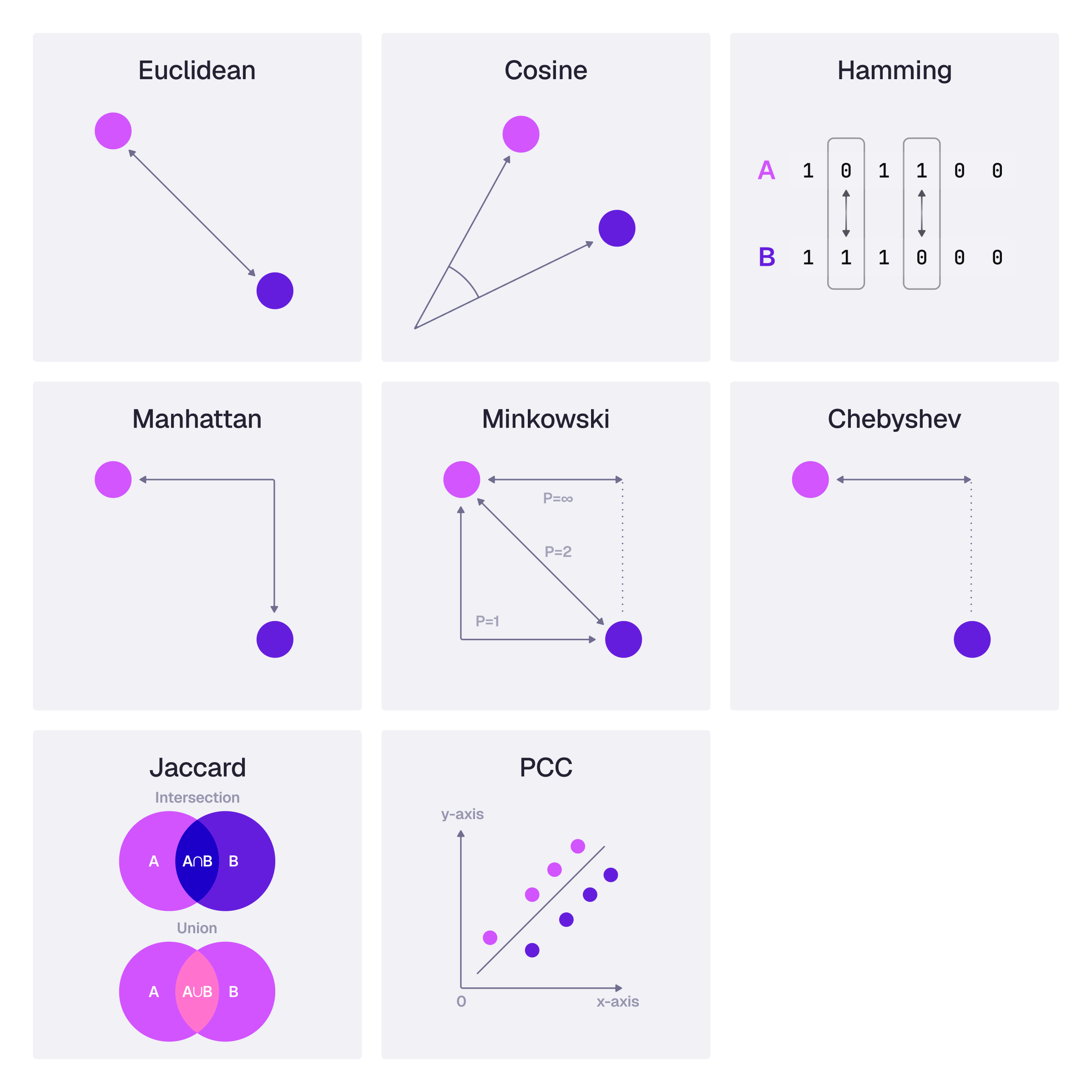
Function | Description |
|---|---|
vector::add() | Performs element-wise addition of two vectors |
vector::angle() | Computes the angle between two vectors |
vector::cross() | Computes the cross product of two vectors |
vector::divide() | Performs element-wise division between two vectors |
vector::dot() | Computes the dot product of two vectors |
vector::magnitude() | Computes the magnitude (or length) of a vector |
vector::multiply() | Performs element-wise multiplication of two vectors |
vector::normalize() | Computes the normalisation of a vector |
vector::project() | Computes the projection of one vector onto another |
vector::scale() | Multiplies each item in a vector |
vector::sum() | Sums vectors element-wise, as a scalar or as a grouped aggregate |
vector::subtract() | Performs element-wise subtraction between two vectors |
vector::distance::chebyshev() | Computes the Chebyshev distance |
vector::distance::cosine() | Computes the cosine distance between two vectors |
vector::distance::euclidean() | Computes the Euclidean distance between two vectors |
vector::distance::hamming() | Computes the Hamming distance between two vectors |
vector::distance::knn() | Returns the distance computed during the query |
vector::distance::manhattan() | Computes the Manhattan distance between two vectors |
vector::distance::mahalanobis() | Computes the Mahalanobis distance between two vectors given a covariance matrix |
vector::distance::minkowski() | Computes the Minkowski distance between two vectors |
vector::similarity::cosine() | Computes the Cosine similarity between two vectors |
vector::similarity::jaccard() | Computes the Jaccard similarity between two vectors |
vector::similarity::pearson() | Computes the Pearson correlation coefficient between two vectors |
vector::similarity::spearman() | Computes the Spearman rank correlation coefficient between two vectors |
vector::add
The vector::add function performs element-wise addition of two vectors, where each element in the first vector is added to the corresponding element in the second vector.
vector::add(array, $other: array) -> arrayThe following example shows this function, and its output:
vector::add([1, 2, 3], [1, 2, 3]);[2, 4, 6] vector::angle
The vector::angle function computes the angle between two vectors, providing a measure of the orientation difference between them.
vector::angle(array, $other: array) -> numberBoth vectors must have the same dimension and a non-zero magnitude. A zero-magnitude input (including []) returns an error.
The following example shows this function, and its output:
vector::angle([5, 10, 15], [10, 5, 20]);0.36774908225917935f vector::cross
The vector::cross function computes the cross product of two vectors, which results in a vector that is orthogonal (perpendicular) to the plane containing the original vectors.
vector::cross(array, $other: array) -> arrayThe following example shows this function, and its output:
vector::cross([1, 2, 3], [4, 5, 6]);

[-3, 6, -3]
vector::divide
The vector::divide function performs element-wise division between two vectors, where each element in the first vector is divided by the corresponding element in the second vector.
vector::divide(array, $other: array) -> arrayThe divisor vector must not contain a zero. Division by zero returns an error instead of NaN.
The following example shows this function, and its output:
vector::divide([4, 6], [2, 3]);[2, 2] vector::dot
The vector::dot function computes the dot product of two vectors, which is the sum of the products of the corresponding entries of the two sequences of numbers.
vector::dot(array, $other: array) -> numberThe following example shows this function, and its output:
vector::dot([1, 2, 3], [1, 2, 3]);14 vector::magnitude
The vector::magnitude function computes the magnitude (or length) of a vector, providing a measure of the size of the vector in multi-dimensional space.
vector::magnitude(array) -> numberAn empty vector returns 0.
The following example shows this function, and its output:
vector::magnitude([ 1, 2, 3, 3, 3, 4, 5 ]);8.54400374531753f vector::multiply
The vector::multiply function performs element-wise multiplication of two vectors, where each element in the first vector is multiplied by the corresponding element in the second vector.
vector::multiply(array, $other: array) -> arrayThe following example shows this function, and its output:
vector::multiply([1, 2, 3], [1, 2, 3]);[1, 4, 9] vector::normalize
The vector::normalize function computes the normalisation of a vector, transforming it to a unit vector (a vector of length 1) that maintains the original direction.
vector::normalize(array) -> arrayThe vector must have a non-zero magnitude. A zero vector (including []) returns an error.
The following example shows this function, and its output:
vector::normalize([ 4, 3 ]);[0.8f, 0.6f] vector::project
The vector::project function computes the projection of one vector onto another, providing a measure of the shadow of one vector on the other. The result points along the second vector, scaled by the dot product of the two vectors divided by the square of the second vector's magnitude. Its length is the magnitude of the first vector multiplied by the cosine of the angle between the two vectors.
vector::project(array, $other: array) -> arrayThe second vector must have a non-zero magnitude. Projecting onto a zero vector (including []) returns an error.
The following example shows this function, and its output:
vector::project([1, 2, 3], [4, 5, 6]);[1.6623376623376624f, 2.077922077922078f, 2.4935064935064934f] vector::scale
The vector::scale function multiplies each item in a vector by a number.
vector::scale(array, $other: number) -> arrayThe following example shows this function, and its output:
vector::scale([3, 1, 5, -3, 7, 2], 5);[15, 5, 25, -15, 35, 10] vector::sum
Available since: v3.3.0
The vector::sum function adds vectors element-wise. It is available in two forms, matching other aggregates such as math::sum:
Scalar - sum a collection of vectors you already hold as
array<array<number>>Aggregate - fold a vector-valued expression across the rows of a
GROUP BY(orGROUP ALL)
vector::sum(array<array<number>>) -> array | noneAn empty collection returns NONE (there is no dimension to produce a zero vector for). Two empty vectors sum to []. Vectors in the collection must share the same dimension; a mismatch returns an error in the scalar form.
The following example shows the scalar form, and its output:
vector::sum([[1, 2, 3], [4, 5, 6]]);
//- [5, 7, 9]

vector::sum([[1, 2], [3, 4], [5, 6]]);
//- [9, 12]

vector::sum([[1.5, 2.5], [1, 1]]);
//- [2.5f, 3.5f]

vector::sum([[], []]);
//- []

vector::sum([]);
//- NONE

[[1, 2], [3, 4]].vector_sum();
//- [4, 6]
Aggregate form
As an aggregate, vector::sum keeps one running vector per group, so state stays O(dimension) rather than materialising every embedding with array::group then folding.
On the streaming path:
Rows whose vector is
NONEorNULLare skipped (same idea as a missing field formath::sum)A group that never sees a vector yields
NONEA group whose vectors disagree on dimension yields
NULL, not a partial sum
Together with vector::scale and math::sum, a weighted centroid is one query:
CREATE engagement:1 SET user = 'alice', weight = 2, embedding = [1, 0, 0] RETURN NONE;
CREATE engagement:2 SET user = 'alice', weight = 3, embedding = [0, 1, 0] RETURN NONE;
CREATE engagement:3 SET user = 'bob', weight = 1, embedding = [0, 0, 4] RETURN NONE;

SELECT
	user,
	vector::scale(
		vector::sum(vector::scale(embedding, weight)),
		1.0 / math::sum(weight)
	) AS interest
FROM engagement
GROUP BY user
ORDER BY user;

-- alice → [0.4f, 0.6000000000000001f, 0f]
-- bob   → [0f, 0f, 4f]

SELECT user, vector::sum(embedding) AS total
FROM engagement
GROUP BY user
ORDER BY user;

-- alice → [1, 1, 0]
-- bob → [0, 0, 4] Write the reciprocal as a float (1.0 / math::sum(weight)). With integer weights, 1 / math::sum(weight) is integer division and truncates to 0, which scales the weighted total away entirely. Float weights promote the reciprocal on their own.
vector::subtract
The vector::subtract function performs element-wise subtraction between two vectors, where each element in the second vector is subtracted from the corresponding element in the first vector.
vector::subtract(array, $other: array) -> arrayThe following example shows this function, and its output:
vector::subtract([4, 5, 6], [3, 2, 1]);[1, 3, 5] vector::distance::chebyshev
The vector::distance::chebyshev function computes the Chebyshev distance (also known as maximum value distance) between two vectors, which is the greatest of their differences along any coordinate dimension.
vector::distance::chebyshev(array, $other: array) -> numberTwo empty vectors return 0.
The following example shows this function, and its output:
vector::distance::chebyshev([2, 4, 5, 3, 8, 2], [3, 1, 5, -3, 7, 2]);6f vector::distance::cosine
Available since: v4.0.0
The vector::distance::cosine function computes the cosine distance between two vectors, which is 1 minus their cosine similarity. Vectors that point in the same direction have a distance of 0.
vector::distance::cosine(array, $other: array) -> numberThe following example shows this function, and its output:
vector::distance::cosine([10, 50, 200], [400, 100, 20]);0.8474178403755869fThis is the distance that an HNSW or DISKANN index defined with DIST COSINE uses, so ORDER BY vector::distance::cosine(field, $vector) LIMIT k can be answered by such an index. See ordering by distance.
vector::distance::euclidean
The vector::distance::euclidean function computes the Euclidean distance between two vectors, providing a measure of the straight-line distance between two points in a multi-dimensional space.
vector::distance::euclidean(array, $other: array) -> numberThe following example shows this function, and its output:
vector::distance::euclidean([10, 50, 200], [400, 100, 20]);432.43496620879307f vector::distance::hamming
The vector::distance::hamming function computes the Hamming distance between two vectors, measuring the minimum number of substitutions required to change one vector into the other, useful for comparing strings or codes.
vector::distance::hamming(array, $other: array) -> numberThe following example shows this function, and its output:
vector::distance::hamming([1, 2, 2], [1, 2, 3]);1 vector::distance::knn
The vector::distance::knn function returns the distance computed during the query by the Knn operator (avoiding recomputation).
vector::distance::knn() -> numberThe following example shows this function, and its output, when used in a SELECT statement:
CREATE pts:1 SET point = [1,2,3,4];
CREATE pts:2 SET point = [4,5,6,7];
CREATE pts:3 SET point = [8,9,10,11];
SELECT id, vector::distance::knn() AS dist FROM pts
WHERE point <|2,EUCLIDEAN|> [2,3,4,5];[
{
id: pts:1,
dist: 2f
},
{
id: pts:2,
dist: 4f
}
] vector::distance::manhattan
The vector::distance::manhattan function computes the Manhattan distance (also known as the L1 norm or Taxicab geometry) between two vectors, which is the sum of the absolute differences of their corresponding elements.
vector::distance::manhattan(array, $other: array) -> numberThe following example shows this function, and its output:
vector::distance::manhattan([10, 20, 15, 10, 5], [12, 24, 18, 8, 7]);13 vector::distance::mahalanobis
Available since: v3.3.0
The vector::distance::mahalanobis function computes the Mahalanobis distance between two vectors given a covariance matrix. Unlike Euclidean distance, it scales differences by the inverse of the covariance, so correlated dimensions are not double counted.
vector::distance::mahalanobis(array, $other: array, $covariance: array<array<number>>) -> numberThe two vectors must share the same non-zero dimension. The covariance argument must be a square matrix of that dimension and must be symmetric positive-definite (validated via Cholesky decomposition). When the covariance is the identity matrix, the result matches vector::distance::euclidean.
The following example shows this function, and its output:
-- An identity covariance matrix gives the same result as euclidean
vector::distance::mahalanobis([1, 2], [3, 4], [[1, 0], [0, 1]]);
//- 2.8284271247461903f

vector::distance::mahalanobis([1, 2], [3, 4], [[2, 1], [1, 2]]);
//- 1.632993161855452f

vector::distance::mahalanobis([1, 2], [1, 2], [[2, 1], [1, 2]]);
//- 0f
A non-square matrix, a matrix that is not symmetric positive-definite, empty vectors, or a dimension mismatch returns an error.
vector::distance::minkowski
The vector::distance::minkowski function computes the Minkowski distance between two vectors, a generalization of other distance metrics such as Euclidean and Manhattan when parameterised with different values of p.
vector::distance::minkowski(array, $other: array, $p_value: number) -> numberThe following example shows this function, and its output:
vector::distance::minkowski([10, 20, 15, 10, 5], [12, 24, 18, 8, 7], 3);4.862944131094279f vector::similarity::cosine
The vector::similarity::cosine function computes the Cosine similarity between two vectors, indicating the cosine of the angle between them, which is a measure of how closely two vectors are oriented to each other.
vector::similarity::cosine(array, $other: array) -> numberThe following example shows this function, and its output:
vector::similarity::cosine([10, 50, 200], [400, 100, 20]);0.15258215962441316f vector::similarity::jaccard
The vector::similarity::jaccard function computes the weighted Jaccard similarity between two vectors: the sum of the smaller of each pair of corresponding elements, divided by the sum of the larger of each pair. On vectors that hold only 0 and 1, this is the same as the binary Jaccard similarity, the size of the intersection divided by the size of the union.
vector::similarity::jaccard(array, $other: array) -> numberFrom SurrealDB 4.0, the two vectors must have the same dimension, and the function treats each position as a separate element. Before 4.0, each vector was treated as a set of its distinct values, so vector::similarity::jaccard([1,1,0,0], [1,0,1,0]) returned 1f where it now returns 0.3333333333333333f. Two empty vectors return 1.
The following example shows this function, and its output:
-- Vectors of 0 and 1: one position in common out of three that are set in either
vector::similarity::jaccard([1,1,0,0], [1,0,1,0]);
//- 0.3333333333333333f

-- Weighted: (1 + 2 + 3) / (2 + 2 + 4)
vector::similarity::jaccard([1,2,3], [2,2,4]);
//- 0.75f
vector::similarity::pearson
The vector::similarity::pearson function computes the Pearson correlation coefficient between two vectors, reflecting the degree of linear relationship between them.
vector::similarity::pearson(array, array) -> numberBoth vectors must have the same dimension of at least 2, and neither may have zero variance.
The following example shows this function, and its output:
vector::similarity::pearson([1,2,3], [1,5,7]);0.9819805060619659f vector::similarity::spearman
Available since: v3.3.0
The vector::similarity::spearman function computes the Spearman rank correlation between two vectors: each vector is converted to average ranks (ties share a rank), then Pearson correlation is applied to those ranks.
vector::similarity::spearman(array, $other: array) -> numberBoth vectors must have the same dimension of at least 2, and neither may have zero variance after ranking (a constant vector returns an error).
The following example shows this function, and its output:
vector::similarity::spearman([1, 2, 3], [1, 10, 100]);
//- 1f

vector::similarity::spearman([1, 2, 3], [3, 2, 1]);
//- -1f

-- Ties use average ranks
vector::similarity::spearman([1, 2, 2, 3], [1, 2, 3, 4]);
//- 0.9486832980505138f